How to Turn a Song Into Lofi: A Complete 2026 Guide for Producers
Learn how to turn a song into lofi using modern 2026 techniques and Soundverse Similar Music Generator.
How to Turn a Song Into Lofi
What does it mean to turn a song into lofi?
Turning a song into lofi means reinterpreting an existing piece of music with the relaxed, nostalgic, and texturally warm aesthetics of lofi production. This style, influenced by vintage tape saturation, gentle imperfections, and mellow beats, often transforms high-energy or highly polished tracks into calm, emotionally rich versions that resonate with listeners seeking intimacy and focus.
In 2026, lofi music continues to thrive on streaming platforms, social media, and video backgrounds. Indie artists and music producers increasingly explore how to turn a song into lofi to repurpose older releases, diversify their sound palette, and enhance engagement through creative remixing.

Why is lofi so popular in 2026?
The lofi trend, established through streaming nostalgia playlists, evolved significantly by 2026. Modern audiences now appreciate authenticity and imperfection as artistic elements. Producers use tape-like textures, analog-inspired imperfections, and gentle swing rhythms to evoke calmness.
Platforms like YouTube, Spotify, and TikTok promote atmospheric lofi edits for work and relaxation content. Artists leverage these opportunities to broaden reach, often exploring AI-assisted music creation tools for faster workflow. External guides such as Crafting Your First LoFi Track: A Step-by-Step Guide and How to Make LoFi Music: The Complete Guide also highlight how producers develop authentic lofi mixes.

What defines the lofi aesthetic?
The lofi sound is characterized by:
- Soft percussion and laid-back tempo – usually between 70–90 BPM.
- Retro saturation – tape hiss, vinyl crackle, and gentle distortion.
- Warm harmonies – jazz-inspired chords and mellow tones.
- Minimalistic arrangement – less emphasis on vocals, more focus on vibe.
- Dynamic imperfections – slightly off-grid timing, faded highs, and lower fidelity.
Understanding these sonic traits is essential before you attempt to create a lofi remix from a standard song.
How do you turn a song into lofi?
Turning a song into lofi involves both technical and creative decisions. It is part art and part science — about deconstructing the original and re-building it around warmth and texture.
Step 1: Feature Overview — Access Similar Music Generator
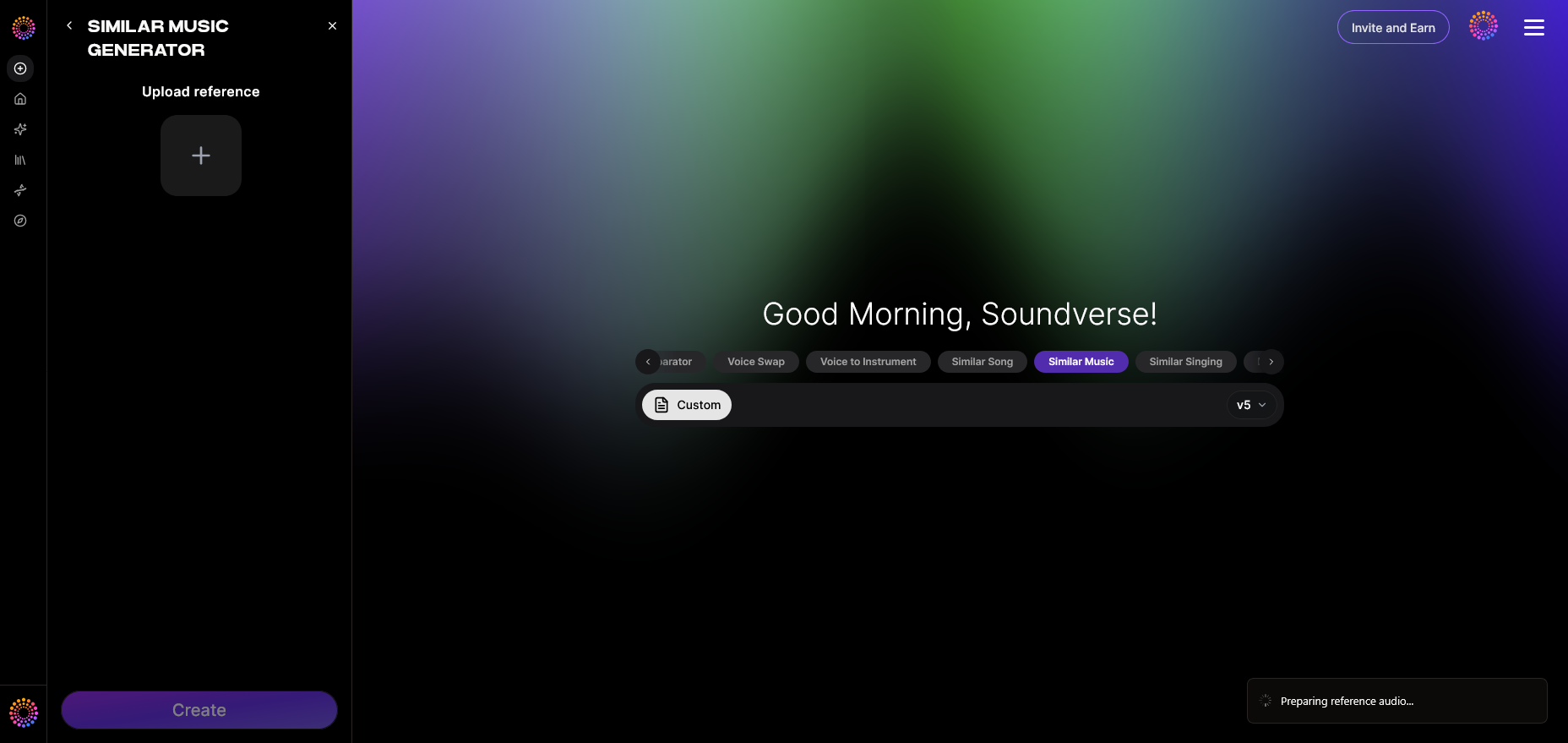
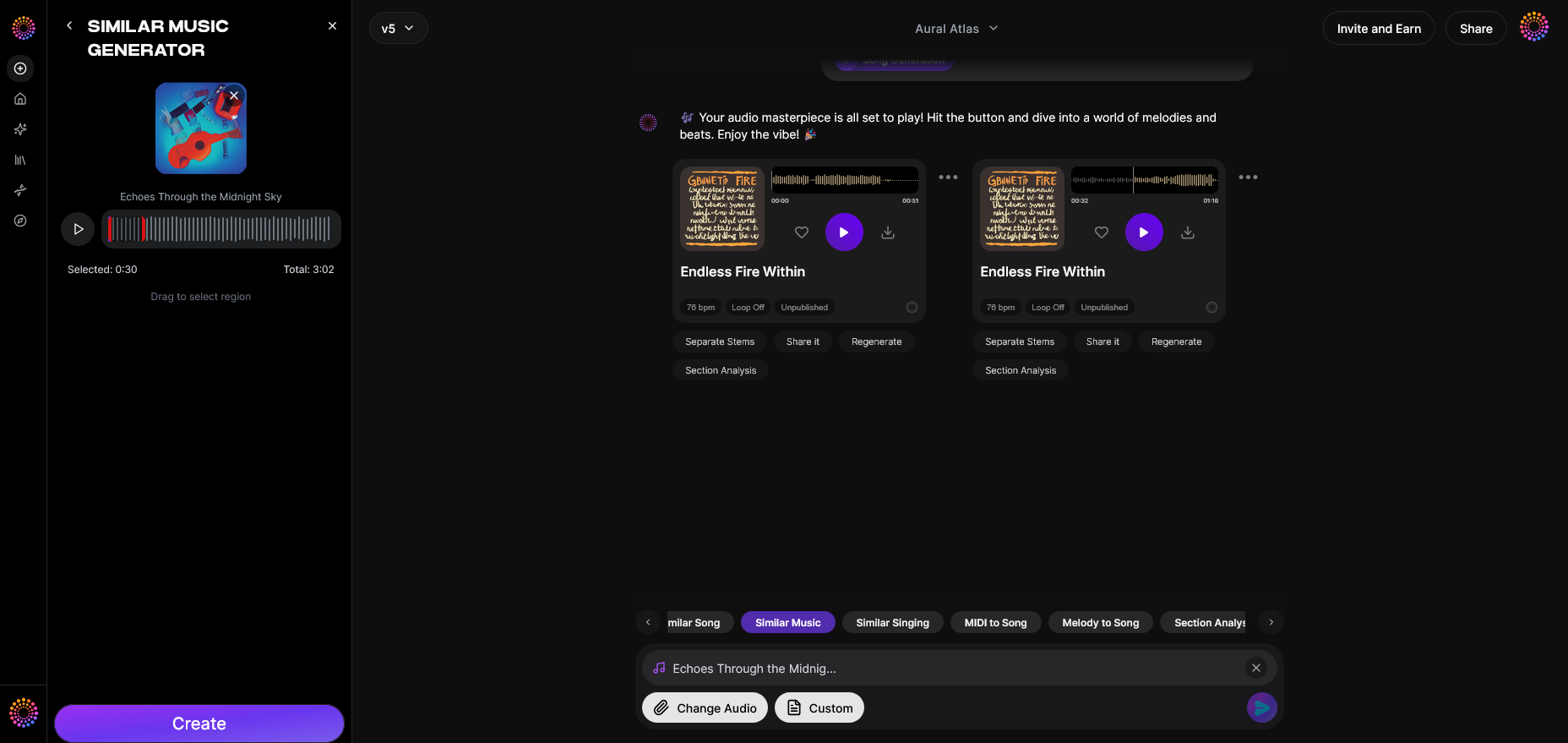
Start by accessing Soundverse and navigating to the Similar Music Generator. This tool is designed to analyze a reference track and generate instrumental compositions that share its tempo, key, and mood. Although it's primarily used in film scoring and content creation, music producers repurpose it to achieve stylistic transformations, such as turning polished songs into immersive lofi versions.
Step 2: Reference Selection — Upload reference music track
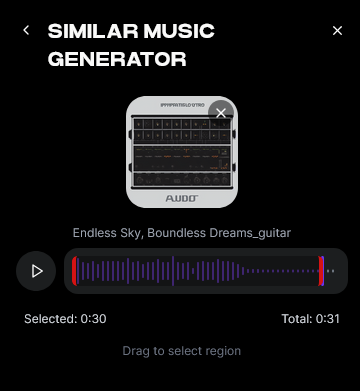
Upload the original track you wish to transform into lofi. The generator will analyze tempo, key, and emotional context. You can choose excerpts or entire songs for the reference. If you want to isolate specific parts like drums or vocals before uploading, utilize the Soundverse Stem Separator to split the track into editable stems.
Step 3: Generation — Generate music in similar style
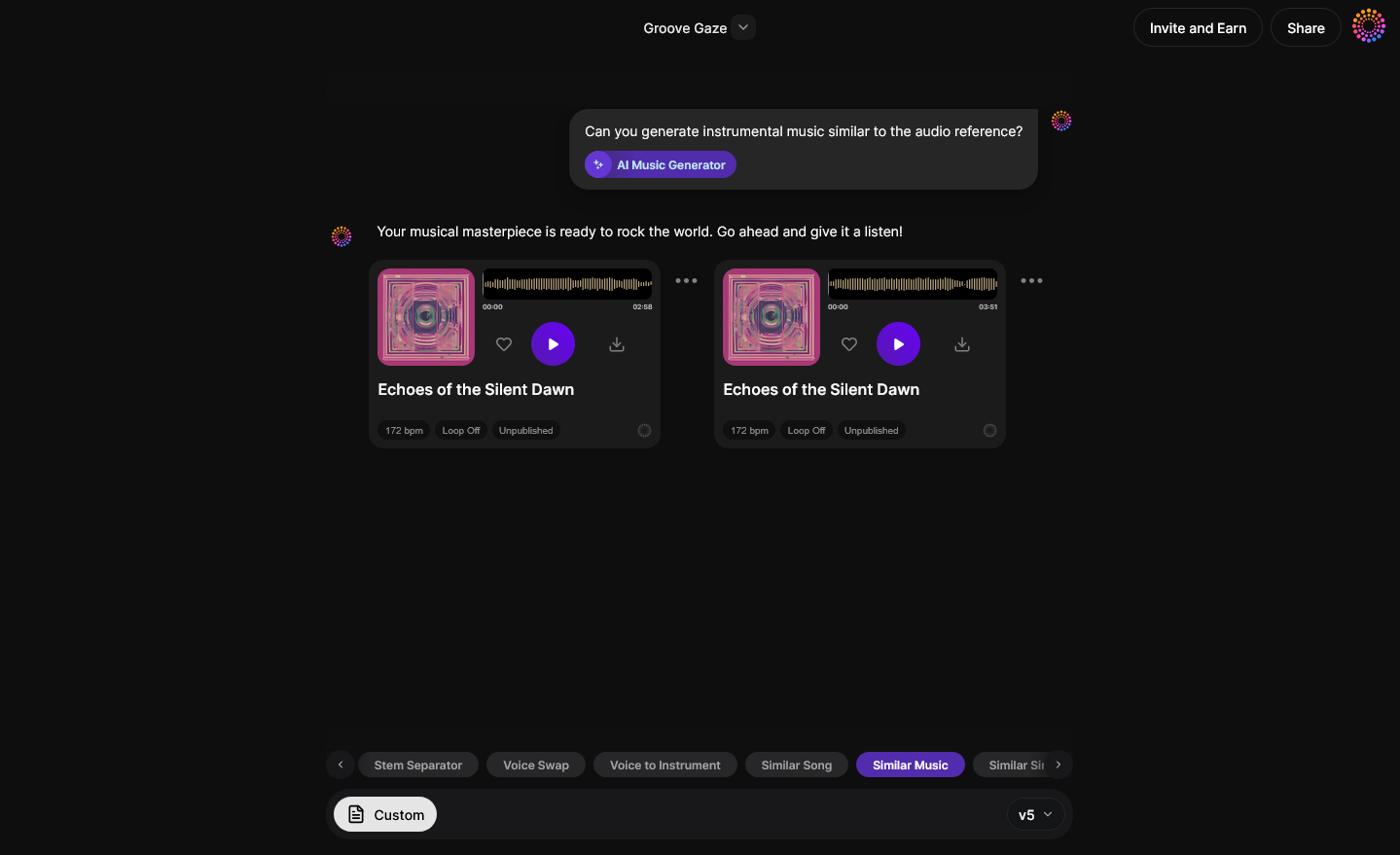
Trigger the generation process. The Similar Music Generator produces original instrumental material inspired by your reference song’s vibe. You can adjust composition intensity to make the output more chilled or lo-fi-like. This asynchronous process (upload → process → result) delivers professionally balanced instrumentals that mimic but reinvent your original track’s mood.
Step 4: Download Music — Export generated instrumental
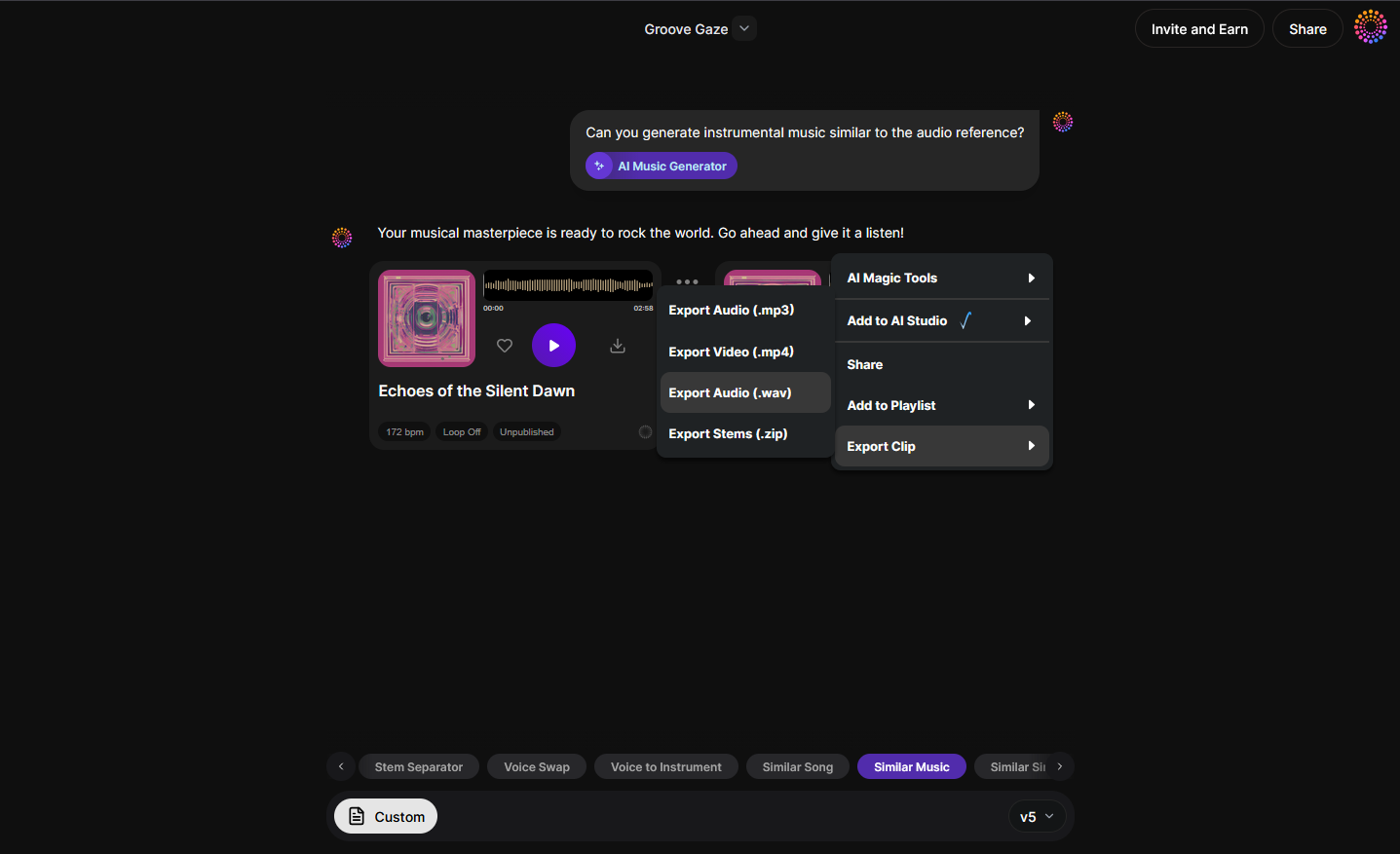
After generation completes, download the created instrumental. You can further refine it using digital audio workstations (DAWs) like Ableton or FL Studio. Add soft filters, tape emulation, or vinyl crackle. Overlay subtle drum loops or ambient textures.
Once finished, you have effectively turned a song into lofi—maintaining emotional familiarity while replacing dense production with smooth analog-style textures.
What software and techniques help in lofi remix production?
If you prefer manual editing beyond automated generation, several approaches can help:
- DAW tools – Use EQ to tame highs and compress lows for warm resonance.
- Saturation plugins – Emulate cassette or vinyl tone.
- Reverb and delay – Create spatial depth and softness.
- Resampling – Reduce bit rate or sample rate subtly for “imperfect” audio.
- Drum programming – Favor brushed snares, rim hits, and gentle kicks.
- DIY lofi editing – Layer background noises like rain or street ambience.
For inspiration, read 40 hand-picked lofi text-to-music prompts that demonstrate current 2026 trends in chilled instrumental sound design. You can also learn from creators via How To Make Lofi Music in FL Studio 21 (2026) or Make ANY Music Sound Lofi (SUPER EASY).
How to make lofi music from scratch vs. remixing existing songs
There’s an important distinction between composing new lofi tracks and remixing an existing song into lofi. When composing from scratch, one builds melodies and textures organically. Remixing, however, involves transforming an already structured composition:
- Remix approach: Keep original chord progressions, lower BPM, and smooth instrumentation.
- Compositional approach: Start fresh with mellow elements that evoke nostalgia.
In 2026, both practices intersect as AI enables precise reference-based transformations using tools like Soundverse’s Similar Music Generator. For a deeper dive, watch our guide on creating Deep House music or explore Soundverse Tutorial Series - 9. How to Make Music to understand generative workflows.
How Soundverse enhances professional lofi editing
Modern creators use Soundverse’s suite of AI tools to streamline the production:
- Stem Separator — Isolate instrumental elements for custom effect treatments.
- Inpainting — Regenerate sections to remove harsh transitions.
- Extend Music — Seamlessly lengthen lofi edits while preserving tonal consistency.
Together, these tools reduce manual workload, allowing producers to focus on aesthetic creativity rather than technical separation.
For detailed guidance on generating music by genre or mood, explore AI music generator prompts and genre-themed composition tips.
How to make lofi remixes instantly using Soundverse Similar Music Generator
Now that you understand the process of turning a song into lofi, here’s how you can do it efficiently within Soundverse:
The Similar Music Generator produces original instrumental compositions inspired by reference tracks. It uses instrumental style transfer and detailed musical analysis—evaluating tempo, key, and mood—to create new material that captures your song’s essence in a mellow, lofi-adapted form.
Core capabilities include:
- Instrumental style transfer for visual and emotional consistency.
- Detailed musical analysis.
- Reference-based loop creation for easy integration into videos or podcasts.
Primary use cases:
- Reimagining songs for film/TV backgrounds.
- Creating mellow versions for gaming or podcast intros.
- Generating chill lounge reinterpretations of your existing discography.
Within minutes, Soundverse transforms reference tracks into lush, atmospheric instrumentals suited for your lofi remix projects.
Final thoughts
Turning a song into lofi in 2026 combines artistry, nostalgia, and technology. Whether you use manual DAW techniques or rely on AI tools like Soundverse, success depends on capturing the emotional softness that defines lofi. The trend continues growing because creators across genres discover new serenity in transforming polished works into calming, imperfect masterpieces.
Soundverse reinforces this creative freedom, helping producers remix, recompose, and evolve their sound consistently. Explore deeper possibilities with Soundverse’s arrangement and production tools and join the global community reshaping music aesthetics for the digital era.
Create Your Own Lofi Tracks with Soundverse AI
Transform any song into a chill, immersive lofi vibe instantly. Experiment with filters, instruments, and moods to create unique soundscapes powered by AI.
Related Articles
- 40 Hand-Picked Lofi Text-to-Music Prompts for All Occasions: Find creative AI prompts to generate lofi beats that fit any mood or project.
- How to Create Jazz Music with Soundverse AI: Discover how to use AI tools to produce smooth and improvised jazz tracks effortlessly.
- Generate AI Music with Soundverse Text-to-Music: Learn how Soundverse’s text-to-music technology lets you generate full tracks from simple text prompts.
- Soundverse Introduces Stem Separation AI Magic Tool: Explore how stem separation technology helps isolate vocals, beats, and instruments to remix or enhance your tracks.
Here's how to make AI Music with Soundverse
Video Guide

Here’s another long walkthrough of how to use Soundverse AI.
Text Guide
- To know more about AI Magic Tools, check here.
- To know more about Soundverse Assistant, check here.
- To know more about Arrangement Studio, check here.
Soundverse is an AI Assistant that allows content creators and music makers to create original content in a flash using Generative AI.
With the help of Soundverse Assistant and AI Magic Tools, our users get an unfair advantage over other creators to create audio and music content quickly, easily and cheaply.
Soundverse Assistant is your ultimate music companion. You simply speak to the assistant to get your stuff done. The more you speak to it, the more it starts understanding you and your goals.
AI Magic Tools help convert your creative dreams into tangible music and audio. Use AI Magic Tools such as text to music, stem separation, or lyrics generation to realise your content dreams faster.
Soundverse is here to take music production to the next level. We're not just a digital audio workstation (DAW) competing with Ableton or Logic, we're building a completely new paradigm of easy and conversational content creation.
TikTok: https://www.tiktok.com/@soundverse.ai
Twitter: https://twitter.com/soundverse_ai
Instagram: https://www.instagram.com/soundverse.ai
LinkedIn: https://www.linkedin.com/company/soundverseai
Youtube: https://www.youtube.com/@SoundverseAI
Facebook: https://www.facebook.com/profile.php?id=100095674445607
Join Soundverse for Free and make Viral AI Music

We are constantly building more product experiences. Keep checking our Blog to stay updated about them!