How to Put Your Voice in a Song Using AI (2026 Guide)
Learn how to use AI voice in song creation with Soundverse Voice Swap & AI singing tools.
How to Put Your Voice in a Song Using AI
In 2026, musicians and creators are embracing AI music creation at unprecedented levels. The idea of using AI to bring your own voice into a song—whether it’s as a digital clone, a stylized vocal performance, or a supernatural character—is shaping a new era of personalized music. The concept of putting an AI voice in song isn’t just about vocal filters or autotune; it’s about using advanced neural synthesis to recreate tone, emotion, and performance with astonishing accuracy.
This article walks you through exactly how to put your own voice into a song using AI, with a focus on the Soundverse platform. You’ll learn how Soundverse’s Voice Swap technology revolutionizes music creation for 2026, enabling voice cloning for music and powered by ethical artist-trained systems. Whether you’re building demos, experimenting with genre fusion, or making viral TikTok covers, this step-by-step guide will help you start making music with your voice.
How to make AI voice in song with Soundverse Voice Swap
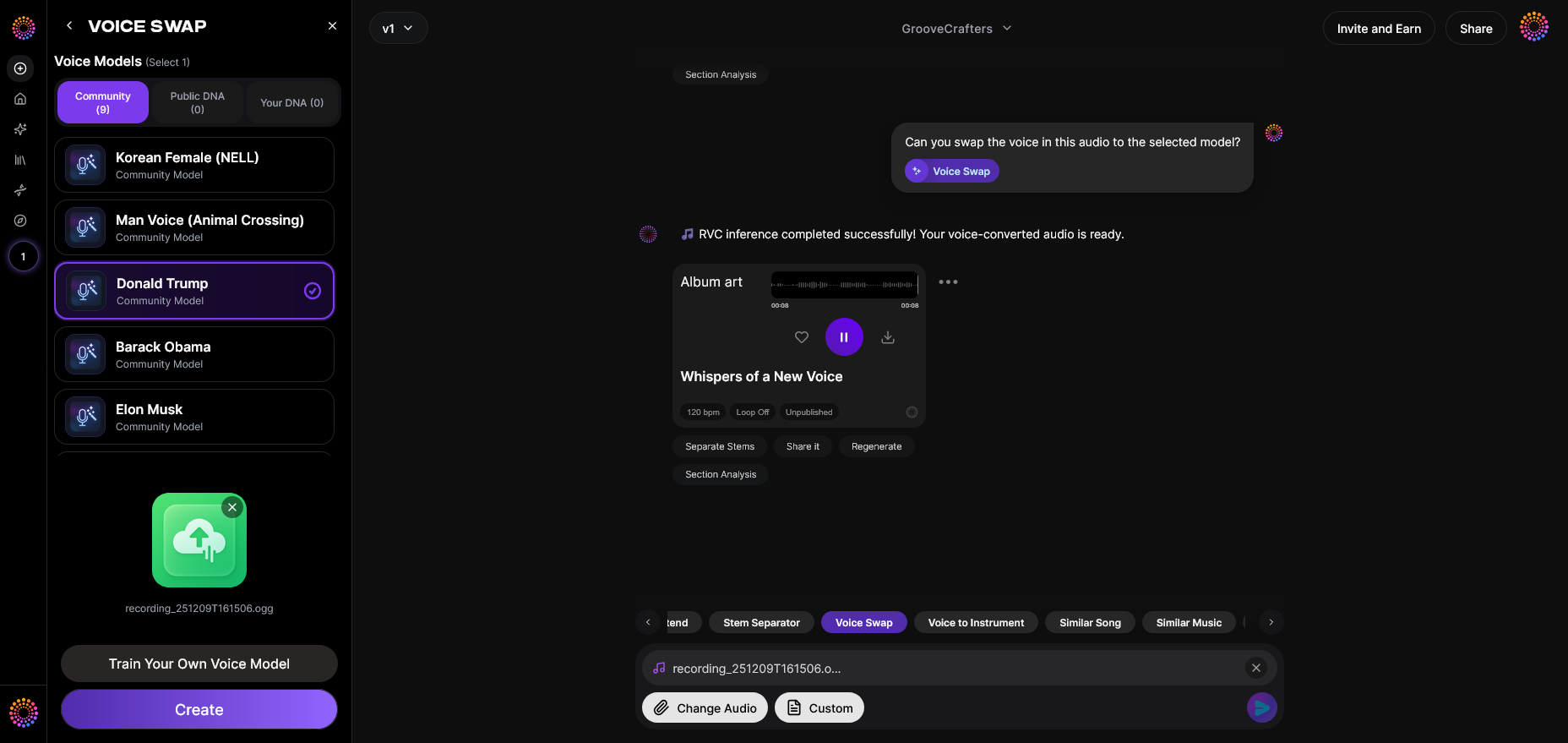
Soundverse’s Voice Swap is the central feature for integrating AI voices into songs. It’s designed to replace the vocal identity in an audio track while preserving timing, phrasing, and emotion. That means you can record your own vocal—or use an existing singer—and transform it into any other voice model you choose.
Key capabilities of Voice Swap:
- Community Voices: Select from celebrity or character voices shared across the Soundverse community.
- Public DNA & Personal DNA: Use public voice profiles or create your own personal voice DNA trained on your vocal samples.
- Voice-to-Voice Conversion: Upload your singing or speaking track and apply transformations that maintain nuances while changing vocal tone.
This asynchronous workflow ensures quality and privacy: you upload the voice once, the system processes based on your target model, and you receive the transformed vocal back—no live preview or real-time filters, ensuring stable rendering.
Why creators love Voice Swap in 2026
AI music generation has matured past raw machine sounds. In 2026, platforms such as Soundverse have redefined what it means to make music with your voice. Artists now experiment safely without worrying about copyright infringement, thanks to Soundverse DNA technology, which trains only on licensed catalogs and lets musicians monetize their sonic identity ethically.
Voice Swap is widely used for:
- Crafting demo vocals when singers aren’t available.
- Testing a track’s emotional impact across different vocal styles.
- Creating parody or entertainment performances with famous voices—as seen in AI Voice Cloning for Music: How Synthetic Vocals Are Redefining ...
- Developing unique character vocals for games, videos, and animations.
For additional reading, explore how AI is changing music industry trends or how AI-generated tracks are transforming the music industry.
Step-by-Step: How to Put Your Voice in a Song Using Soundverse Voice Swap

Step 1: Access the Voice Swap Tool
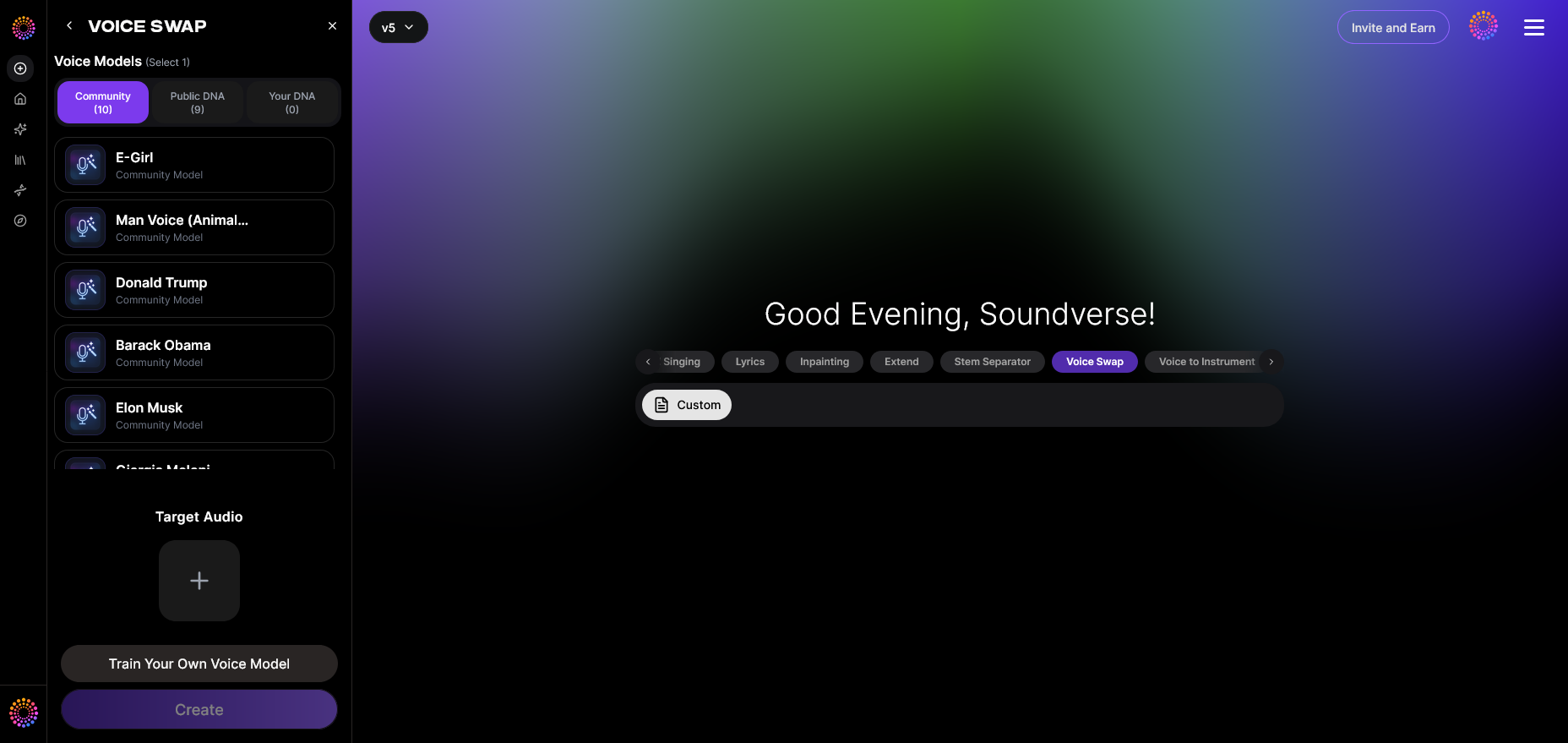
Log into your Soundverse dashboard and open the Voice Swap module. This is where you’ll start your journey to blend your own vocals with AI. The interface is streamlined, focusing on upload and selection options to make music creation fast and intuitive.
Step 2: Upload Audio

Upload an existing audio file containing vocals—either sung or spoken. You can record something fresh or repurpose an older track. The system reads phrasing, pitch contour, and rhythm to preserve your natural performance through the processing stage.
Step 3: Target Voice Selection
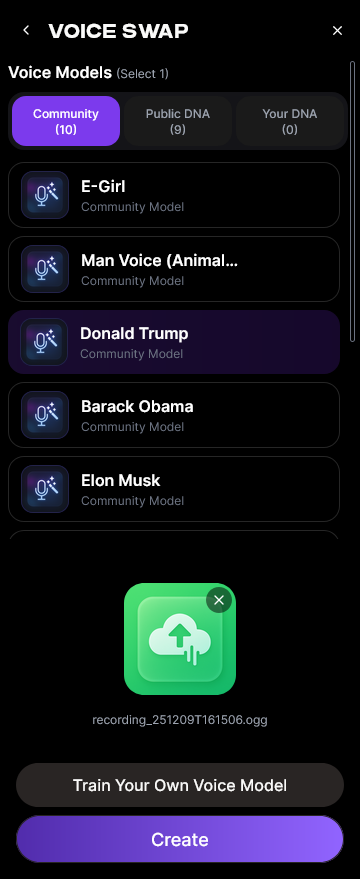
This is the creative phase. Choose your preferred target voice from Soundverse’s collection of Community Voices or DNA templates. You can select a celebrity-inspired tone, a stylized character, or your own custom DNA.
Custom DNA is especially powerful: it lets you save your unique voice characteristics and apply them repeatedly to new songs, achieving both creative consistency and brand identity across your projects. For more inspiration, check out Best AI Vocal Generators for Music Production in 2026.
Step 4: Generation
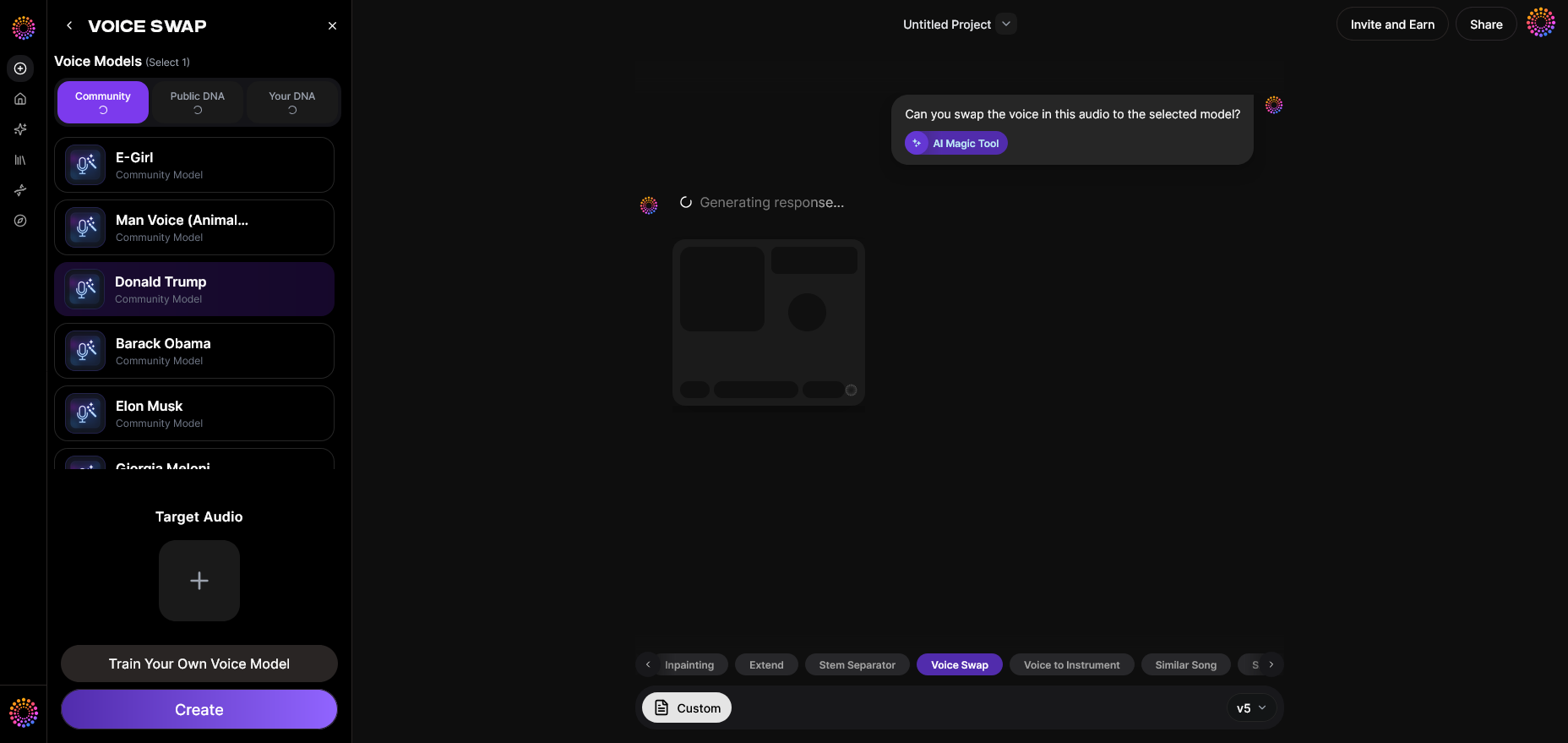
Click Generate to initiate processing. Soundverse’s AI will render the new vocal identity over your original performance, capturing emotion and timing precisely. Because the system operates asynchronously, generation typically completes within minutes, depending on complexity.
Step 5: Download Result
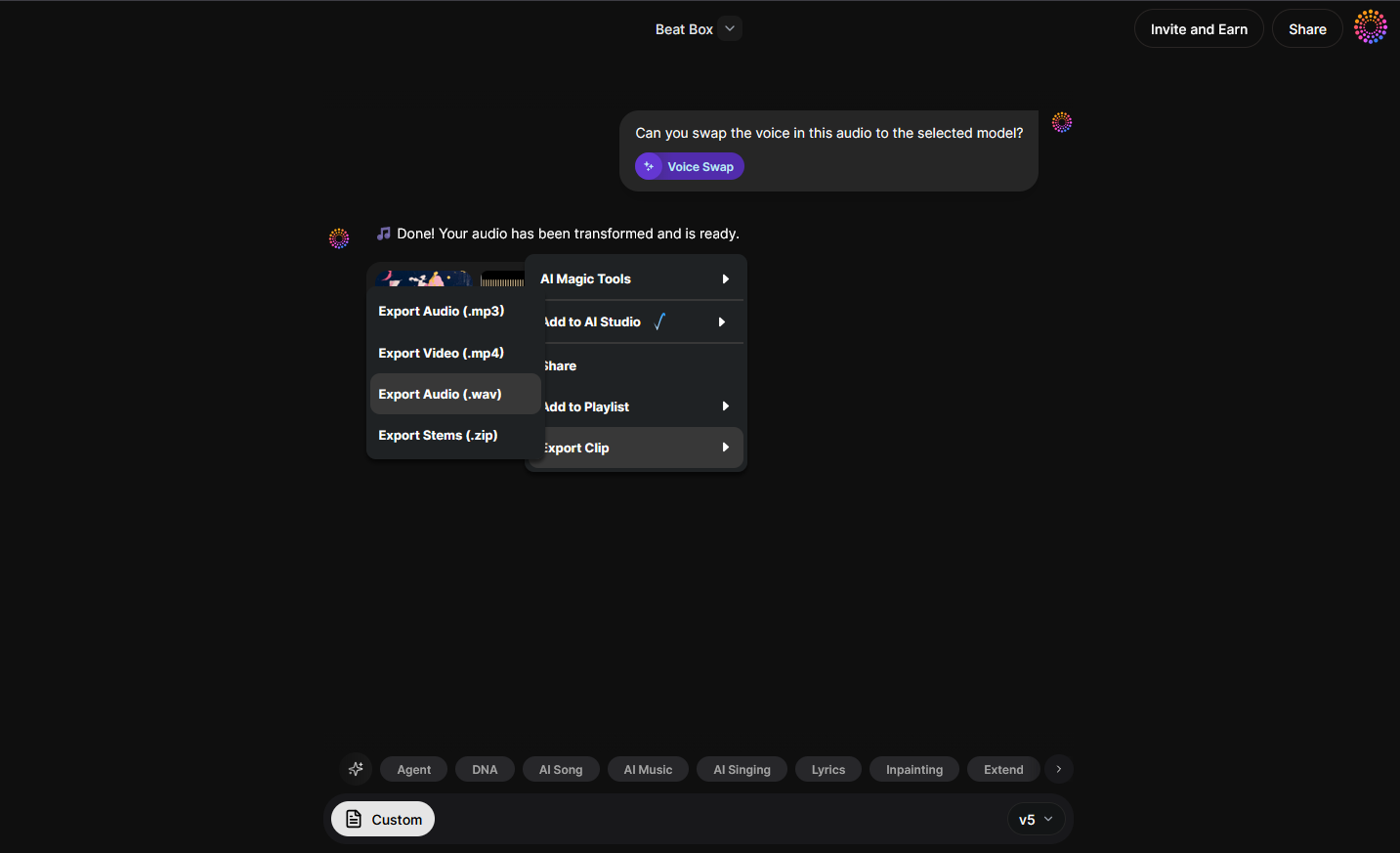
Once generation is complete, you can download your transformed voice track. This voice-swapped audio is ready for mixing or mastering. Pair it with the AI Song Generator to build full compositions directly within Soundverse. For video creators, consider using How AI Lip-Sync Technology is Transforming Visual Music ... to sync vocals seamlessly with visuals.
For a deeper dive, watch our guide on creating Deep House music.
Expanding Your Creative Workflow Beyond Voice Swap
After you’ve swapped voices in your song, Soundverse offers multiple tools to take your production to the next level.
Use the AI Song Generator
The AI Song Generator composes full tracks from text or lyrics prompts, automatically integrating accompaniment, melody, and arrangement. Pairing this with your new AI voice makes it possible to generate complete, polished songs. Learn more in How to Make AI Sing Your Lyrics in 2026: A Complete Guide for ... or explore Generate AI Music with Soundverse.
Transform Vocals Into Instruments
Want to experiment further? Soundverse’s Voice to Instrument converts your humming, beatboxing, or vocal melody into playable instruments like guitar, drums, or flutes. It recognizes musical phrasing from your vocal line and renders it realistically—a creative bridge between singing and instrumental expression. Watch the How to Make Music tutorial for demonstrations.
Ethical AI Music Creation with Soundverse DNA
Soundverse DNA aligns with the new ethical standards in 2026’s music industry. Built on licensed catalogs, it ensures rights-protected music generation where artists receive royalties for their trained models. This solves prior problems seen in 2024–2025 when unauthorized voice cloning sparked controversy. Now, professional musicians and producers confidently use AI without crossing ethical boundaries.
If you’re exploring styles, also check how to create country music with AI or make rap music using Soundverse for genre-specific workflows.
For an extended tutorial series, visit the Explore Tab.
Pro Tips for Perfect AI Singing Results
- Use high-quality recordings: The clearer your input vocals, the better the AI can capture emotional details.
- Test multiple voices: Try different DNA styles to find the one that resonates with your track’s mood.
- Blend with mastering tools: Enhance results through post-production mixing—balancing the swapped voice against instrumental stems.
- Experiment with genre filters: Soundverse’s prompt filters let you shape your output around specific vibes, tempos, and instruments. Read how genre filters elevate your results here.
- Respect ethical usage: Always ensure you use licensed or personal DNA models. Soundverse’s commitment to artist-approved training helps creators remain compliant and fair.
Why AI Voice in Song Is Transforming Creation in 2026
The integration of AI voices in music is more than a trend—it’s a cultural shift. In 2026, musicians can easily generate high-fidelity songs from minimal data inputs—lyrics, references, or even vocal fragments. AI singing tools bridge the gap between amateur creators and professional production quality.
Services like Soundverse apply fine-tuned models to analyze phrasing subtleties, which traditional synthesizers missed in the past. The technology isn’t just about automation; it’s about collaboration between human creativity and machine precision. As highlighted in The Complete Guide to AI Music Creation in 2026 - Soundverse AI, these advances reshape creative production globally.
With more creators producing music independently, AI-powered composition systems foster unprecedented accessibility. Soundverse’s holistic suite—Voice Swap, AI Song Generator, Voice to Instrument, and DNA licensing—empowers modern musicians to create faster, smarter, and ethically.
Bring Your Voice to Life with Soundverse AI
Turn your voice into professional-quality vocals for any genre in seconds. Unlock cutting-edge AI voice synthesis tools and start producing songs that truly sound like you.
- Soundverse Saar: AI Voice Assistant — Discover how the Soundverse Saar AI voice assistant helps creators generate lifelike vocals and enhance music production seamlessly.
- AI Ranks Soundverse’s AI Singer #1: The Ultimate AI Singing Platform Dominating 2025 — Explore how Soundverse’s AI Singer is setting new standards for AI-driven vocal generation and artistic innovation.
- Generate AI Music with Soundverse Text-to-Music — Learn how to use Soundverse’s text-to-music technology to instantly create full tracks from simple text prompts.
- Soundverse Assistant: Your AI Music Co‑Producer — See how the Soundverse Assistant collaborates with you to help arrange, mix, and refine AI-generated compositions.
Here's how to make AI Music with Soundverse
Video Guide

Here’s another long walkthrough of how to use Soundverse AI.
Text Guide
- To know more about AI Magic Tools, check here.
- To know more about Soundverse Assistant, check here.
- To know more about Arrangement Studio, check here.
Soundverse is an AI Assistant that allows content creators and music makers to create original content in a flash using Generative AI.
With the help of Soundverse Assistant and AI Magic Tools, our users get an unfair advantage over other creators to create audio and music content quickly, easily and cheaply.
Soundverse Assistant is your ultimate music companion. You simply speak to the assistant to get your stuff done. The more you speak to it, the more it starts understanding you and your goals.
AI Magic Tools help convert your creative dreams into tangible music and audio. Use AI Magic Tools such as text to music, stem separation, or lyrics generation to realise your content dreams faster.
Soundverse is here to take music production to the next level. We're not just a digital audio workstation (DAW) competing with Ableton or Logic, we're building a completely new paradigm of easy and conversational content creation. TikTok: https://www.tiktok.com/@soundverse.ai Twitter: https://twitter.com/soundverse_ai Instagram: https://www.instagram.com/soundverse.ai LinkedIn: https://www.linkedin.com/company/soundverseai Youtube: https://www.youtube.com/@SoundverseAI Facebook: https://www.facebook.com/profile.php?id=100095674445607
Join Soundverse for Free and make Viral AI Music

We are constantly building more product experiences. Keep checking our Blog to stay updated about them!