How to Make Your Own Lofi Music: A Complete 2026 Guide to Lofi Music Production
Learn lofi music production from home in 2026 with easy steps, tools, and Soundverse AI.
How to Make Your Own Lofi Music
What is Lofi Music and Why is it So Popular in 2026?
Lofi music—or “low fidelity” music—refers to a genre characterized by imperfections such as tape hiss, vinyl crackle, and mellow chord progressions. It prioritizes mood and texture over technical perfection. Since 2024 and 2025, lofi has dominated YouTube, Twitch, and Spotify playlists as an ideal background for studying, relaxing, and creating content. In 2026, this trend has evolved further, blending nostalgic charm with modern AI-assisted production workflows.
The heart of lofi lies in simplicity. Producers combine jazz-inspired chords, soft drum loops, and ambient effects to evoke emotion and nostalgia. Whether you’re an indie artist or a beginner producer, learning lofi music production helps you build expressive soundscapes even in a modest home studio.
What Equipment Do You Need for DIY Lofi Music Production?
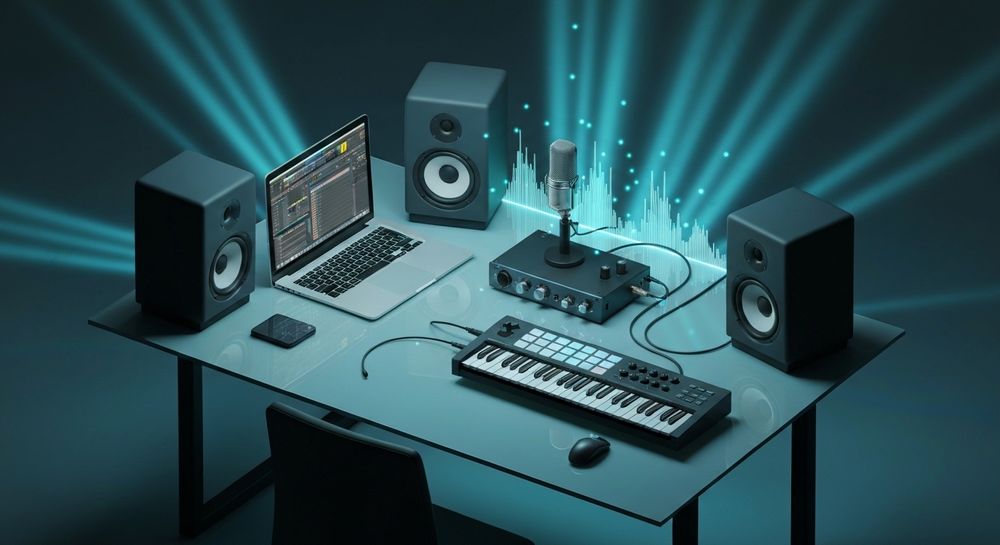
Creating lofi music doesn’t require expensive gear. The key is warmth, texture, and vibe. A simple home setup suffices:
- Laptop or Desktop: Any modern computer capable of running a digital audio workstation (DAW). Popular choices include Ableton Live, FL Studio, and Logic Pro.
- Audio Interface: Helps capture clean recordings from instruments or microphones.
- MIDI Keyboard (Optional): Essential for playing chords and melodies easily.
- Studio Headphones/Monitors: Accurate sound helps identify frequencies that might clash.
- Microphone: For recording ambient sounds or soft vocals if desired.
A minimalist, distraction-free workspace encourages creative thinking. For a detailed breakdown of how creators optimize their studios, check Soundverse’s article on AI Magic Tools, which explores intuitive software integrations that enhance workflow.

How Do You Create Lofi Beats at Home?
Lofi beats revolve around groove and emotion. Here’s a simple process for anyone starting from scratch:
- Drum Design: Use soft, vintage-sounding drum samples. Emphasize gentle kicks and crispy snares reminiscent of old vinyl records.
- Chord Progression: Play jazzy chords using electric piano, Rhodes, or guitar samples. Seventh and ninth chords are your best friends.
- Melody Layering: Keep melodies minimal and repetitive. A muted trumpet, soft synth, or sampled piano can create a soothing lead.
- Sound Texture: Add tape noise, vinyl crackle, and reverb. These imperfections define the genre.
- Arrangement: Most lofi tracks are under three minutes and loop-friendly, perfect for background playlists.
For deeper inspiration, see 40 hand-picked lofi text-to-music prompts that help beginners start creatively without getting stuck.
How to Build a Home Studio for Lofi Music Production?
Your environment influences creativity. A cozy home studio setup promotes relaxed sessions crucial for crafting warm, immersive music.
- Room Treatment: Simple foam panels or rugs can reduce echo.
- Lighting: Soft ambient lighting sets the mood.
- DAW Selection: Pick software that matches your comfort level—Ableton is best for loops, Logic Pro for instruments.
- Sample Libraries: Explore royalty-free sample packs to avoid copyright issues. Read Navigating the world of royalty-free and copyright-free music to ensure compliance.
A home studio shouldn’t intimidate you—it’s a creative oasis for testing sounds, practicing lofi sound design, and building confidence independently.
What Are the Key Elements of Lofi Sound Design?
Lofi sound design is what makes your music feel nostalgic yet modern. Pay attention to these aspects:
- Warm Tone Shaping: Use EQ to roll off highs, creating a darker, intimate sound.
- Bitcrushing & Saturation: Slight distortion adds character.
- Reverb & Delay: Space effects evoke emotional depth.
- Layering Ambient Textures: Field recordings such as rain or café chatter enhance immersion.
This combination of techniques defines DIY lofi music in 2026—natural imperfections intentionally crafted with care. For additional insight, check out Understanding Lo-Fi: The Charm of Low Fidelity Music or Lo-fi music | Description, Production, & History | Britannica for background on sonic imperfections that shape the genre.
How Can Beginners Learn Lofi Music Production Quickly?
New creators often struggle with structure or mixing, but the Internet provides countless learning resources. Tutorials on YouTube remain invaluable, while AI-powered platforms now accelerate skill building for indie musicians.
You can experiment by producing a short loop and testing it against others. Experimentation is key—create variations of drums and chords until something resonates emotionally. For example, explore our Soundverse Tutorial Series - 9. How to Make Music to watch guided steps in musical creation.
For broader education on digital creativity, see How AI-generated music is transforming the music industry. It explains how hybrid human–AI collaboration fosters new artistic ecosystems in 2026.
How to Make Lofi Music with Soundverse AI Music Generator

Now that you understand the fundamentals of lofi music production, here’s how to create it instantly using Soundverse.
Step 1: Feature Overview

Access the Soundverse AI Music Generator from the main menu. This tool creates fully produced instrumental music from text prompts—ideal for crafting lofi beats, ambient soundscapes, and loopable backgrounds.
Step 2: Description Input

Enter a text description that defines your desired lofi vibe. For example, “warm jazz chords with vinyl crackle and relaxed hip-hop groove.” The platform interprets this description to generate corresponding music.
Step 3: Style & Duration

Select your preferred genre (lofi, chillhop, or ambient), and set your track length. Enable Loop Mode if you intend to use your creation for streaming background music or meditation playlists.
Step 4: Generation

Click Generate. The Soundverse engine (using the latest V4 and V5 models) produces your unique instrumental track asynchronously based on the text prompt. You’ll receive a ready-to-use, vocal-free output suitable for videos, podcasts, or studying playlists.
Step 5: Export Options

Once satisfied, download your newly generated lofi beat in standard formats. You can import it into your DAW for further refinement or mix multiple AI tracks with human-recorded elements.
Soundverse also offers complementary tools like Similar Music Generator for style-matched compositions, Extend Music for lengthening loops, and Stem Separator to extract drum or bass stems from mixed tracks. These tools expand creative control in DIY lofi production workflows.
Why Soundverse is Perfect for Creators in 2026
Lofi music in 2026 benefits from AI-driven creative assistance. Soundverse stands out by enabling detailed genre and mood control while maintaining artistic authenticity. It empowers beginners to initiate professional-quality projects without technical barriers.
For further exploration, you might read:
- Generate AI Music with Soundverse Text-to-Music
- Soundverse Introduces Stem Separation AI Magic Tool
- Best AI Music Generator: Top Picks and Review
In conclusion, mastering lofi music production at home in 2026 means combining intentional imperfection with evolving technology. Through tools like Soundverse, even beginners can turn relaxed ideas into emotionally rich productions fit for streaming, study playlists, or cinematic scores.
Whether you’re aiming to create viral chill music or simply unwind with your DIY beats, this hybrid method—human creativity plus AI precision—represents the future of lofi sound design.
Start Creating Your Own Lofi Beats with Soundverse AI
Unlock the power of AI to generate chill, dreamy lofi tracks in minutes. Experiment with textures, moods, and loops effortlessly using Soundverse's intuitive platform.
- 40 Hand-Picked Lofi Text-to-Music Prompts for All Occasions — Get inspired with 40 creative prompts designed to help you generate smooth lofi beats instantly using AI.
- Generate AI Music with Soundverse Text-to-Music — Learn how Soundverse's text-to-music feature can transform written prompts into dynamic, studio-ready compositions.
- Soundverse AI Magic Tools: Create Content Quickly with AI — Discover how Soundverse’s AI Magic Tools speed up music creation and make professional-level output accessible to everyone.
- How an AI Music Generator Inspires Creative Fusion — Explore how AI music technology blends creativity and innovation to inspire new styles like lofi and beyond.
Here's how to make AI Music with Soundverse
Video Guide

Here’s another long walkthrough of how to use Soundverse AI.
Text Guide
- To know more about AI Magic Tools, check here.
- To know more about Soundverse Assistant, check here.
- To know more about Arrangement Studio, check here.
Soundverse is an AI Assistant that allows content creators and music makers to create original content in a flash using Generative AI.
With the help of Soundverse Assistant and AI Magic Tools, our users get an unfair advantage over other creators to create audio and music content quickly, easily and cheaply.
Soundverse Assistant is your ultimate music companion. You simply speak to the assistant to get your stuff done. The more you speak to it, the more it starts understanding you and your goals.
AI Magic Tools help convert your creative dreams into tangible music and audio. Use AI Magic Tools such as text to music, stem separation, or lyrics generation to realise your content dreams faster.
Soundverse is here to take music production to the next level. We're not just a digital audio workstation (DAW) competing with Ableton or Logic, we're building a completely new paradigm of easy and conversational content creation.
TikTok: https://www.tiktok.com/@soundverse.ai
Twitter: https://twitter.com/soundverse_ai
Instagram: https://www.instagram.com/soundverse.ai
LinkedIn: https://www.linkedin.com/company/soundverseai
Youtube: https://www.youtube.com/@SoundverseAI
Facebook: https://www.facebook.com/profile.php?id=100095674445607
Join Soundverse for Free and make Viral AI Music

We are constantly building more product experiences. Keep checking our Blog to stay updated about them!