How to Make EDM Music: A Complete 2026 Guide for Aspiring Producers
Learn how to make EDM music easily in 2026 using Soundverse AI Song Generator. Step-by-step tutorial for beginners.
How to Make EDM Music
Electronic Dance Music (EDM) continues to dominate global playlists in 2026, merging technology with creativity in unprecedented ways. Aspiring producers now have access to AI-powered tools that make music creation faster, smarter, and more intuitive. If you’ve ever wondered how to make EDM music from scratch, this comprehensive guide will walk you through the fundamentals, production techniques, and how to use Soundverse AI Song Generator to create professional-quality EDM tracks with ease.
What is EDM and Why is it Still Trending in 2026?
EDM refers to Electronic Dance Music, an umbrella term covering sub-genres like house, techno, trance, dubstep, and future bass. Since 2024, EDM has evolved with hybrid genres blending pop vocals and AI-driven sound textures. In 2026, producers lean on AI assistance not just for creative inspiration but for mixing automation and track arrangement. Whether you want to headline festivals or just create social media-ready beats, mastering electronic dance music production is an invaluable skill.
What Do You Need to Start Making EDM Music?
To begin your journey, you’ll need:
- Music Production Software for EDM – Digital Audio Workstations (DAWs) such as Ableton Live, FL Studio, and Logic Pro remain popular. However, newer AI-integrated tools complement these workflows.
- Audio Interface & MIDI Controller – These help record and manipulate sounds more accurately.
- Sample Libraries and Synth Plugins – From Serum to Massive X, these define your sound palette.
- Soundverse AI Tools – The suite from Soundverse, including the AI Song Generator, revolutionizes composition and EDM sound design.
Before diving into beats and drops, let’s explore how Soundverse simplifies the creative process.
How to Make EDM Music with Soundverse AI Song Generator

The Soundverse AI Song Generator lets you turn descriptions or lyrics into full-fledged songs complete with AI-generated vocals and instrumentals. The system moves through a multi-stage pipeline that handles melody, arrangement, and mixing automatically. For EDM creators, this means faster prototyping and more focus on artistic direction rather than technical execution.
For a detailed overview, read How to Write an EDM Song: A Step-by-Step Guide for 2026 and How to Make EDM: A Step-by-Step Guide for Beginners in 2026.
Why Use Soundverse for EDM Production?
- Describe Your Song Mode: Input a description like “high-energy festival EDM with futuristic vocals,” and Soundverse generates a full track.
- Custom Mode: Enter your lyrics and configure tempo, genre, and energy level.
- Reference Audio Support: Upload reference tracks or samples to shape your sound.
- Quick Style Selection: Choose EDM presets or experiment with hybrid genres.
It’s particularly useful for songwriting demos, vocal prototyping, and content creation for YouTube or social media, supporting more than ten languages for multilingual vocal generation. Let's go through the official steps for creating EDM songs using Soundverse.
For a deeper dive, watch the Soundverse Tutorial Series - 10. Make Deep House Music and Soundverse Tutorial Series - 9. How to Make Music.
Step 1: Feature Overview

Access the AI Song Generator feature from the main Soundverse menu. Once opened, select “Create New Song.” This hub lets you choose between Describe Your Song or Custom mode, depending on whether you want freestyle creativity or structured song input.
Step 2: Lyrics Input
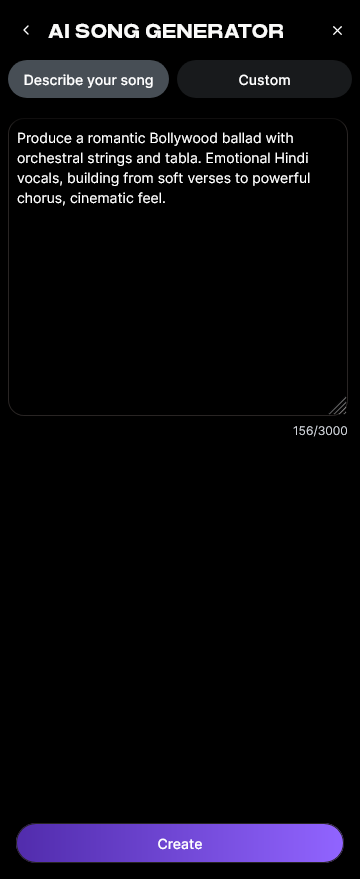
In Custom mode, paste or type your lyrics directly into the lyrics input field. If you’re making instrumental EDM, you can skip lyrics and let Soundverse focus solely on instrumental generation. You can describe themes like “nightlife club vibe” or “uplifting festival drop.”
Step 3: Style Selection

Select “EDM” under Quick Style Selection. Within this genre, you can refine sub-types such as house, trance, or bass-heavy festival music. This step determines the instrumentation, rhythm complexity, and tonal balance.
Step 4: Configuration

Set generation parameters: tempo (BPM), length, and vocal presence. Here, fine-tuning helps achieve specific outcomes. For example, set BPM around 128 for house or 140 for future bass. If you prefer only instrumentals, disable vocals.
Step 5: Generation

Click the “Generate” button. Soundverse processes the prompt and lyrics asynchronously through its pipeline, developing the melody, arranging sections, and applying mixing balances suitable for EDM. You can learn more in How to Write EDM Music: A Complete Guide for Beginners in 2026.
Step 6: Generation Complete

After processing, the completed EDM track appears in the results section. You can preview it to assess how the AI arranged the song. Each file comes normalized with basic mastering suitable for demos or social uploads.
Step 7: Export Results

Download the generated song in multiple formats (like WAV or MP3). You can then import it into your DAW for extra customization, layering, and detailed EDM mixing and mastering refinement. Explore detailed workflows in A Complete Guide to Electronic Dance Music Production in 2026.
Pro Tips for Beginners Learning EDM Production
- Understand Song Structure: EDM tracks follow intro, build-up, drop, and outro patterns. Learning this helps you arrange dynamics effectively.
- Focus on Sound Design: Experiment with synths, filters, and automation. Check out Soundverse AI Magic Tools for creative inspiration.
- Master the Art of Mixing: Use EQ and compression to balance layers. If interested, read more about EDM mixing and mastering with AI tools.
- Study Modern Trends: Explore how AI-generated music is transforming the industry in this article.
- Stay Creative: Don’t rely solely on presets—combine AI assistance with your unique ideas.
How AI Is Changing EDM Creation in 2026
AI doesn’t replace musicians—it expands creativity. Producers in 2026 use AI for rapid prototyping, remixing, and inspiration. Soundverse Assistant acts almost like a co-producer, helping manage workflow while maintaining personal artistic control. The trend mirrors deeper collaborations between human creativity and machine intelligence.
For another visual demonstration, check out Soundverse Tutorial Series - 8. "Explore" Tab.
Advanced EDM Sound Design Tips
For those progressing beyond beginner level, here are a few EDM sound design tips:
- Layer Synths: Combine analog-inspired synths with AI-generated textures.
- Automate Transitions: Smooth out build-ups and breaks using reverb fades and sweep effects.
- Use Reference Tracks: Upload a well-produced EDM track to Soundverse for sonic matching.
- Experiment with Vocals: Generate multilingual acapellas with Soundverse AI Singing Generator.
Why Soundverse Stands Out in 2026
Soundverse remains ahead of traditional text-to-music solutions by enabling fully structured EDM production within minutes. Other AI music platforms may provide loops or beats, but Soundverse delivers complete arrangements ready for mastering. For creative professionals, it’s the go-to tool that perfectly bridges human emotion with technological precision.
For cross-genre inspiration, explore how it can create other styles too:
- How to Create Jazz Music with Soundverse AI
- How to Create Country Music with Soundverse AI
- How to Create Rap Music with AI
Each shows how the same workflow adapts across music genres, making Soundverse a complete creative hub.
Start Creating Your Own EDM Tracks with Soundverse
Experience effortless music creation powered by AI. Generate professional-quality EDM in minutes—mix, master, and share instantly without traditional software limitations.
Related Articles
- How to Create EDM with Soundverse AI — Learn how Soundverse AI helps you design authentic EDM tracks with precision and creativity.
- Generate AI Music with Soundverse Text-to-Music — Discover how text prompts can help you instantly turn ideas into full musical compositions.
- Soundverse AI Revolutionizing Music Creation for New Age Content Creators — Explore how Soundverse is transforming the way digital creators produce fresh music content.
- 50 Hand-Picked Deep House Text-to-Music AI Music Generation Prompts — Get inspired with curated AI music prompts for creating energetic deep house tracks.
Here's how to make AI Music with Soundverse
Video Guide

Here’s another long walkthrough of how to use Soundverse AI.
Text Guide
- To know more about AI Magic Tools, check here.
- To know more about Soundverse Assistant, check here.
- To know more about Arrangement Studio, check here.
Soundverse is an AI Assistant that allows content creators and music makers to create original content in a flash using Generative AI.
With the help of Soundverse Assistant and AI Magic Tools, our users get an unfair advantage over other creators to create audio and music content quickly, easily and cheaply.
Soundverse Assistant is your ultimate music companion. You simply speak to the assistant to get your stuff done. The more you speak to it, the more it starts understanding you and your goals.
AI Magic Tools help convert your creative dreams into tangible music and audio. Use AI Magic Tools such as text to music, stem separation, or lyrics generation to realise your content dreams faster.
Soundverse is here to take music production to the next level. We're not just a digital audio workstation (DAW) competing with Ableton or Logic, we're building a completely new paradigm of easy and conversational content creation.
TikTok: https://www.tiktok.com/@soundverse.ai
Twitter: https://twitter.com/soundverse_ai
Instagram: https://www.instagram.com/soundverse.ai
LinkedIn: https://www.linkedin.com/company/soundverseai
Youtube: https://www.youtube.com/@SoundverseAI
Facebook: https://www.facebook.com/profile.php?id=100095674445607
Join Soundverse for Free and Make Viral AI Music

We are constantly building more product experiences. Keep checking our Blog to stay updated about them!