How to Make Drum Patterns: A Complete Guide for Beginners in 2026
Learn how to make drum patterns, use Soundverse Voice to Instrument, and master beat creation in 2026.
How to Make Drum Patterns
Creating drum patterns is one of the most essential skills in modern music production. Whether you’re working on a hip-hop beat, EDM track, or cinematic score, understanding how to make drum patterns gives your music rhythm, soul, and movement. In 2026, beginner producers have access to advanced tools like Soundverse’s Voice to Instrument feature that make drum programming and rhythm creation easier than ever before.
Why Learning How to Make Drum Patterns Matters
A good drum pattern is the backbone of any track. It sets the groove, defines the genre, and creates emotional energy. Drum patterns influence how listeners move to your music — from head-nodding hip-hop beats to high-tempo EDM kicks. For beginners, learning how to make drum patterns is also the entry point to understanding music production basics like timing, quantization, and dynamics.
As of 2026, music production has become more accessible thanks to AI-driven tools. Platforms such as Soundverse have simplified beat making even for those without instrumental skills. You can now sketch ideas by humming or beatboxing into your microphone and turn them into realistic drum sounds.
How to Make Drum Patterns with Soundverse Voice to Instrument
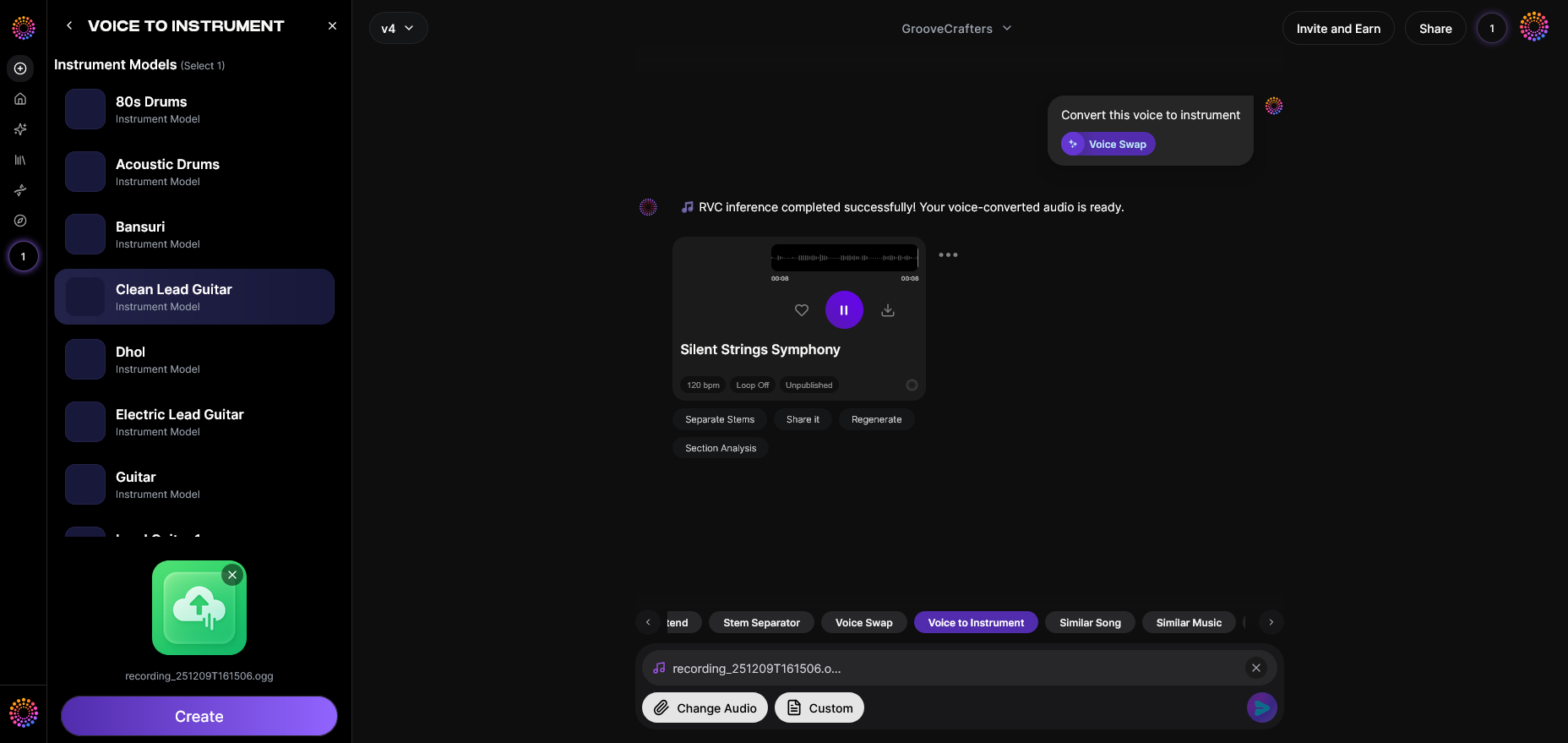
Soundverse’s Voice to Instrument feature is designed specifically for creators who want to generate instrumental parts using their voice. It transforms vocal input — humming, beatboxing, or singing — into realistic instrumental sounds such as drums, guitar, sitar, or flute. For a deeper dive, watch our Soundverse tutorial on making music.
What Makes Voice to Instrument Powerful
- Timbre Transfer: It converts the unique tonal qualities of your voice into instrumental tones.
- Wide Instrument Library: It includes both Western and ethnic instruments, enabling global fusion across genres.
- Supports Melodic and Rhythmic Input: Whether you hum a melody or beatbox a rhythm, it intelligently translates those nuances into playable instrument sounds.
This tool helps aspiring producers move from ideas to rhythm creation in seconds. Instead of manually programming every kick, snare, and hi-hat, you can simply record yourself beatboxing and let Soundverse convert that performance into MIDI drum patterns or audio-ready drums. According to How to Make Music with Your Voice in 2026: A Complete Beginner's Guide, the Voice to Instrument model analyzes your voice for pitch and phrasing, converting each nuance into corresponding instrument notes.

Step 1: Feature Overview — Access Voice to Instrument
To start creating drum patterns, log into your Soundverse workspace and select the Voice to Instrument tool. This is your starting point to transform vocal rhythm ideas into digital drums.
Step 2: Instrument Selection — Choose Target Instrument Type
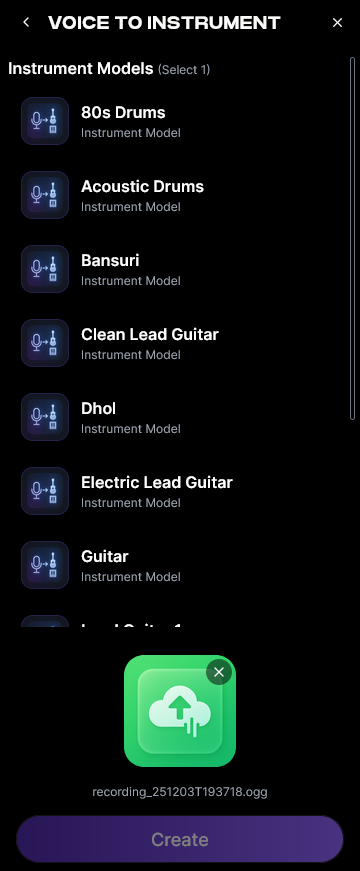
Within the interface, select Drums as your target instrument. You can explore other instruments for future projects, but for rhythm creation, drums will provide the best results. This ensures that your beatboxing will translate into percussive hits.
Step 3: Upload Target Audio — Upload Audio with Vocal Track
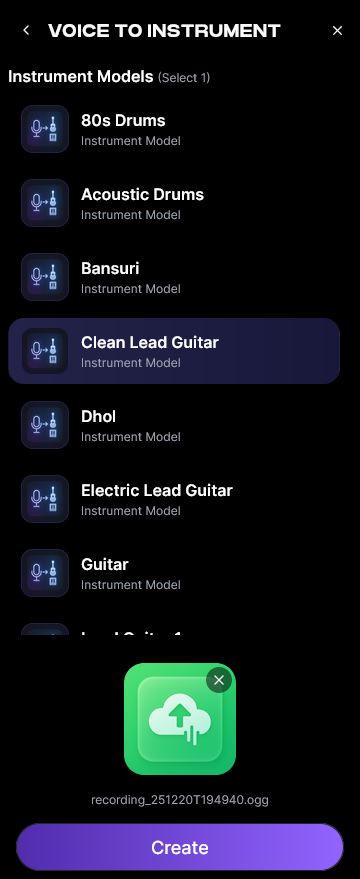
Next, upload an audio clip of your beatboxing or humming session. This can be a short 4-bar loop or a full verse-length groove. The AI processes uploaded audio asynchronously — meaning you record first and let the AI handle the transformation afterward.
Step 4: Generation — Convert Vocals to Selected Instrument
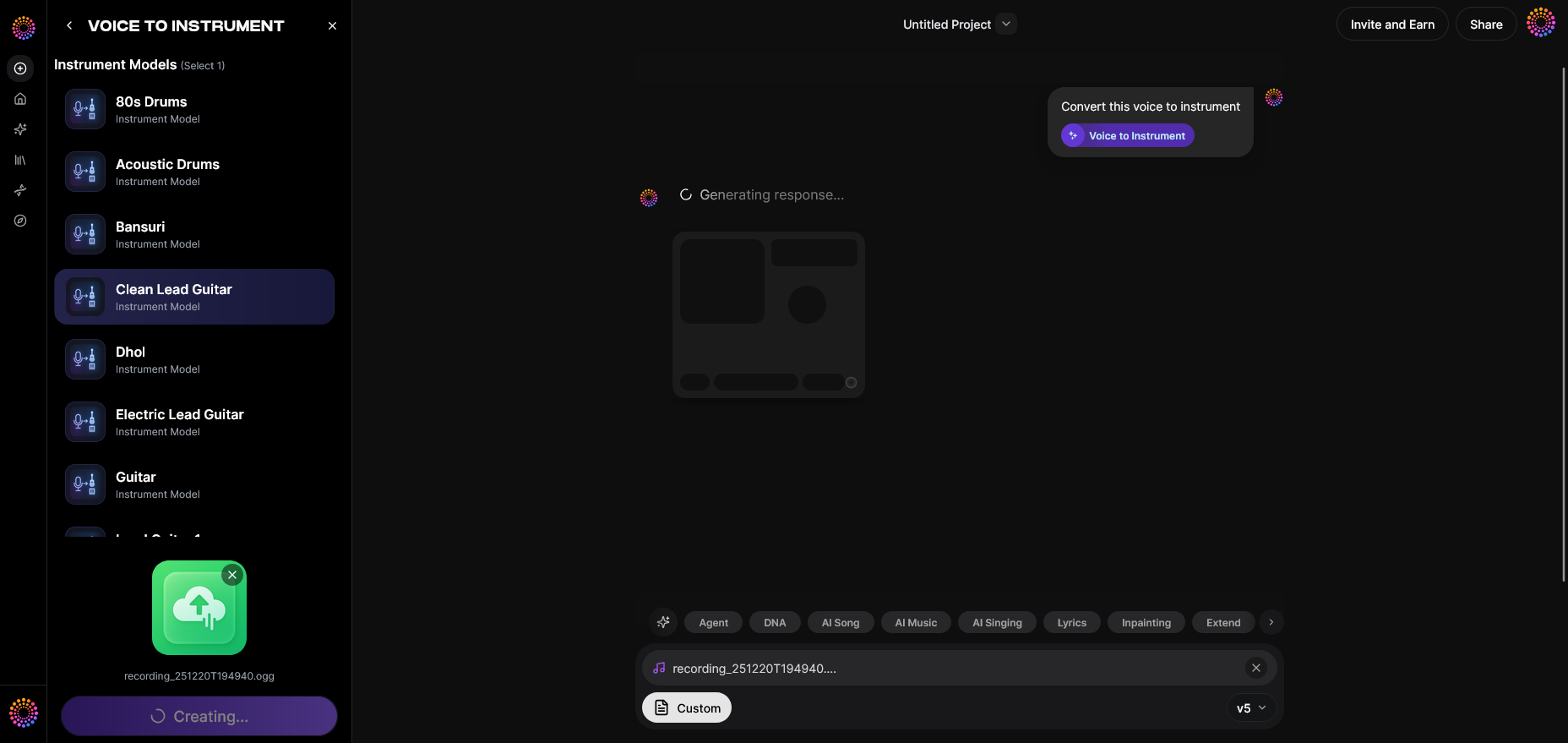
Once your vocal track is uploaded, click ‘Generate’. Soundverse will analyze your pitch, timing, and timbre to produce a realistic drum performance that maintains the rhythmic phrasing you created.
Step 5: Download Result — Export Instrument Version
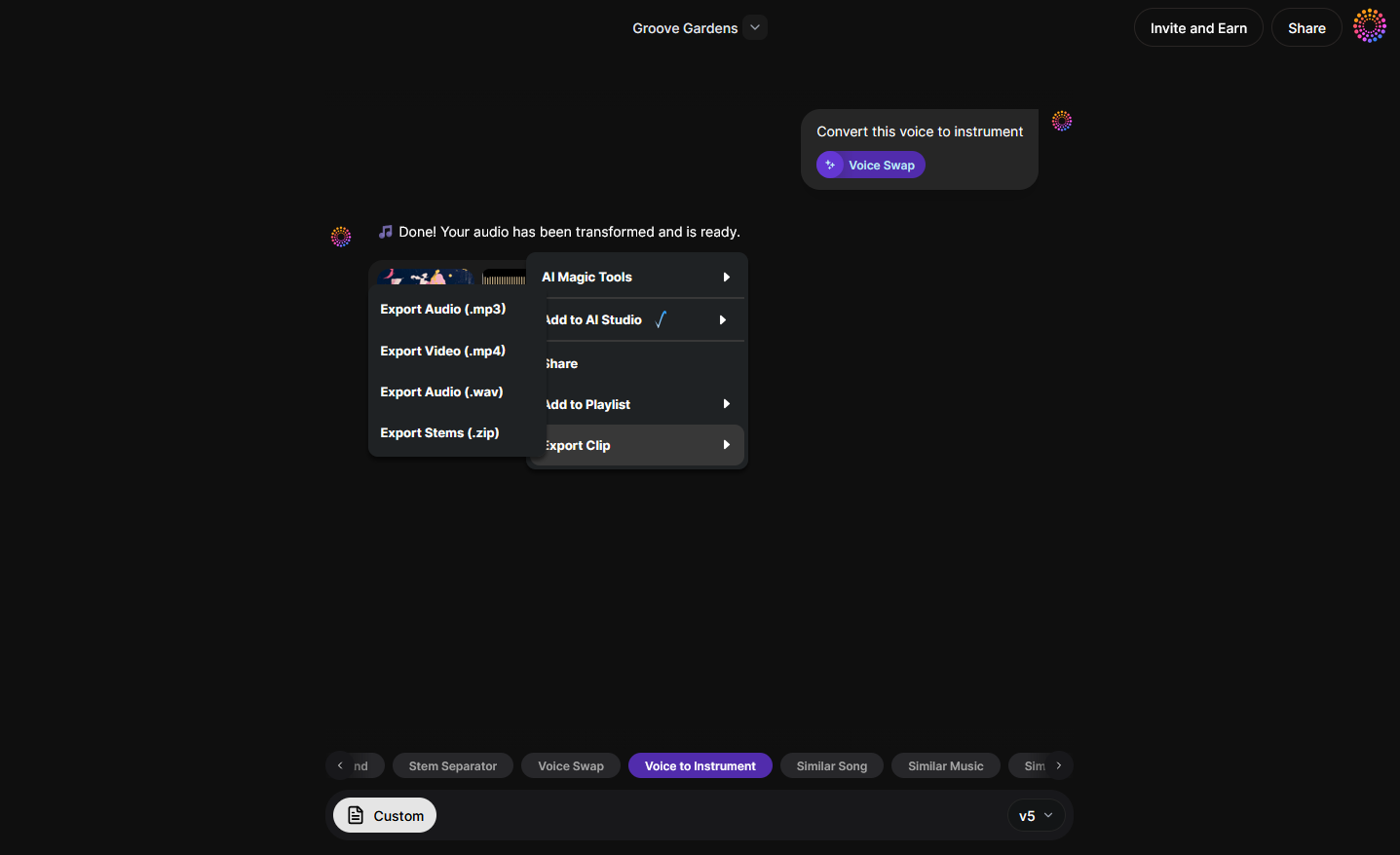
After generation, you can download your new drum track as either an audio file or a MIDI pattern. The MIDI option lets you rearrange hits or layer with other samples inside your chosen DAW.
Practical Beat Making Tips for Beginners
Once you’ve converted your voice to drum sounds, the fun part begins — refining and arranging rhythm. Here are some beat making tips to help you craft professional-sounding drum arrangements:
- Start Simple: Use a basic four-on-the-floor kick pattern or a boom-bap groove to understand timing.
- Quantize Carefully: Slight timing shifts make rhythms human. Too much quantization feels robotic.
- Layer Percussion: Combine electronic drums with natural samples or ethnic instruments using Soundverse’s library.
- Use Variation: Create small changes between bars — like muting hi-hats or switching snares — to keep the groove interesting.
- Experiment with Dynamics: Adjust velocity levels to make your MIDI drum patterns feel more natural.
- Reference Genre-Specific Patterns: Study styles from jazz, rock, EDM, and world music. You can explore related guides, like How to Create EDM with Soundverse AI or How to Create Jazz Music with Soundverse AI.
Using AI to Improve Rhythm Creation in 2026
Artificial intelligence is redefining how we create music. In 2026, rhythm creation no longer requires deep knowledge of drumming techniques. AI understands human timing nuances and can generate patterns that align perfectly with desired genres. Tools like the Soundverse Agent enhance automation by handling multi-step workflows — you can request, “Create a pop beat, then remove the drums,” and the system will orchestrate associated tools such as the Stem Separator.
The Stem Separator tool from Soundverse is useful if you want to extract drums from mixed audio for remixing. Learn more about this AI capability in Soundverse Introduces Stem Separation AI Magic Tool.
Integrating Drum Programming with Other Soundverse Tools
Beyond Voice to Instrument, Soundverse offers other innovative music tools:
- AI Music Generator: Perfect for creating complete background tracks or beat loops from text prompts. You can learn more about it in Generate AI Music with Soundverse Text to Music.
- Agent: The conversational AI assistant for music creators. It helps you find the right tools automatically as explained in Let Soundverse Assistant Auto-Select the Right AI Magic Tool for You.
These integrations make Soundverse a complete ecosystem for beginners exploring music production basics in 2026.
Pro Tips for Better Drum Patterns
- Match Energy with Bass: Kick drums and basslines should lock in rhythmically to create tight grooves.
- Study Genre Structures: Hip-hop emphasizes strong backbeats (snares), while techno uses deep rhythmic repetition.
- Use Velocity and Swing: Adding swing makes your patterns groove more naturally.
- Incorporate Ethnic Percussion: Since Soundverse supports sitar and bansuri conversion through Voice to Instrument, consider mixing world influences into your drums.
- Iterate Multiple Versions: Export several variations and test which fits best with your melody lines.
Start Making Drum Patterns in Seconds with Soundverse AI
Transform your rhythm ideas into polished beats using Soundverse’s AI-powered tools. Create, refine, and experiment effortlessly to craft unique drum patterns for any genre.
Related Articles
- How to Create Rap Music with AI — Explore how AI can help you craft dynamic rap beats and flow-ready instrumentals effortlessly.
- How to Create EDM with Soundverse AI — Learn how to design energetic EDM tracks and rhythmic drops using Soundverse’s intuitive AI composer.
- How to Make AI-Generated Music — Dive into the full process of creating high-quality songs using AI—from rhythm development to final mix.
- Soundverse AI Magic Tools: Create Content Quickly with AI — Discover a range of AI Magic Tools designed to simplify and speed up your music creation workflow.
Here's how to make AI Music with Soundverse
Video Guide

Here’s another long walkthrough of how to use Soundverse AI.
Text Guide
- To know more about AI Magic Tools, check here.
- To know more about Soundverse Assistant, check here.
- To know more about Arrangement Studio, check here.
Soundverse is an AI Assistant that allows content creators and music makers to create original content in a flash using Generative AI.
With the help of Soundverse Assistant and AI Magic Tools, our users get an unfair advantage over other creators to create audio and music content quickly, easily and cheaply.
Soundverse Assistant is your ultimate music companion. You simply speak to the assistant to get your stuff done. The more you speak to it, the more it starts understanding you and your goals.
AI Magic Tools help convert your creative dreams into tangible music and audio. Use AI Magic Tools such as text to music, stem separation, or lyrics generation to realise your content dreams faster.
Soundverse is here to take music production to the next level. We're not just a digital audio workstation (DAW) competing with Ableton or Logic, we're building a completely new paradigm of easy and conversational content creation.
TikTok: https://www.tiktok.com/@soundverse.ai Twitter: https://twitter.com/soundverse_ai Instagram: https://www.instagram.com/soundverse.ai LinkedIn: https://www.linkedin.com/company/soundverseai Youtube: https://www.youtube.com/@SoundverseAI Facebook: https://www.facebook.com/profile.php?id=100095674445607
Join Soundverse for Free and make Viral AI Music

We are constantly building more product experiences. Keep checking our Blog to stay updated about them!