How to Make a Multilingual Song Using AI Music in 2026
Learn how to create multilingual songs using AI music tools in 2026.
How to Make a Multilingual Song Using AI Music
Creating a multilingual song using AI music tools has become one of the most exciting innovations in the music world in 2026. Musicians and digital creators around the globe are combining cultural influences and languages to reach broader audiences. Thanks to advancements in artificial intelligence and machine learning in music creation, producing songs that seamlessly blend English, Spanish, Korean, Hindi, and other languages is no longer an impossible challenge.
Why is AI music multilingual song creation trending in 2026?
In the past few years (2024–2025), AI songwriting software evolved rapidly. By 2026, the industry has matured, with platforms such as Soundverse enabling creators to write, produce, and mix multilingual songs within minutes. Social media platforms and streaming services have become increasingly global, urging artists to cater to multilingual audiences. The success of ai mixed language songs on TikTok and YouTube proves that creators who use artificial intelligence music tools can attract listeners from multiple regions simultaneously.
Machine learning in music creation has advanced to the point where models can understand phonetics, tone, and rhythm nuances across different languages. This lets creators focus on storytelling and emotion rather than worrying about linguistic barriers.
What are the benefits of creating multilingual songs using AI?
- Global audience reach: A multilingual song appeals to listeners from different backgrounds and cultures.
- Creative diversity: Mixing languages enhances lyrical depth and artistic expression.
- Efficient production: AI songwriting software reduces the time needed to write, arrange, and mix music.
- Cross-platform success: Multilingual tracks perform better on international streaming charts and social media algorithms.
- Cost savings: AI music tools minimize the need for hiring vocalists, lyricists, or translators.
Creators seeking insight into broader technological trends can learn more through articles such as AI music in the USA and How AI-generated music is transforming the music industry, which explore how global adoption of AI enhances artistic collaboration.
How to make a multilingual song using Soundverse AI Song Generator

Soundverse’s AI Song Generator is the core feature enabling multilingual creativity for today’s musicians.
Overview of Soundverse’s AI Song Generator
The AI Song Generator transforms text descriptions or full lyrics into entire songs featuring AI-generated vocals and instrumentals. It operates through a multi-stage pipeline that covers lyric interpretation, melody building, arrangement, and mixing. This asynchronous workflow ensures that users can input their ideas, let the system process them, and receive polished songs afterward.
Core capabilities include:
- Describe Your Song Mode: Users can type prompts like “Energetic pop track about unity in English and Spanish,” and Soundverse automatically generates suitable compositions.
- Custom Mode: Advanced creators can input custom lyrics and precise settings.
- Reference Audio Support: Upload existing recordings or songs for vocal style or musical mood guidance.
- Quick Style Selection: Switch easily between genres such as Pop, EDM, Rock, Jazz, and more.
Soundverse supports over ten languages, making it ideal for multilingual content creation, songwriting demos, vocal prototyping, and content creation for social media.
To dive deeper into genre-specific workflows, explore tutorials like How to Create EDM with Soundverse AI and How to Create Jazz Music with Soundverse AI for inspiration.
Step 1: Feature Overview

Start by accessing the AI Song Generator from the Soundverse main menu. This tool serves as your central hub for generating both lyrics and music in multiple languages.
Step 2: Lyrics Input
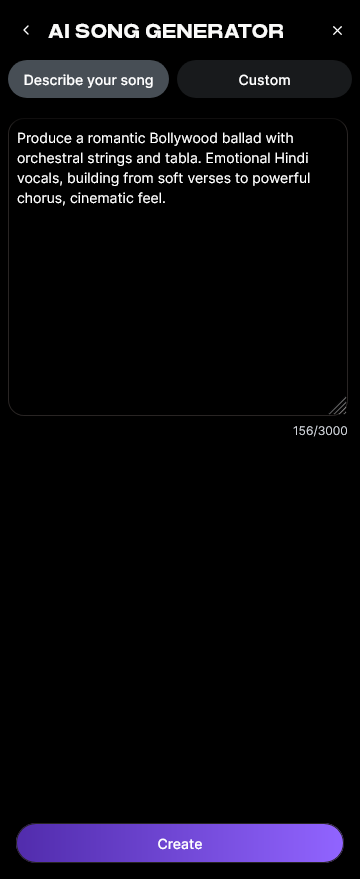
Enter or paste lyrics directly into the interface. You can blend languages — for example, writing verses in English and choruses in Spanish or French. The AI model interprets linguistic flow and creates melodic phrasing that reflects each language’s rhythm and sound.
For users who need extra help structuring multilingual lyrics, the AI Lyrics Writer tool can generate lines based on theme, tone, and emotion. It integrates seamlessly within the Song Generator through the “Help Me Write” option.
Step 3: Style Selection

Next, select the genre and musical style that match your creative vision. Whether you want a Latin-Pop fusion or a Lo-Fi bilingual ballad, Soundverse’s Quick Style Selection feature offers preset environments to shape the arrangement. The AI automatically adjusts instrumentation according to the language mood and tempo.
Step 4: Configuration

Set generation parameters, including vocal language balance, tempo, instrumentation intensity, and emotional tone. Advanced configurations enable creators to specify voice types and perform harmonic blending across linguistic lines.
Step 5: Generation

After you configure all options, click “Generate.” Soundverse processes your input through its multi-stage pipeline — creating lyrics alignment, melody, arrangement, and complete mixing. Remember, this step is asynchronous: the AI takes time to render your track and returns the finalized song ready for export.
Step 6: Generation Complete

Once processing is complete, the platform displays your finished song. You can listen to previews, evaluate how the AI blended different languages, and make adjustments if needed.
For visual learners, watch our Soundverse Tutorial Series - 9. How to Make Music or Soundverse Tutorial Series - 10. Make Deep House Music on YouTube.
Step 7: Export Results

Finally, export your multilingual song in various formats such as MP3, WAV, or stem-separated versions. This makes it easier to integrate into cross-language music production workflows or remix sessions using other DAWs.
Related reading: Soundverse introduces Stem Separation AI Magic Tool explains how creators can isolate vocals from instruments for translation or remixing.
Pro Tips for AI Music Multilingual Song Creation
- Leverage Voice Swap for localization: After generating your track, use Soundverse’s Voice Swap tool to replace the singer’s voice with a regional accent or custom style. Upload the original track, choose your target voice model, and let the AI re-render.
- Maintain phonetic rhythm: Even when mixing languages, ensure that syllabic flow across verses remains consistent.
- Experiment with experimental textures: Combine standard vocal styles with the AI Singing Generator, which can create textured performances — including whispering or playful character voices.
- Use feedback loops: Export your multilingual creation, gather listener feedback from native speakers, and refine the lyrics.
For creators looking to expand their musical horizons, articles such as What AI Can Generate Songs and Soundverse AI Magic Tools: Create Content Quickly with AI offer valuable insights on refining production workflows.
Why Soundverse is the best choice for cross-language music production in 2026
Soundverse’s ecosystem simplifies cross-language music production for both professionals and beginners. With multilingual support, intuitive design, and cross-feature integration (Lyrics Writer, Singing Generator, and Voice Swap), artists can produce ai mixed language songs that sound natural and emotionally coherent.
Because music streaming is more global than ever in 2026, creating multi-language tracks ensures cultural reach and stronger fan engagement. Soundverse empowers musicians to bridge continents through melody and language.
Start Creating Multilingual Songs with AI Today!
Experience how Soundverse empowers you to blend languages, genres, and emotions seamlessly using AI music technology. Unlock endless creativity and tell your global story through sound.
Related Articles
- How an AI Music Generator Inspires Creative Fusion: Discover how AI can spark new musical ideas by merging cultures, genres, and innovative sound design.
- Generate AI Music with Soundverse Text-to-Music: Learn how to turn your words into dynamic compositions instantly using Soundverse’s text-to-music engine.
- Soundverse AI Revolutionizing Music Creation for New-Age Content Creators: Explore how Soundverse is changing the way creators produce music, offering tools that simplify complex composition processes.
- The Role of AI Music in Film and Television: See how AI-generated music is reshaping soundtracks and cinematic storytelling for multilingual audiences.
Here's how to make AI Music with Soundverse
Video Guide

Here’s another long walkthrough of how to use Soundverse AI.
Text Guide
- To know more about AI Magic Tools, check here.
- To know more about Soundverse Assistant, check here.
- To know more about Arrangement Studio, check here.
Soundverse is an AI Assistant that allows content creators and music makers to create original content in a flash using Generative AI.
With the help of Soundverse Assistant and AI Magic Tools, our users get an unfair advantage over other creators to create audio and music content quickly, easily and cheaply.
Soundverse Assistant is your ultimate music companion. You simply speak to the assistant to get your stuff done. The more you speak to it, the more it starts understanding you and your goals.
AI Magic Tools help convert your creative dreams into tangible music and audio. Use AI Magic Tools such as text to music, stem separation, or lyrics generation to realise your content dreams faster.
Soundverse is here to take music production to the next level. We're not just a digital audio workstation (DAW) competing with Ableton or Logic, we're building a completely new paradigm of easy and conversational content creation.
TikTok: https://www.tiktok.com/@soundverse.ai
Twitter: https://twitter.com/soundverse_ai
Instagram: https://www.instagram.com/soundverse.ai
LinkedIn: https://www.linkedin.com/company/soundverseai
YouTube: https://www.youtube.com/@SoundverseAI
Facebook: https://www.facebook.com/profile.php?id=100095674445607
Join Soundverse for Free and make Viral AI Music

We are constantly building more product experiences. Keep checking our Blog to stay updated about them!