How to Create AI Music for Product Reviews in 2026
Learn how to create AI music for product reviews and unboxing videos using Soundverse AI Music Generator.
How to Create AI Music for Product Reviews
In today’s digital landscape, product review videos are among the most powerful content formats for brand influence and online engagement. Whether you’re a tech YouTuber, lifestyle vlogger, or e-commerce marketer, how you present your reviews can make or break viewer trust. One often overlooked element is the audio experience—particularly, the background music. In 2026, creating custom background soundscapes that align with your brand identity no longer requires a full production team. With AI music creation for product reviews, creators can generate personalized, royalty-free music that fits each product’s vibe perfectly.
Why Does Music Matter in Product Review Videos?

Viewers remember how a video makes them feel, not just what they see. The right soundtrack enhances the narrative of your review. For instance, a minimalist tech gadget deserves futuristic ambient tones, while a beauty product review benefits from soft, elegant instrumentals. AI-generated review audio can adapt to these needs instantly. Instead of browsing endless royalty-free music libraries, you can now describe your desired style in plain text and let AI handle the rest.
In 2026, AI music tools are becoming smarter at detecting emotional intent. They don’t just create generic loops—they interpret descriptive prompts like “sleek modern synths with a confident energy” or “uplifting acoustic background for lifestyle unboxing.” The result? Consistent branding, less manual searching, and unique audio signatures across all your videos.
How to Make AI Music for Product Reviews with Soundverse AI Music Generator
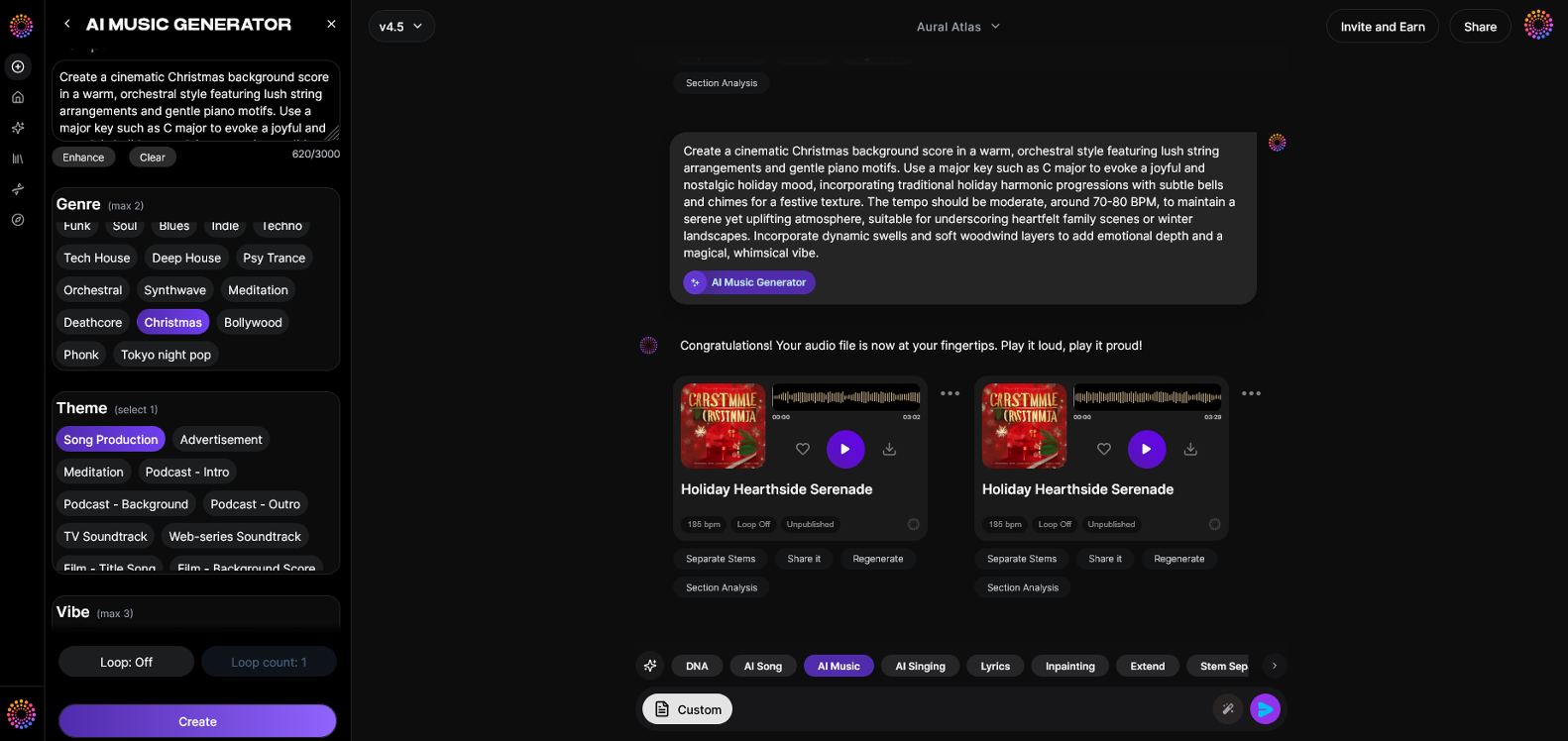

Before diving into the creative process, let’s explore the solution that powers thousands of creators worldwide: the Soundverse AI Music Generator.
What is the Soundverse AI Music Generator?
Soundverse’s AI Music Generator allows users to create fully produced instrumental tracks from simple text prompts. It focuses on background compositions, beats, and ambient soundscapes designed for commercial use—making it an ideal fit for product reviews and unboxing videos.
Core capabilities include:
- Text-to-Music Generation: Describe the desired vibe in a few words (e.g., "soft jazz for luxury skincare review"), and the AI generates a complete instrumental piece.
- Loop Mode: Enables seamless repetition of music so it naturally extends under your entire review segment without abrupt stops.
- Genre and Mood Control: Creators can select specific genres, moods, or instrument combinations for precise results.
- V4 and V5 Models: These latest generation models ensure improved realism, better instrument balance, and refined emotion mapping in 2026.
This feature was built from the ground up to serve creators who need adaptive, flexible, and fast audio solutions for video production. It integrates perfectly with review workflows because all tracks are instrumental—ensuring they never clash with voice narration or product sounds.
For a deeper dive, watch our guide on creating Deep House music or explore the Soundverse tutorial on making music.
Step 1: Feature Overview
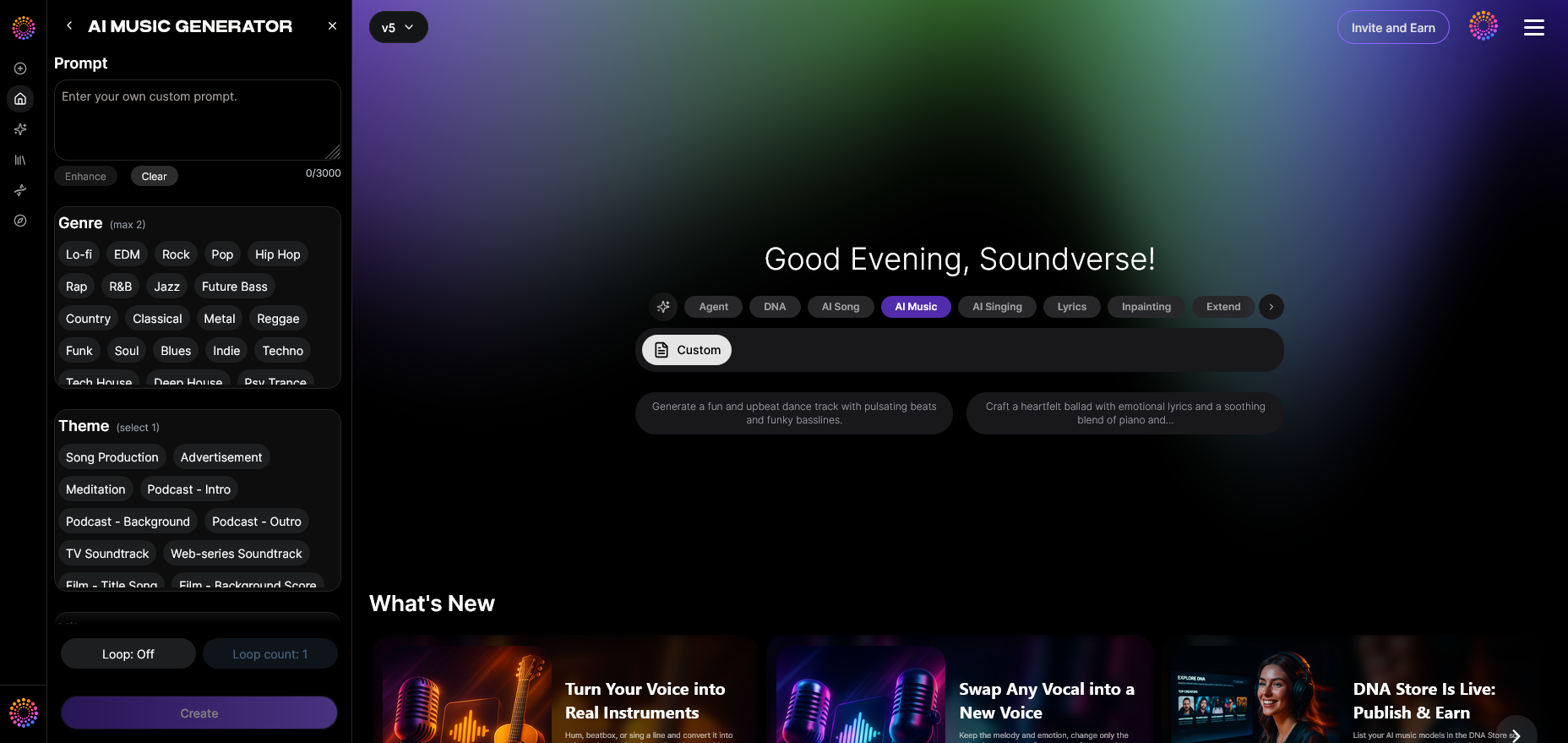
Access the AI Music Generator from the main Soundverse menu. Once logged in, navigate to the tool panel and select “AI Music Generator.” This opens the interface where all text-to-music creation begins.
Step 2: Description Input
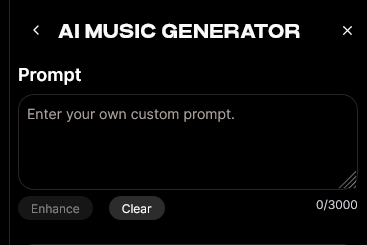
Enter a text description of your desired background sound. Be specific about your product and audience. For example:
- “Energetic EDM-style beat for a smart fitness band review.”
- “Soft ambient piano loop for a skincare product demonstration.”
The better your prompt, the more aligned the generated track will be. You can learn more about crafting powerful prompts in this guide.
Step 3: Style & Duration
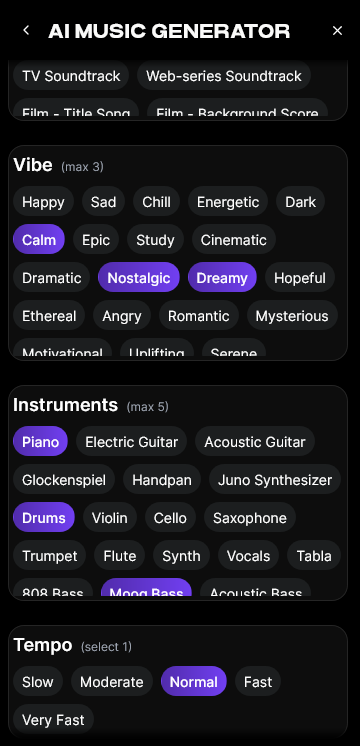
Next, define the style, tempo, mood, and duration. Whether your video is a quick one-minute TikTok or a 15-minute YouTube breakdown, you can customize the music to fit perfectly. For unboxing videos, many creators prefer calm mid-tempo music that loops for the entire clip.
Step 4: Generation
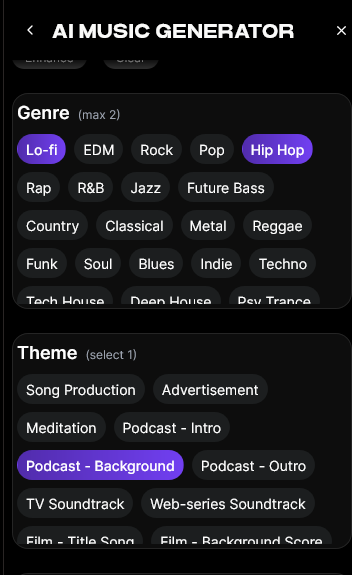
Click “Generate.” The AI processes your text input asynchronously and produces the instrumental track. You’ll receive a playable preview once rendering completes. This workflow eliminates the need for manual composition and expensive licensing agreements.
Step 5: Export Options

Once you’re satisfied, choose how you want to export the track. You can download the audio for direct use in your review editing timeline. Loop Mode tracks ensure uninterrupted playback, which is ideal for longer footage segments.
How AI-Generated Review Audio Enhances Engagement
Integrating AI-generated review audio brings measurable improvements to viewer retention. Calm yet engaging background music keeps viewers emotionally connected while allowing your voice to remain center stage. Since every AI-generated track is original, you won’t face copyright strikes or repeated sounds across competitor videos.
You can even mix styles for different segments:
- Intro Scenes: Upbeat tones to grab attention.
- Unboxing Moment: Light acoustic or minimalist electronic textures.
- Hands-On Shots: Subtle rhythmic loops that complement your voiceover.
- Closing Summary: Ambient fades that wrap up your message with polish.
Soundverse’s AI-created product soundtrack ensures each phase of your review feels intentional and cohesive.
Pro Tips for Better AI Music Integration in 2026
- Stay Consistent: Use similar tonal palettes across your channel, so your brand identity feels familiar.
- Optimize for Voice: Keep AI-generated music slightly under the vocal range, using low or mid frequencies to avoid muddiness.
- Experiment with Genres: As noted in AI Music Trends, 2026 is seeing hybrid genre fusions like ambient-hop and electro-lounge take over YouTube’s background music scene.
- Batch Create Tracks: Generate multiple loop variations for long content series like weekly reviews or unboxings.
- Leverage Other Soundverse Tools:
- Use Similar Music Generator to emulate the tone of your previous videos for brand coherence.
- Try Extend Music if your track is slightly too short for the full cut.
- Use Soundverse Trace to protect your audio assets with embedded authorship and attribution.
By implementing these tips, you maintain a professional-grade auditory identity while saving hours in post-production.
Why Soundverse Leads in AI Music Creation for Product Reviews
Unlike traditional licensing platforms, Soundverse was built for speed, personalization, and creative control. Thousands of creators already use Soundverse for background soundscapes, unboxing music, and branded loops. According to recent insights from Soundverse AI Magic Tools, automation continues to redefine digital content creation.
Creators appreciate how Soundverse integrates across workflows. You can easily transition from making AI music for product demos to generating complete tracks for other formats like podcasts or short ads. To further explore diverse applications, read about how AI music influences modern branding and check out genre-specific guides such as How to Create EDM with Soundverse AI.
The biggest benefit? Full creative freedom without legal risk. Each generated track is cleared for commercial use, making it safe for monetized YouTube videos, sponsored campaigns, or e-commerce product showcases.
Explore More:
- Mubert Alternatives: Soundverse
- Soundverse Assistant: Your AI Co-Producer
- AI Music in the USA
- Join the Soundverse Affiliate Program
Start Creating AI Music for Your Next Product Review Today
Bring your content to life with custom AI-generated tracks that match your brand’s vibe. Create, edit, and refine music effortlessly using Soundverse’s advanced AI tools.
Create Music with Soundverse Now
Related Articles
- Generate AI Music with Soundverse: Text-to-Music Made Simple — Discover how Soundverse transforms text prompts into full-fledged compositions that suit any video or product demo.
- Enhancing YouTube Content with Royalty-Free and Copyright-Free Music Using Soundverse AI — Learn how to elevate your YouTube reviews and content using copyright-safe music tracks generated by AI.
- The Benefits of Composing with an AI Music Generator — Find out how AI-powered tools simplify music creation while maintaining creative control and originality.
- Soundverse AI: Revolutionizing Music Creation for New-Age Content Creators — Explore how Soundverse empowers creators to produce studio-quality soundtracks using next-gen AI technology.
Here's how to make AI Music with Soundverse
Video Guide

Here’s another long walkthrough of how to use Soundverse AI.
Text Guide
- To know more about AI Magic Tools, check here.
- To know more about Soundverse Assistant, check here.
- To know more about Arrangement Studio, check here.
Soundverse is an AI Assistant that allows content creators and music makers to create original content in a flash using Generative AI.
With the help of Soundverse Assistant and AI Magic Tools, our users get an unfair advantage over other creators to create audio and music content quickly, easily and cheaply.
Soundverse Assistant is your ultimate music companion. You simply speak to the assistant to get your stuff done. The more you speak to it, the more it starts understanding you and your goals.
AI Magic Tools help convert your creative dreams into tangible music and audio. Use AI Magic Tools such as text to music, stem separation, or lyrics generation to realise your content dreams faster.
Soundverse is here to take music production to the next level. We're not just a digital audio workstation (DAW) competing with Ableton or Logic, we're building a completely new paradigm of easy and conversational content creation.
TikTok: https://www.tiktok.com/@soundverse.ai
Twitter: https://twitter.com/soundverse_ai
Instagram: https://www.instagram.com/soundverse.ai
LinkedIn: https://www.linkedin.com/company/soundverseai
Youtube: https://www.youtube.com/@SoundverseAI
Facebook: https://www.facebook.com/profile.php?id=100095674445607
Join Soundverse for Free and make Viral AI Music

We are constantly building more product experiences. Keep checking our Blog to stay updated about them!