How to Create AI Music for E-Learning Courses: A Complete Guide for 2026
Learn how to create AI music for e-learning with Soundverse’s AI Music Generator. Step-by-step guide for educators and course designers.
How to Create AI Music for E-Learning Courses
In 2026, online education continues to evolve rapidly, and one of the most impactful elements shaping the e-learning experience is audio—especially background music created with artificial intelligence. For course creators, instructional designers, and education technology professionals, incorporating AI music for e-learning is no longer optional; it’s becoming an essential part of effective content design. The right sound enhances engagement, improves information retention, and creates a mood that supports learning outcomes.
But how can you easily create professional-quality educational audio without needing to hire composers or buy expensive music licenses? The answer lies in AI tools specifically designed for educators—like Soundverse’s AI Music Generator.
Why is AI Music Important for E-Learning in 2026?
Today’s e-learning platforms are highly interactive and multimedia-driven. Students aren’t just reading slides; they are watching instructional videos, participating in simulations, and completing gamified modules. Music plays a key role in keeping learners focused and emotionally connected. Studies in cognitive psychology show that learners retain more when the environment is pleasant yet unobtrusive—a precise niche where AI-generated learning music excels.
AI music for e-learning allows educators to design immersive experiences without worrying about copyright or composition skills. In 2026, this technology is particularly valuable because:
- Personalization: AI can adapt music styles to specific course topics, age groups, and cultural contexts.
- Consistency: Courses can maintain a uniform sound identity across modules.
- Efficiency: You can create unlimited course background music with minimal time investment.
- Cost-effectiveness: No need for studio rentals or licensing fees.
For instance, a business management course could use calm, modern ambient tones for leadership lessons, while language learning activities might include upbeat instrumental rhythms to encourage participation.
How to Make AI Music for E-Learning Courses with Soundverse AI Music Generator
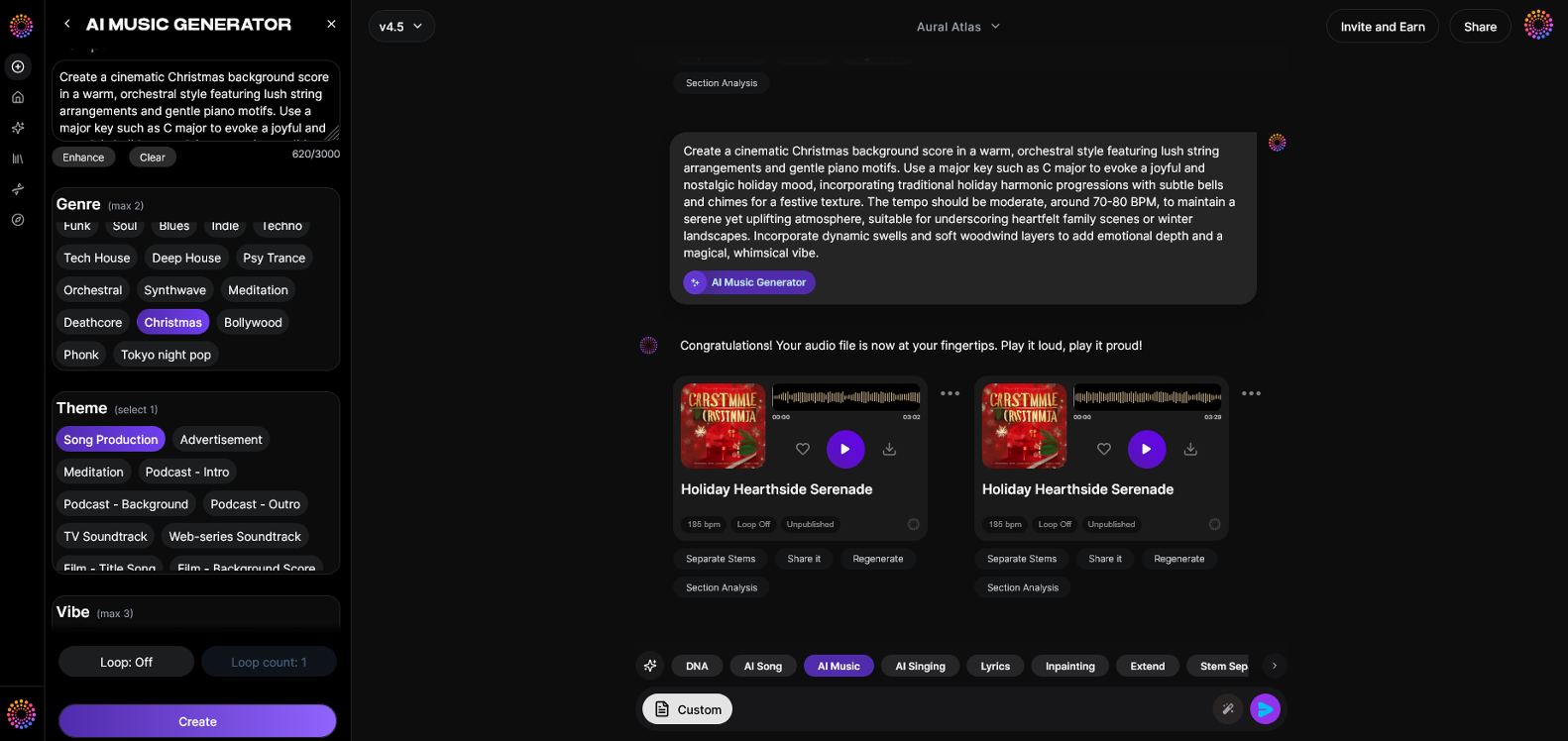
Soundverse’s AI Music Generator is the most suitable tool for creating instrumental, looping educational background tracks optimized for long-form learning environments.
Feature Overview:
- Creates fully produced instrumental music from text prompts. Simply type what you want to hear (“soft acoustic background for a financial course”) and Soundverse’s AI crafts the track.
- Loop Mode for seamless repetition. Perfect for courses where background music needs to run continuously without audible breaks.
- Detailed control over genre, mood, and instruments. This ensures each section of your educational content gets the right tone.
- V4 and V5 Model options. Choose between different technology versions depending on your depth of complexity and realism.
It specializes in creating background tracks, beats, and soundscapes—making it the ideal solution for e-learning environments where vocals could distract learners. For an in-depth demonstration, watch our tutorial on creating educational music with Soundverse.
Let’s go through how you can create effective educational audio step-by-step.
Step 1: Feature Overview
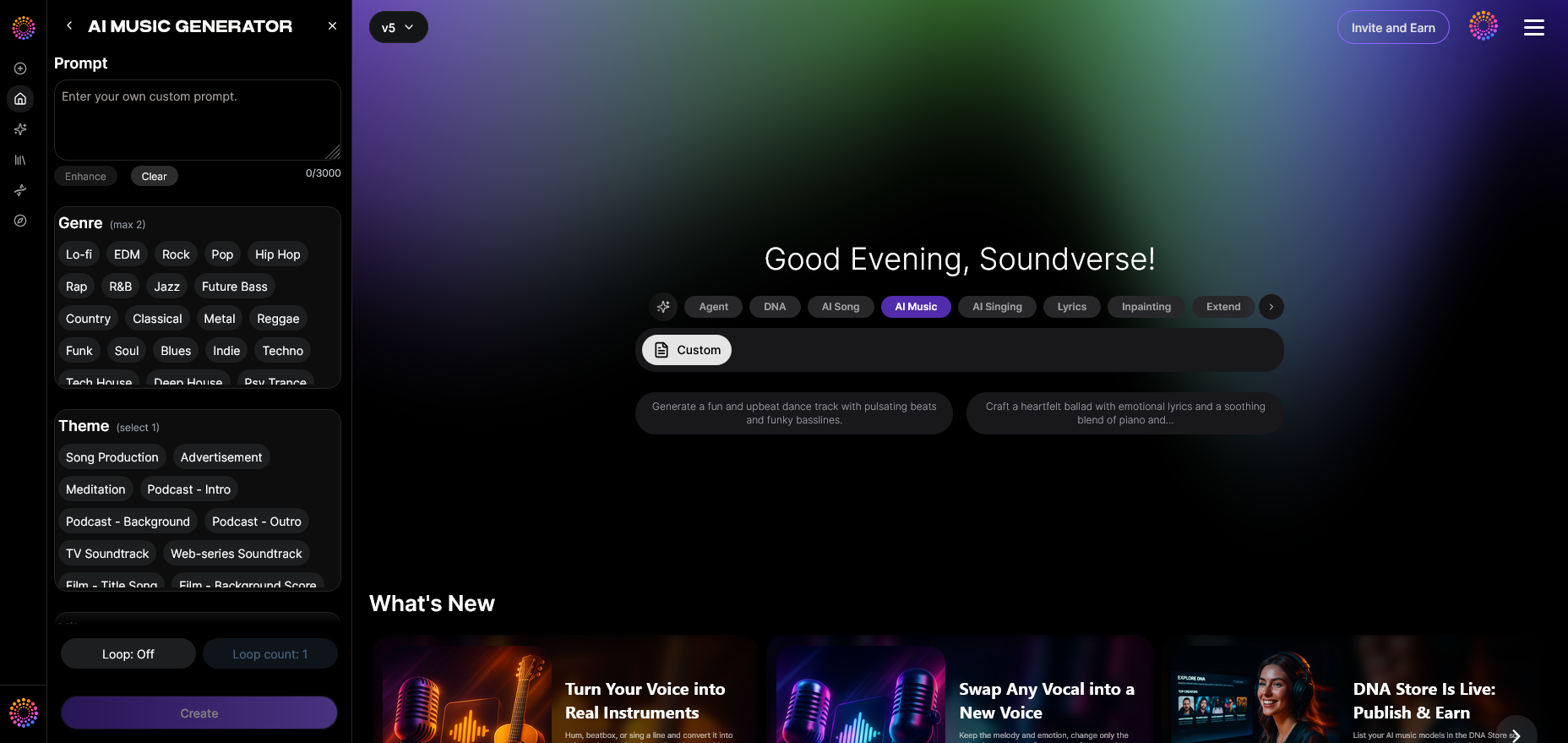
Access the AI Music Generator from Soundverse’s main menu. Once inside, you’ll notice options for creating instrumental loops and setting preferences. The interface is designed for both beginners and professionals, so even course designers with no musical background can start immediately.
Step 2: Description Input
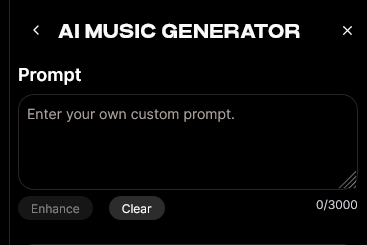
Enter a text description of the type of music you want. The prompt is where creativity matters. For example:
- “Peaceful piano atmosphere for mindfulness lessons.”
- “Upbeat electronic soundscape for gamified learning quizzes.”
- “Soft acoustic melody for historical storytelling.”
The AI interprets your language to generate music matching the described tone, mood, and instruments. If you’re unsure what to write, use inspiration from other prompts shared on Soundverse’s AI prompt guide to spark ideas.
Step 3: Style & Duration
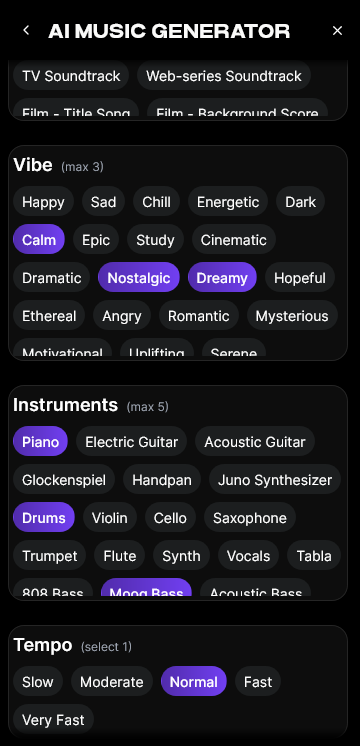
Next, select the style and duration of your track. This is particularly important for e-learning because each module may need a different runtime.
- For short introduction videos, 30–60 seconds works well.
- For longer lessons, 5–10-minute loops maintain flow.
- For meditative or focus-building activities, continuous looping with minimal rhythmic changes enhances concentration.
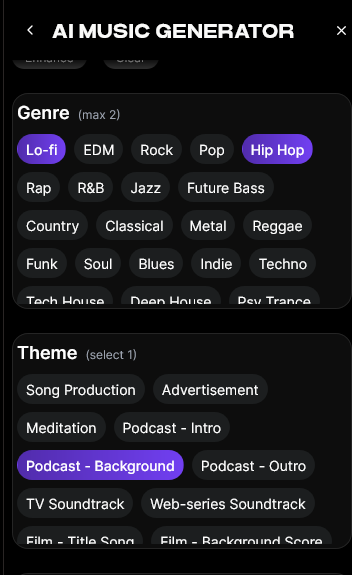
The genre control lets you specify themes like ambient, classical, electronic, or acoustic—matching pedagogical goals. For example, Soundverse’s meditation music guide demonstrates how calm textures promote relaxed learning environments.
Step 4: Generation
Hit the Generate button. Soundverse’s AI Music Generator will now process your input asynchronously to produce the instrumental track. Within moments, you receive a professionally mixed audio file ready to be added to your e-learning course. There’s no need to wait for live previews because the generation process ensures full-quality music based on your text prompt.
Once created, listen to the result and adjust the prompt if necessary. You might refine the description to tweak energy levels—such as changing “bright” to “subtle”—for a better learning experience.
Step 5: Export Options
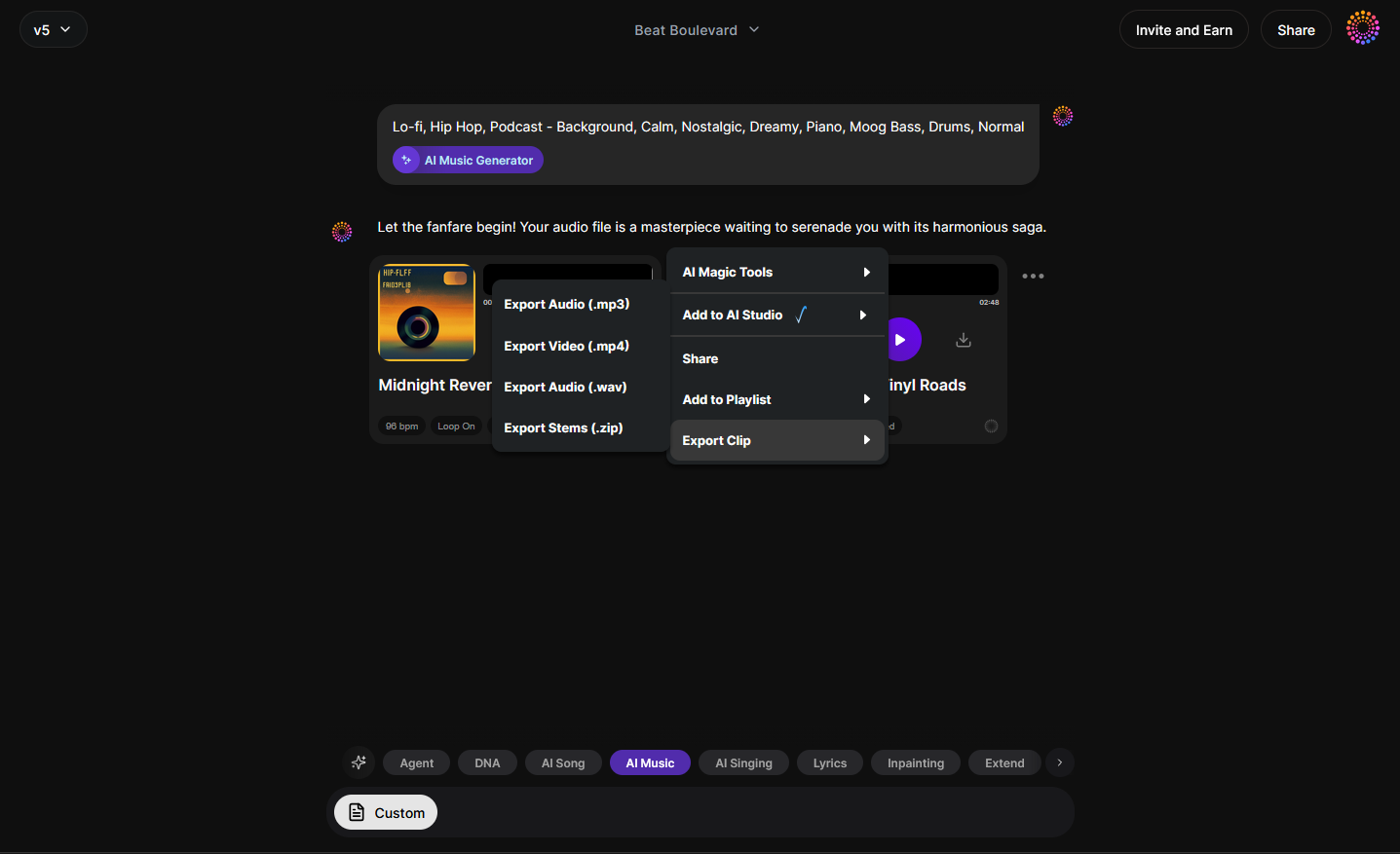
After achieving your desired output, select from export formats such as WAV or MP3. These can be easily integrated into learning management systems, video content, or gamified platforms.
The loopable option allows seamless playback for modules that run for extended durations. This feature makes Soundverse stand out among AI music creation tools offered by competitors like Mubert or Soundraw—both of which primarily focus on quick soundtrack generation for marketing, rather than educational continuity.
If you’re curious about how Soundverse compares to other top music generators, check out this comprehensive review on Mubert alternatives for deeper insights.
How Does AI Music Improve Learning Outcomes?
- Enhances focus and attention: Balanced audio frequencies reduce cognitive fatigue, helping learners stay engaged through long sessions.
- Creates emotional cues: Music signals transitions between topics, maintaining structure in complex subjects.
- Improves memory retention: Learners associate melodies with lessons, improving recall.
- Supports inclusivity: AI-generated learning music avoids lyrical bias and cultural mismatch, which is ideal for global audiences.
In 2026, educational institutions and individual creators are increasingly adopting generative technologies for such benefits. When paired with high-quality visuals and narration, AI-based course background music becomes a subtle yet powerful teaching tool.
Pro Tips for Using AI Music in E-Learning Design
- Keep it subtle: Music should enhance, not dominate, learning environments.
- Match music tone with course content: Relaxed melodies for theory, upbeat rhythms for active learning.
- Loop cleanly: Avoid breaks that interrupt attention between segments.
- Balance loudness: Mix audio carefully so voices and sound aren’t competing.
- Use multiple tracks: Different modules might need unique moods.
These principles are explained further in Soundverse’s AI Magic Tools guide, which helps creators streamline automated content creation workflows.
The Broader Impact of AI Music in the Education Sector
Beyond e-learning, educational institutions are using AI-generated music for:
- Course intros and outros
- Corporate training programs
- Interactive lesson games
- Virtual classrooms and augmented reality labs
This integration reflects the growing trend noted in Soundverse’s report on AI’s role in the music industry, where creative automation meets educational purpose.
Start Creating AI Music for Your Courses Today
Make your e-learning modules more immersive with custom, royalty-free AI-generated music. Soundverse helps you design educational soundtracks that enhance focus and engagement effortlessly.
Try Soundverse Free
Related Articles
- The Role of AI Music in Film and Television: Discover how AI-driven composition is reshaping soundtrack creation across visual media.
- Enhancing YouTube Content with Royalty-Free and Copyright-Free Music Using Soundverse AI: Learn how creators can elevate videos with AI-generated music that’s copyright-safe.
- How to Make AI-Generated Music: Step into the world of automatic composition and learn how to create original tracks with AI tools.
- The Benefits of Composing with AI Music Generator: Explore how AI composition tools boost creativity, productivity, and accessibility in music-making.
Here's how to make AI Music with Soundverse
Video Guide

Here’s another long walkthrough of how to use Soundverse AI.
Text Guide
- To know more about AI Magic Tools, check here.
- To know more about Soundverse Assistant, check here.
- To know more about Arrangement Studio, check here.
Soundverse is an AI Assistant that allows content creators and music makers to create original content in a flash using Generative AI.
With the help of Soundverse Assistant and AI Magic Tools, our users get an unfair advantage over other creators to create audio and music content quickly, easily and cheaply.
Soundverse Assistant is your ultimate music companion. You simply speak to the assistant to get your stuff done. The more you speak to it, the more it starts understanding you and your goals.
AI Magic Tools help convert your creative dreams into tangible music and audio. Use AI Magic Tools such as text to music, stem separation, or lyrics generation to realise your content dreams faster.
Soundverse is here to take music production to the next level. We're not just a digital audio workstation (DAW) competing with Ableton or Logic, we're building a completely new paradigm of easy and conversational content creation.
TikTok: https://www.tiktok.com/@soundverse.ai
Twitter: https://twitter.com/soundverse_ai
Instagram: https://www.instagram.com/soundverse.ai
LinkedIn: https://www.linkedin.com/company/soundverseai
Youtube: https://www.youtube.com/@SoundverseAI
Facebook: https://www.facebook.com/profile.php?id=100095674445607
Join Soundverse for Free and make Viral AI Music

We are constantly building more product experiences. Keep checking our Blog to stay updated about them!