How to Convert a Song into a Lo-Fi Track (2026 Guide)
Learn how to convert song to lofi using professional tools and production techniques. Step-by-step lofi remix tutorial for 2026 creators.
How to Convert a Song into a Lo-Fi Track
Lo-fi music has evolved from an underground aesthetic into a globally recognized sound that defines chill playlists, study mixes, and background ambiences for content creators. As music producers and engineers continue to adapt their workflows for 2026, one skill stands out: knowing how to convert a song to lofi while preserving its emotional core.
Lo-fi music production is not about degrading quality—it’s about selectively emphasizing imperfections that give a track character and nostalgia. In this guide, you’ll learn how to transform any polished song into a smooth lofi remix using both manual techniques and AI-assisted workflows.
What Is a Lo-Fi Track and Why Convert Songs to This Style?

Lo-fi (short for low fidelity) represents a genre that embraces sonic warmth, vinyl crackle, tape hiss, and slightly detuned instruments. Converting songs to lofi lets producers create versions that feel more intimate and retro, suitable for social media posts, podcasts, or background soundtracks.
By turning modern songs into lofi tracks, producers can:
- Recontextualize the original vibe.
- Add analog-sounding imperfections.
- Make existing compositions suitable for relaxing environments.
- Enhance engagement through nostalgia and mood.
Over the past two years (2024–2025), the popularity of aesthetic lofi mixes grew exponentially on YouTube and Spotify. Entering 2026, the trend continues with more creators seeking fast ways to convert tracks into lofi without spending hours manually filtering and degrading sound.
What Tools Do You Need for Lo-Fi Music Production?

To begin, you’ll need basic digital audio workstation (DAW) software such as Ableton Live, FL Studio, or Logic Pro. Key plugins and resources include:
- EQ and Filter Plugins: For rolling off high frequencies to create warmth.
- Noise and Texture Layers: Add vinyl crackle, tape hiss, or ambient room noise.
- Compression and Saturation: Use soft compression and analog saturation to emulate older studio gear.
- Time Modulation: Employ subtle pitch drift or wow-and-flutter effects.
If you want to explore professional or automated options, consider reading Mubert Alternatives or the Soundraw Alternative guide for more production tool comparisons.
You can also explore additional techniques through Soundation’s online studio guide and Steinberg’s Lo-Fi Music tutorial for cross-platform workflow tips.
Step 1: Feature Overview — Access Similar Music Generator
Before you dive into sound design, it helps to understand that AI can streamline this process. Soundverse’s Similar Music Generator enables music creators to produce original instrumental compositions inspired by a reference track. For lofi remixes, this tool can recreate a song’s mood and tonal structure into an instrumental that feels chill and cohesive.
Accessing this feature gives users an AI-assisted environment where instrumental style transfer happens automatically. You get detailed musical analysis—tempo, key, and emotional tone—helping maintain consistency with the source track while transitioning into a lofi aesthetic.
For a deeper dive, watch our guide on creating Deep House music or explore the Soundverse tutorial series for workflow insights.
Step 2: Reference Selection — Upload Reference Music Track
To convert song to lofi efficiently, you start by selecting the track you want to remix. In the Soundverse interface, upload the song file as a reference. The system then evaluates its rhythm, melody, and harmonic progression.
This step is essential because every lofi remix relies on the emotional DNA of the original composition. Once uploaded, the Similar Music Generator translates your song’s profile into parameters suitable for generating a chill, downtempo version.
Producers can also use the Stem Separator beforehand to isolate vocals, drums, or bass—making it easier to manipulate sound layers individually for lofi treatment.
If you’re learning from scratch, tutorials like Make ANY Music Sound Lofi (SUPER EASY) or FL Studio 21 LoFi Guide showcase beginner workflows.
Step 3: Generation — Create Music in Similar Style
When generating your lofi-inspired version, Soundverse processes the uploaded song and outputs a stylistically similar composition. Here’s where you refine the sound:
- Apply gentle compression.
- Reduce brightness using EQ.
- Introduce vinyl, cassette, or ambient noise layers.
- Lower tempo slightly to evoke calmness.
- Use reverb and subtle distortion for a nostalgic texture.
This stage combines music editing for lofi with digital polish—balancing grit and beauty. Producers who enjoy experimenting can check out related guides like How to Create Country Music with Soundverse AI or How to Create Jazz Music with Soundverse AI to explore stylistic transformation workflows.
Watch the Explore Tab tutorial on Soundverse’s YouTube channel to get more comfortable with workflow customization.
Step 4: Download Music — Export Generated Instrumental
After generation is complete, you can export your newly created lofi instrumental. Use your DAW for minor post-processing, adding final touches such as tape delay or stereo narrowing.
To make your own lofi track sound authentic, consider blending multiple layers during export—ambient pads, chord loops, and rhythmic swings create that signature nostalgic groove. The exported file will serve as an excellent base for mixing vocals or layering existing samples.
Creators can also look at the AI Lo-Fi Music Generator by Soundful for similar instant-beat workflows to compare approaches.
Key Tips for Manual Lofi Remixing in 2026
Even with advanced AI tools, manual techniques continue to offer premium control over the creative process. Here are essential production principles for mastering the lofi aesthetic:
- Lower Sample Rate Gently: Downsampling can add digital grit; however, keep clarity in drums to avoid muddiness.
- Warm Saturation: Use tape emulation plugins for organic distortion.
- Vinyl Noise as Texture, Not Distraction: Adjust volumes so the noise adds warmth without overpowering the musicality.
- Humanization: Slight timing imperfections make digital beats sound analog.
- Minimalist Mixing: Avoid hyper-compression. Allow sonic space to breathe.
This approach resonates with producers who want depth and authenticity in every lo-fi remix tutorial. You can find extended workflow examples on YouTube, such as laziest way to make lo-fi music in 2026 (starting from zero).
How to Make a Lo-Fi Remix That Retains Emotion
The best lofi tracks preserve emotional nuance. Strive for balance between clarity and nostalgia:
- Keep chord progression intact.
- Delay or reverb vocals to create atmosphere.
- Use low-end softness to accent relaxation.
Modern audiences in 2026 seek tracks that feel handcrafted yet professional. Your sound should sound cozy and cinematic—perfect for content creators using AI music in film or podcast contexts. Explore the Role of AI Music in Film and Television for insights on emotional scoring techniques.
How to Make Lo-Fi Tracks with Soundverse Similar Music Generator
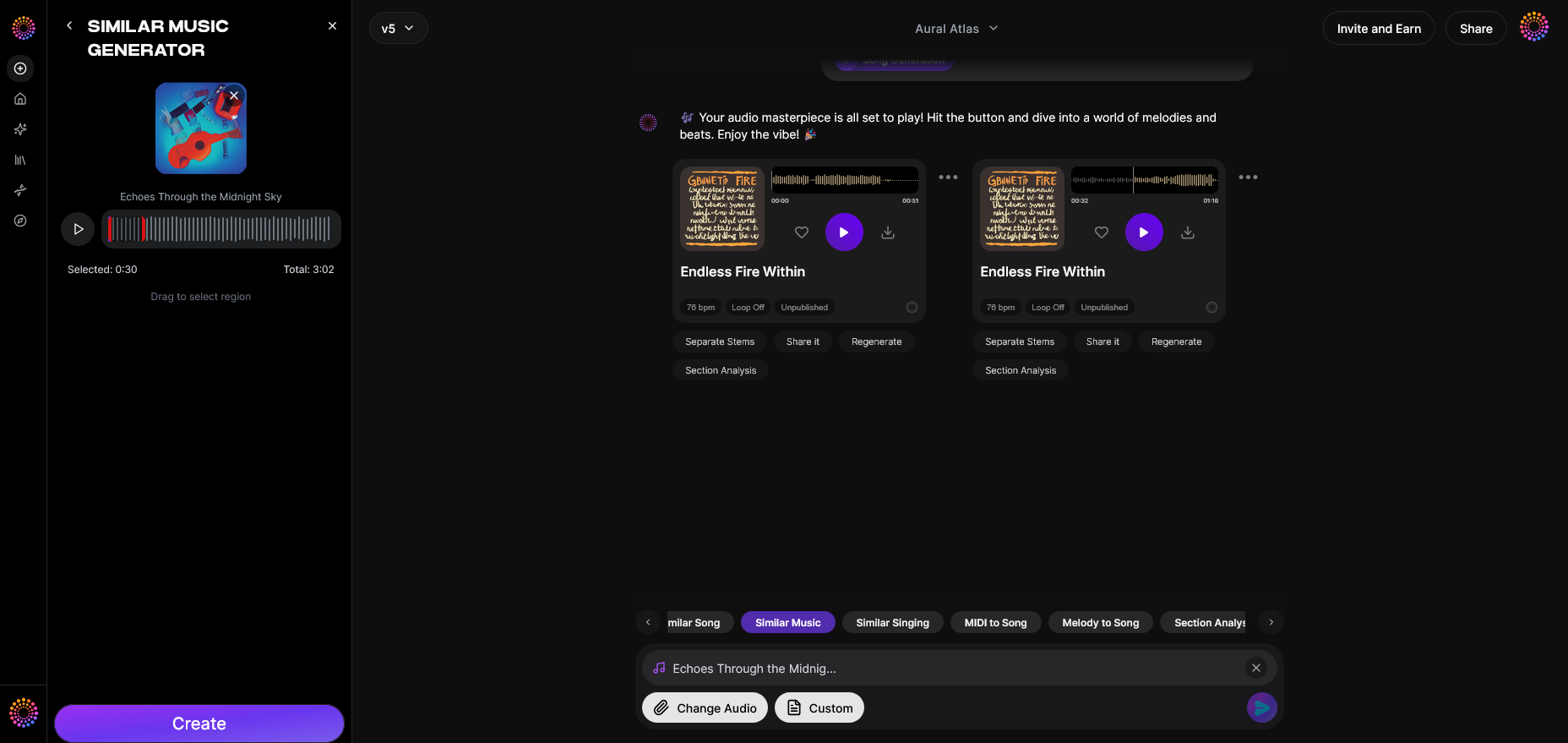
Now that you understand the art and science behind converting songs to lofi, here’s how to create them instantly using Soundverse.
- Instrumental Style Transfer: Generates new compositions inspired by your uploaded reference.
- Detailed Musical Analysis: Automatically matches tempo, key, and mood for lofi transformation.
- Reference-Based Loop Creation: Builds cohesive loops ideal for chill background scores or visuals.
Soundverse’s Similar Music Generator can serve professionals working on game themes, film segments, or podcast ambience—perfect for creators who love smooth lofi sound effects and quick production workflows.
By integrating other Soundverse AI Magic Tools, users can stretch creative boundaries. Pair Similar Music Generator with Inpainting to adjust musical phrases precisely or Extend Music to lengthen loops seamlessly without losing vibe coherence. Learn more from Soundverse AI Magic Tools Create Content Quickly With AI.
Turn Any Song into a Lo-Fi Masterpiece Today!
Transform your favorite tracks into soothing, nostalgic lo-fi beats using Soundverse AI. Experiment with textures, moods, and authentic vinyl warmth — all in just a few clicks.
Related Articles
- 40 Hand-Picked Lo-Fi Text-to-Music Prompts for All Occasions: Discover inspiring prompt ideas to fuel your next lo-fi creation with AI-driven flair.
- Soundverse Introduces Stem Separation AI Magic Tool: Learn how to isolate vocals, drums, and instruments seamlessly using Soundverse's advanced stem separation features.
- What Are Song Stems and Why Do You Need Them: Understand the importance of song stems and how they empower remixing and lo-fi transformations.
- Generate AI Music with Soundverse Text-to-Music: Explore how to create unique AI-generated songs with text prompts, genre filters, and creative control.
Here's how to make AI Music with Soundverse
Video Guide

Here’s another long walkthrough of how to use Soundverse AI.
Text Guide
- To know more about AI Magic Tools, check here.
- To know more about Soundverse Assistant, check here.
- To know more about Arrangement Studio, check here.
Soundverse is an AI Assistant that allows content creators and music makers to create original content in a flash using Generative AI.
With the help of Soundverse Assistant and AI Magic Tools, our users get an unfair advantage over other creators to create audio and music content quickly, easily and cheaply.
Soundverse Assistant is your ultimate music companion. You simply speak to the assistant to get your stuff done. The more you speak to it, the more it starts understanding you and your goals.
AI Magic Tools help convert your creative dreams into tangible music and audio. Use AI Magic Tools such as text to music, stem separation, or lyrics generation to realise your content dreams faster.
Soundverse is here to take music production to the next level. We're not just a digital audio workstation (DAW) competing with Ableton or Logic, we're building a completely new paradigm of easy and conversational content creation.
TikTok: https://www.tiktok.com/@soundverse.ai
Twitter: https://twitter.com/soundverse_ai
Instagram: https://www.instagram.com/soundverse.ai
LinkedIn: https://www.linkedin.com/company/soundverseai
Youtube: https://www.youtube.com/@SoundverseAI
Facebook: https://www.facebook.com/profile.php?id=100095674445607
Join Soundverse for Free and make Viral AI Music

We are constantly building more product experiences. Keep checking our Blog to stay updated about them!