How to Arrange a Song: A Complete Song Arrangement Guide for 2026
Learn how to arrange a song like a pro using Soundverse Arrangement Studio and modern music composition techniques.
How to Arrange a Song
Arranging a song is one of the most critical stages in turning your musical ideas into a fully formed production. Whether you’re a beginner songwriter or an intermediate music producer, understanding how to structure and shape your track is key to making music that connects emotionally and sounds professional. In 2026, the process of arranging music has evolved to include powerful AI music production tools like Soundverse, which streamline composition and help creators build detailed arrangements effortlessly.
Why is Song Arrangement Important in Modern Music Production?

Song arrangement defines how a composition unfolds from start to finish. It determines which instruments play when, how intensity builds and releases, and how each section supports the lyrical or melodic message. For example, a well-crafted arrangement ensures that every part—intro, verse, chorus, bridge, and outro—contributes to the song’s narrative flow.
In recent years, from 2024 to 2025, the trend in music production shifted toward compact, emotion-driven structures. By 2026, producers are balancing efficiency with emotional depth, creating arrangements that engage the listener both sonically and emotionally. Understanding this balance is essential if you want your sound to feel contemporary while maintaining musical integrity.
How to Make an Effective Song Arrangement with Soundverse Arrangement Studio
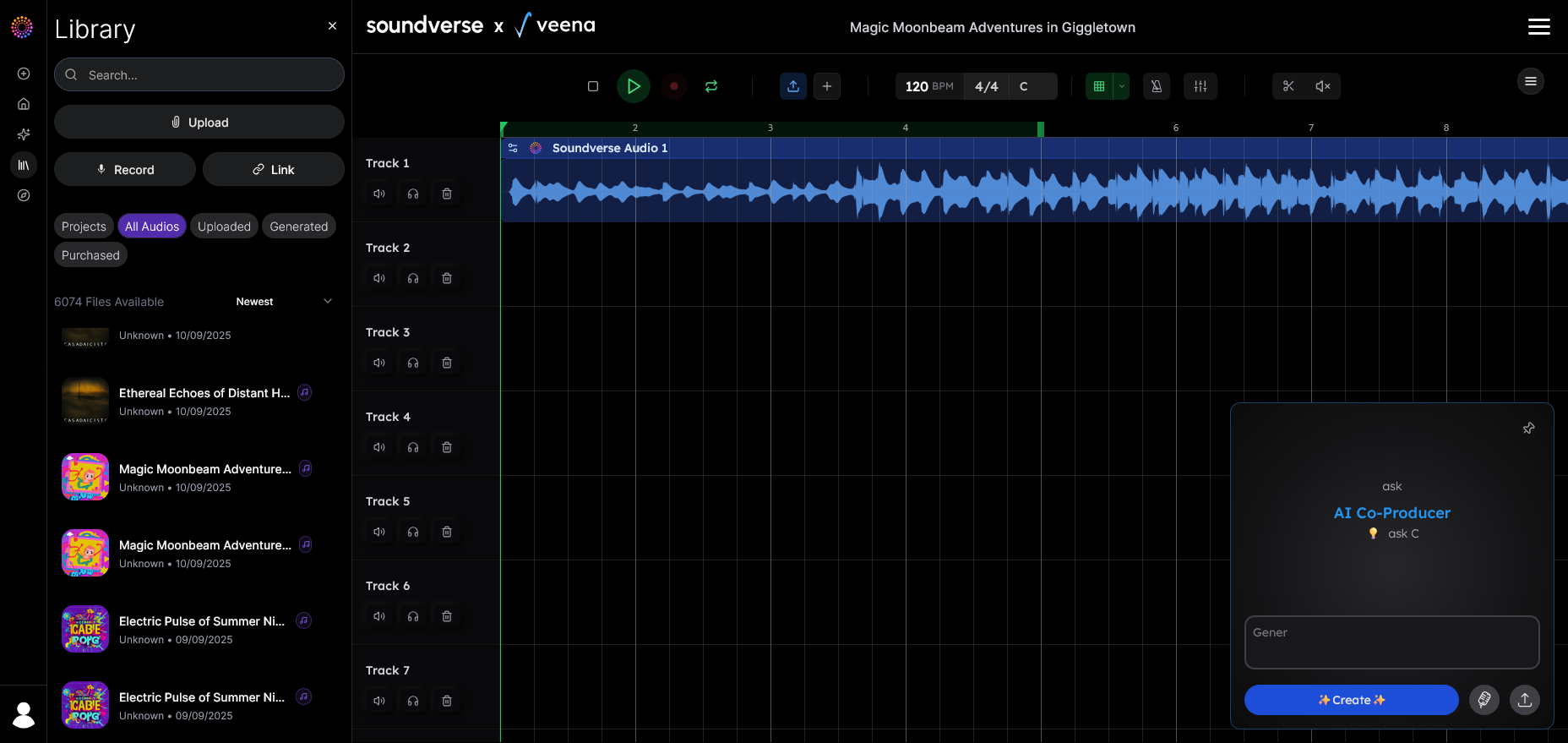

Soundverse’s Arrangement Studio is a collaborative editing environment designed for creators who want precision and control over their compositions. It allows users to open generated tracks for detailed editing, rearrange sections, and refine their musical ideas with multitrack editing capabilities. You can combine multiple stems, experiment with transitions, and fine-tune arrangements before finalizing your production.
The Arrangement Studio integrates seamlessly with Soundverse’s DNA generation tools and supports other features like Section Analysis and Stem Separator for a complete workflow. Section Analysis automatically detects and labels structural segments (Intro, Verse, Chorus, Bridge, Outro) with precise timestamps. This gives you a roadmap for editing and remixing without guesswork. With Stem Separator, you can dissect mixed audio into editable stems such as vocals, drums, bass, and guitars—perfect for refining the dynamic flow of your track.
These integrations allow beginners to approach arranging more intuitively, while professionals can execute complex compositional adjustments with maximum efficiency.
For a deeper dive into arranging and creating AI music, watch Soundverse Tutorial Series - 9. How to Make Music.
Step 1: Define Your Song’s Foundation
Every arrangement starts with understanding the essence of your song. Ask yourself what emotion or story you want to convey. Is it a high-energy pop anthem, a mellow acoustic ballad, or an experimental electronic piece? Defining your theme helps determine the tempo, key, and instrumentation before you begin rearranging sections inside Arrangement Studio.
At this early stage, consider using simple tools like chord sequences or melody generators to sketch the foundation. Platforms like Soundverse offer DNA-based generation tools that provide musical seeds to develop further.
Step 2: Structure the Song Sections
Next, break down your song into clearly defined parts. The most common sections include:
- Intro – Establishes mood and tone.
- Verse – Presents the narrative or lyrical idea.
- Chorus – Delivers the main hook or emotional peak.
- Bridge – Offers contrast or transition.
- Outro – Concludes the story smoothly. Within Arrangement Studio, you can drag and reorder sections easily. Use the Section Analysis tool to view how each part aligns with the timeline. This visual map ensures your transitions are smooth and the energy progression keeps listeners engaged.
Step 3: Combine and Refine Stems
Once the basic structure is set, use the Stem Separator integration to work on individual elements. For instance, if the drums dominate in the chorus but feel flat in the verse, isolate that stem and adjust its dynamics. Arrangement Studio lets you blend multiple stems from different sessions, combining guitar riffs, bass lines, and vocal layers from multiple takes.
This technique is especially valuable when collaborating with other musicians remotely—a common workflow in 2026 music production culture, where AI platforms facilitate global collaboration.
Step 4: Inpaint and Polish Transitions
A smooth arrangement depends on transitions feeling natural. Use Soundverse’s Inpainting feature for precise regeneration of specific sections without altering the entire track. For example, if the bridge doesn’t match your song’s emotional direction, you can regenerate just that segment.
This non-destructive workflow saves time compared to traditional methods of cutting and re-recording. It’s particularly helpful when working on genre-specific arrangements, such as EDM or jazz, where subtle timing and dynamic shifts matter. You can learn more about how AI impacts modern music genres in AI Music Industry Trends 2026.
Step 5: Balance Energy and Dynamics
An articulate arrangement maintains listener interest through variation. Balance your highs and lows strategically—too many high-energy sections can tire the audience, while excessive calm moments may lead to disengagement. Soundverse’s multitrack environment helps visualize and edit these dynamics effectively.
Experiment by alternating textures across sections. Add minimalist verses with soft pads followed by an explosive chorus driven by layered synths and percussive hits. This dynamic control ensures your song feels cohesive yet compelling throughout.
For additional examples, watch Soundverse Tutorial Series - 10. Make Deep House Music.
Step 6: Evaluate and Export Your Final Arrangement
Before finalizing, listen critically to each part. Is the emotional flow consistent? Are the transitions tight? Arrangement Studio allows you to make micro level adjustments to timing and stem balance until your piece feels complete.
Once satisfied, export the multitrack project for mixing or mastering. You can then enhance your work with AI mastering tools or share the stems for collaboration.
Pro Song Structure Tips and Modern Arrangement Trends in 2026
- Contrast Creates Interest – Alternate between sparse and dense arrangements. For example, a stripped-down verse followed by a full chorus maintains engagement.
- Motif Development – Repeat melodic motifs subtly across sections to reinforce identity.
- Use Silence – Strategic pauses can emphasize emotional delivery.
- Genre Customization – Adapt your structure to genre expectations. Check guides like How to Create EDM with Soundverse AI or How to Create Jazz Music with Soundverse AI for specific arrangement approaches.
- AI-Assisted Refinement – In 2026, creators use AI not just to generate music but to refine artistic decisions. Tools like Soundverse’s Inpainting and Stem Separation provide a professional workflow for tweaking every layer intelligently.
How Does Arrangement Impact the Songwriting Process?
Arrangement is where songwriting and production meet. You might have written powerful lyrics or a memorable chord progression, but without a thoughtful structure, those ideas won’t shine. The songwriting process benefits greatly from visual arrangement mapping. Tools like Section Analysis simplify identifying the best sections for lyrical impact or instrumental emphasis.
For example, the bridge can serve as an emotional pivot point. By placing it strategically after a chorus, you can heighten emotional delivery before returning to a final refrain. These decisions turn a simple draft into an expressive piece of art.
Using Soundverse Arrangement Studio Alongside Other Tools
The real power of Soundverse lies in its ecosystem. When Arrangement Studio is paired with tools like Stem Separator and Inpainting, creators can achieve end-to-end control over production within one collaborative environment.
You can learn more about Soundverse’s tool synergy in Soundverse AI Magic Tools: Create Content Quickly with AI. Combining these features streamlines your workflow from idea to master-ready track.
Master Your Song Arrangement with Soundverse
Transform your rough composition into a polished masterpiece using Soundverse’s AI-powered Arrangement Studio. Experiment with structure, instrumentation, and flow effortlessly.
Start Arranging Now
Related Articles
- What Is Soundverse Arrangement Studio and What Does It Do? – Discover how Soundverse’s Arrangement Studio simplifies the process of structuring, layering, and enhancing your songs with AI precision.
- What Are Song Stems and Why Do You Need Them? – Learn the importance of song stems in professional music production and how they help refine your arrangement workflow.
- Soundverse Introduces Stem Separation AI Magic Tool – Explore Soundverse’s latest AI innovation that allows precise stem separation, opening new creative possibilities for remixing and arranging.
- Soundverse Assistant: Your AI Music Co-Producer – Find out how Soundverse Assistant helps producers streamline the creative journey from concept to completed arrangement.
Here's how to make AI Music with Soundverse
Video Guide

Here’s another long walkthrough of how to use Soundverse AI.
Text Guide
- To know more about AI Magic Tools, check here.
- To know more about Soundverse Assistant, check here.
- To know more about Arrangement Studio, check here.
Soundverse is an AI Assistant that allows content creators and music makers to create original content in a flash using Generative AI.
With the help of Soundverse Assistant and AI Magic Tools, our users get an unfair advantage over other creators to create audio and music content quickly, easily and cheaply.
Soundverse Assistant is your ultimate music companion. You simply speak to the assistant to get your stuff done. The more you speak to it, the more it starts understanding you and your goals.
AI Magic Tools help convert your creative dreams into tangible music and audio. Use AI Magic Tools such as text to music, stem separation, or lyrics generation to realise your content dreams faster.
Soundverse is here to take music production to the next level. We're not just a digital audio workstation (DAW) competing with Ableton or Logic, we're building a completely new paradigm of easy and conversational content creation.
TikTok: https://www.tiktok.com/@soundverse.ai
Twitter: https://twitter.com/soundverse_ai
Instagram: https://www.instagram.com/soundverse.ai
LinkedIn: https://www.linkedin.com/company/soundverseai
Youtube: https://www.youtube.com/@SoundverseAI
Facebook: https://www.facebook.com/profile.php?id=100095674445607
Join Soundverse for Free and make Viral AI Music

We are constantly building more product experiences. Keep checking our Blog to stay updated about them!
Image Steps: []