Describe the Workflow for Distributing Music to Multiple Digital Stores at Once
How labels and agencies distribute music to multiple stores at once: intake, store rules, DDEX delivery, QC, rejections, updates and parallel releases.
To distribute music to multiple stores at once, you upload each release to one distributor, which turns your audio, artwork and metadata into a standard feed and sends it to every store and territory you tick. For an agency or small label, the real work is the operations around that upload: intake, store rules, dates, QC, tracking and fixes.
This is the playbook for a coordinator running five or six artists. Still choosing a distributor? Our roundup of music distribution tools that integrate with label workflows compares them. We read every page cited here on 23 November 2026.
The workflow at a glance
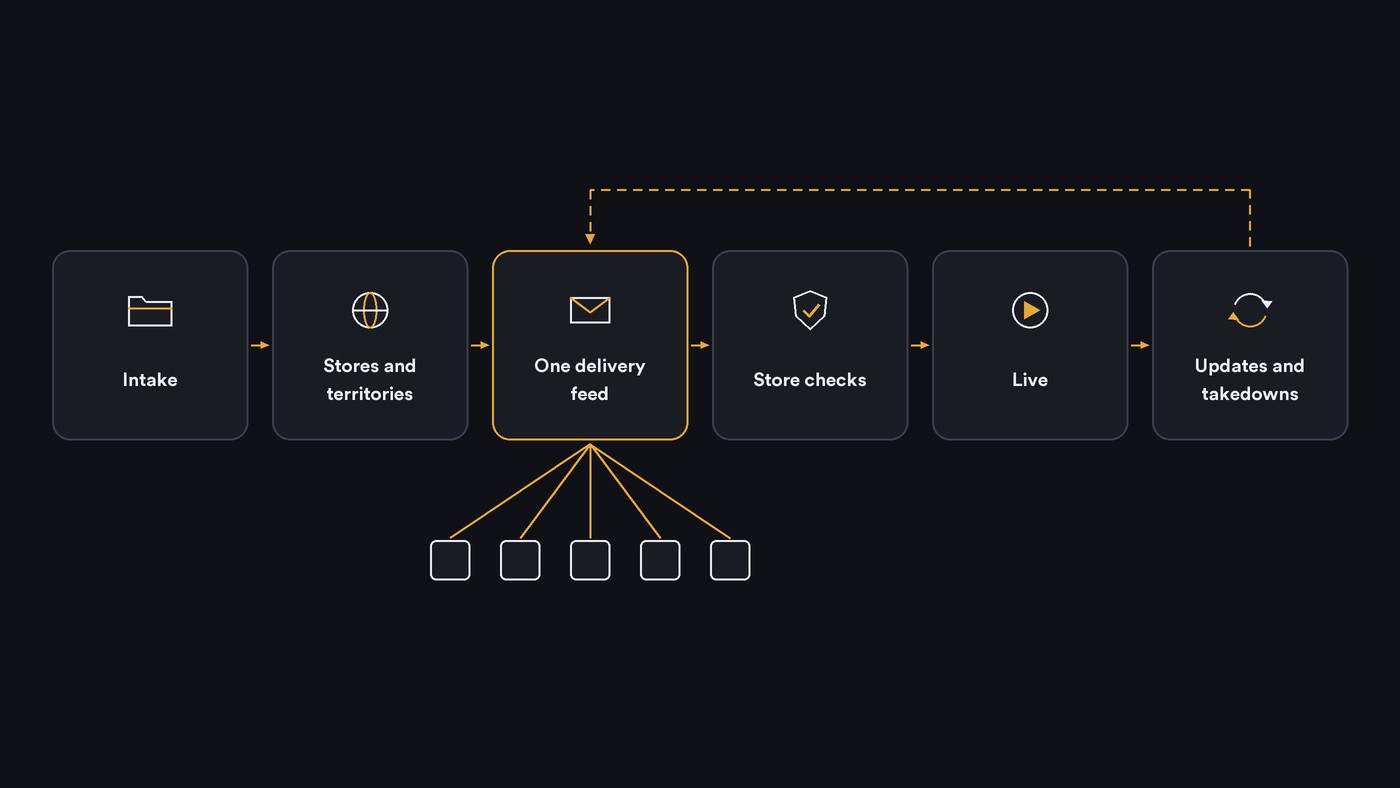
- Intake. Audio, artwork, credits and rights notes go into one folder and one tracker row.
- Stores and territories. Decide where each release goes, including Content ID and social libraries.
- Delivery. The distributor packages the release once and sends a feed to each store.
- Store checks. Each store ingests and reviews it on its own schedule.
- Release. It goes live at the date and time you set.
- Tracking and fixes. Confirm it's live everywhere, fix rejections, send updates or takedowns.
Intake: one folder and one row per release
- A release folder named the same way every time, with subfolders for masters, artwork, lyrics and paperwork.
- A release sheet as the only source of truth for titles, names and codes. Staff copy from the sheet, never from an email thread. Our guide to the metadata required for distribution lists the fields it needs.
- Store art and promo art, kept apart. Apple's Music Style Guide says cover art must not contain website addresses, logos, QR codes, release dates or references to competitors, or mention formats such as Dolby Atmos or lossless. "Out Friday" graphics belong in the promo folder.
- A rights note per track: who owns the master, whether a beat was leased, which samples or loops were used, and whether AI tools were involved. Step 2 depends on it.
- A sign-off. One named person approves the sheet against the final audio and art.
Choosing stores and territories
- Territories. Spotify's metadata guidelines ask for the countries a release should be available in, or worldwide. Restrict only when rights require it, such as a sample cleared for some countries. Apple's guide makes you responsible for local regulations and cultural sensitivities wherever you clear a release.
- Content ID and social libraries. Opt in track by track, from the rights note.
- Exclusions. Record any store you leave out, and why, so nobody "fixes" it later.
How one upload reaches many stores
Your upload becomes a structured message for each store. The industry format is DDEX's Electronic Release Notification standard. DDEX says its main message, the NewReleaseMessage, carries metadata about the release and every recording or video in it, plus the terms for when, where and how stores can make it available. It travels through cloud storage or web services, with two consequences:
- Every later change is another delivery. Spotify's help page on removed music tells distributors to check past deliveries for a takedown, a delete or an end date.
- Each store runs its own clock. "Delivered" in your dashboard doesn't mean live everywhere. Our guide on why delivery timelines matter covers lead times store by store.
Store-specific rules that commonly cause rejections
Apple Music. Apple's guide says content is hidden as "Repeated Submissions" when copies of the same content arrive with slightly different titles or artists, and unlike a ticket, an editorial hide can't be fixed by redelivering or updating metadata. A Dolby Atmos version must match the stereo version in duration and content.
Spotify. Its cover art requirements ask for a square sRGB image between 640 and 10,000 pixels a side, not upscaled. Artist names should be spelled the same on every release, and the guidelines explain why: "We display your music exactly as it's delivered to us, so it's important to get your metadata right."
YouTube Content ID. YouTube's eligibility rules start with ownership: "You must have exclusive rights to the material in the reference file for the territories where you claim ownership." Ineligible examples include non-exclusively licensed content, Creative Commons and public domain material, sound effects and production loops, sound-alikes, remasters, compilations and continuous DJ mixes. A track on a leased beat stays out.
Short-video and social libraries. Ditto's help pages on Meta and TikTok, both dated 22 October 2026, list ineligible content including non-exclusive beats, library samples and loops, slowed or reverb sound-alikes, public domain material, ambient audio, generic instrumentals, covers, AI-generated or assisted content, and releases with mixed eligibility. Check your own distributor's list.
The fix for all four is the rights note: decide eligibility per track before delivery, not after a claim.
Release dates and time zones across a roster
Keep one roster calendar in UTC, with each release's date, go-live mode and pitch deadline.
- Global moment or local midnight. Spotify's page on unreleased music explains both. A release set for 12:00 AM UTC goes live everywhere at once, and Spotify for Artists shows the earliest date in any country, so an artist in the Americas may see the day before. Local midnight rolls out country by country.
- Pitch window. Spotify recommends a live date at least 7 days out so an unreleased song can be pitched to editors. Add your distributor's review time and count back.
- Spacing. Avoid two roster releases on one Friday unless you can promote both.
QC checklist before you submit
Someone other than the uploader ticks these:
- The audio is the approved master, in the right version per track.
- Files and track order match the release sheet.
- The cover is square, sRGB, not upscaled, and free of URLs, logos, QR codes, dates and format badges.
- Names on the cover match the metadata.
- Artist names match earlier releases, and each artist is linked to the right store profile.
- Explicit flags are set per track, and released recordings keep their ISRCs.
- Stores and territories are confirmed for this release.
- Content ID and social opt-ins follow the rights note.
- Date, go-live mode and time zone match the calendar.
- Any track with third-party audio has been checked against known recordings, and sign-off is recorded.
Tracking delivery status and fixing rejections
Track three states per release: approved by the distributor, delivered, and live in each store.
- Watch the Upcoming tab. Spotify says a release can take around 48 hours to appear in Spotify for Artists after the distributor submits it. If it's missing, ask whether it went to the right artist profile. Report a wrong release there and tell your distributor, since Spotify says mismatches usually appear on every service.
- Log every rejection with the store, reason, fix and redelivery date. Patterns show up fast, such as one designer adding dates to covers.
- Fix at the source. Correct the sheet or asset first, then redeliver through the distributor.
Takedowns and metadata updates after release
- Simple edits, such as a misspelled credit, go through the distributor as an update. Spotify says it needs at least 2 business days to process one.
- Structural changes differ. Spotify notes a release's track structure can't change after ingestion; you redeliver under a new primary ID such as a new UPC. Ditto's page on editing a release after it's been sent to stores (1 September 2026) says adding or removing tracks, reordering them or changing the main artist needs a takedown and re-upload with the original ISRCs and release date, which keeps stream counts and playlist placements.
- Takedowns remove a release from stores. If one goes out by mistake, Spotify says an update reinstating track-level rights should bring the music back within 2 business days.
Running several artists' releases in parallel
- One tracker, one row per release: stage, owner, upload date, release date and mode, store status, rejections, Content ID status, next action.
- A weekly review of the next six weeks and every open rejection.
- One label name. Spotify builds a label team's catalog from the distributor and label names in release metadata, so a single spelling keeps every artist visible to your team.
- Know your access. Spotify label team members can edit an artist's profile only when the label handles that artist's latest or upcoming release, and they join an artist team only if the artist invites them.
- Batch the checking, not the uploading. QC several releases in one session, but upload each on its own so one bad asset doesn't hold up the rest.
Where Soundverse fits
Soundverse is an AI music platform that takes you from idea to audience. Your distributor delivers the release; Soundverse helps with the planning and assets before delivery.
Release Planner turns a finished track into a day-by-day, platform-split rollout with a recommended release day and pre-save, smart link and playlist pitch deadlines. For small labels it sizes each plan to the artist's audience, region and budget, and lists its research sources. Asset Studio makes cover art, story backgrounds, a YouTube thumbnail, a tour poster and a merch mockup in one look, with no text on the images, so you add the title and keep dates off the store cover. Copyright Checker fingerprints a final master against released recordings; Soundverse describes it as a recognition check, not legal clearance.
Licensing is set by plan: the Free plan is for personal use, and the Creator plan comes with a royalty-free license.
This walkthrough shows Release Planner turning a track and a few release details into a day-by-day, platform-split rollout plan.
FAQ
Can I distribute music to multiple stores at once with one upload? Yes. One upload goes to every store you select as separate deliveries, and each store ingests it on its own timeline.
Should every track be opted into YouTube Content ID? Only tracks you hold exclusive rights to. YouTube lists non-exclusive licenses, public domain material, production loops and sound-alikes as ineligible, so a track on a leased beat stays out.
How do I change a release after it's live? Ask your distributor to send an update for metadata fixes. Adding or removing tracks or changing the main artist usually means a takedown and re-release with the original ISRCs, as Ditto describes.
How many releases can a small team run in parallel? That depends on people more than software. A shared tracker, a UTC calendar, two-person QC and staggered dates keep releases from colliding.
Sign up for Soundverse free and plan your roster's next release with Release Planner. More release guides on the Soundverse blog.