Buying a License for a High-Quality AI Music Editing Suite for Studio Projects
How to buy an AI music editing suite license for studio work: perpetual vs subscription, upgrades, activations, with iZotope, Steinberg, Logic and more.
To buy a license for a high-quality AI music editing suite for your studio projects, go direct to the maker and pick by job: iZotope RX and Ozone for repair and mastering, Steinberg SpectraLayers Pro for AI unmixing, or Logic Pro, Ableton Live 12 Suite or FL Studio for AI editing inside a DAW. Soundverse covers it in a browser.
We checked every vendor page cited here on 19 November 2026, while several were running seasonal sales, so read the prices as a dated snapshot. iZotope's site served our tools a bot check that day, and Steinberg's shop loads prices we couldn't capture, so confirm both at checkout.
What the AI in an editing suite does for you
Most of what you pay for falls into three jobs, so decide which your sessions need first.
- Repair. Noise, hum, clicks, mouth noise and bleed, removed without cutting the take. SpectraLayers and iZotope RX are built around this.
- Unmixing and stems. Pulling vocals, drums, bass and other parts out of a mixed file. Live 12 Suite, Logic Pro, FL Studio and SpectraLayers all do it, at very different depths.
- Assistants. Tools that listen to a mix and propose settings, such as Ozone's Master Assistant, Logic's Mastering Assistant or FL Studio's cloud mastering.
For online options that split and master, see our comparison of AI audio suites for stem separation and mastering.
Ways to pay: own it, rent it or subscribe
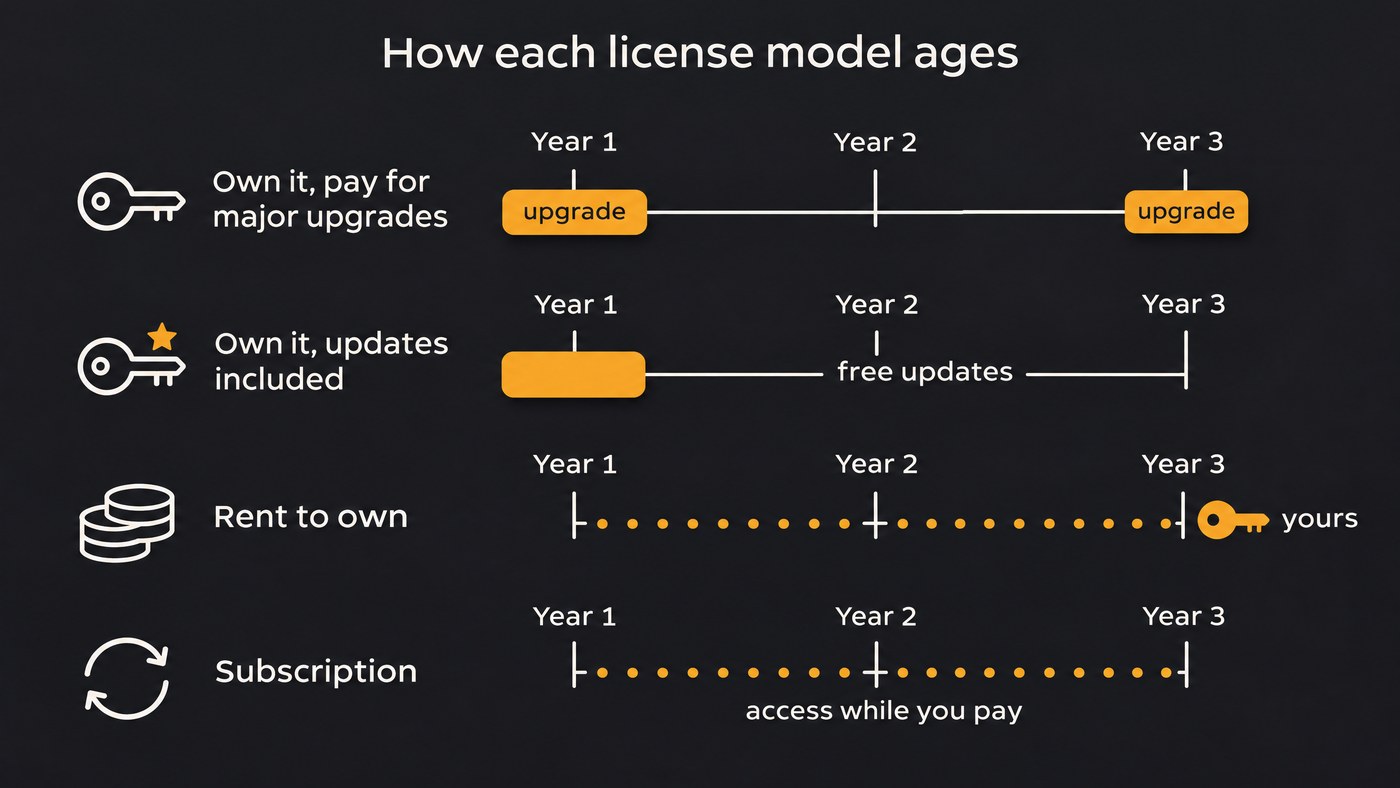
The license model sets the three-year cost, not just today's price.
- Own it, pay for major versions. Steinberg sells SpectraLayers 13 and WaveLab 13 as full versions delivered by download access code, and WaveLab's new-features page has a grace-period check for a free update to version 13.
- Own it, with updates included. Image-Line says every FL Studio edition gets Lifetime Free Updates, and moving up an edition costs only the price difference.
- One price or a subscription, same app. Logic Pro costs $199.99 outright, or $12.99 monthly or $129 yearly as part of Apple Creator Studio, which starts with a 30-day free trial. Apple says the features match either way.
- Rent to own. Ableton offers it for Live 12 Suite: "You'll have full access to Live while you're renting it, and pay the same amount as you would for a one-off purchase." Image-Line's Rent-to-Own Plus makes FL Studio yours after 12 payments, while the FL Cloud part continues until you cancel.
- Editions and bundles. iZotope sells RX 12 in Elements, Standard and Advanced editions, lists bundles such as Music Production Suite 9, RX Post Production Suite 9 and an Everything Bundle, and offers a subscription.
AI music editing suite shortlist, with where to buy
iZotope RX 12, Ozone 12 and Music Production Suite 9
Buy at izotope.com. RX 12 is iZotope's repair and enhancement line, and Ozone 12 is its mastering suite. iZotope's Master Assistant tutorial describes Ozone 12 as a suite of 20 mastering tools with an AI-powered assistant that offers Auto-Master and Custom flows, and notes that Ozone 12 Elements works as a macro processor only. Price Music Production Suite 9 against the single products you'd actually use.
Best for: studios that finish records in their own DAW.
Steinberg SpectraLayers Pro 13, with WaveLab Pro 13
SpectraLayers is Steinberg's spectral editor. Steinberg gives Pro its fullest set of AI-assisted processes, for unmixing songs, de-bleeding tracks and splitting any sound into tones, transients and noise, while Elements covers routine repair, noise and hum reduction and selected AI processes, including vocal unmixing. Version 13 adds Unmix Sound Effects, Ambience Heal and Reconstruct to Pro, and Elements gains Unmix Two Voices, Voice DeClick and Voice DeCrosstalk, per the new features page. It runs standalone, inside Cubase, Nuendo and other hosts through ARA 2, and in Pro Tools through an AudioSuite bridge.
WaveLab Pro 13 is the mastering and album-assembly partner, but its feature list has no AI assistant.
Best for: repair-heavy work, from rescued live recordings to remix prep.
Logic Pro
Buy on the Mac App Store or through Apple Creator Studio. Apple's Logic Pro page lists Stem Splitter for drums, bass, vocals, guitar, piano and other instruments, plus Mastering Assistant. It needs a Mac with Apple silicon.
Best for: Mac studios that want the editor and the DAW in one purchase.
Ableton Live 12 Suite
Buy from Ableton's shop, where final prices depend on your country. Viewed from India, it showed Suite at ₹39,990, cut to ₹31,992 in a 20% sale that runs until Live 13's release in early 2027 and includes a free Live 13 upgrade, or ₹1,667 a month for 24 months on rent-to-own. Stem separation comes with Suite and, per the Live 12 release notes, runs locally into four stems.
Best for: electronic producers who want separation on their own machine.
FL Studio
Buy from Image-Line. Its editions page listed Producer Edition, the first with stem separation, at $139 (down from $179) and All Plugins Edition at $224 (down from $449). AI mastering comes through the FL Cloud Plus or Pro subscription, which has a 30-day free trial.
Best for: beatmakers who want to own the DAW outright.
Soundverse
Our own platform runs in the browser. Stem Separator splits 2 or 6 stems on every plan, and a 14+ stem split with MIDI on Creator and above. AI Vocal Cleaner removes noise, hum and clicks from a vocal on every plan. Plans are on the pricing page.
Best for: independent artists who work without installing software.
Activations, seats and formats
- Steinberg says on its help page that a Steinberg Licensing license can be activated on up to three computers, and you release one in Steinberg Activation Manager to move it.
- iZotope, Ableton and Image-Line: none of the pages we read gives an activation count. Get the number from the vendor before a second room or laptop goes on the license.
- Soundverse: collaborators need only a free account. A shared project's track limit follows the owner's plan, each person's exports follow their own plan, and Enterprise lists custom seats.
- Hosts and formats: SpectraLayers uses ARA 2 and the AudioSuite bridge, while WaveLab takes VST 3 plug-ins. Soundverse AI Studio doesn't load VST or AU plugins.
- Offline or online: Live Suite separates stems locally, FL Studio's cloud mastering needs an internet connection, and Soundverse works in the browser.
What the license lets you release
Editing software processes audio you bring, so two questions matter: your rights in that audio, and the terms on any content bundled with the suite.
Apple's support article on Logic's content quotes the license: "Except as otherwise provided, all Sample Content included in the Apple Software may be used on a royalty-free basis to create your own original soundtracks for your film, video, and audio projects." The same clause bars redistributing those loops and samples on their own.
Image-Line says sounds you download through FL Cloud are yours to keep, even if you cancel. For Soundverse: Licensing is set by plan: the Free plan is for personal use, and the Creator plan comes with a royalty-free license. Our pages add that you need the rights to anything you upload or record, including samples and other people's performances.
For the rest, read the license agreement before you deliver a client project.
Checklist before you pay
- Trial it on a real problem file, such as a noisy vocal or a bounce you need to unmix.
- Check the edition, not the product name. In Live, stem separation comes with Suite; in FL Studio it starts at Producer Edition; and iZotope describes Ozone 12 Elements as a macro processor.
- Price the next upgrade. Free lifetime updates and a paid major version cost very different amounts over three years.
- Read the sale terms. Ableton's 20% offer ends when Live 13 ships.
- Get activations in writing for every room and laptop.
- Match the host. Confirm ARA 2, AAX or your DAW's format for each plugin.
- Know what needs the internet, from cloud mastering to license checks.
- File the invoice and license terms with the project.
To judge the AI features themselves, see the main features of an AI-integrated music studio, or compare top AI music production suites by job.
Where Soundverse fits
Soundverse is an AI music platform that takes you from idea to audience, built for independent artists who release music. AI Vocal Cleaner cleans a raw vocal and Stem Separator splits a mix. AI Studio, a multitrack studio in the browser, is where you mix with Mix One and master with Mastering One, with Analysis One for loudness and true peak. The studio itself, including Mix One and Mastering One, uses no tokens on any plan.
Paid plans are subscriptions with nothing to install. Creator and above export WAV, FLAC, AAC and OGG at up to 96 kHz, plus stems in a ZIP, and you can upgrade, downgrade or cancel at any time. It won't replace a desktop suite if you rely on third-party plugins or long sessions: export stops at 15 minutes or 24 tracks.
In this seven-minute tutorial, producer Mayur Jumani makes a track, records vocals over it, splits stems, plays Synth One, mixes and exports from AI Studio.
FAQ
Is a perpetual license better than a subscription for a studio? A perpetual license suits studios that keep sessions for years and want no monthly bill; a subscription spreads the cost. Check the upgrade policy too: FL Studio includes lifetime free updates, so elsewhere ask whether the next major version is paid.
Which AI music editing suite is best for audio repair? SpectraLayers Pro and iZotope RX are the specialists. SpectraLayers Pro lists AI unmixing, de-bleeding and the new Ambience Heal and Reconstruct modules in version 13. Run your worst file through any trial on offer.
Can one license cover several studio computers? Steinberg Licensing allows up to three activated computers per license. For the others, ask the vendor before you buy, and get the answer in writing.
Do I need a separate stem splitter if I buy a DAW? Not always. Live 12 Suite, Logic Pro and FL Studio Producer Edition and up include stem separation. Buy a dedicated tool such as SpectraLayers when you need deeper unmixing or repair.
Sign up for Soundverse free and try stem separation and mastering in your browser before you buy anything. More production guides on the Soundverse blog.
