Where to Buy Access to an Automated Music Distribution and Editing Suite
Looking for a music distribution and editing suite? Compare LANDR Studio, BandLab Membership and DistroKid with Mixea, or build your own setup.
If you want to buy access to an automated music distribution and editing suite, LANDR Studio is the closest single subscription: AI mastering, plugins, samples and unlimited distribution together. BandLab Membership and DistroKid with its Mixea mastering service are the other bundles. Many independent artists still pair a separate editor with a distributor.
Below is what each one includes, checked on each company's own site on 7 November 2026, what "automated" really covers, and a release workflow that automates the dull parts without handing over control of your music.
What an automated music distribution and editing suite covers
Every release has two halves, and a suite tries to sell you both.
- Editing: arranging, fixing problem sections, mixing and mastering. The parts that automate well are mastering, stem separation and first-pass mix balance.
- Distribution: delivering audio, artwork and metadata to streaming stores, then collecting and splitting royalties. The parts that automate well are delivery, royalty splits and smart links.
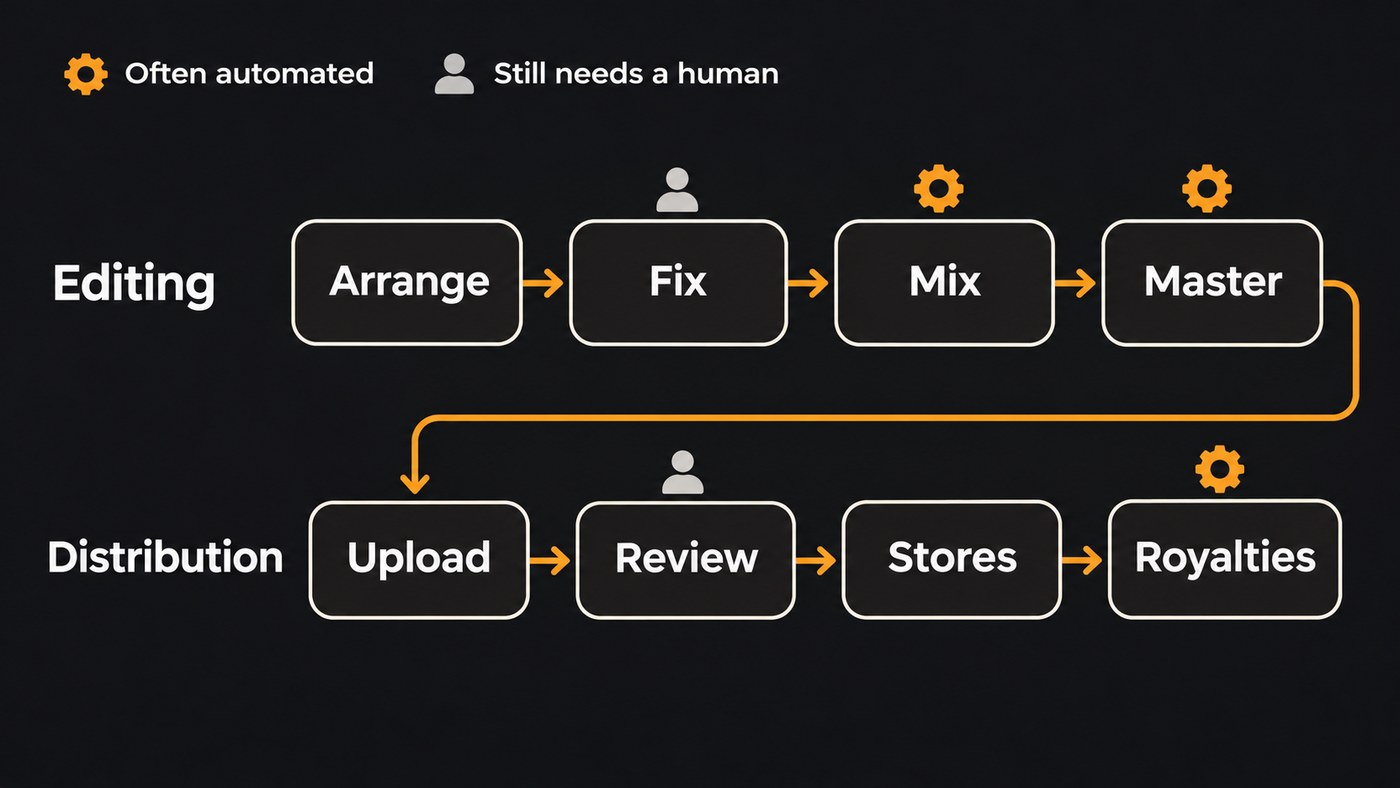
Two things no suite automates away. Someone still has to listen critically before you upload, and the distributor's review and each store's ingestion still run on their own schedules.
Automation is also no reason to release in bulk. When Spotify announced a new music spam filter on 25 September 2025, it named mass uploads, duplicates and artificially short tracks among the tactics the system would identify, tag and stop recommending. Use automation to save hours on each release, not to multiply releases.
Suites you can buy access to today
These are the bundles that put editing tools and distribution under one account.
LANDR Studio
LANDR's homepage, checked 7 November 2026, lists what's included in LANDR Studio: unlimited AI mastering (including the LANDR Mastering Plugin for your DAW), unlimited distribution, royalty-free samples, effects and instrument plugins including stem separation, online courses and collaboration tools. LANDR also says you keep 100% of your royalties.
The detail that matters most for a subscription is what happens when you stop paying. LANDR's answer on the same page: "your music stays live forever, even if you cancel."
Good fit if you already produce in a DAW and want finishing and release on one bill.
BandLab Membership
BandLab's homepage describes its Studio as "100% free", running in the browser and on your phone. Its mastering page, checked 7 November 2026, offers free mastering with four presets and says Membership lets you master as many tracks as you want and keep 100% of earnings on distribution. When BandLab launched distribution on 10 November 2023, it said the service is exclusively available through the paid Membership plan.
Good fit if you already write in BandLab, especially on a phone, and want the release step in the same app.
DistroKid plus Mixea
DistroKid's pricing page, checked 7 November 2026, lists three annual plans: Musician, Musician Plus and Ultimate. All include unlimited uploads, royalty splits and free promo tools, and Ultimate adds "Replace song audio", useful when you spot a mix problem after release.
DistroKid doesn't edit your music itself. Mixea, its mastering service, masters your first track free, then charges a yearly fee for unlimited masters. You choose an Intensity level and Brighter or Warmer EQ, and files come back as 24-bit, 48 kHz WAV.
Good fit if you mix in your own DAW and want a quick master plus distribution in one account.
Build your own: an editor plus the distributor you trust
For most home-studio and AI-assisted artists, the flexible route is two tools: edit in a DAW or an AI studio, then pick a distributor on its own merits, whether that's DistroKid, TuneCore, CD Baby or another service. You lose one login and gain the freedom to switch either half later.
If any part of your track was made with AI tools, read each distributor's current policy first. We cover whether DistroKid allows AI-generated music, and our AI music distribution checklist walks through the rest.
How to choose the right suite
- Start from where you edit now. If you live in Logic, Ableton or FL Studio, you need finishing and distribution, which points to LANDR or DistroKid with Mixea. If you're starting from a phone or a browser, BandLab or an AI studio makes more sense.
- Ask what happens when you stop paying. LANDR states its answer publicly. Get the same answer in writing from any other service's help centre before you upload a catalogue.
- Check how you fix a live release. DistroKid lists audio replacement on its Ultimate plan. Elsewhere, fixing the audio can mean taking the release down and delivering it again.
- Ask about AI disclosure. Spotify now shows AI credits that artists submit through their label or distributor, with its own caveat: "Not all distributors enable artists to disclose yet, but we intend to expand this more broadly over time." If you use AI tools, pick a distributor that lets you say so.
- Plan for co-writers. If you split songs, royalty splits inside the distributor save you a spreadsheet. DistroKid lists splits on every plan.
- Judge the master by ear. Compare the automated master against a commercial reference at matched loudness before you pay for a year. Our guide to automated vs professional AI mastering explains when an engineer is worth it.
A release workflow that automates the dull parts
You can automate most of the busywork whichever suite you buy. Here's the order that keeps you in control.
- Finish the edit. Fix the weak bar, the clipped consonant or the late harmony now, while it's cheap to change.
- Mix, then master to a streaming target. A common target is around −14 LUFS integrated with a true-peak ceiling of −1 dBTP. Export a 24-bit WAV.
- Set the date before you upload. Give your distributor and the stores time to process, and leave room for pre-saves and pitches.
- Upload with clean metadata. Spell your artist name exactly as on your existing profiles, credit every writer, and fill in AI disclosure fields where your distributor offers them.
- Automate the follow-up. Smart links, release-day checks across stores and teaser uploads are the jobs worth handing to tools.
- Check every store on release day. Missing or mislabeled releases are easier to fix in the first week.
Where Soundverse fits
Soundverse is an AI music platform that takes you from idea to audience. It covers the editing half and the planning around release, not the delivery itself: getting a song onto Spotify or Apple Music still goes through a distributor like the ones above.
AI Studio is a multitrack studio in your browser where you record, generate, edit, mix and master. Mix One and Mastering One run on every plan at no token cost, and Creator adds WAV and stem export plus Inpainting to rewrite a single section. Release Planner writes a day-by-day rollout with pre-save, smart link and pitch deadlines, and it doesn't post or submit anything for you. With the Soundverse for Chrome extension, Agent One can upload a track to SoundCloud or a visualizer to YouTube as Private, and check your distributor dashboard or the stores you name to report where the release is live.
Licensing is set by plan: the Free plan is for personal use, and the Creator plan comes with a royalty-free license.
This video shows Mix One and Mastering One mixing and mastering a track by genre inside AI Studio.
FAQ
Is there one subscription that both edits and distributes music? LANDR Studio and BandLab Membership come closest, since both pair mastering and production tools with distribution. DistroKid covers distribution and adds mastering through Mixea, a separate subscription. None replaces a full editor if your track still needs arranging or fixing.
Is automated mastering good enough for a streaming release? For many independent releases, it's a solid starting point. Compare it against a reference track at the same loudness, and try a second setting before you settle. Hire an engineer when the song carries a big budget or the automated master keeps fighting the mix.
Do I keep my royalties with these suites? LANDR says you keep 100% of your royalties, DistroKid lists keeping 100% of earnings on all plans, and BandLab says Membership keeps 100% of earnings on distribution. Read each distribution agreement for store fees and payout terms before you sign.
What happens to my releases if I cancel? LANDR says releases stay live even if you cancel. Policies differ from service to service, so check the help centre of any distributor before you commit a catalogue to it.
Sign up for Soundverse free and take your next song from first idea to a release-ready master. More release guides on the Soundverse blog.
