Where Can I Buy a Subscription to an AI Singing Generator That Allows for Custom Vocal Style Adjustments?
Where to buy an AI singing generator subscription with custom vocal style controls: ACE Studio, Kits.ai, Soundverse and Suno, and what each tier adds.
You can buy an AI singing generator subscription with custom vocal style adjustments straight from the developer's own website: ACE Studio, Kits.ai, Soundverse and Suno all sell subscriptions. What "custom" means varies a lot, from picking a preset style to training your own voice or drawing tension and energy curves note by note.
Every plan detail below was checked on each company's own site on 7 November 2026. Prices change often, so this guide sticks to what each tier lets you change about a voice, and what happens to that voice if you stop paying.
What counts as a custom vocal style adjustment
Most tools sell "custom vocals", but the control behind that phrase comes in four levels. A subscription usually gives you one or two of them.
- Style presets. You pick a voice type or genre and the tool sings in it. Fast, but anyone using the same preset gets a similar sound.
- A reference voice. You upload a clip and the tool sings new words in a voice like it.
- Your own voice model. You train on recordings of your voice, or a consenting singer's, and reuse that voice on every song.
- Performance parameters. You shape breath, tension, falsetto or intensity over time, the way you'd ride a fader on a real take.
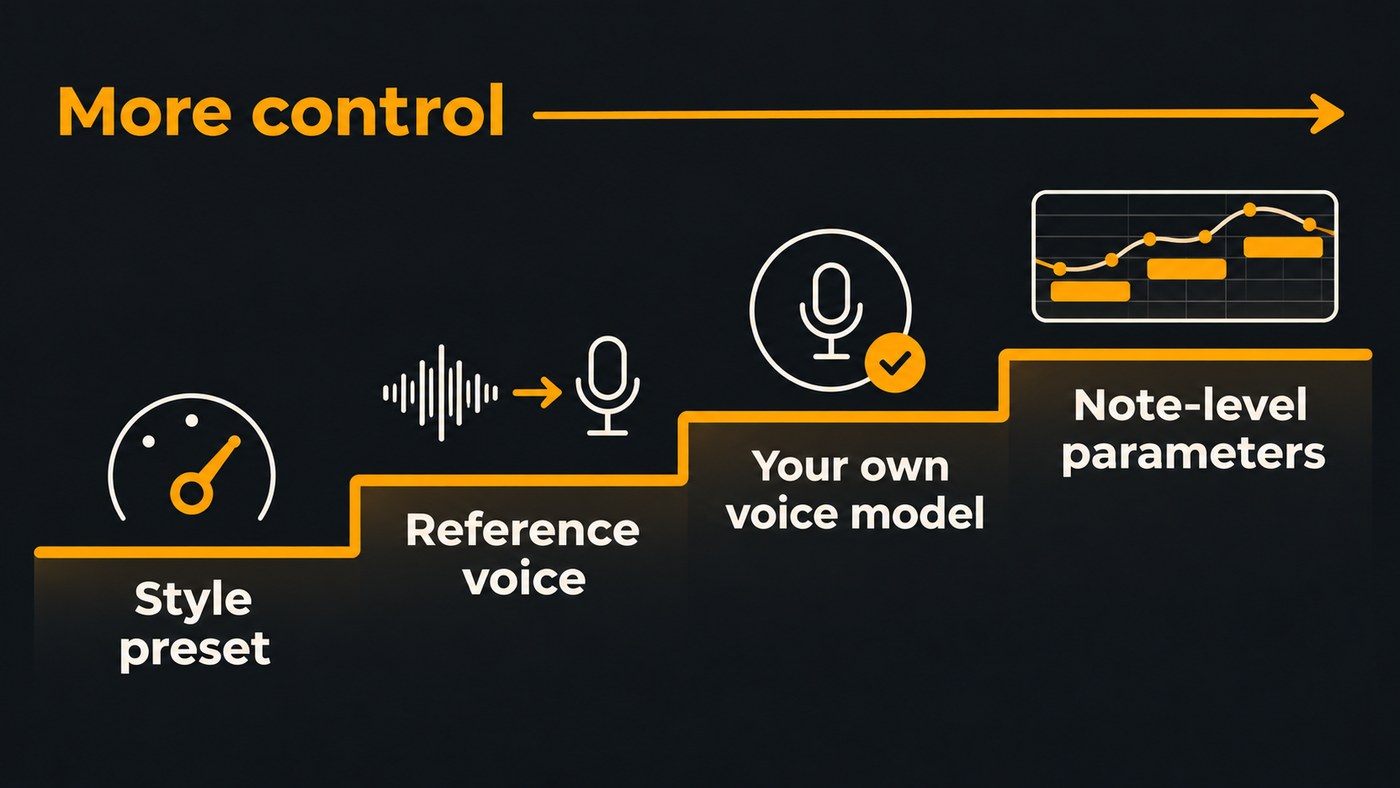
For a singer-songwriter, levels 3 and 4 do the heavy lifting. They're what make a demo sound like you instead of a stock voice.
Where to buy an AI singing generator subscription
Each option below is bought directly from the company's site, and each gives you a different kind of control over the voice.
ACE Studio: note-level control over a virtual singer
ACE Studio turns MIDI notes and lyrics into a sung vocal, so you write the melody and the software performs it. Its vocal parameters documentation, checked 7 November 2026, describes a Dynamic lane for its V2 voices plus an Advanced panel with Air, Falsetto, Tension and Energy. In ACE's own words: "Dynamic is a single envelope that controls the overall intensity of the vocal delivery, from soft and gentle to powerful and full."
You can also blend voice seeds into a hybrid voice and clone your own voice into a cloning slot. The ACE Studio pricing page offers Artist and Artist Pro plans, with Subscribe, Buy and a rent-to-own option, and Artist Pro includes more voice cloning slots. One licensing detail worth knowing: ACE's license page says most pre-made voices are royalty-free, while a few carry a "third-party license required" tag for commercial use.
Best for producers who are comfortable in a piano roll and want to direct every phrase.
Kits.ai: change the voice on a take you recorded
Kits.ai is a voice converter: you sing a guide, or bring one, and it re-sings the take in another voice. On the Kits.ai pricing page, checked 7 November 2026, the Free plan includes the Voice Designer and Voice Blender, and the paid Starter, Producer and Professional tiers add professional voice cloning, advanced settings, a choir tool, voice slots and download minutes.
Read the cancellation FAQ before you train a stack of voices: "Custom voices will not be deleted if you cancel your subscription, but they will be frozen and unavailable for use."
Best for singers who already record and want to change the voice, not the performance.
Soundverse: lyrics to vocal, then songs in your own voice
The Soundverse AI Singing Generator sings your lyrics as an a cappella vocal with nothing behind it. You pick a Vocal style such as Pop (Female), Pop (Male), Rap, Rock, Metal, Choir or Vocal Chops, or add a voice reference of at least 30 seconds and it sings in a similar voice. It runs on the Free plan with Soundverse v6; Creator adds v7 and v8, and Pro adds Soundverse v9. One honest limit: each take sings about the first 350 characters of your lyrics, roughly a verse and a chorus.
For your own voice, Train Voice Clone (Creator and up) builds a reusable voice from one take with at least 15 seconds of singing, and the AI Song Generator can then sing whole songs in it. A practical trick from the feature page: train one clone from a breathy take and another from a belted one, then pick per song. Voice Swap works on every plan and re-sings an existing vocal in another voice while keeping the performance, with pitch shift of up to 24 semitones either way, reverb and a backing-level control.
Best for singer-songwriters who want demos in their own voice and a full arrangement around them.
Suno: full songs that can use your voice
Suno generates whole songs rather than isolated vocals. Its pricing page, checked 7 November 2026, lists "Record, upload, and create with your own voice" and custom models on both the Pro and Premier plans, along with Pro features such as Personas. Premier adds Suno Studio. The Free plan includes no commercial rights and no monthly song downloads.
Best for songwriters who want a finished arrangement fast and don't need note-level control.
Prefer to pay once: VOCALOID6
If a subscription isn't what you want, Yamaha sells VOCALOID6 Editor as software you buy, with a free trial that includes every feature. Its product page, checked 7 November 2026, says it ships with more than 100 style presets for the manner of singing and tone of voice, and its VOCALO CHANGER feature imports your own singing to copy your style.
What to check before you subscribe
- Which tier holds the control you want. Presets are often free, while cloning and training sit a tier up. On Soundverse, Similar Singing Generator, Train Voice Clone and Train Voice Model need Creator, and Soundverse v9 needs Pro.
- What happens to your voice if you cancel. Kits.ai freezes custom voices until you renew. ACE Studio's rent-to-own option is built so that paying for two years gives you lasting access. Ask the same question of any tool before you invest weeks of training.
- Training cost against your monthly allowance. On Soundverse, one voice-clone training run uses more tokens than the Creator plan's monthly allowance, so you'd add a top-up or choose Pro. Soundverse's monthly tokens reset each month and don't roll over, and Suno says its subscription credits don't carry over either.
- Downloads and file formats. Kits.ai meters download minutes by tier, Suno caps song downloads per month, and Soundverse's paid plans add WAV and stem downloads.
- Commercial use. On Soundverse, licensing is set by plan: the Free plan is for personal use, and the Creator plan comes with a royalty-free license. Check the equivalent terms for every tool on your shortlist.
- Consent for any voice that isn't yours. Soundverse won't start training until you confirm the voice is yours or the singer has given explicit consent. Our guide on how to get permission for voice cloning in music covers what to put in writing.
How to test vocal styles before you pay
Most tools above have a free tier, trial or refund window, so run the same test through each before you pick a plan.
- Write one test lyric. Eight lines covering a verse and a chorus, with one long held vowel and one fast run of consonants.
- Record a dry reference. Sing 30 to 60 seconds in a quiet room, no reverb and no music behind you, across a range of notes.
- Keep the settings equal. Use a comparable style in every tool, for example a male or female pop voice, so you compare engines rather than presets.
- Listen for three things. Do your words come through clearly, does the held note stay stable, and does the chorus lift above the verse?
- Then pay for one tier. Upgrade only where the free test convinced you, and train your voice on your cleanest takes.
If you're deciding between a quick clone and a fully trained model, read Voice Clone vs Voice Training. For a side-by-side of the converter approach, see Kits AI vs Soundverse.
Where Soundverse fits
Soundverse is an AI music platform that takes you from idea to audience, built for independent artists who release music. For a singer-songwriter, the vocal tools connect: the AI Singing Generator for a quick a cappella, Train Voice Clone for whole songs in your voice, and Train Voice Model with Voice Swap for a closer match. That model trains on 10 minutes or more of clean solo recordings over a few hours and stays Private unless you share it.
Results open in AI Studio, where you can build an instrumental around the vocal. What Soundverse doesn't give you is ACE-style breath and tension curves drawn under each note; if that's the control you need, ACE Studio is the better buy. Plans can be upgraded, downgraded or cancelled at any time with no lock-in.
Licensing is set by plan: the Free plan is for personal use, and the Creator plan comes with a royalty-free license.
This demo shows the AI Singing Generator turning lyrics into an a cappella vocal guided by a vocal reference.
FAQ
Is there a free AI singing generator with custom vocal styles? Yes, with limits. Kits.ai's Free plan includes its Voice Designer and Voice Blender, and Soundverse's AI Singing Generator runs on the Free plan with preset styles and an optional voice reference. Training your own voice model generally needs a paid tier.
Can an AI singing generator sing in my own voice? Several can. Soundverse's Train Voice Clone needs one take with at least 15 seconds of singing, Kits.ai offers cloning from its Starter tier, and Suno and ACE Studio both include own-voice options on paid plans. A clean, dry recording across your range gives the best result.
Should I pick a subscription or a one-time purchase? A subscription suits you if you'll use the tool every month and want newer models as they arrive. A purchase such as VOCALOID6 suits you if you'd rather pay once. Either way, check what happens to trained voices if you stop paying.
Can I release songs made with an AI singing generator? That depends on your plan's license and on the voice. Use a paid plan whose license covers release, and only use voices you own or have permission for. Spotify's policy, announced 25 September 2025, allows vocal impersonation only when the impersonated artist has authorized it.
Sign up for Soundverse free and hear your lyrics sung before you commit to a plan. More vocal guides on the Soundverse blog.
