Apps & browser extension · Free
Soundverse's AI tools and your own plugins, inside your DAW
Agent One, the AI tools, Sounds, DNA and your Library in one plugin, plus the effects and instruments you build. Free in beta for Windows, macOS and Linux.
- Download for Windows (Windows 10 or 11 (64-bit), .exe installer)
- Download for macOS (macOS 12 or later, Apple silicon and Intel, .pkg installer)
- Download for Linux (64-bit Linux, .deb package)
1,000 free tokens to start · No card needed · Cancel paid plans anytime
Do more with Soundverse on Creator — from $9.99/mo, or ₹399/mo in India. 4,000 tokens a month. Billed $119.88 a year on the web, or $12.49 month to month.
Screenshots
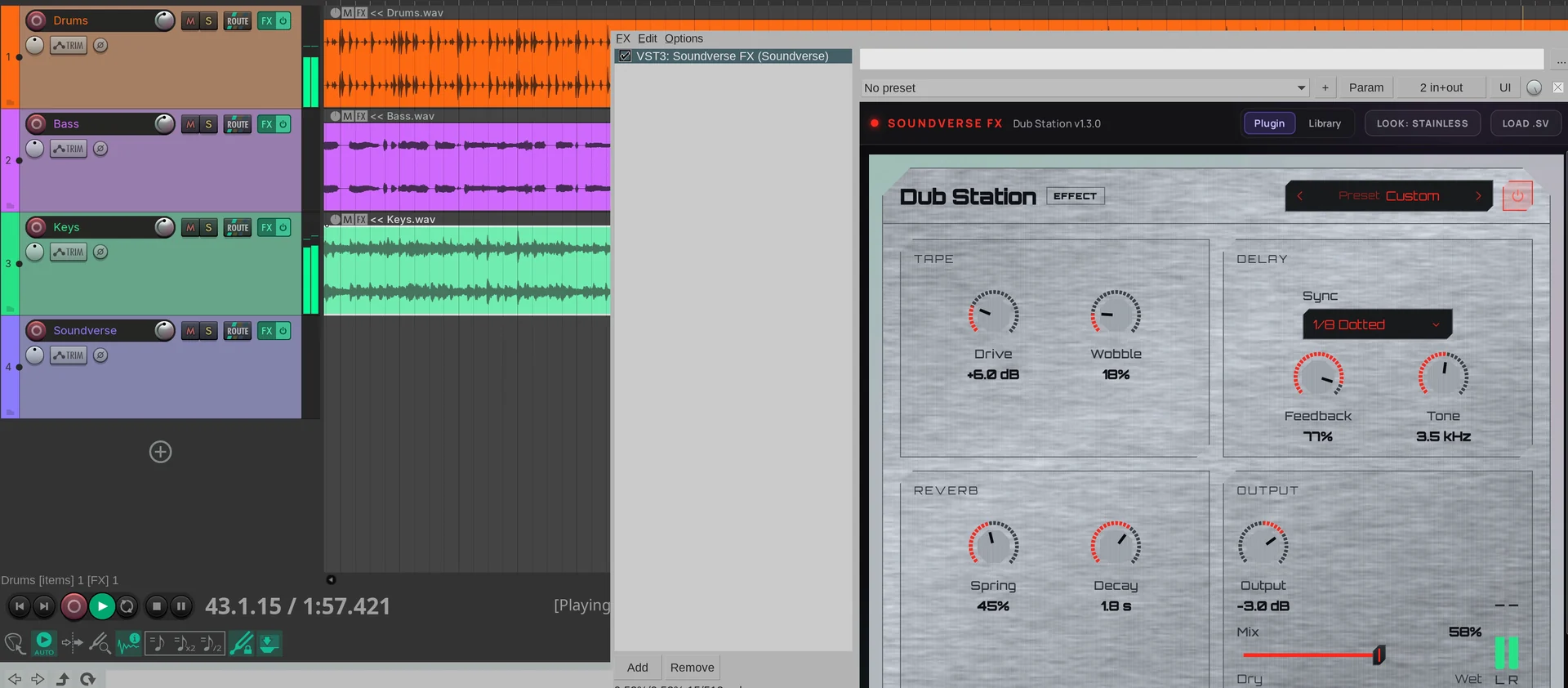
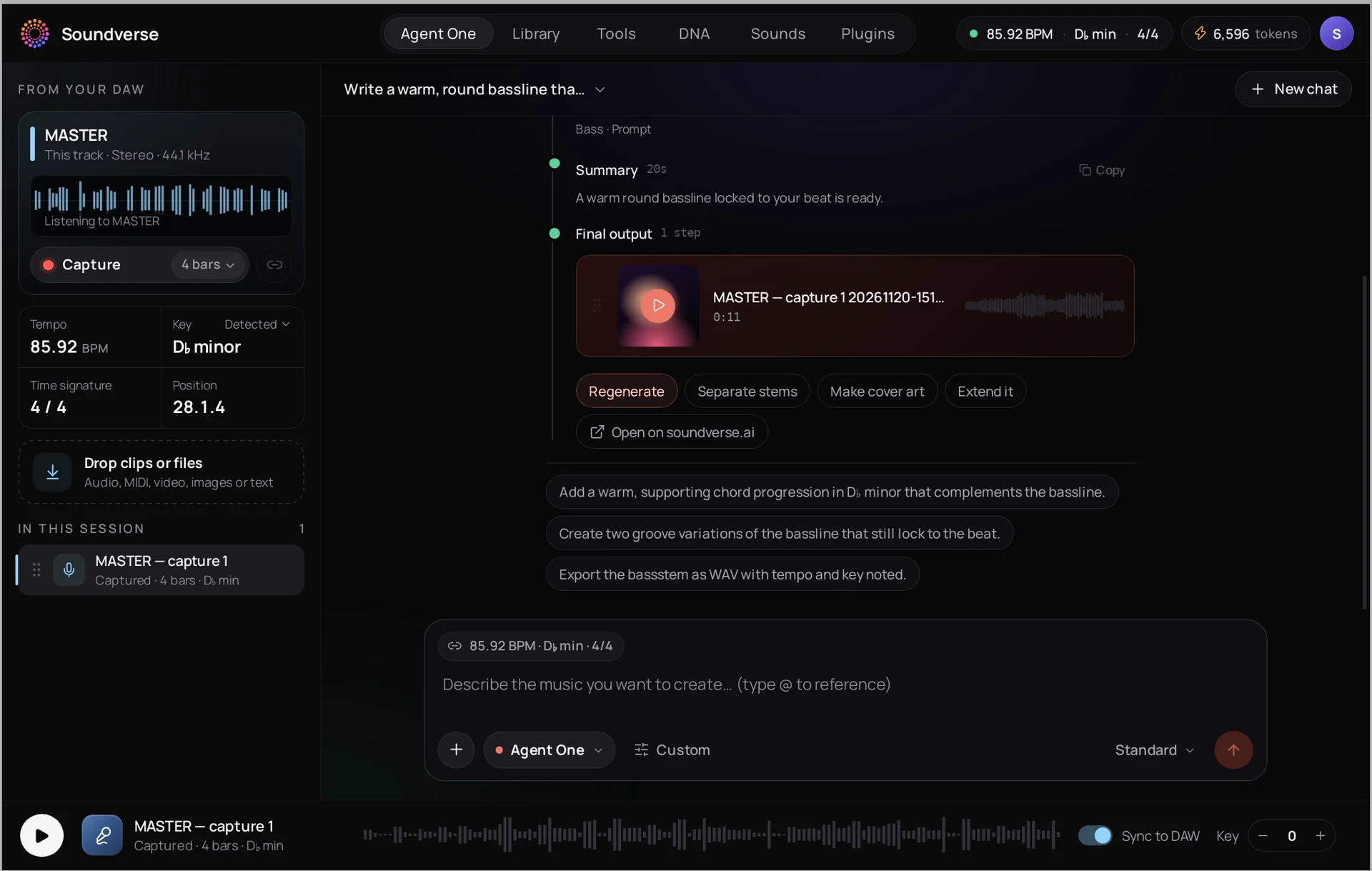
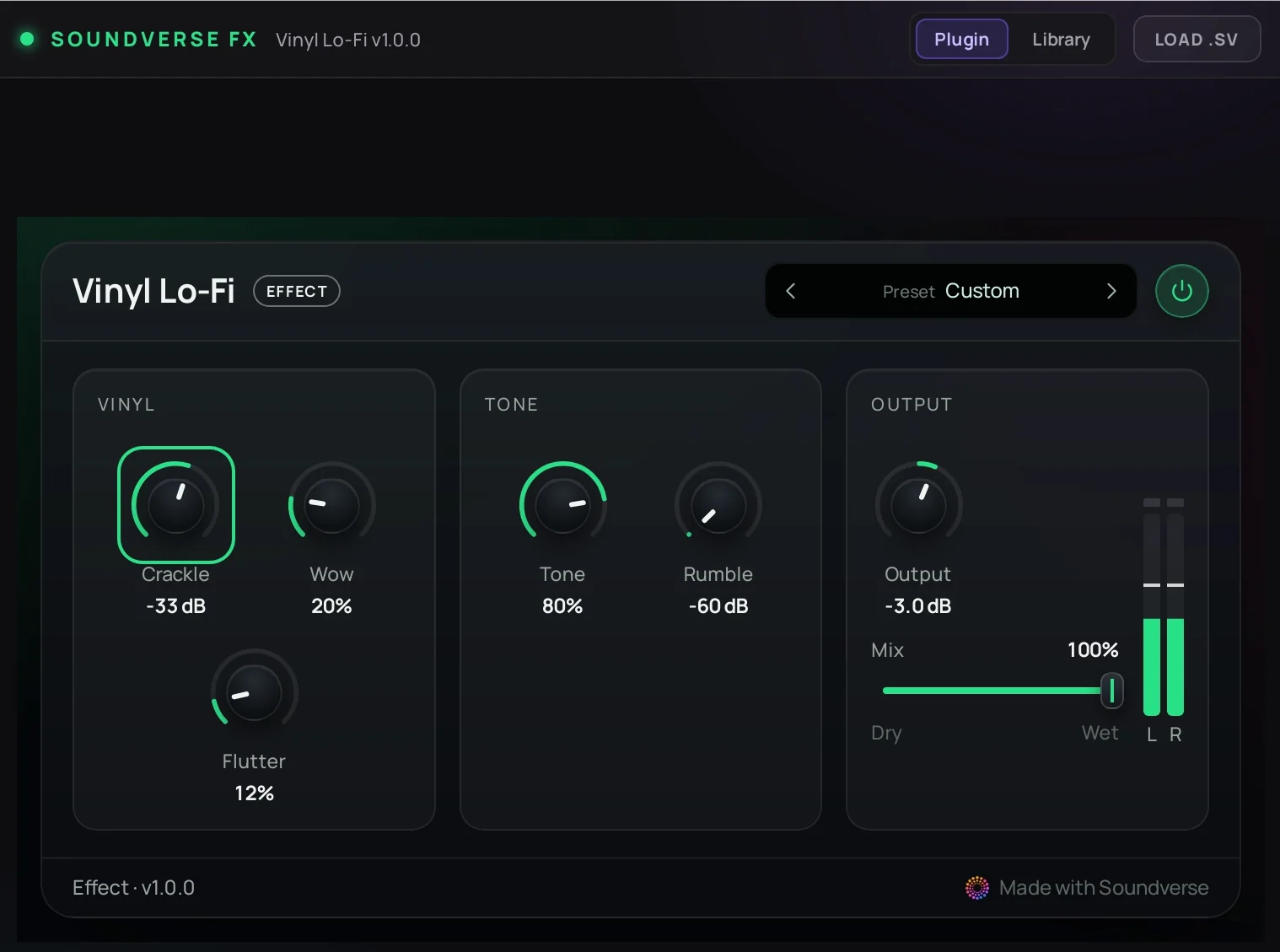
What you get
AI without leaving your session
Generate songs, stems and sounds in a plugin window and drag the results onto your timeline.
Your plugins on real tracks
Load the effects and instruments you build with Agent One onto any track in a click.
One account, one Library
Everything you make in your DAW is in your Library on soundverse.ai, and the other way round.
Who it's for
Producers working in a DAW
Use Soundverse's AI tools and your own plugins without leaving the session you're mixing.
Beatmakers
Generate a stem or find a sound, then drag it straight onto the timeline next to your beat.
Sound designers
Put the effects and instruments you build with Agent One on real tracks next to your other plugins.
Soundverse creators
Bring the songs and sounds in your Library into a DAW project without downloading them one by one.
When to use it
- Your track needs a new part and you don't want to leave your DAW
- You built a plugin with Agent One and want it on a real track
- You want to audition Library songs or Sounds through your DAW's output
- You want Agent One's help in the middle of a session
- You want a stem generated for the song you're arranging
What you can make with it
A stem for your arrangement
Run AI Stem Generator from the Tools tab and drag the new part onto a track.
Your effect on a vocal
Put Soundverse FX on the vocal track and load the radio effect you built with Agent One.
Your synth from MIDI
Add Soundverse Instrument to a MIDI track and load your pad to play it from your keyboard.
Library songs in a session
Search your Library inside the plugin and drag a song or a stem onto the timeline.
A loop from Sounds
Find a loop in Sounds, audition it through your DAW's output and drag it in.
An idea from Agent One
Ask Agent One for a chord idea or a direction while you work, without opening a browser.
The Soundverse VST plugin brings Soundverse into the DAW you already use. It installs three plugins. Soundverse holds Agent One, your Library, the AI tools, Sounds, DNA and your plugins in tabs. Soundverse FX runs your effect plugins on a track, and Soundverse Instrument plays your instrument plugins from MIDI. It's for producers who want AI generation, stems and their own plugins without leaving their session. It's in beta, and downloads for Windows, macOS and Linux open on this page soon.
What you can do
Three plugins, one install
What the installer adds to your DAW.
Soundverse
The main plugin: Agent One, Library, Tools, DNA, Sounds and Plugins tabs, with audition and drag-to-timeline.
Soundverse FX
Runs one of your effect plugins on an audio track, with its own panel, presets and a bypass.
Soundverse Instrument
Plays one of your instrument plugins from a MIDI track, with its own panel, presets and on-screen keyboard.
Inside Soundverse
The tabs of the main plugin.
Agent One
Chat with Agent One about the track you're making, and keep your recent chats from soundverse.ai.
Library and Sounds
Search your Library and the Sounds catalogue, audition through your DAW's output and drag files in.
Tools
Run Soundverse AI tools, such as AI Stem Generator, from inside the plugin, at the same prices as on the web.
DNA
Make music with your artist, voice and instrument models, and train new ones.
Plugins
Your plugins with their faceplates as thumbnails; Load puts one on a track that has Soundverse FX or Soundverse Instrument.
What you need
The beta's requirements.
Windows
Windows 10 or 11, 64-bit, and a DAW that loads VST3 or CLAP plugins.
macOS
macOS 12 or later on Apple silicon or Intel, and a DAW that loads VST3, AU or CLAP plugins.
Linux
A 64-bit x86 Linux that installs .deb packages, and a DAW that loads VST3 or CLAP plugins.
A Soundverse account
A free account to sign in; AI tools use your plan's tokens.
How it works
Install it
Run the installer for Windows, macOS or Linux. It adds Soundverse, Soundverse FX and Soundverse Instrument to your computer's plugin folders as VST3, with AU on macOS and CLAP.
Rescan plugins in your DAW
Open your DAW's plugin manager and rescan, or restart your DAW. The three plugins appear under Soundverse.
Add Soundverse and sign in
Put Soundverse on any track and click Sign in, then approve the code on soundverse.ai. One sign-in covers all three plugins and stays signed in.
Load your plugins on tracks
Add Soundverse FX to an audio track or Soundverse Instrument to a MIDI track. In Soundverse's Plugins tab, hover a plugin and click Load to put it on that track.
Make something and drag it in
Ask Agent One, or run a tool from the Tools tab such as AI Stem Generator. When the result is ready, drag it from Soundverse onto your DAW's timeline.
Why use Soundverse VST Plugin
Stay in your session
Generate songs, stems and sounds, search your Library and audition results without switching to a browser.
Your plugins on any track
Effects and instruments you build with Agent One load on a track in a click and sound the same as in AI Studio.
Straight onto the timeline
Drag audio from your Library, Sounds or a finished tool run onto your DAW's timeline as a file.
One account everywhere
Your plan, tokens, Library and plugins are the same in your DAW as on soundverse.ai.
What it costs
Free to install and use with a free Soundverse account once downloads open. The AI tools inside it use your plan's tokens. On the Free plan, a new account gets 1,000 free tokens once and what you make is for personal use; paid plans add monthly tokens and a commercial license.
The app is free to download; plans are bought in the app or on the web.
Each AI run uses tokens from your plan at that tool's price, in the app as on the web; every tool's page lists it.
The effects and instruments you build with Agent One load in it at no cost.
Creator $12.49 a month, or $9.99 a month billed yearly ($119.88 a year) · Pro $31.24 a month, or $24.99 a month billed yearly ($299.88 a year) · Max from $72 a month, or $60 a month billed yearly ($720 a year).
In India (PayU): Creator ₹499 a month, or ₹399 a month billed yearly (₹4,788 a year) · Pro ₹1,299 a month, or ₹1,039 a month billed yearly (₹12,468 a year) · Max from ₹2,999 a month, or ₹2,399 a month billed yearly (₹28,788 a year).
Prices outside India are in US dollars, billed through Stripe; in India they are in rupees, billed through PayU. Monthly tokens reset each month and don't roll over.
Good to know
In beta
The plugin is in beta: free to download, and the Windows and macOS installers aren't code-signed yet, so your computer may warn you once before it installs.
Desktop DAWs only
It runs as a VST3, AU or CLAP plugin in a 64-bit desktop DAW; there's no mobile version.
Generation needs internet
Signing in, generating and syncing need a connection; synced plugins play offline.
Your Soundverse plugins only
Soundverse FX and Soundverse Instrument load plugins you build with Agent One, not other companies' plugins.
Frequently asked questions
Is the Soundverse VST plugin free to download?
Yes. The beta is free for Windows, macOS and Linux from the buttons at the top of this page. The Windows and macOS installers aren't code-signed yet, so your computer may warn you once: on Windows click More info, then Run anyway; on a Mac open System Settings, then Privacy & Security, and click Open Anyway. Plugins you build with Agent One are waiting in its Plugins tab when you sign in.
Is the Soundverse VST plugin free?
Yes, it's free to install and use with a free Soundverse account. AI tools you run inside it use your plan's tokens at the same price as on soundverse.ai, and the plugins you build load at no cost.
Which DAWs does it work with?
Any DAW that loads VST3 plugins on Windows, macOS or Linux, AU plugins on macOS, or CLAP plugins. Your DAW needs to be 64-bit.
What are Soundverse, Soundverse FX and Soundverse Instrument?
Soundverse is the main plugin, with Agent One, your Library, the AI tools, Sounds, DNA and your plugins in tabs. Soundverse FX is an effect slot that runs one of your effect plugins on a track. Soundverse Instrument is an instrument slot that plays one of your instrument plugins from MIDI. The installer adds all three.
How do I load a plugin I built into my DAW?
Add Soundverse FX to an audio track, or Soundverse Instrument to a MIDI track, and open Soundverse on any track. In Soundverse's Plugins tab, hover your plugin and click Load, then pick the track. The plugin syncs from your account the first time, so it loads even if you built it a minute ago.
How do I generate a stem in my DAW?
In Soundverse, open the Tools tab and choose AI Stem Generator. Pick the stem you want and the song to build it on, then run it. When it's ready, audition it in the plugin and drag it onto your timeline.
Is my DAW project sent to Soundverse?
No. The plugin only sends what you ask it to: your prompts, the files you choose and the tools you run. Your Soundverse plugins process audio on your computer, inside Soundverse FX and Soundverse Instrument.
Does it work offline?
Signing in, generating and syncing need an internet connection. Plugins that have already synced keep playing in your project without one, and a project still plays if you sign out.
Get your plugins ready for your DAW
Download the beta for your computer, then build an effect or an instrument with Agent One: it'll be in the Plugins tab the first time you sign in.