How to Use Voice Swap Software to Test Different Vocal Tones in Songs (2026 Guide)
Explore how voice swap software helps test different vocal tones using AI in 2026.
Voice Swap for Testing Different Vocal Tones in Songs
Introduction: Why Testing Vocal Tones Matters in Modern Music Production
In 2026, the boundaries of sound design and music production have expanded dramatically. With the rise of AI-driven music tools, artists and producers are no longer limited to their natural voices or studio resources. One key innovation leading this transformation is voice swap software — a tool that allows creators to replace or modify the singer’s voice while maintaining emotional nuance, timing, and performance details.
Whether you are an independent singer experimenting with new vocal tones, or a seasoned audio engineer testing multiple voices in demo production, the ability to instantly "swap" a vocal performance opens up new creative possibilities. By leveraging vocal tone AI technologies, musicians can audition different voices on a single track, test timbre variations, and find the perfect tone for their production.
This article explores how to use voice swap software — specifically Soundverse’s Voice Swap feature — to test and refine different vocal tones in your songs.
What Is Voice Swap Software and How Does It Work?

Voice swap software is an AI-powered music production tool that converts one vocal performance into another voice model. Instead of recording multiple takes with different singers, the software processes your initial recording and replaces the vocal identity while preserving the expressive nuances — pitch bends, timing, vibrato, and emotion.
In simple terms, it’s like having dozens of vocalists ready to sing your track instantly. The underlying AI models analyze the source vocals, then re-render them using the target voice profile. Unlike standard voice changers, these systems don’t manipulate audio in real-time; rather, they process audio uploads to ensure high-quality results free from artifacts.
In 2026, professional producers use voice swap tools not only for creative experimentation but also for music production voice editing, demo creation, and cross-genre vocal adaptation. For instance, a pop demo can be tried with a soulful or cinematic tone without re-recording. The Voice-Swap AI platform reflects this growing trend across global studios.
Why Are Musicians Using Vocal Tone AI Tools in 2026?
There are several key reasons why vocal tone AI technology has gained immense popularity among music creators:
- Vocal Identity Exploration: Artists can experiment with vocal tones that were previously out of reach — gender-swapped or stylistically contrasting voices.
- Time Efficiency: Producers avoid booking multiple vocal sessions or studio rentals.
- Creative Diversity: Voice swapping empowers songwriters to test how a track feels across genres or moods.
- Accessibility: Independent musicians can access professional-sounding voices without the cost of session singers.
- Ethical and Licensed Sources: Ethical AI systems like Soundverse’s DNA framework rely on licensed voice data, ensuring copyright-safe content.
In the context of music production, AI singing tools have become essential for both idea generation and production testing. If you’re interested in how this evolution fits into broader industry movements, you can read about how AI music is transforming the industry in our related article.
How to Make Voice Swap for Testing Different Vocal Tones with Soundverse Voice Swap
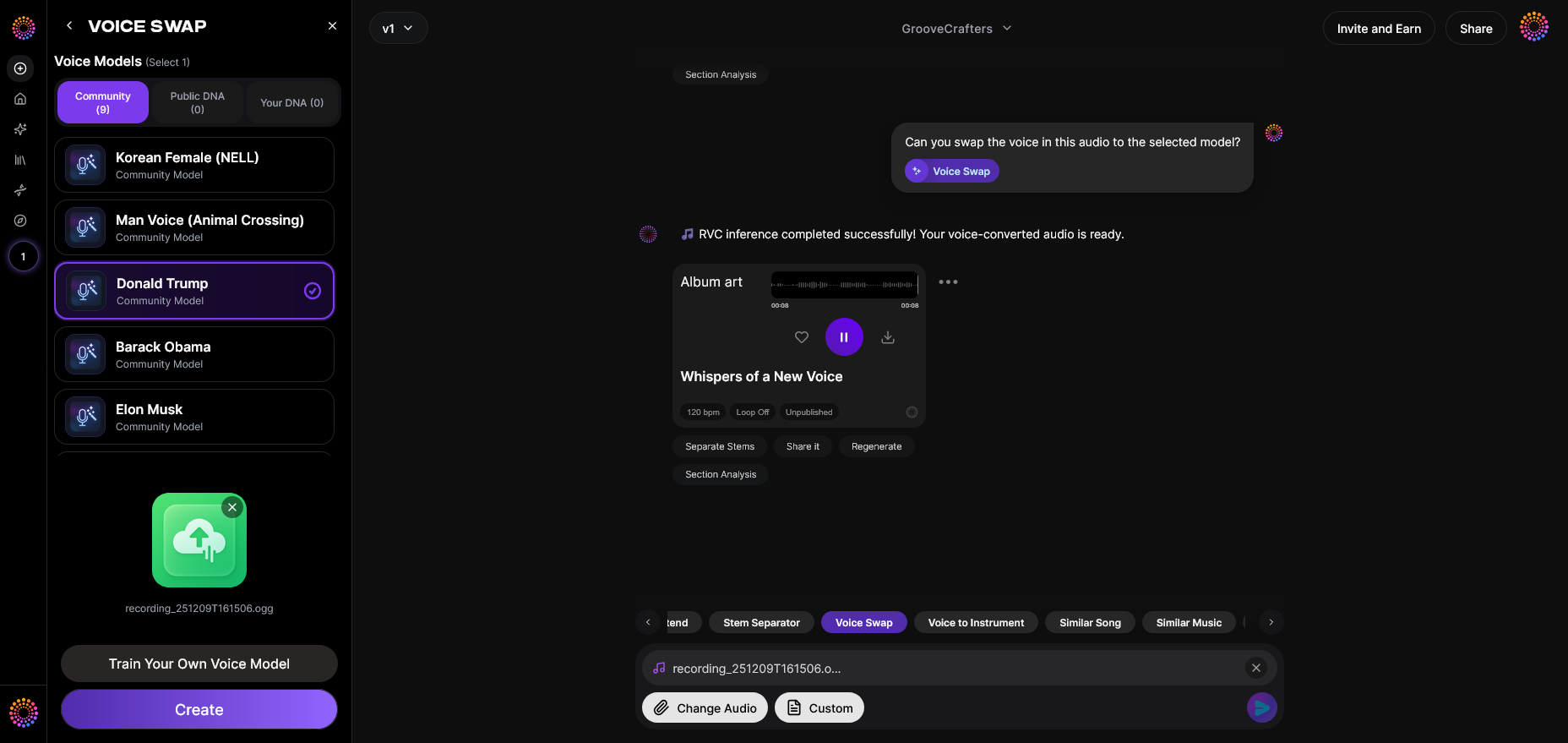
Soundverse’s Voice Swap is an advanced AI singing tool specifically built to help musicians explore and fine-tune their songs using synthetic yet authentic voices. Here’s how you can use it to test different vocal tones effectively.
Step 1: Feature Overview — Access the Voice Swap Tool
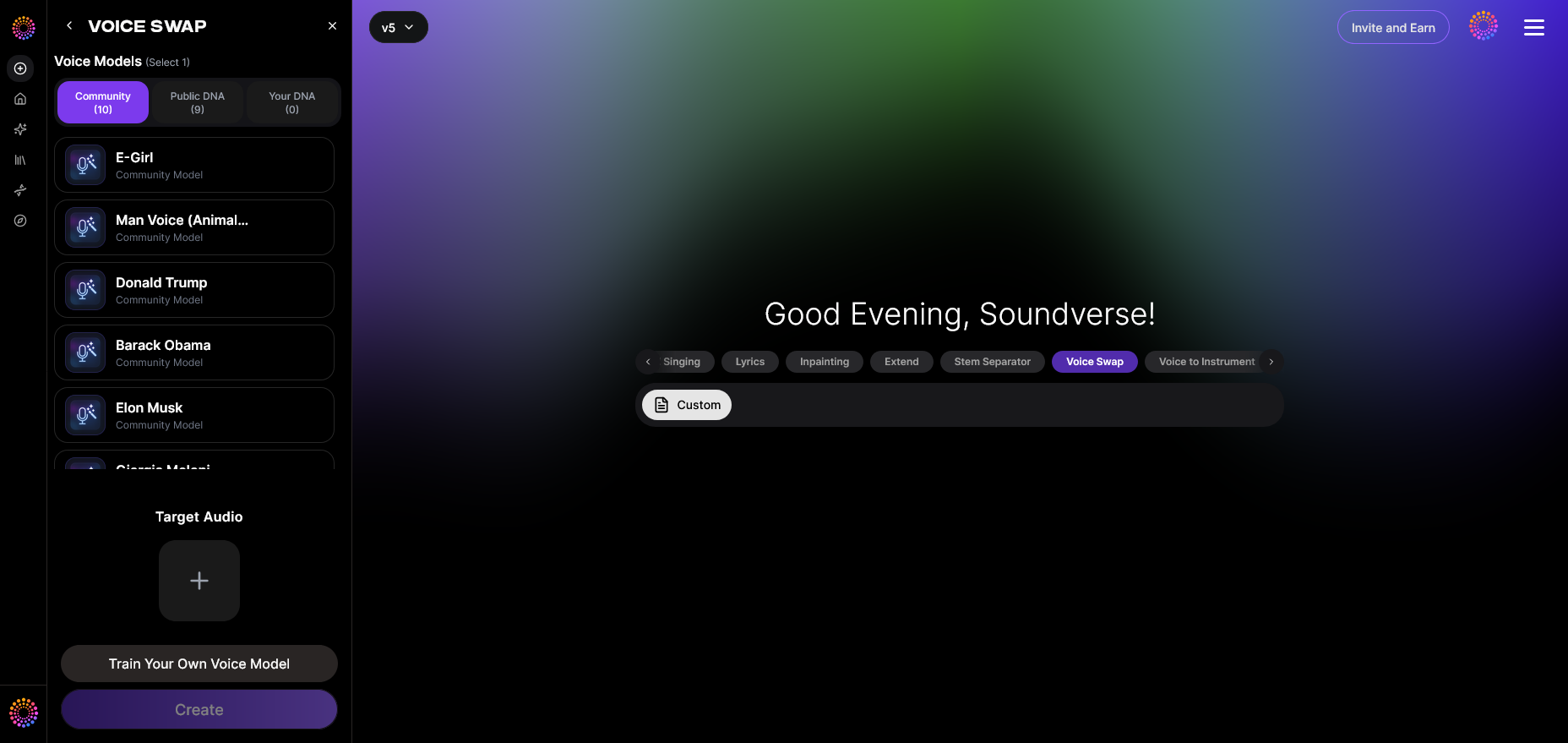
Start by logging into your Soundverse account. Navigate to the “Voice Swap” feature under the AI Magic Tools section. This is where you can upload existing vocal recordings or import stems from other Soundverse sessions. If you’ve worked with tools like the AI Music Generator, you’ll find the interface familiar.
Step 2: Upload Audio — Provide Your Source Vocals

Upload an audio file that contains a clean vocal track. Soundverse’s system works best with isolated vocals, which retain timing and expression. If your source file has background music, you can use Soundverse’s Stem Separation AI Magic Tool to extract vocal stems before processing.
Once uploaded, the AI analyzes pitch curves, phrasing, and dynamics without changing the musical structure.
Step 3: Target Voice Selection — Choose a Voice Model
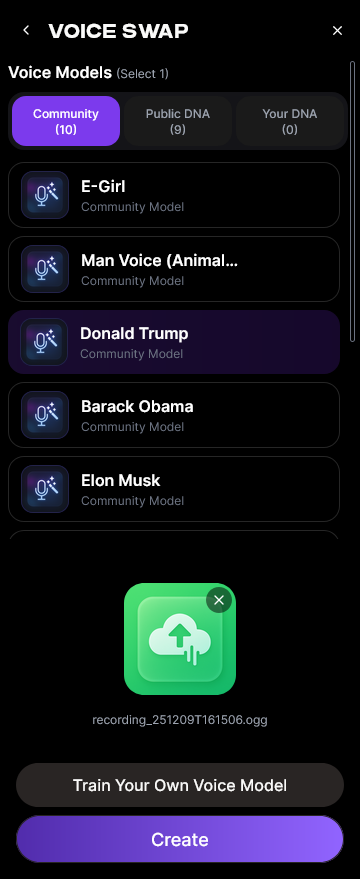
Next, select the target vocal identity. Soundverse supports several options:
- Community Voices: Character, celebrity, or stylistic voice models contributed by the Soundverse community.
- Public DNA Models: AI profiles trained on licensed voice DNA of professional vocalists.
- Personal DNA: Your own custom-trained voice model for a unique touch.
You can test multiple targets sequentially, making comparisons seamless.
Step 4: Generation — Apply the Voice Swap Transformation
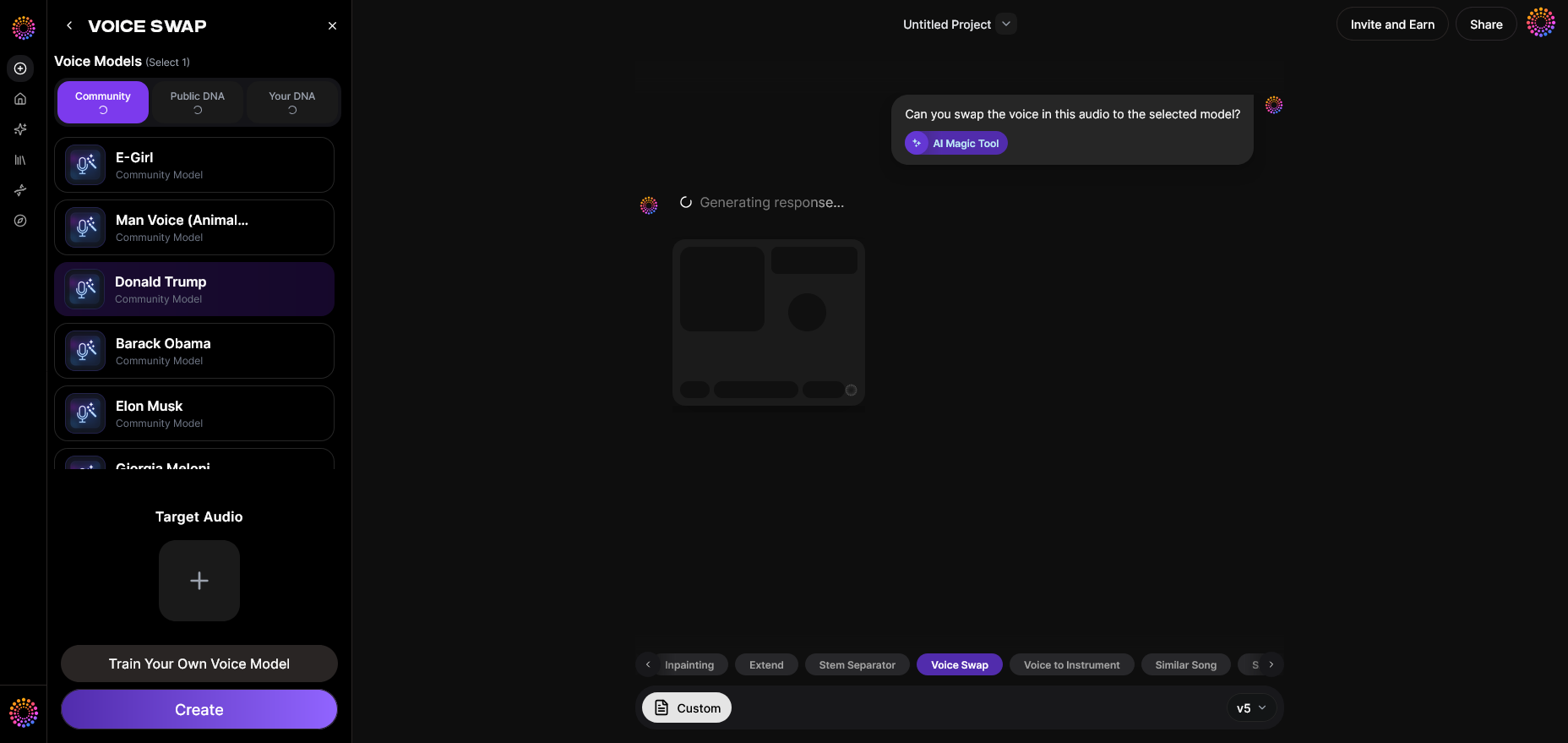
Click “Generate” to begin processing. The system will convert the uploaded voice into the selected model while keeping original timing and emotional nuances intact. The rendering process is asynchronous, meaning the platform processes the file and notifies you once it’s complete.
During this step, you can tweak parameters like style intensity, tone warmth, or presence for subtle differences in output. Many producers use this stage to compare several tonal variations before committing to a final one. For a deeper dive, watch our guide on creating Deep House music which demonstrates similar AI workflow processing within Soundverse’s interface.
Step 5: Download Result — Export the Voice-Swapped Audio
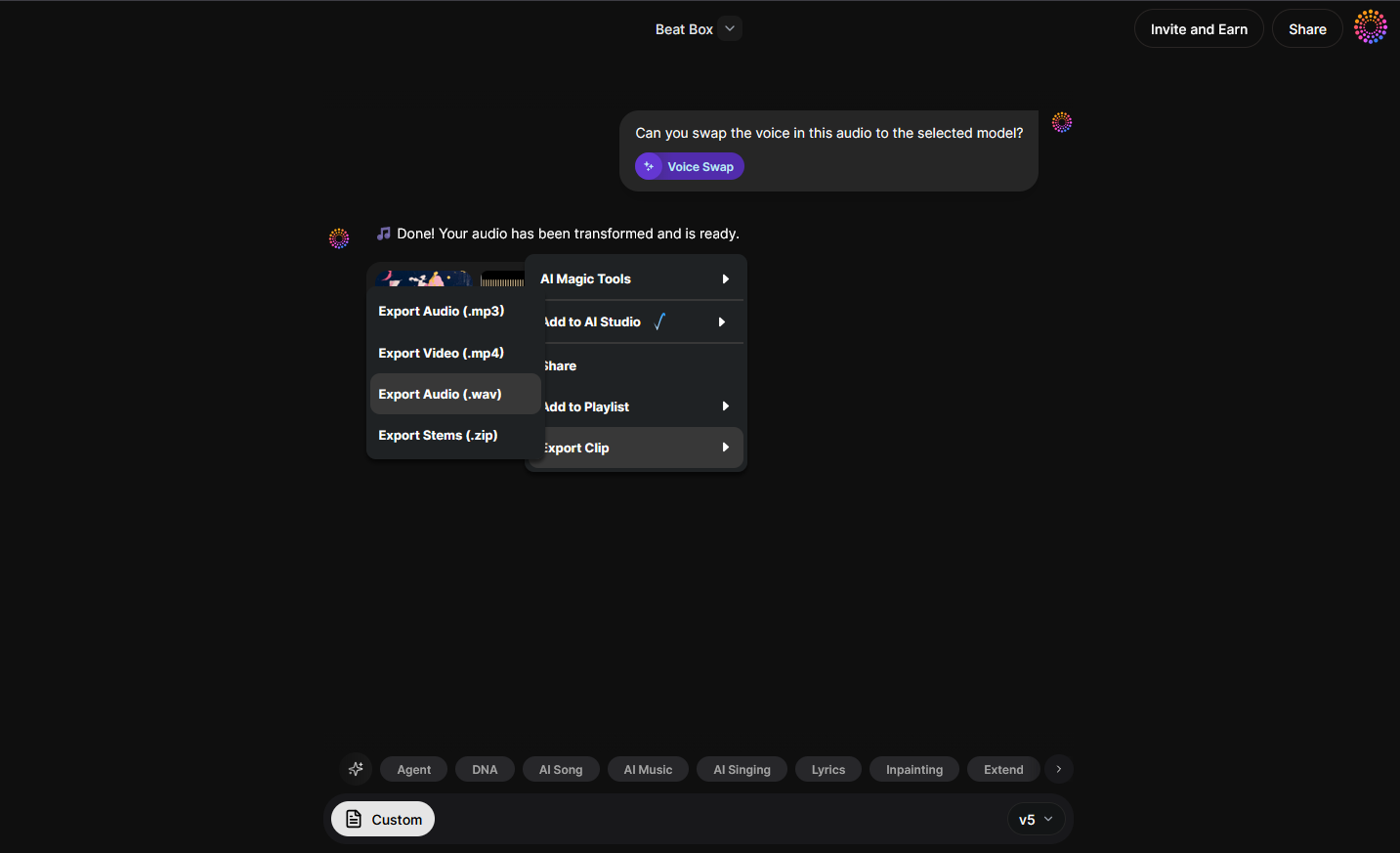
After generation, you’ll be able to preview and download the final output. The resulting file retains original performance fidelity while adopting the target voice characteristics.
The downloaded vocals can then be incorporated into DAWs like Ableton Live or Logic Pro for further mixing or mastering. This flexibility is invaluable for both AI-assisted demos and final release production.
Pro Tips for Testing Vocals with AI Effectively
To get the best results from your voice swap software, consider the following professional tips:
- Use Dry Vocals for Clarity: Reverb and effects can interfere with AI analysis; upload clean stems where possible.
- Compare Tones in Context: Always listen within the full mix. A voice that sounds bright solo might feel harsh in production.
- Leverage AI Singing Tools for Reference: Use AI singing tools to generate alternate guide vocals or harmonies for contextual comparison.
- Blend Real and AI Vocals: Hybridize layers of AI-generated vocals and real singing for organic texture.
- Experiment with Genre Filters: Tools like Soundverse's AI Magic Tools help find the best genre-tone pairings.
- Stay Ethical: When using celebrity or character voices, ensure you use legal and ethical datasets like Soundverse’s licensed system.
By combining these strategies, producers create unique soundscapes without compromising authenticity.
How Voice Swap Enhances Music Production Voice Editing
Traditional music production voice editing involves hours of comping, tuning, and EQ adjustments. With AI voice swapping, editing becomes a creative decision rather than a technical one. Instead of fixing pitch issues manually, artists can focus on artistic direction — choosing which tone, expression, and character best suits the song.
Beyond tonal adjustments, the voice changer for music also improves workflow efficiency. It allows for fast iteration during demo phases, speeding up client approvals and collaboration cycles.
The technology complements existing workflows, especially when paired with Soundverse Assistant, the platform’s AI co-producer that suggests the right voice models or tonal variations automatically.
Beyond Voice Swapping: Soundverse’s AI Ecosystem
Soundverse doesn’t stop at vocal transformation. Its related features — such as the Similar Singing Generator and AI Singing Generator — expand the creative possibilities further:
- Similar Singing Generator: This tool matches tone and emotional delivery to a specific reference voice, ideal for maintaining consistent vocal identity across songs.
- AI Singing Generator: It creates entirely new vocal performances from text or lyrics, making it ideal for experimenting with diverse singing styles.
- Soundverse DNA: A foundational system that builds on licensed data to generate unique, monetizable sonic identities for artists.
These tools work in synergy, providing a fully integrated solution for testing, creating, and finalizing music content using AI. For additional insight, check our YouTube tutorial on how to make music, which showcases Soundverse’s ecosystem in action.
To see how Soundverse compares with other platforms, explore our articles on Mubert alternatives and the best Soundraw alternative.
Try Soundverse’s Voice Swap Software Today
Explore limitless vocal possibilities by testing different tones, styles, and textures with Soundverse’s cutting-edge AI. Get started and transform your creative process in minutes.
Start Creating Music
Related Articles
- Soundverse Introduces Stem Separation AI Magic Tool: Discover how Soundverse’s advanced stem separation empowers creators to isolate vocals and instruments effortlessly.
- Soundverse Saar: AI Voice Assistant: Learn how Soundverse Saar helps artists and producers streamline music creation with voice-guided AI assistance.
- Soundverse AI Revolutionizing Music Creation for New-Age Content Creators: Explore how Soundverse AI is empowering creators to produce professional-quality music without technical barriers.
- Generate AI Music with Soundverse Text-to-Music: Find out how to turn simple text prompts into complete musical compositions using Soundverse’s AI tools.
Here's how to make AI Music with Soundverse
Video Guide

Here’s another long walkthrough of how to use Soundverse AI.
Text Guide
- To know more about AI Magic Tools, check here.
- To know more about Soundverse Assistant, check here.
- To know more about Arrangement Studio, check here.
Soundverse is an AI Assistant that allows content creators and music makers to create original content in a flash using Generative AI.
With the help of Soundverse Assistant and AI Magic Tools, our users get an unfair advantage over other creators to create audio and music content quickly, easily and cheaply.
Soundverse Assistant is your ultimate music companion. You simply speak to the assistant to get your stuff done. The more you speak to it, the more it starts understanding you and your goals.
AI Magic Tools help convert your creative dreams into tangible music and audio. Use AI Magic Tools such as text to music, stem separation, or lyrics generation to realise your content dreams faster.
Soundverse is here to take music production to the next level. We're not just a digital audio workstation (DAW) competing with Ableton or Logic, we're building a completely new paradigm of easy and conversational content creation.
TikTok: https://www.tiktok.com/@soundverse.ai
Twitter: https://twitter.com/soundverse_ai
Instagram: https://www.instagram.com/soundverse.ai
LinkedIn: https://www.linkedin.com/company/soundverseai
Youtube: https://www.youtube.com/@SoundverseAI
Facebook: https://www.facebook.com/profile.php?id=100095674445607
Join Soundverse for Free and make Viral AI Music

We are constantly building more product experiences. Keep checking our Blog to stay updated about them!