How to Use Voice Swap for Creative Remixes and Demo Creation in 2026
Discover how to use Soundverse Voice Swap to reinvent vocals in remixes and demos with AI precision.
Voice Swap for Creative Remixes and Demos
In 2026, AI-driven music production continues to revolutionize how producers and artists experiment with vocals, arrangements, and creative expression. One of the most game-changing innovations that has captured the imagination of remix artists and demo creators this year is voice swap—a powerful technology that lets you change the vocal identity of a track while maintaining its emotional essence and timing.
Whether you’re crafting a remix, testing a new vocal style, or creating concept demos, AI tools like Soundverse’s Voice Swap enable limitless transformation without losing human nuance. This guide explores how voice swap empowers creative remixing, helps with demo creation, and reshapes the possibilities in music production tools.
What is Voice Swap and Why Does It Matter in 2026?
Voice swap refers to an AI process that replaces the voice in an audio track with a completely new one—be it a celebrity-inspired tone, a character voice, or a custom vocal identity. What makes it special is how it preserves the performance dynamics—timing, expressiveness, and articulation—of the original vocalist. Instead of merely pitching or morphing audio, it intelligently reconstructs the voice performance through voice-to-voice conversion.
In 2026, music creators use voice swap to:
- Create vocal guides for demos with different artists in mind.
- Reimagine remix vocals using emotional variants.
- Produce themed content for games, animation, and virtual performances.
- Develop character voices for entertainment or parody applications.
The evolution of AI voice changer tools has made it easier for producers to test variations before booking real talent. It’s like auditioning multiple vocalists instantly with precision and expressiveness.
How Voice Swap Enhances Creative Remixing

When remixing, experimenting with vocals is everything. Voice swap gives remixers the flexibility to:
- Replace traditional vocals with a new tone or performer identity.
- Maintain original phrasing, rhythm, and breath patterns for consistency.
- Transform old recordings into modern interpretations using celebrity voices or stylized AI vocal DNA.
- Combine it with Stem Separator (see Soundverse introduces Stem Separation AI Magic Tool) to isolate vocal tracks before swapping.
These transformations help artists to create versions that resonate with diverse audiences. In the era of hybrid creativity, remixing no longer means just changing beats — it means reimagining vocal identity and emotional delivery.
For a deeper dive, watch our tutorial on how to make music with Soundverse to see how voice transformation blends into complete production workflows.
Why Producers Use Voice Swap for Demo Creation
Creating demos often demands testing different singers or vocal styles to capture the perfect sound. Traditionally, producers relied on session musicians, which can be time-consuming. With voice swap, the process becomes streamlined:
- Upload a rough demo featuring a placeholder vocal.
- Choose a target voice model matching the intended performer’s characteristics.
- Generate the swapped audio that preserves the performative emotion of your original guide.
This AI-based workflow saves production time and allows producers to deliver multiple vocal versions to clients or collaborators effortlessly.
For those working with film or gaming projects, it can quickly render character voices without additional voice-over sessions. This approach also aligns with the broader world of creative remixing, where sound identity and storytelling merge.
How to Make Creative Remixes and Demos with Soundverse Voice Swap
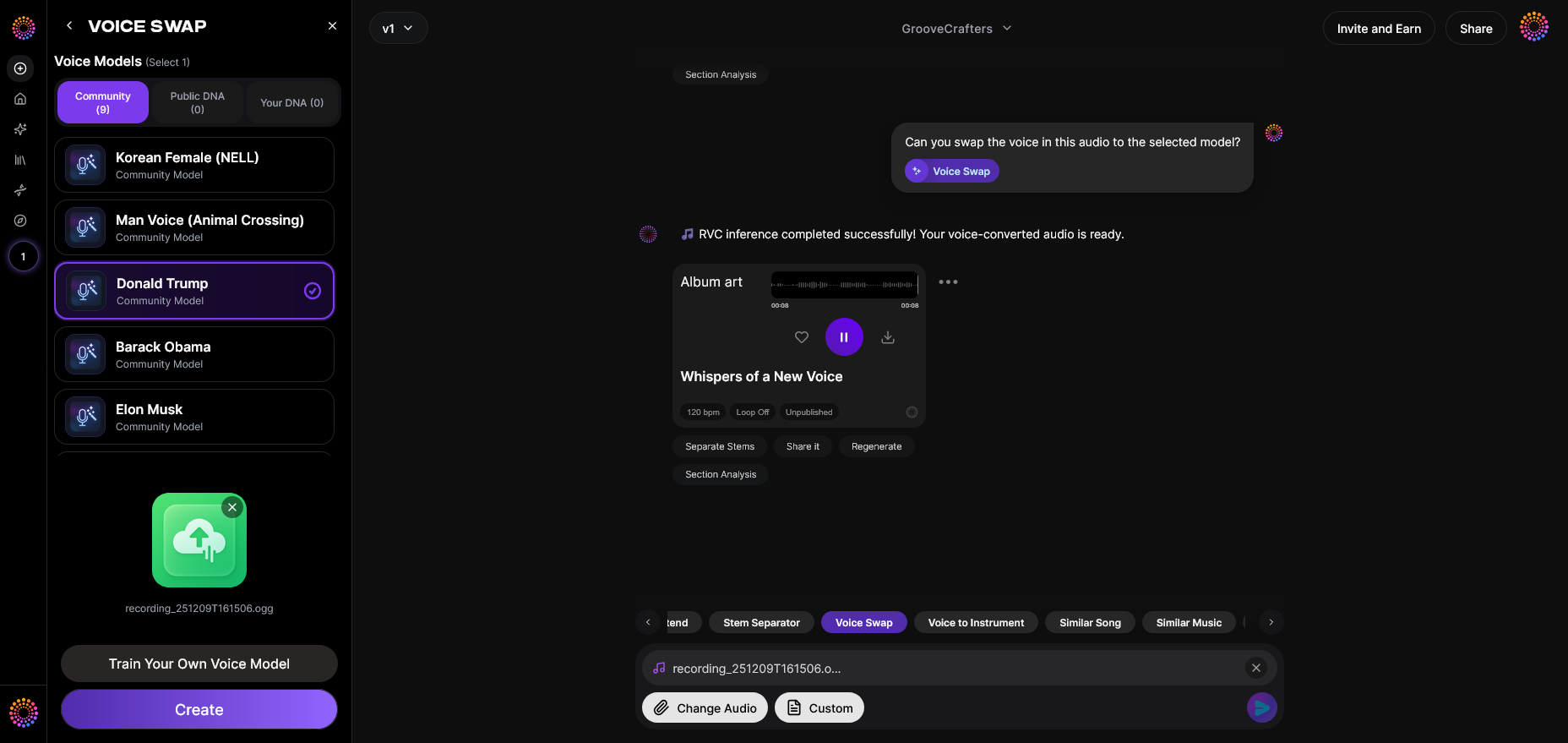
Soundverse Voice Swap is designed specifically for producers who want quality, flexibility, and performance accuracy. Here’s how to bring your vocal ideas to life using this powerful feature:
Step 1: Feature Overview — Access Voice Swap Tool
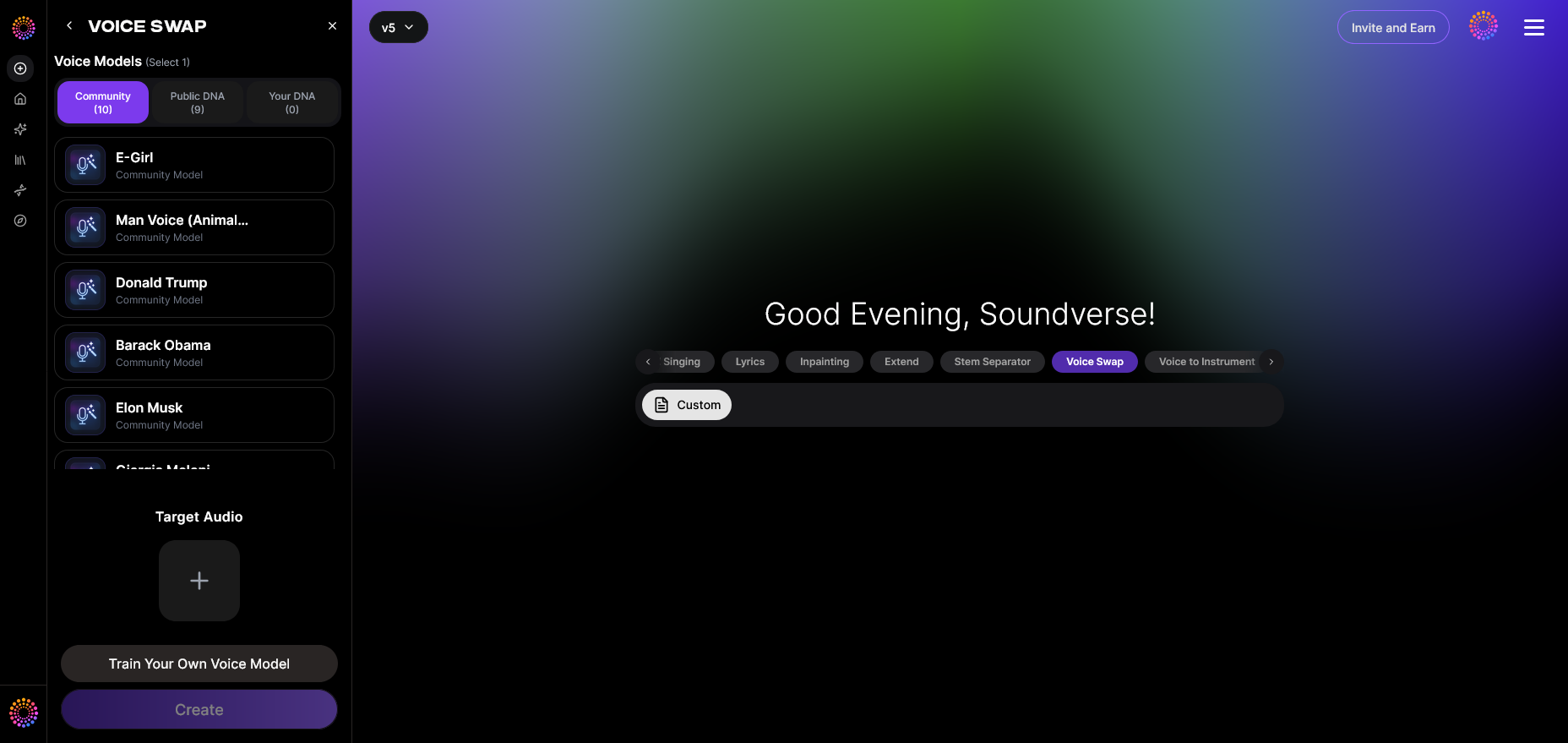
Voice Swap is accessible directly through the Soundverse AI platform. Once logged in, navigate to the Voice Swap tool to start. This is where you’ll transform existing vocals using community or custom voices.
Step 2: Upload Audio — Add Your Source Vocal Track

Upload any audio containing vocals you wish to transform. This could be a demo, recorded performance, or isolated vocal from a separated stem using the Stem Separator tool. Soundverse supports both recorded and produced tracks for processing.
Step 3: Target Voice Selection — Choose the Target Voice or Style
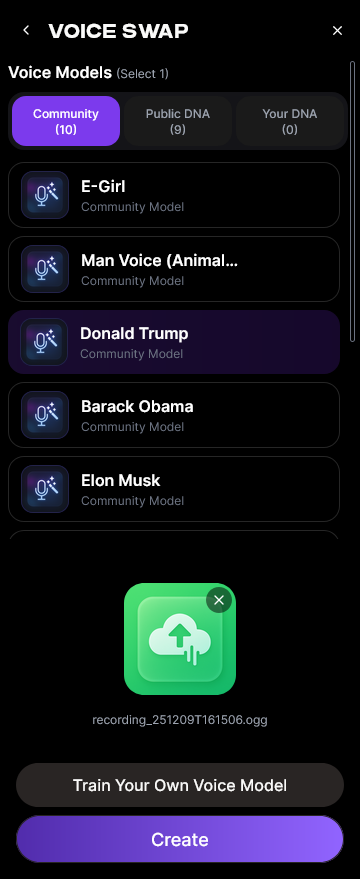
Select your desired voice model. You can use Community Voices for popular celebrity or character tones, or your Personal DNA if you’ve created custom vocal identities. This step defines the stylistic personality of your new vocal performance.
Step 4: Generation — Apply Voice Swap Transformation
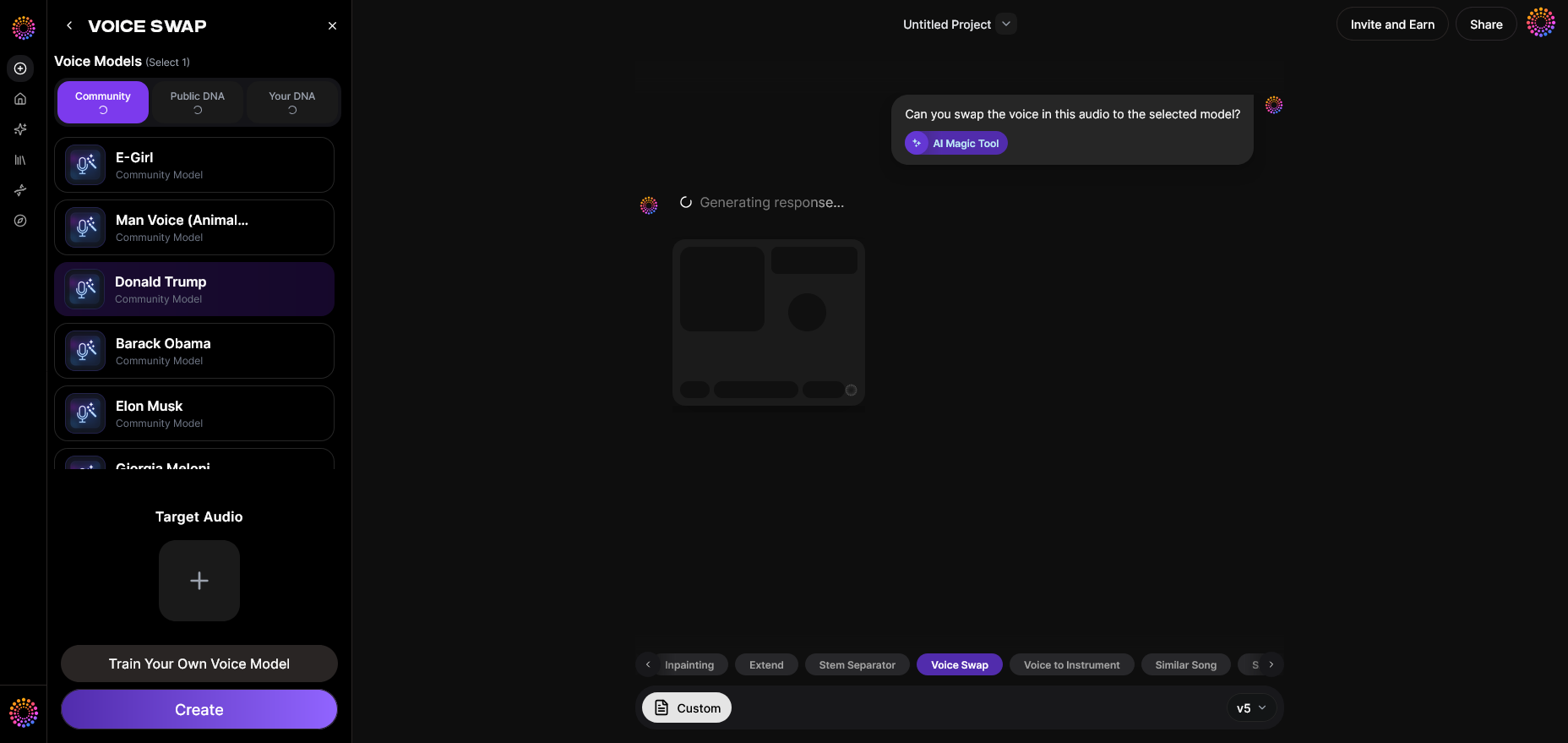
After setting the target, initiate the generation process. Soundverse’s AI performs asynchronous transformation, replacing the vocal identity while preserving performance nuances, timing, and emotion. This stage is where your remix or demo comes to life with a new voice.
Step 5: Download Result — Export the Final Audio
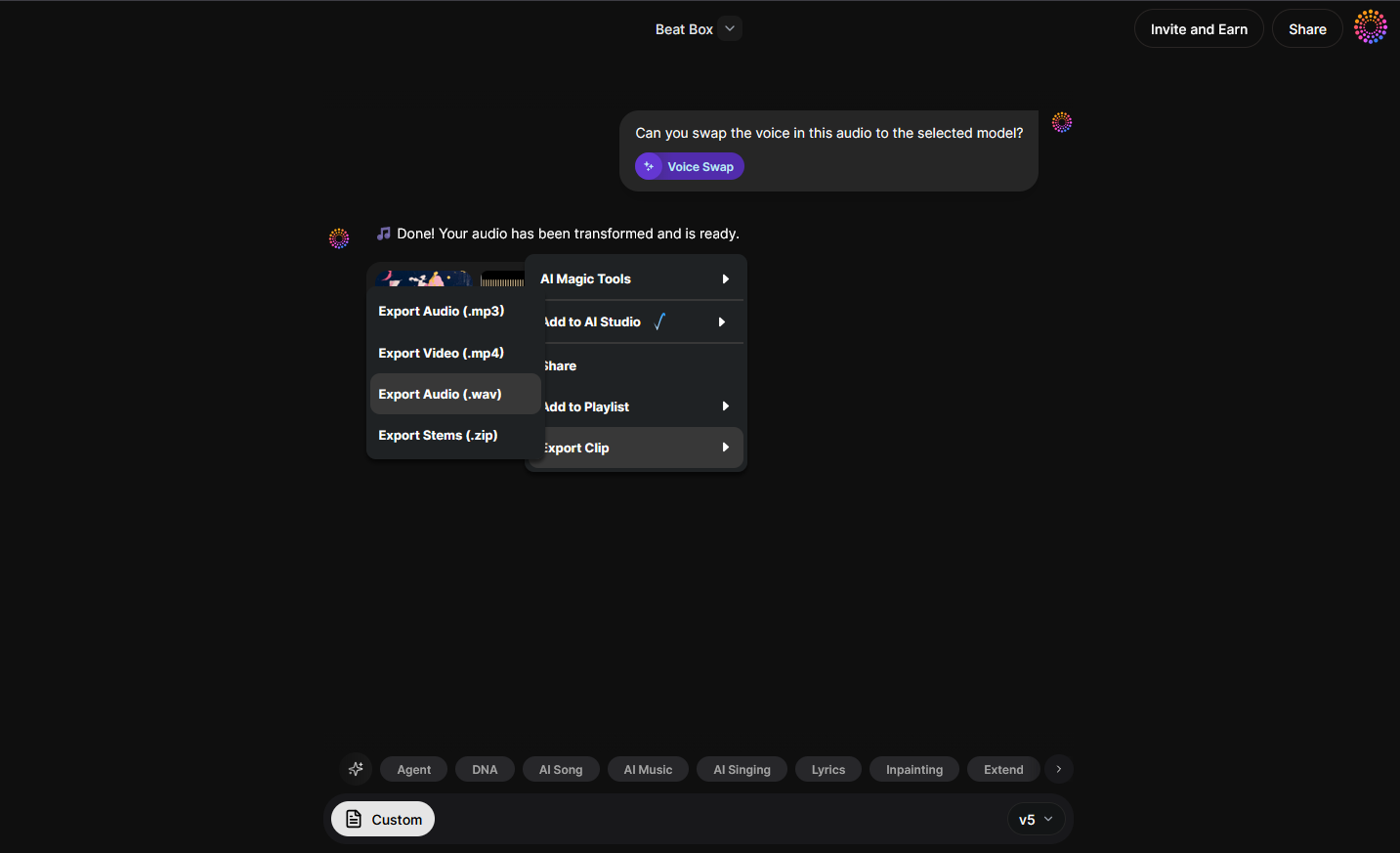
Once processing completes, export your resulting audio. The voice-swapped track can be integrated into your remix session or used as a demo guide. You can refine sections using Inpainting, Soundverse’s tool for precision editing and lyric modifications.
Pro Tips for Perfect AI-Enhanced Remixes
- Combine multiple Soundverse tools: Use Stem Separator to extract vocals cleanly before swapping voices. Pair with Inpainting to edit sections afterward.
- Experiment with different voice models: Test celebrity voices for parody versions or artistic reinterpretations.
- Maintain emotional consistency: Voice swap preserves original performance nuances—leverage this by ensuring your source recording captures expressive timing.
- Enhance demos further: Use the Similar Singing Generator to create new vocal lines that match tone and emotion for additional harmony or call-and-response sections.
- Stay inspired: Check out How AI-Generated Music is Transforming the Music Industry to learn how automation and human creativity intersect.
- For genre-based performance effects, watch our Soundverse Deep House creation guide.
The New Era of Demo Creation and Remix Vocals in 2026
Compared to 2024 and 2025, where most AI music tools focused on instrumental generation, 2026’s trend emphasizes vocal identity manipulation. Voice-driven remixing tools like Soundverse have enabled producers to create genre-crossing mashups, emotionally dynamic reworks, and high-quality demos with minimal resources.
Soundverse stands out because of its Voice-to-Voice conversion accuracy — it doesn’t distort pitch or flatten emotion. Instead, it faithfully carries over the expressive performance from the original singer into the new vocal identity. This level of preservation is key to producing natural-sounding remixes and demos.
Why Soundverse Voice Swap Leads the Pack
Unlike basic AI voice changers that alter pitch or timbre, Soundverse’s Voice Swap is designed for professional production. It supports Community Voices (famous or stylized tones), Public DNA, and Personal DNA, allowing for complete customization. You can craft unique vocal identities for future tracks, character projects, or demo showcases.
Soundverse also integrates seamlessly with its ecosystem of AI magic tools—like Stem Separator and Inpainting—described in Soundverse AI Magic Tools: Create Content Quickly with AI. This makes it more than a voice swapper; it becomes an end-to-end production assistant.
For creative professionals seeking alternatives, Mubert Alternatives: Soundverse highlights why producers increasingly choose Soundverse for multi-feature versatility, and Soundraw Alternative details its advanced toolkit integration for vocal and instrumental generation.
Try Voice Swap and Remix Like Never Before!
Transform your demos and remixes instantly with Soundverse’s voice swap feature. Experiment with different vocal tones, styles, and creativity without ever needing a vocalist!
Start Creating with Voice Swap
- Soundverse Introduces Stem Separation AI Magic Tool - Discover how Soundverse’s AI can isolate vocals, instruments, and beats to make remixing effortless.
- Soundverse Saar: AI Voice Assistant - Learn how Soundverse Saar helps creators find the perfect AI voice to match any genre or vibe.
- AI Ranks Soundverse’s AI Singer #1: The Ultimate AI Singing Platform Dominating 2025 - Explore how Soundverse’s AI singer technology is changing how producers and artists create vocals.
- Soundverse AI Revolutionizing Music Creation for New-Age Content Creators - Uncover the future of creative music making with AI that adapts to your sound exploration needs.
Here's how to make AI Music with Soundverse
Video Guide

Here’s another long walkthrough of how to use Soundverse AI.
Text Guide
- To know more about AI Magic Tools, check here.
- To know more about Soundverse Assistant, check here.
- To know more about Arrangement Studio, check here.
Soundverse is an AI Assistant that allows content creators and music makers to create original content in a flash using Generative AI.
With the help of Soundverse Assistant and AI Magic Tools, our users get an unfair advantage over other creators to create audio and music content quickly, easily and cheaply.
Soundverse Assistant is your ultimate music companion. You simply speak to the assistant to get your stuff done. The more you speak to it, the more it starts understanding you and your goals.
AI Magic Tools help convert your creative dreams into tangible music and audio. Use AI Magic Tools such as text to music, stem separation, or lyrics generation to realise your content dreams faster.
Soundverse is here to take music production to the next level. We're not just a digital audio workstation (DAW) competing with Ableton or Logic, we're building a completely new paradigm of easy and conversational content creation. TikTok: https://www.tiktok.com/@soundverse.ai Twitter: https://twitter.com/soundverse_ai Instagram: https://www.instagram.com/soundverse.ai LinkedIn: https://www.linkedin.com/company/soundverseai Youtube: https://www.youtube.com/@SoundverseAI Facebook: https://www.facebook.com/profile.php?id=100095674445607
Join Soundverse for Free and make Viral AI Music

We are constantly building more product experiences. Keep checking our Blog to stay updated about them!