Top AI Voice Synthesis Apps for Creators
The top AI voice synthesis apps for artists, sorted by job: singing synths, text-to-song, your own voice and speech, with each app's commercial terms.
The top AI voice synthesis apps for creators depend on the job. To sing notes and lyrics you write, pick Synthesizer V, ACE Studio or VOCALOID7. For full songs with vocals from text, try Soundverse, Suno or Eleven Music. To re-sing a take in your own voice, use Kits.ai, Voice-Swap or Soundverse. For voiceovers, use ElevenLabs or Soundverse.
For artists, singers and producers, here's what each app does, how easy it is, what it exports, what its terms say about commercial use and who it suits, checked on 19 November 2026. For prices, see our voice cloning cost comparison. We make Soundverse, so its entries stick to our own pages.
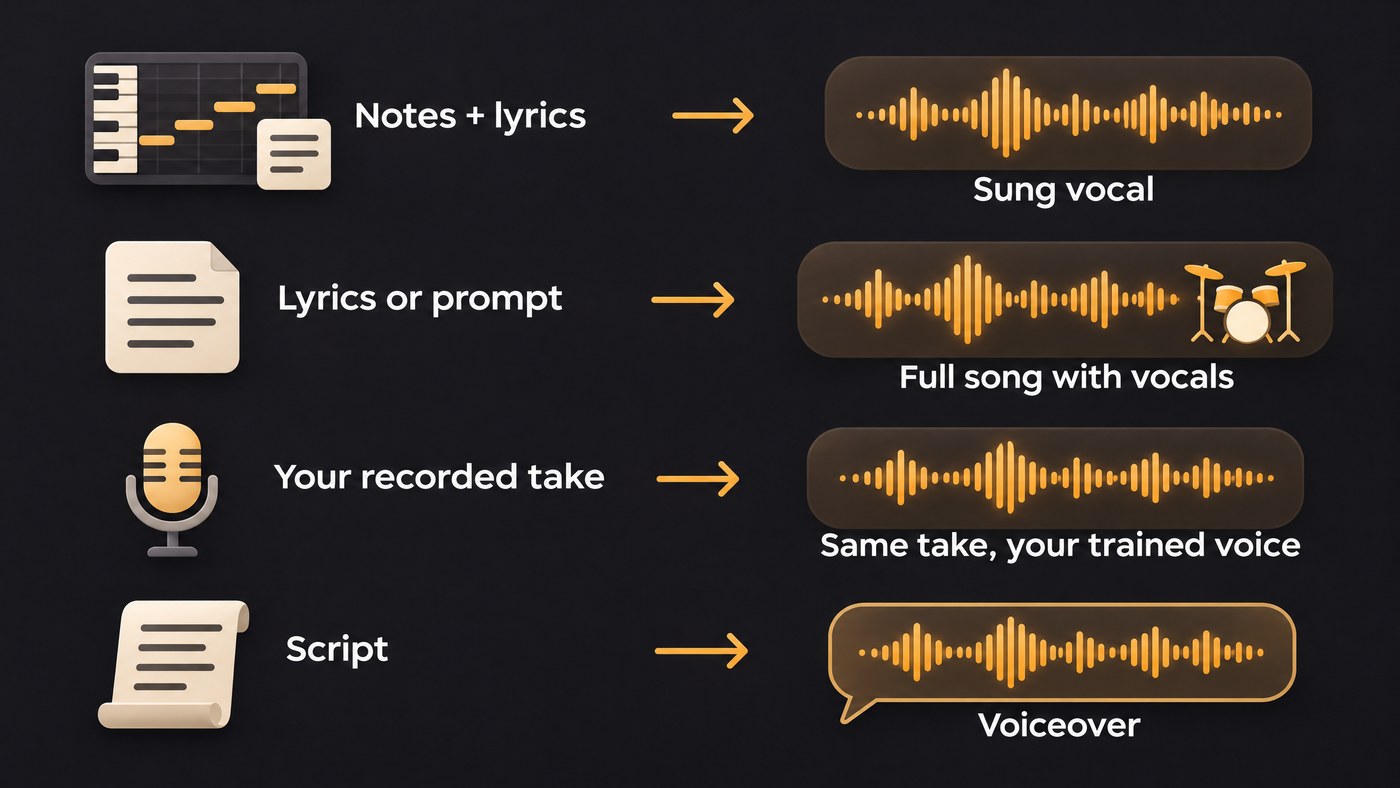
Singing synthesis from notes and lyrics
You write the melody as MIDI, type the lyrics, and the software sings exactly that: most control, most work.
Synthesizer V Studio 2 Pro (Dreamtonics)
- What it does: you draw notes, type lyrics in English, Japanese, Mandarin, Cantonese, Spanish or Korean, then shape pitch, vibrato, breathiness and phoneme timing.
- Ease of use: familiar if you write in a piano roll; runs standalone or as a VST3, AU, AAX or ARA plugin.
- Export: WAV, FLAC or MP3, plus MIDI and stems.
- Commercial use: the Pro edition is listed with "unlimited commercial use" and "Full commercial licensing for most voices". Dreamtonics' site blocked our checker, so these come from an Internet Archive copy of its page captured 15 November 2026.
- Suits: producers who want to direct every syllable.
ACE Studio
- What it does: load an AI voice on a track, write MIDI notes and paste in the lyrics; MIDI and MusicXML files import.
- Ease of use: a DAW-style editor, easiest if you think in MIDI.
- Export: the master or each track as audio (ACE recommends 24-bit WAV for masters), and MIDI with lyrics and phonemes.
- Commercial use: ACE's License & Copyright page says: "You may use outputs created with ACE Studio in commercial or non-commercial projects, unless a specific feature, model, voice, instrument, or third-party service states otherwise on this page." A few voices carry a "third-party license required" tag.
- Suits: producers who want note-level vocals and a voice changer in one app.
VOCALOID7 (Yamaha)
- What it does: notes and lyrics in, a sung vocal out, with lyrics that can mix Japanese, English and Chinese.
- Ease of use: Cubase users enter notes and lyrics in the Key Editor; other DAWs load it as VST3, AU or ARA2. There's a trial and a standalone Lite editor.
- Export: WAV or MP3, MIDI and VPRX files.
- Commercial use: Yamaha's VOCALOID7 FAQ says: "In general, original songs created using the Yamaha voicebank included with VOCALOID7 may be used commercially without special permission or additional fees." The EULA lists exceptions.
- Suits: Cubase users and multilingual writers.
For a singing-only shortlist, read the best AI singing generator platforms for independent artists.
Text-to-song with vocals
Lyrics or a description in, a finished song with vocals out: fastest to hear an idea, least note-level control.
Soundverse AI Song Generator
- What it does: Describe mode writes lyrics from your idea; Custom mode sings your lyrics word for word (up to 3,000 characters on paid plans). AI Singing Generator returns an a cappella instead.
- Ease of use: browser-based; songs arrive with a title and cover art. Free runs Soundverse v6, and Soundverse v9 is on Pro and Max.
- Export: MP3 on Free; paid plans add WAV and stem downloads.
- Commercial use: Licensing is set by plan: the Free plan is for personal use, and the Creator plan comes with a royalty-free license.
- Suits: songwriters who want to hear finished lyrics sung.
Suno
- What it does: Suno's homepage calls it an AI music generator that starts from a melody, your lyrics or a feeling; its Voices feature sings what you write in your own recorded voice.
- Ease of use: prompt-first, on web, iOS and Android.
- Export: since 3 September 2026, downloads are capped by plan, and stems count as part of a song's one download.
- Commercial use: Suno's downloads FAQ lists "Free: 0 downloads" and "Pro: 20 downloads per month, with commercial use rights", with Premier at 60.
- Suits: artists on a paid plan who want quick full-song drafts.
Eleven Music (ElevenLabs)
- What it does: songs in any style and length from prompts, with an editor for lyrics, sections and structure.
- Ease of use: prompt-first, with an optional short audio reference.
- Export: an audio download within monthly limits; Free can't download.
- Commercial use: ElevenLabs' Music Terms (last updated 9 October 2026) mark Music Streaming Distribution "Prohibited" on Free and Starter and "Permitted" from Creator up. Except on Enterprise Music, media use excludes film, TV, radio and studio games.
- Suits: artists already on ElevenLabs.
Udio, for now
Udio's Terms of Service (last revised 12 November 2025) say "you may use Output solely for your personal and non-commercial purposes, provided that you may not download any copies of your Output from the App for any purpose." Until that changes, it's not an option for a release.
Voice conversion and cloning of your own voice
You sing, and the app swaps the timbre for a trained voice model while keeping the phrasing. Only clone your own voice, or one whose owner has given explicit consent.
Kits.ai
- What it does: its Voice Changer turns a vocal into another voice while keeping the delivery, including custom voices trained on audio you own.
- Ease of use: upload an MP3 or WAV, and Kits can isolate the vocal from a full mix.
- Export: free accounts can't download; paid tiers get monthly download minutes.
- Commercial use: for models trained on content you have the rights to, Kits' Help Center (5 August 2026) says "you have a license to use the output of your AI voice models however you like".
- Suits: singers who want harmonies, doubles or demos in their own voice.
Voice-Swap
- What it does: converts vocals into its session singer and featured artist voices, or a custom model of your voice, including through a VST/AU plugin.
- Ease of use: once the plugin is installed, it works inside your DAW.
- Commercial use: the Voice-Swap FAQ says: "Yes, you can use Session Singers AI audio commercially without extra payment, but you should generate a free license." Featured artist voices need a paid license, and the FAQ doesn't cover custom models, so check the Terms first.
- Suits: producers who want conversion inside the DAW.
Soundverse Train Voice Clone and Voice Swap
- What it does: Train Voice Clone builds a singing voice from one recording with at least 15 seconds of singing, and AI Song Generator sings new songs in it. Train Voice Model learns your voice from 10 minutes or more of clean, dry solo recordings, for re-singing existing vocals in Voice Swap.
- Ease of use: training starts only once you confirm the voice is yours or that the singer gave explicit consent.
- Plans: both training tools need Creator or above; Voice Swap with Community and Public voices runs on every plan. Commercial use is set by plan, as above.
- Suits: singers who want demos in their own voice.
Speech voices for intros and voiceovers
ElevenLabs Text to Speech
- What it does: reads a script in a library voice or a clone of your own speaking voice; ElevenLabs' Professional Voice Cloning docs say those clones don't support singing yet.
- Ease of use: paste a script, pick a voice, generate.
- Export: MP3, WAV, M4A or FLAC from your history.
- Commercial use: ElevenLabs' Help Center says: "All paid plans include a commercial license, provided you're not using Beta Services." The free plan has none and requires attribution.
- Suits: podcast intros, release trailers and channel voiceovers.
Soundverse AI Speech Generator
- What it does: reads up to 3,000 characters per run in one of its built-in voices, including Indian English narrators, many of whom also read Hindi. It doesn't clone voices.
- Ease of use: play each voice's sample, then download an MP3 or generate straight onto your AI Studio timeline. Commercial use is set by plan.
- Suits: a spoken intro built in the same project as the music, with the AI Speech Generator.
What Are the Best AI Platforms for High-Quality Voice Synthesis?
Quality means something different for each job:
- Singing synthesis: note-by-note control of pitch, timing, vibrato and breaths.
- Text-to-song: lyrics sung word for word, and a vocal that holds up in the chorus.
- Your own voice: the training audio matters as much as the app. Soundverse asks for 10 minutes or more of clean solo recordings for Train Voice Model; ElevenLabs recommends at least 30 minutes of speech for a professional clone.
- Speech: natural pacing on your real script.
Run the same eight bars or 60-word script through two apps and compare on headphones. For the stricter bar a clone must clear in professional work, read which AI voice apps allow professional-grade vocal cloning.
Where Soundverse fits
Soundverse is an AI music platform that takes you from idea to audience, built for independent artists who release music. It covers three of the four jobs above: songs with vocals from your lyrics, your own voice through Train Voice Clone and Voice Swap, and narration from AI Speech Generator. Results from all three can sit in AI Studio, on one timeline with the music.
It isn't a note-by-note singing synth; to redraw the vibrato on one held note, use Synthesizer V, ACE Studio or VOCALOID7. Licensing is set by plan: the Free plan is for personal use, and the Creator plan comes with a royalty-free license.
This walkthrough covers Soundverse's Create tools, with AI Song Generator from 0:05 and AI Speech Generator from 0:39.
FAQ
Which AI voice app is best for singing my own lyrics? With a MIDI melody, a singing synth such as Synthesizer V, ACE Studio or VOCALOID7 sings exactly your notes. With lyrics only, a text-to-song app writes the melody; Soundverse's Custom mode sings your words as written.
Can I clone a singer's voice if they agree? It depends on the app. Soundverse trains a clone once you confirm the voice is yours or that the singer gave explicit consent, while ElevenLabs' professional clones are limited to your own voice. Never clone a voice without its owner's permission.
Are free plans enough to release music? Usually not. Suno's free plan has no downloads, ElevenLabs' free plan has no commercial license, Kits.ai free accounts can't download, and Soundverse's Free plan is for personal use. Test on free; release from a plan that allows it.
Sign up for Soundverse free and hear your lyrics sung today. More vocal guides on the Soundverse blog.
