Step-by-Step: Creating YouTube-Safe AI Music That Never Gets Claimed
Learn how to create AI music for YouTube that stays claim-free using Soundverse Trace.
Step-by-Step: Creating YouTube-Safe AI Music That Never Gets Claimed
In 2026, mastering AI music creation for YouTube has become a must for anyone producing digital content. With YouTube’s increasingly advanced copyright detection algorithms, creators need more than just originality—they need verifiable proof that their music is copyright free. That’s where tools like Soundverse Trace step in, forming the perfect solution for generating royalty-free AI music that’s completely YouTube-safe.
Why creators need YouTube-safe AI music in 2026
Over the past two years (2024–2025), AI-generated music exploded across platforms. By 2026, every major content creator understands that simply using an AI music generator isn’t enough. YouTube’s Content ID system now detects microscopic similarities between uploaded tracks and copyrighted catalogs. If your track shares even a small sonic pattern with existing music, your monetization can be blocked or worse, claimed by a rights holder.
That’s why sound provenance, transparency, and verifiable datasets have become central to YouTube-safe audio production. AI tools must now demonstrate not only creativity but traceability.
How to make YouTube-safe AI music with Soundverse Soundverse Trace
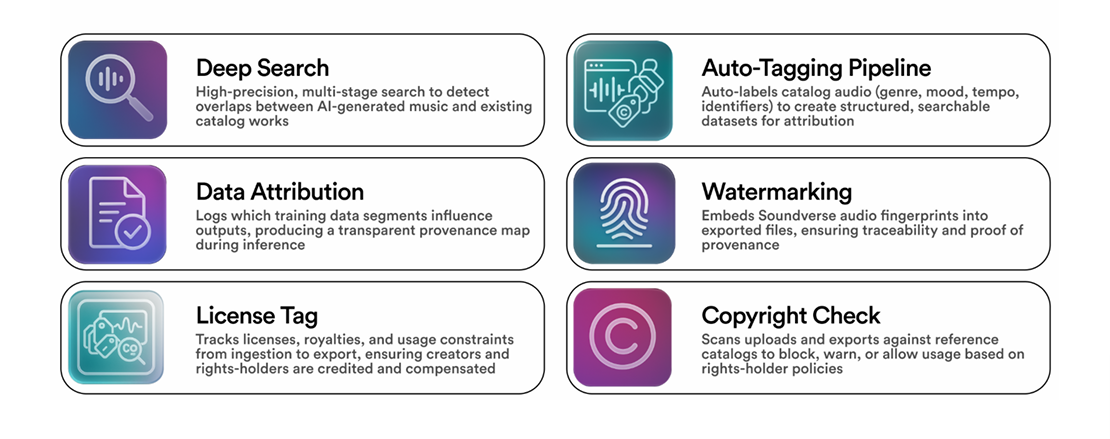
Soundverse Trace is the industry’s trust layer designed to guarantee the authenticity and legality of AI music. It doesn’t just create sounds; it secures them across their entire lifecycle.

What Soundverse Trace offers
Soundverse Trace embeds a multi-stage verification system into every generated track. Its core capabilities include:
- Deep Search: Performs one-to-one and one-to-many scans to detect overlaps between AI outputs and copyrighted material.
- Data Attribution: Logs precisely which training data influenced the final result so creators can trace their song’s lineage.
- Audio Watermarking: Inserts inaudible security fingerprints into your exported tracks, ensuring your content is uniquely identifiable if it’s ever disputed.
- License Tagging: Attaches rights and metadata tags to your music from ingestion to export, preserving all usage details.
These systems combine to make sure your AI-generated background tracks, soundscapes, or cinematic instrumentals remain certified safe on platforms like YouTube, Instagram, and TikTok.
Soundverse Trace plays a central role in Soundverse’s Ethical AI Music Framework, which ensures every generated song respects artist rights and consent throughout its development. This comprehensive infrastructure has also inspired other Soundverse AI advancements such as the AI Music Generator and the Similar Song Generator.
For a deeper dive, watch our guide on creating Deep House music or explore the Soundverse Tutorial Series - How to Make Music.
Step 1: Define your creative vision
Start by understanding what kind of music you want to generate. Are you looking for copyright free background music for vlogs, royalty-free ambient soundscapes for travel videos, or upbeat intro music for tech reviews? In 2026, trends lean heavily toward cinematic and mood-based tracks that feel distinct yet algorithmically safe.
To form ideas, creators often turn to Soundverse’s library of text-to-music prompts, such as the curated lists from 100 Text-to-Music Prompts That Will Help You Create Viral Music or thematic guides like How to Create Country Music with Soundverse AI. These starter references help refine tone and tempo before generation.
Step 2: Use the AI Music Generator to create your track
Head to the Soundverse AI Music Generator and input a descriptive prompt—something like “energetic synthwave for gaming montages” or “soft acoustic atmosphere for daily vlogs.” The generator converts your text into instrumental sound, free from vocal components, and optimized for looping.
Once processed, review the output against your intended vibe. If the sound feels off-brand, simply adjust the prompt by tweaking genre or mood. For inspiration, guides like Now Generate Music with Filters Such As Genre, Theme, Instruments, or Even Vibe show how filter layering strengthens audio direction.
Step 3: Run deep verification with Soundverse Trace
After generation, upload your track into Soundverse Trace. This step ensures that the result passes rigorous deep search and provenance verification. The system asynchronously analyzes the waveform against global databases, detecting potential overlaps or derivative data samples.
The Data Attribution layer specifies which sources influenced your track, confirming legality. For YouTube creators, this transparency matters—it's your evidence in case of any copyright claim.
Step 4: Apply watermarking and license tagging
Once verification is complete, Soundverse Trace automatically embeds an Audio Watermark—an inaudible fingerprint that future-proofs the sound. Every export also carries a License Tag, listing usage permissions and metadata to ensure your music remains documented.
This combination prevents third-party misuse, helps in takedown automation requests, and authenticates your ownership if YouTube’s system ever flags your work.
Step 5: Export and upload to YouTube
Download the verified file from Soundverse in your chosen format. Before uploading to YouTube, verify the attribution record issued by Trace. Include the metadata tag in the video description as proof of provenance.
Your AI-generated track now qualifies as verified YouTube-safe audio. When YouTube scans it through Content ID, the embedded watermark and Trace tag ensure that your content stays untouched by false claims.
For long-form vloggers or filmmakers seeking variety, combining tracks made with Soundverse Trace and remix tools like the Stem Separation AI Magic Tool offers dynamic flexibility without legal risk.
To protect your channel even further, explore insights from AI slop on YouTube and how to protect your channel in 2026 - MilX and stay informed through YouTube Policies Crafted for Openness.
Pro Tips for flawless AI music creation
- Avoid vocal mimicry – Even if you want human texture, stay purely instrumental. Human-like voices may resemble existing singers and trigger claims.
- Loop intelligently – When producing looping background tracks, the AI Music Generator provides settings for seamless transitions across loops.
- Test variations – Generate multiple versions to find the most unique sonic identity.
- Maintain metadata integrity – Do not strip license tags from files before uploading; they’re essential for future dispute protection.
- Stay updated on YouTube policies – As copyright frameworks evolve in 2026, ensuring your tracks link back to transparent AI datasets remains the best safety mechanism.
Why Soundverse Trace matters in 2026
As AI-powered sound creation accelerates, platforms demand traceable ownership like never before. Soundverse Trace acts as a verification backbone, connecting innovation with compliance. It goes beyond creating no copyright sound—it ensures enduring trust for every generated beat.
Creators adopting Soundverse today position themselves for sustainable success. By combining creative freedom with technological accountability, they help build the ethical future of AI-generated music.
Start Creating Copyright-Free AI Music Today
Generate unique, royalty-free tracks for your YouTube videos in minutes using Soundverse’s intelligent music creator. No claims, no takedowns—just effortless creativity backed by cutting-edge AI.
Related Articles
- Enhancing YouTube Content with Royalty-Free and Copyright-Free Music Using Soundverse AI: Discover how Soundverse can help you enhance your YouTube videos with safe, copyright-free AI-generated music.
- Navigating the World of Royalty-Free and Copyright-Free Music Using Soundverse AI: Learn how to choose and use royalty-free music effectively for hassle-free content creation.
- Generate AI Music with Soundverse Text-to-Music: Explore Soundverse’s text-to-music feature and instantly generate tracks that match your creative vision.
- What AI Can Generate Songs: Find out which AI tools are best for automatic song creation—and how Soundverse stands out.
Here's how to make AI Music with Soundverse
Video Guide

Here’s another long walkthrough of how to use Soundverse AI.
Text Guide
- To know more about AI Magic Tools, check here.
- To know more about Soundverse Assistant, check here.
- To know more about Arrangement Studio, check here.
Soundverse is an AI Assistant that allows content creators and music makers to create original content in a flash using Generative AI. With the help of Soundverse Assistant and AI Magic Tools, our users get an unfair advantage over other creators to create audio and music content quickly, easily and cheaply. Soundverse Assistant is your ultimate music companion. You simply speak to the assistant to get your stuff done. The more you speak to it, the more it starts understanding you and your goals. AI Magic Tools help convert your creative dreams into tangible music and audio. Use AI Magic Tools such as text to music, stem separation, or lyrics generation to realise your content dreams faster. Soundverse is here to take music production to the next level. We're not just a digital audio workstation (DAW) competing with Ableton or Logic, we're building a completely new paradigm of easy and conversational content creation.
TikTok: https://www.tiktok.com/@soundverse.ai
Twitter: https://twitter.com/soundverse_ai
Instagram: https://www.instagram.com/soundverse.ai
LinkedIn: https://www.linkedin.com/company/soundverseai
Youtube: https://www.youtube.com/@SoundverseAI
Facebook: https://www.facebook.com/profile.php?id=100095674445607
Join Soundverse for Free and make Viral AI Music

We are constantly building more product experiences. Keep checking our Blog to stay updated about them!
Image Steps: []