Soundverse API: your first AI song in 3 API calls
Create a key, POST /v7/generate/song, poll, then download. In the walkthrough a v7 song took 71 seconds and cost $0.12. Curl and Python examples inside.
Quick answer: The Soundverse API turns a prompt into a finished song in three calls: POST /v7/generate/song to start it, GET /v1/generations/{job_id} to poll it, and GET /v1/files/{file_id}/download to fetch the audio. In the walkthrough video the song was ready 71 seconds after the request and cost $0.12 (12 tokens), a 3:03 FLAC. It's for developers adding music to an app, product or pipeline. You pay per call from a prepaid balance, with no separate subscription plan required to start.
Sign-up to a finished song in under two minutes, first in Postman, then in Python.
Before you start: account, balance and key
Everything starts at platform.soundverse.ai, the developer console with the docs, pricing, API keys and billing.
- Sign up with Google, Apple, Microsoft or email, then set up your company account. The company name is optional.
- Add balance. 1 token = $0.01, and a v7 song costs 12 tokens ($0.12).
- Create an API key on the API Keys page. It's shown only once, so copy it right away.
Every request except the health check sends the key as a bearer token in the Authorization header. Keys in the docs' examples start with sksoundverse_. The examples below use YOUR_API_KEY as a placeholder. A missing or malformed header returns 401 UNAUTHENTICATED; a revoked key returns 401 INVALID_API_KEY.
 One prompt in, one finished song out: vocals, instruments and arrangement.
Call 1: start the song
Send your prompt, and optionally your own lyrics, to the v7 song route. The base URL is https://apiv2.soundverse.ai.
curl -X POST https://apiv2.soundverse.ai/v7/generate/song \
  -H "Authorization: Bearer YOUR_API_KEY" \
  -H "Content-Type: application/json" \
  -H "Idempotency-Key: first-song-001" \
  -d '{
    "prompt": "uplifting indie pop, female vocals",
    "lyrics": "walking through the city lights..."
  }'
It returns 201 straight away with {"job_id": "...", "status": "queued"}. The song is made in the background. The Idempotency-Key header is optional but worth sending: if your client retries with the same key, you get the original task back instead of a second song and a second charge.
Call 2: poll until it's done
Ask for the job's status with the job_id you got back.
curl https://apiv2.soundverse.ai/v1/generations/JOB_ID \
  -H "Authorization: Bearer YOUR_API_KEY"
The status moves through queued, processing, and then completed or failed. In the walkthrough it reached completed after 71 seconds. If you'd rather not poll, GET /v1/generations/{id}/stream sends live progress as server-sent events. Billing settles either way, even if you never poll to the end.
Call 3: download the audio
A completed generation returns one or more output.assets, and each asset carries a durable file_id. Pass it to the download route:
curl https://apiv2.soundverse.ai/v1/files/FILE_ID/download \
  -H "Authorization: Bearer YOUR_API_KEY"
You get back a short-lived signed link scoped to your account; in the walkthrough it was valid for one hour. Don't open output.assets[].url directly. It's a private storage locator and returns ResourceNotFound in a browser.
The finished song is also saved to the Soundverse Library of the account that owns the key. API outputs are hidden from public and profile pages by default, and you can play them from the Library when you're signed in to that account.
The same three calls in Python
The walkthrough repeats the flow in about 20 lines of Python. This version uses the Requests library.
import time
import requests

API = "https://apiv2.soundverse.ai"
HEADERS = {"Authorization": "Bearer YOUR_API_KEY"}

job = requests.post(  # call 1: start the song, get a job_id straight away
    f"{API}/v7/generate/song",
    headers={**HEADERS, "Idempotency-Key": "first-song-001"},
    json={"prompt": "uplifting indie pop, female vocals",
          "lyrics": "walking through the city lights..."},
).json()

while True:  # call 2: poll until the job finishes
    task = requests.get(f"{API}/v1/generations/{job['job_id']}", headers=HEADERS).json()
    if task["status"] in ("completed", "failed"):
        break
    time.sleep(5)

file_id = task["output"]["assets"][0]["file_id"]  # call 3: signed download link
link = requests.get(f"{API}/v1/files/{file_id}/download", headers=HEADERS).json()
print(link)  # a short-lived signed link to the audio
In production, check for failed before reading output, and keep the key on your server, never in client code.
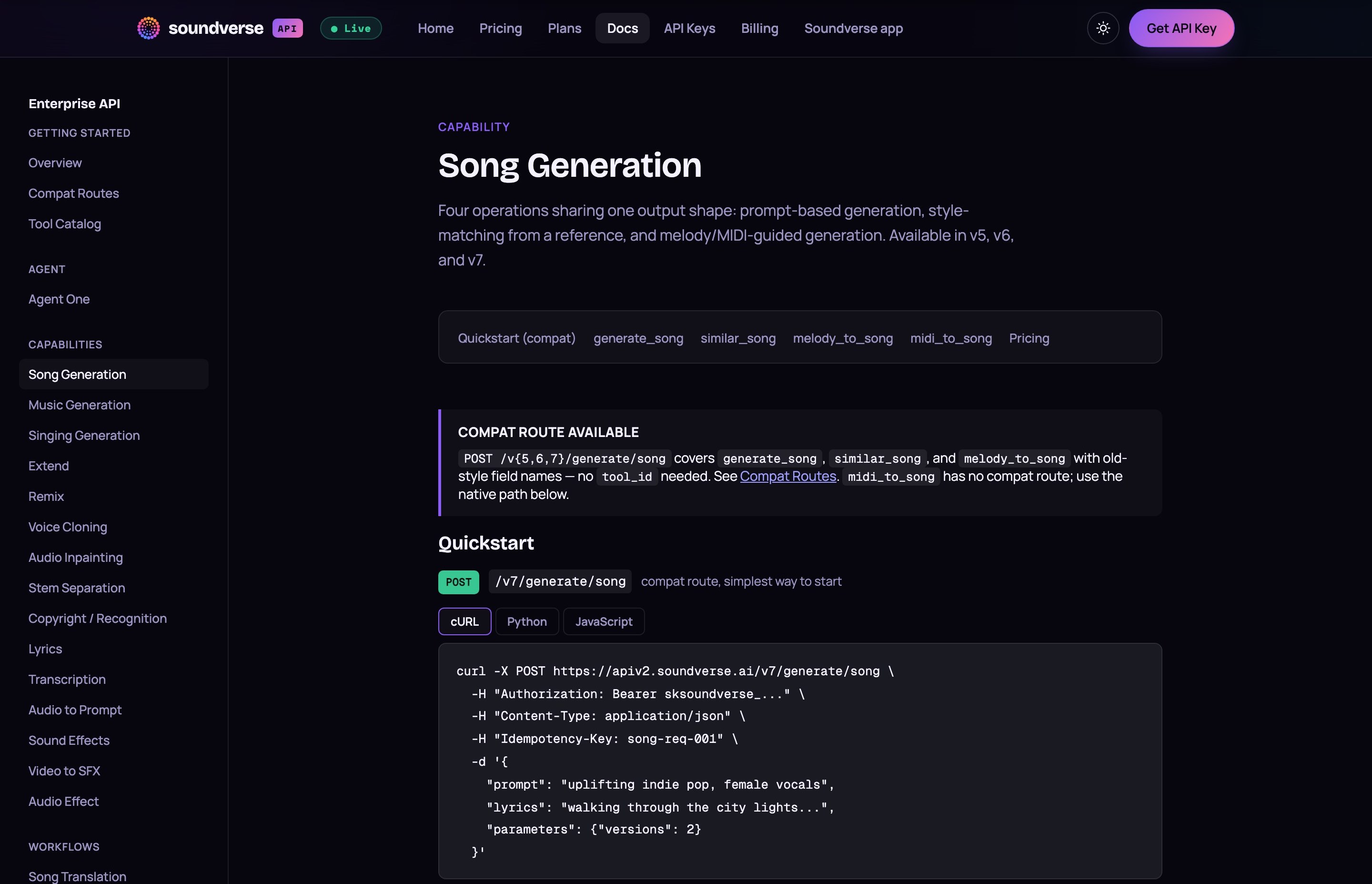 The docs' quickstart: one POST to /v7/generate/song, in cURL, Python or JavaScript.
What a call costs
Prices are per call, in USD, by capability and licence tier, and every call shows up in Billing. The walkthrough's song appeared there at $0.12. These are the representative prices on the platform's pricing page as of November 2026:
| Capability | Version | Royalty-Free | Standard | Distribution | Sync | Master |
|---|---|---|---|---|---|---|
| Song generation | v7 | $0.12 | $0.25 | $0.27 | $0.67 | $1.67 |
| Music generation | v5 / v6 / v7 | $0.07 | $0.11 | $0.14 | $0.28 | $0.70 |
| Singing generation | v5 / v6 / v7 | $0.09 | $0.14 | $0.18 | $0.36 | $0.90 |
| Remix | v5 / v6 / v7 | $0.30 | $0.30 | $0.30 | $0.30 | $0.30 |
| Stem separation | 2, 6 or 12 stems | $0.10 | $0.10 | $0.10 | $0.10 | $0.10 |
| Copyright check | v5 | $0.03 | $0.03 | $0.03 | $0.03 | $0.03 |
Song generation on older versions costs less at Royalty-Free: $0.07 on v5 and $0.10 on v6. Royalty-Free is the default when you don't set a licence. The others step up from there: Distribution covers releasing to streaming platforms, Sync covers film, TV, ads and games, and Master is a full, exclusive ownership transfer. Check the docs and the Terms of Service for what each tier allows. This isn't legal advice.
What else the API covers
The three calls above use a compat route, the simplest way to start. Under it sits one native endpoint, POST /v1/generations, which takes a tool_id for the capability you want. GET /v1/tools lists the tools your account can bill against, and GET /v1/account/balance returns what's left.
The docs cover these capabilities:
- Create: song generation (v5, v6 and v7), instrumental music, lyrics, singing, sound effects, and sound effects matched to a video.
- Edit: extend, remix, audio inpainting, stem separation and audio effects.
- Voice: voice cloning from a consented reference, then songs or singing in that saved voice.
- Analyze: transcription, audio to prompt and a copyright check.
- Workflows: multi-step routes such as Karaoke Instrumental, Song Translation and Humming to Song, billed per step.
- Agent One: Soundverse's AI music agent, in flash, standard and pro tiers, with an optional
max_budgetcap in cents.
Two errors are worth handling from day one. 402 InsufficientFunds means you need to top up. 429 RateLimited is retryable, and there are no rate-limit headers, so back off and retry with the same Idempotency-Key.
The Soundverse API platform announcement, from July 2025.
 Stem separation is one call: 2, 6 or 12 stems at $0.10.
FAQ
How much does one song cost through the API?
At the Royalty-Free tier, a song costs $0.12 on v7, $0.10 on v6 and $0.07 on v5, as of November 2026. Higher licence tiers cost more; the v7 table above has the full ladder.
Do I need a Soundverse subscription to use the API?
No. You add balance on the platform and each call is charged from it. The platform says no separate subscription plan is required to start. App plans such as Creator and Pro are listed on the main pricing page.
How long does a song take?
In the walkthrough, 71 seconds from request to completed. Poll or stream the job rather than waiting a fixed time.
Where do API-generated songs go?
They're saved to the Soundverse Library of the account that owns the API key, hidden from public and profile pages by default. Download them from your backend with the signed link, or play them from the Library.
My code uses the old endpoints. Do I need to rewrite it?
Not yet. Most old URLs and field names still work through a compatibility layer, and the docs' Compat Routes page lists them. Capabilities such as sound effects and audio to prompt are only on the native POST /v1/generations route.
Try it
Create a key at platform.soundverse.ai, paste it into the curl above, and poll: the walkthrough's song was done in 71 seconds. Prefer to make music from a chat instead of code? See the Soundverse MCP guide for Claude and ChatGPT, the [API overview](https://www.soundverse.
