Is AI Video Generation Becoming Standard for Independent Artists?
AI video generation is becoming standard for teasers, loops and visualizers, not yet for the main music video. Dated evidence, limits and a plan.
AI video generation is becoming standard for the short visuals around an independent release: teasers, loops, visualizers and vertical hook clips. It isn't yet standard for the main music video. As of November 2026, YouTube and Meta have built AI video into the apps artists post to, while many artists still film the performance itself.
"Standard" is a strong word, so here is a practical test with three parts. The tools sit inside the apps you already use. The industry has written rules for them. Listeners accept the result. Below is where each part stands, with sources and dates, followed by a plan you can use on your next single.
What the evidence shows in late 2026
The tools now live inside the apps you post to
On 16 September 2025, at Made on YouTube, YouTube announced Veo 3 Fast, a custom version of Google DeepMind's Veo 3 built into Shorts. YouTube's announcement describes free 480p clips with sound, made from your phone, rolling out first in the US, UK, Canada, Australia and New Zealand. On 19 May 2026, YouTube added remixing with Gemini Omni to Shorts Remix and the YouTube Create app, at no cost.
Meta took a similar step on 25 September 2025 with Vibes, a feed of AI videos in the Meta AI app. Its announcement says you can layer in music and cross-post to Instagram and Facebook Stories and Reels.
When the app you post a clip to can also generate it, AI video stops being a specialist tool.
Music delivery has a field for it
YouTube's help page on disclosing Gen AI usage for music content, checked in November 2026, lets music partners mark content as fully Gen AI, partly Gen AI or no Gen AI. Labels and distributors send it through DDEX ERN 4.3.2 or later, or YouTube's CSV templates, including the Music Video templates. If you upload yourself, you mark it in the attributes section of YouTube Studio.
The page's own example of partly Gen AI is a song made with 100% human-performed audio whose music video visuals come from a text-to-video model. That setup, your own song with generated visuals, now has its own place in the delivery spec.
YouTube is promoting the idea too. Its blog post of 14 November 2025 on its Latin Grammys exhibition in Las Vegas, built around a new era of the music video, describes attendees trying Google's Veo 3.1 with the help of Veo experts.
Artists already use AI in other parts of a release
The most useful recent survey is LANDR's How Musicians REALLY Use AI, published 18 November 2025. LANDR surveyed 1,241 music makers from its own community between 30 September and 6 October 2025. It found that 87% use AI somewhere in their workflow. Out of 52 uses tested, the most wanted help was cover art creation, audience research, stats analysis and promotion strategy, and over 80% of respondents use or want to use AI for those tasks.
Other numbers are less bullish. Ditto Music's survey, published 20 May 2025, found that 48% of artists had used AI in some part of their music-making, down from 59.5% in 2023, and that 42% named lack of personal creativity as their biggest concern.
Neither survey measures AI video on its own, and we couldn't find a large survey that does. Be careful with any single "X% of artists use AI video" figure you see quoted without a source.
Listeners are split
Washed Out's "The Hardest Part" in May 2024 was an early public test. Stereogum reported that the video was created with OpenAI's text-to-video tool Sora by director Paul Trillo, and that it drew criticism, including from Youth Lagoon's Trevor Powers. Ernest Greene, who records as Washed Out, replied in a thread on X, as quoted by Stereogum: "Whether you're scared, excited, or undecided about these new tools, they are here to stay." In the same thread he drew a line between responsible and irresponsible use of the tools.
Two and a half years later, both halves still hold. The tools stayed, and some listeners still react badly to a fully generated video, especially one that imitates a filmed performance.
Where AI video is already routine for independent artists
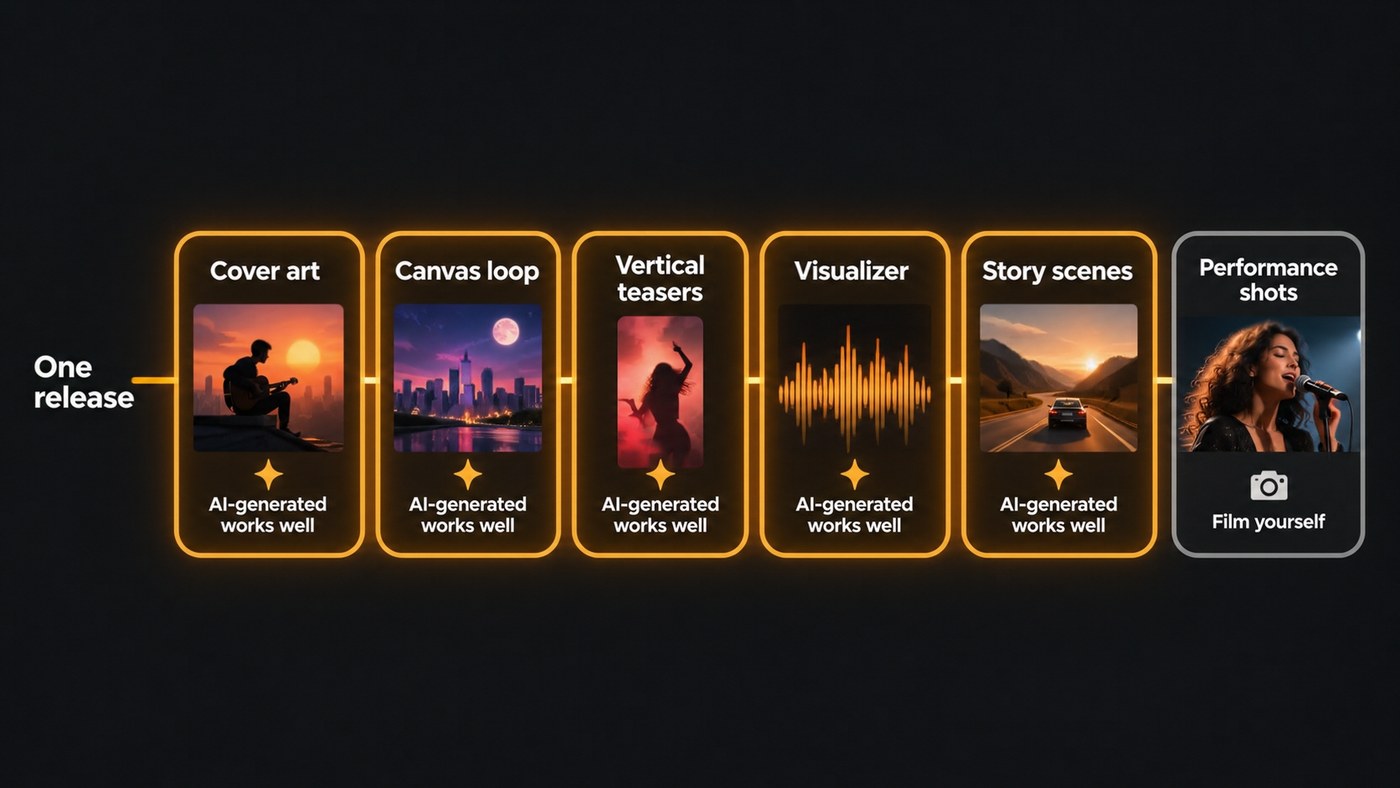
- Moving cover art and Canvas-style loops. A few seconds of slow motion across your artwork, with no singing. Generated loops suit this job well.
- Vertical teasers and hook clips for Shorts, Reels and TikTok in the weeks around release day.
- Visualizers and lyric video backgrounds, where the picture supports the words and nobody expects a performance.
- Virtual and animated artists, where a generated character is the whole point of the project.
- Shot tests before a shoot, to try a location or a camera move before you pay for a day on set.
Where AI video isn't standard yet
- The flagship video with you in it. Fans want to see how you actually move and sing, and some tools restrict realistic faces. Soundverse's Lip Sync page, for example, says its video model blocks realistic human faces, so illustrated and anime-style characters work best there.
- Long continuous takes. Generators work in short clips. Soundverse's AI Video Generator makes one clip of 3 to 30 seconds per run, depending on the model, so a three-minute song is built from many separate shots.
- Mass-produced uploads. On 15 July 2025, YouTube renamed its "repetitious content" monetization policy to "inauthentic content". Its channel monetization policies now list AI-generated content made with generic or unoriginal templates among the things that can't earn money, and add: "If you use automated tools or templates to help create your content, the final product must still demonstrate your creative vision and provide educational or entertainment value."
How to use AI video generation on your next release
- List the visuals the release needs. Usually a 16:9 video for YouTube, three to five vertical clips, a Canvas loop, cover art and a thumbnail.
- Mark the ones that need you on camera. Performance shots, studio moments and live footage. Film those yourself, even on a phone.
- Generate the rest. Loops, story scenes, backgrounds and teasers are where generation saves the most time and money.
- Lock one look. Pick a palette, a character and one or two locations, and reuse the same reference images as first frames so the shots match.
- Cut to the song. Put scene changes on downbeats and save the biggest visual change for the first chorus.
- Disclose and keep your rights clean. Mark AI use in YouTube Studio's attributes when it applies, and only use songs, images and faces you own or have permission to use.
For more on how these visuals work in a rollout, read how AI music videos are used in modern music marketing. For the budget side, see how AI music videos can replace expensive video shoots, and for platform rules, our guide to YouTube's AI music labeling requirements.
Will AI video generation become the default for independent artists?
For short-form release visuals, the evidence points that way: the generators sit inside YouTube and Meta's own apps, and YouTube's music metadata already has a slot for AI visuals. For the main music video, the open question is how listeners respond. Our read, and it is an opinion: the version most likely to become normal is a hybrid, with generated scenes around real footage of the artist, clearly disclosed.
Where Soundverse fits
Soundverse is an AI music platform that takes you from idea to audience, and its video tools start from your track. AI Music Video Generator takes a song you already have, or a one-line idea for a new one. Agent One writes a script and quotes the cost for your approval, then films the scenes and cuts them to the music, in 16:9 or 9:16 at up to 1080p. Turn on Lip Sync and the lead sings to camera.
For single shots, AI Video Generator turns a prompt or an image into a clip with models such as Veo 3.1, Seedance 2.5 and Gemini Omni Flash. Start a clip on your cover art for moving artwork, or pick 9:16 for a teaser. Both video tools need the Creator plan or above. For stills, Music Release Visuals makes cover art, story backgrounds, a YouTube thumbnail, a tour poster and a merch mockup in one look, on the Free plan.
Licensing is set by plan: the Free plan is for personal use, and the Creator plan comes with a royalty-free license.
Sideways Eyes is a song and music video that a Soundverse user made with AI Music Video Generator.
FAQ
Do I have to label AI-generated visuals in my music video? On YouTube, often yes. Its music disclosure guidance treats a human-performed song with AI-generated video visuals as partly Gen AI, and you can mark that in the attributes section of YouTube Studio. Check each platform's own rules before release day.
Can an AI music video still earn money on YouTube? It can. YouTube's monetization policies target generic, templated, mass-produced content, and say that work made with automated tools must still show your creative vision. A video directed around your own song is a different case from a channel of interchangeable AI clips.
Will fans turn on me for using AI video? Some might, especially if a fully generated video passes itself off as a filmed one. Mixing real footage of you with generated scenes, and saying plainly what you used, keeps the focus on the music.
Do I need an AI-generated song to use AI video? No. YouTube's own example of partly Gen AI music content is a fully human-performed song with AI-generated visuals. You can bring your own track to most music video generators, as long as you hold the rights to it.
What's the easiest first step? Moving cover art. One image, one short prompt and a few seconds of slow motion give you a loop for Spotify, a story background and the opening shot of a teaser.
Sign up for Soundverse free and plan the visuals for your next single. More release guides on the Soundverse blog.
