How to Write Lyrics to a Beat: A Complete Guide for 2026 Songwriters
Learn how to write lyrics to a beat using proven songwriting techniques and Soundverse AI tools.
How to Write Lyrics to a Beat
Writing lyrics that align perfectly with a beat is one of the most essential skills for modern musicians and producers. Whether you're crafting your first song or refining your process as a professional songwriter, learning how to write lyrics to a beat can transform your music from sounding generic to emotionally immersive. In 2026, advancements in AI-driven music tools have redefined the way artists approach lyric creation, rhythm matching, and overall song structure.
Why learning how to write lyrics to a beat matters in 2026
Music creation today is increasingly beat-driven. The rise of AI-generated instrumentals and genre-specific backing tracks means that musicians now often start with a beat rather than a melody. Aspiring songwriters must understand how words mesh with the rhythm, timing, and emotional tone of the instrumental. When done correctly, lyrics become an extension of the beat — complementing the groove rather than competing with it.
In previous years (2024–2025), many creators struggled with consistency between lyric structure and instrumental flow. However, by 2026, platforms like Soundverse have streamlined this process with advanced AI tools built specifically for lyric composition around beats.
How to make lyrics to a beat with Soundverse AI Lyrics Writer
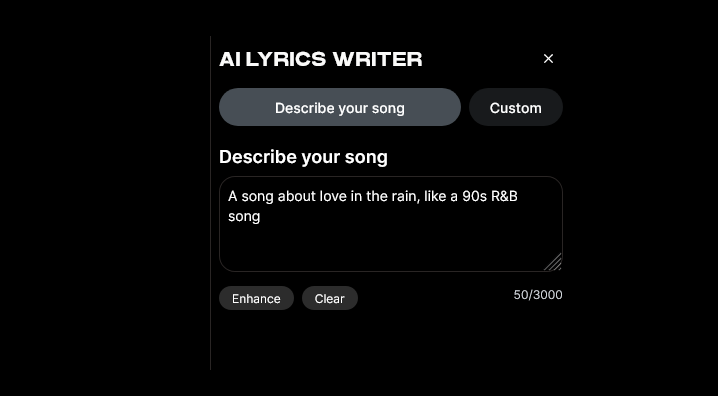
Soundverse’s AI Lyrics Writer is designed to help creators instantly generate structured song lyrics based on a desired tone, theme, or genre. It operates within the Soundverse ecosystem and integrates seamlessly with the AI Song Generator and AI Music Generator, allowing full creative synergy between lyrics and instrumentals.
Core capabilities of the AI Lyrics Writer:
- Structure Generation: Automatically creates a lyrical framework including verses, choruses, and bridges.
- Mood and Genre Customization: Allows selection of a specific vibe like melancholy jazz, upbeat pop, or storytelling hip-hop.
- Partial Lyric Completion: Fill in incomplete lines to keep your creative momentum flowing.
- ‘Help Me Write’ Integration: When working on music production inside Soundverse, you can invoke the lyric assistant instantly to continue or revise content.
These features are especially useful for overcoming writer’s block and for educational purposes where improving lyric structure is key. The AI Lyrics Writer also supports exporting lyric drafts for further composition inside the AI Song Generator, which transforms written text into a complete production including vocals and instrumental backing.
Step 1: Feature Overview — Access AI Lyrics Writer
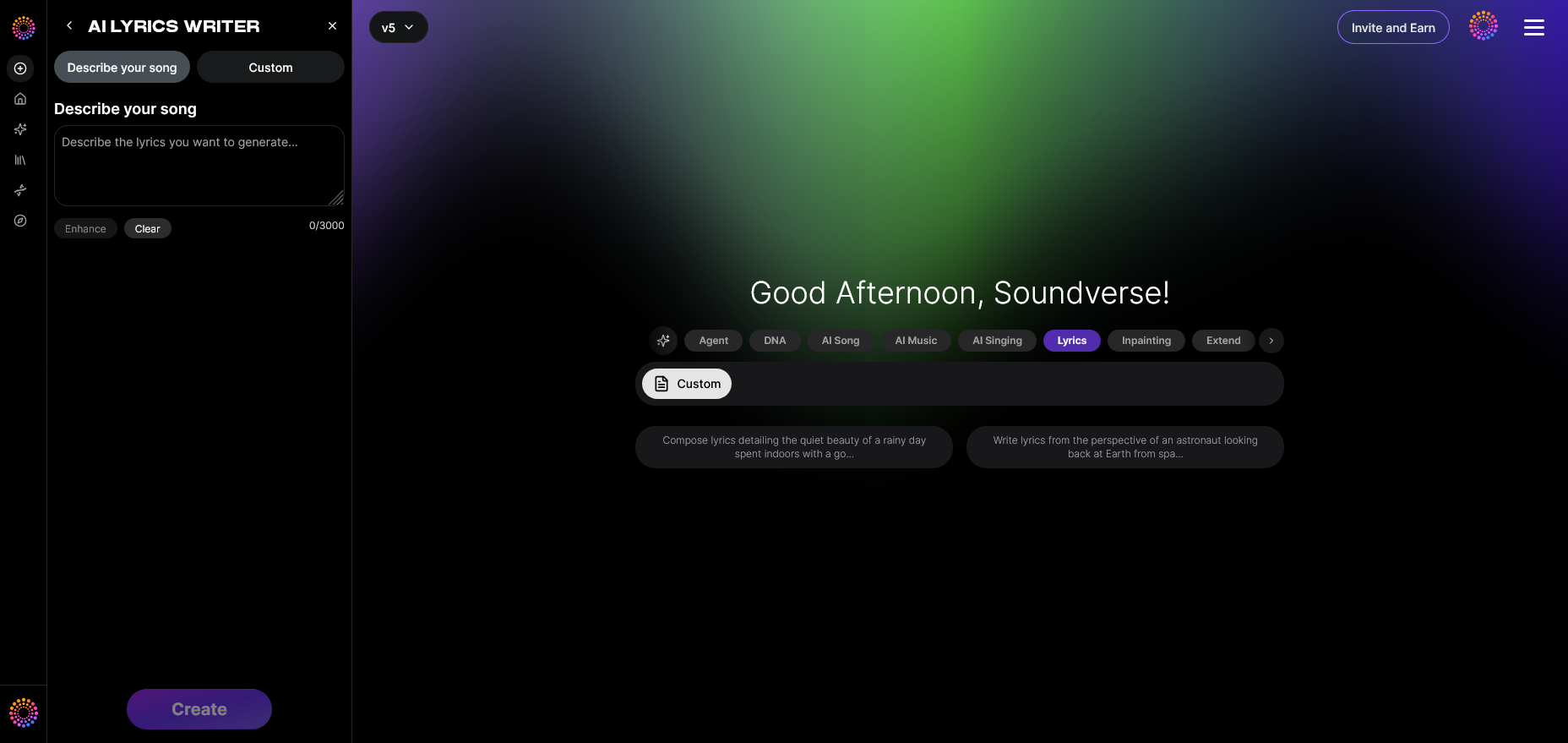
Start by logging into your Soundverse account. From your dashboard, choose the “AI Lyrics Writer” module. This tool is accessible across various sections of Soundverse, including the “Help Me Write” dialogue when generating songs with text prompts. Once opened, you can select the genre and tone that match the beat you plan to use.
Step 2: Theme Input — Enter Song Theme or Mood
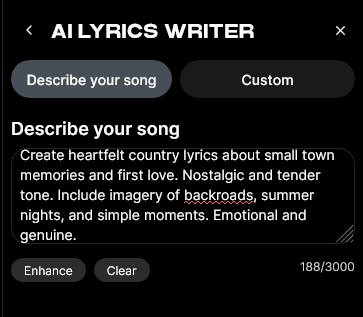
Input your core idea or mood. For example, specify whether your track conveys love, determination, melancholy, or celebration. The AI Lyrics Writer uses this information to craft lyrics that fit thematically and rhythmically with your beats. If you’re working with a trap rhythm or an EDM groove, describing the tempo or vibe allows the AI to craft words that align with syllabic pacing.
Step 3: Generation — AI Creates Lyrics Based on Theme
Click “Generate,” and Soundverse’s algorithms produce a structured lyric sheet. This sheet includes verses, choruses, and possibly a bridge section. You can adjust or replace any segment using “Partial completion,” ensuring the generated output reflects your personal tone. The asynchronous processing ensures that each generation is analyzed thoroughly for rhythm compatibility and word balance — providing coherent harmony between the beat and the words.
What are the fundamentals of writing lyrics for music?
Writing lyrics for music starts with synergy — ensuring what you write can flow naturally with the instrumental structure. Here are essential songwriting tips for balancing creativity and rhythm:
- Analyze the Beat First: Listen repeatedly and identify accent points or pauses. These will later dictate where your syllables land.
- Determine Emotional Tone: Every beat conveys a mood. Match your lyric themes accordingly — energetic tracks fit confident or celebratory tones, while lo-fi rhythms invite introspection.
- Match syllables to rhythm: Focus on meter and phrasing. Short syllables typically complement quick beats, while elongated phrases work best with slower grooves.
- Structure Consistently: Maintain a verse-chorus-bridge balance. This structure not only aligns with commercial songwriting norms but also gives your audience rhythm-based anchor points.
- Experiment with Cadence: Your lyrical cadence should echo the pulse of the beat. Record vocal testing to ensure smooth delivery.
How to match lyrics to rhythm effectively
Matching lyrics to rhythm involves understanding timing, accent, and musical symmetry.
- Count the bars: Most beats follow a 4/4 pattern. Map your lyrics so that significant words fall on the accented beats (usually beats 1 and 3).
- Use pauses strategically: Silence after a word builds impact. Integrate moments of rest to sync emotionally with the instrumental.
- Flow testing: Practice reading your lyrics aloud with the beat to assess comfort and timing. If it feels rushed or uneven, adjust syllable lengths or line breaks.
- Leverage technology: You can use text-to-music tools such as Soundverse’s AI Song Generator to audibly preview how your lyrics synchronize with selected instrumentals. Although not real-time, the processed output provides authentic integration analysis.
Beat-driven songwriting: modern techniques and AI integration
Beat-driven songwriting in 2026 relies on technological innovation and creative adaptability. Artists use AI platforms not only as studio aids but also as collaborative partners. Soundverse’s AI Music Generator can create instrumental foundations tailored for lyrics, making songwriter workflows smoother.
Advanced techniques include:
- Genre Simulation: Use AI tools to create custom beats across genres like country, EDM, or rap (see how to create rap music with AI).
- Stem Separation and Sampling: Explore Soundverse’s AI Magic Tool for extracting vocal lines or drum stems from existing tracks to practice lyric alignment.
- Arrangement Insights: Detailed guidance from Soundverse’s Arrangement Studio enables smarter pacing and verse segmentation.
For a deeper dive, watch our guide on creating Deep House music or check the Soundverse Tutorial Series - How to Make Music for hands-on examples of aligning lyrics to beats.
By combining these tools, creators can refine every element of their production around the beat first — and then allow the lyric progression to breathe naturally.
Pro songwriting tips: blending creativity with structure
Beyond technical alignment, emotional storytelling defines impactful songwriting:
- Build imagery: Every lyric should paint a picture or evoke a sensation.
- Maintain authenticity: The audience resonates with sincerity more than perfection.
- Revise in sections: Work on verses independently before connecting them to the chorus.
- Seek AI assistance: When inspiration stalls, use Soundverse’s “Help Me Write” to refresh ideas and generate new lines intuitively.
To explore different creative music atmospheres, you can check specialized guides such as how to create country music with Soundverse AI or how to create EDM with Soundverse AI, each offering tailored composition workflows.
Start Creating Lyrics and Beats with Soundverse AI
Transform your lyrical ideas into full songs effortlessly. Generate custom beats, refine verses, and produce studio-quality music with the power of AI—all in one seamless interface.
Related Articles
- How to Make Good Rap Lyrics: Discover the essential techniques and creative strategies for writing rap lyrics that flow naturally and connect with listeners.
- Generate AI Music with Soundverse Text-to-Music: Learn how to turn written prompts into unique, professional-quality music tracks using Soundverse’s text-to-music technology.
- Soundverse AI Magic Tools: Create Content Quickly with AI: Explore how Soundverse’s AI Magic Tools help you streamline music creation, from lyrics to arrangement, in just a few clicks.
- How to Create Rap Music with AI: A step-by-step guide on how to produce and design your own rap tracks using AI-powered tools in Soundverse.
Here's how to make AI Music with Soundverse
Video Guide

Here’s another long walkthrough of how to use Soundverse AI.
Text Guide
- To know more about AI Magic Tools, check here.
- To know more about Soundverse Assistant, check here.
- To know more about Arrangement Studio, check here.
Soundverse is an AI Assistant that allows content creators and music makers to create original content in a flash using Generative AI.
With the help of Soundverse Assistant and AI Magic Tools, our users get an unfair advantage over other creators to create audio and music content quickly, easily and cheaply.
Soundverse Assistant is your ultimate music companion. You simply speak to the assistant to get your stuff done. The more you speak to it, the more it starts understanding you and your goals.
AI Magic Tools help convert your creative dreams into tangible music and audio. Use AI Magic Tools such as text to music, stem separation, or lyrics generation to realise your content dreams faster.
Soundverse is here to take music production to the next level. We're not just a digital audio workstation (DAW) competing with Ableton or Logic, we're building a completely new paradigm of easy and conversational content creation.
TikTok: https://www.tiktok.com/@soundverse.ai Twitter: https://twitter.com/soundverse_ai Instagram: https://www.instagram.com/soundverse.ai LinkedIn: https://www.linkedin.com/company/soundverseai Youtube: https://www.youtube.com/@SoundverseAI Facebook: https://www.facebook.com/profile.php?id=100095674445607
Join Soundverse for Free and make Viral AI Music

We are constantly building more product experiences. Keep checking our Blog to stay updated about them!