How to Tune a Piano Without Tools: A Beginner’s Guide to DIY Ear Tuning in 2026
Learn how to tune a piano without tools using ear techniques, maintenance tips, and Soundverse AI support.
How to Tune a Piano Without Tools
Tuning a piano is one of the most misunderstood skills among beginner musicians. Many assume it requires specialized tools and professional tuners — and while that’s true for precision work, it’s also possible to tune a piano without traditional tools if you understand how sound and pitch interact. In 2026, with advances in sound technology and AI-based musical support systems like Soundverse, learning how to tune a piano without tools has become more accessible for home musicians.
This guide walks you through the step-by-step process of DIY piano tuning, strategies for tuning by ear, and how to use modern sound analysis tools to refine your musical intuition.
Why Would You Tune a Piano Without Tools?
If your piano’s tone feels off, but you don’t own tuning hammers or tuning forks, you can still improve the overall harmony. Many beginners in 2026 are experimenting with home piano tuning methods because they want immediate results without spending on professional kits. Whether you have an acoustic upright piano or a digital hybrid system, the principles of pitch correction remain the same.
The goal here is not to achieve concert-perfect accuracy but to bring balance back to the instrument through attentive listening and note matching.
How Accurate Can DIY Piano Tuning Be?
Tuning without tools relies heavily on ear training. While it won't replace the precision of professional maintenance, it can restore a harmonious sound and help identify performance anomalies. The better your ear, the more accurate your adjustments will be. Many modern musicians complement ear-based tuning with audio references generated through AI tools or piano simulation software.
For example, musicians now use resources like Soundverse AI Magic Tools to synthesize accurate pitch references before manually adjusting their instrument. This integration of human hearing and machine accuracy is defining DIY piano care trends in 2026.
How to Make Piano Tuning Easier with Soundverse Voice to Instrument
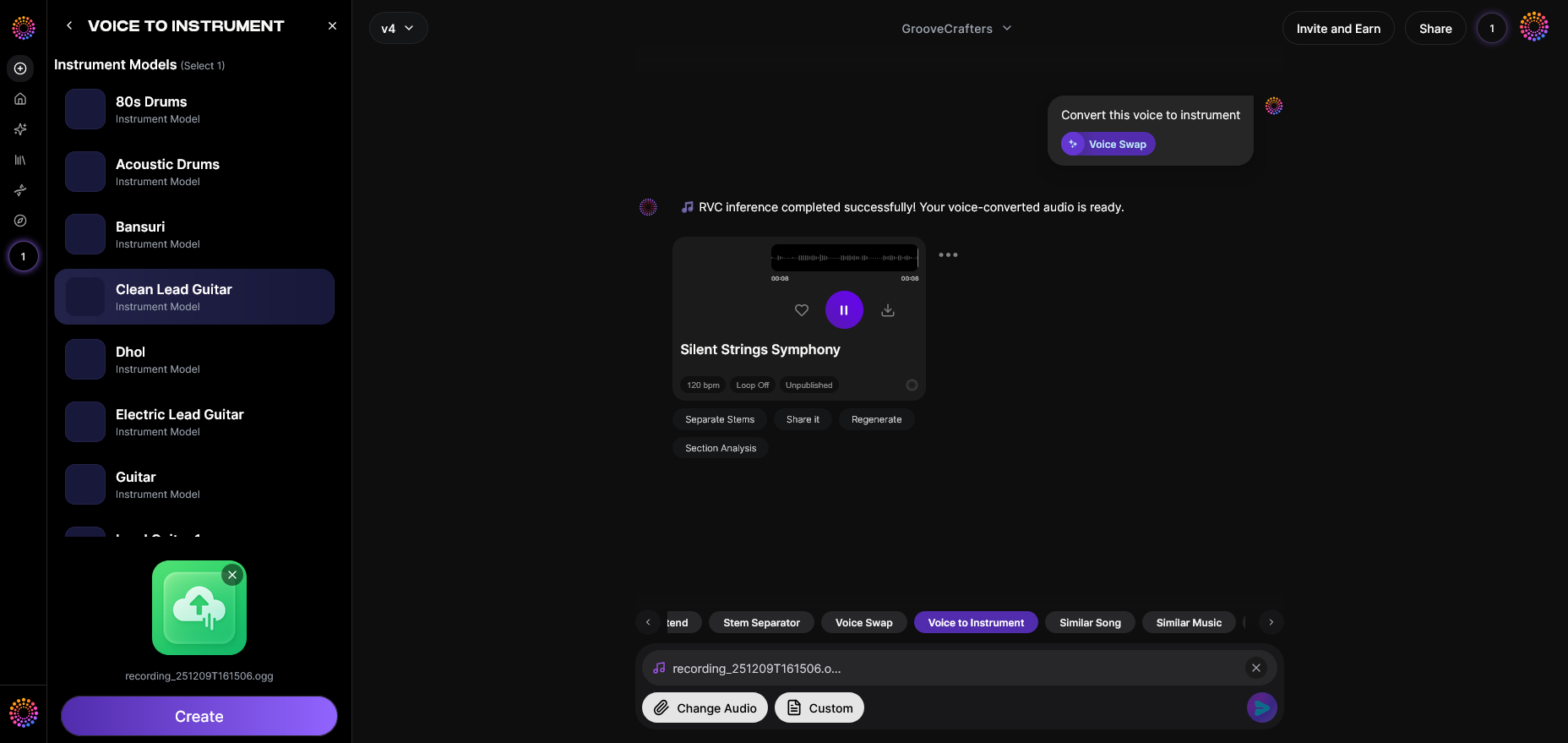
Soundverse’s Voice to Instrument feature revolutionizes the way you generate pitch references. Instead of relying on physical tools, you can use your own voice as the tuning source. This AI system transforms your humming or singing into realistic instrumental tones — from guitar to sitar to flute — with precise pitch retention.
Feature Workflow:
Soundverse’s Voice to Instrument operates in a simple asynchronous process:
Step 1: Feature Overview — Access Voice to Instrument Tool

Log in to Soundverse and navigate to the Voice to Instrument section. This is where your vocal input becomes the foundation of instrumental sound generation.
Step 2: Instrument Selection — Choose Target Instrument Type
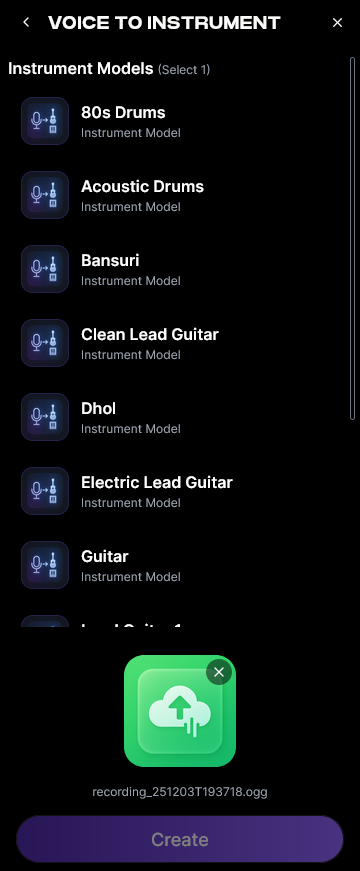
Select an instrument that closely matches the tone quality you want for reference. For piano tuning, flute or guitar may provide clearer pitch samples.
Step 3: Upload Target Audio — Record or Upload Vocal Track
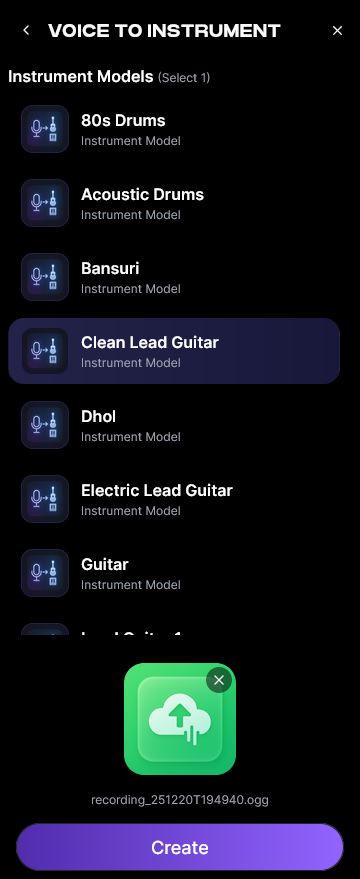
Hum or sing the note you believe is correct and upload it. Soundverse analyzes your recorded pitch and timbre to create the instrumental output.
Step 4: Generation — Convert Vocals to Selected Instrument
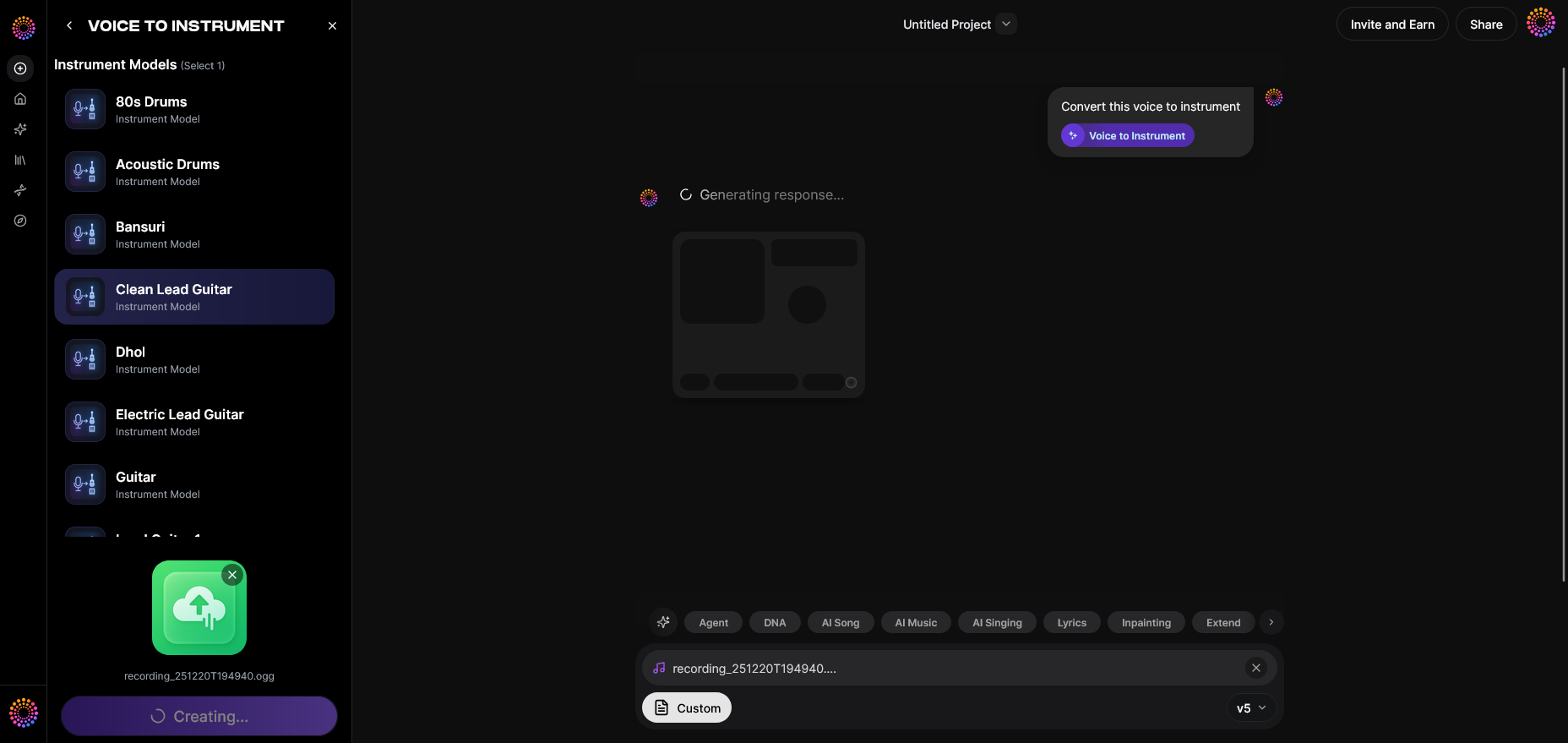
The AI processes your input and outputs a pure instrument sound reflecting the same phrasing and note. You can use this as a pitch standard to tune your piano key by key.
Step 5: Download Result — Export Instrument Version

Once processed, download or play the generated instrument sound beside your piano to balance the pitch alignment. This functions as your DIY reference tone.
Soundverse’s timbre transfer system ensures each note carries your original phrasing, eliminating robotic tone loss. For those improving their ear-training or tonal precision, this workflow provides a modern solution without purchasing hardware.
Step-by-Step Guide: How to Tune a Piano Without Tools
Step 1: Understand Basic Pitch Relationships
A piano is tuned in a semi-equal temperament system where each key is slightly adjusted to balance octaves. Begin by playing a reference tone — you can use Soundverse’s Voice to Instrument or any pitch generator — to identify where notes deviate.
Step 2: Identify Problem Keys
Play scales slowly. Notes that sound hollow, metallic, or discordant are typically out of tune. These tones often occur near the middle register because those keys are used most frequently.
Step 3: Adjust by Ear
For acoustic models, light pressure applied via soft cloth or fingertip against the string near the tuning pins can sometimes influence tension slightly. While this is extremely subtle, it can create minor shifts adequate for ear-level correction. For digital or hybrid systems, adjust internal tuning settings in the control panel.
Step 4: Compare Notes in Octaves
Use the human-ear method — listen for frequency beats. If two notes played together produce pulsation, you know one is sharp or flat. Continue adjusting until the beats slow and dissolve. This is the foundation of non-tool-based tuning.
Step 5: Record Your Piano Sound and Re-check
After adjusting a series of keys, record your playing. Use tools like Soundverse’s Stem Separator to isolate piano tones from other background noise. Re-check the waveform visually or compare tonal balance using Soundverse-generated references.
For additional visual learning, watch our Soundverse Tutorial Series - 9. How to Make Music on YouTube for an overview of practical sound adjustments.
Pro Tips for Beginner Piano Care
- Regular Listening Sessions: Spend time every week comparing pitches. The more familiar you become with your piano’s harmonic structure, the easier tuning becomes.
- Environmental Stability: Maintain consistent humidity and room temperature. Piano strings respond to environmental pressure — instability can undo your tuning progress.
- Avoid Overcorrection: The temptation to continually tweak will cause irregular tone shifts. Once the note sounds balanced with its octave pair, stop adjusting.
- Tune in Short Sessions: Ear-fatigue can mislead perception. Take breaks between keys.
- Use AI Guidance: Platforms like Soundverse let you produce pitch references and analyze tones easily compared to pre-2024 methods, making 2026 tuning routines smarter and faster.
For related insights, check out AI Music Generator and Human Composers: A Future Together and Music Industry Trends to understand how AI supports self-taught musicians globally.
Why Soundverse Is Ideal for Home Piano Enthusiasts
Soundverse isn’t only for creators—it's a versatile assistance system for musicians improving their technical listening. Using vocal input, beginners can train themselves to detect pitch discrepancies naturally. This empowers DIY tuning without depending on costly hardware.
Its Wide Instrument Library across Western and Ethnic tones also lets users compare the piano’s resonance to alternate timbres such as sitar or bansuri, creating a deeper understanding of pitch texture.
For those exploring global sound styles, try the How to Create Jazz Music with Soundverse AI guide to see how pitch variation interacts across genres.
Create Music Without Limits Using Soundverse AI
Generate, fine-tune, and customize your sound effortlessly with Soundverse’s AI-powered music creation suite. Whether you’re adjusting pitch or crafting entire compositions, unleash your creativity today.
Related Articles
- How to Create Jazz Music with Soundverse AI — Discover how Soundverse AI can help you create authentic jazz arrangements with smooth melodies and dynamic rhythms.
- How to Create Country Music with Soundverse AI — Learn to craft heartfelt country tracks using Soundverse AI’s smart composition features and creative tools.
- Generate AI Music with Soundverse Text-to-Music — Turn text prompts into fully produced tracks and explore endless musical possibilities using Soundverse’s text-to-music engine.
- What Are Song Stems and Why Do You Need Them — Understand the value of song stems and how they can transform your mixing and music creation workflow.
Here's how to make AI Music with Soundverse
Video Guide

Here’s another long walkthrough of how to use Soundverse AI.
Text Guide
- To know more about AI Magic Tools, check here.
- To know more about Soundverse Assistant, check here.
- To know more about Arrangement Studio, check here.
Soundverse is an AI Assistant that allows content creators and music makers to create original content in a flash using Generative AI.
With the help of Soundverse Assistant and AI Magic Tools, our users get an unfair advantage over other creators to create audio and music content quickly, easily and cheaply.
Soundverse Assistant is your ultimate music companion. You simply speak to the assistant to get your stuff done. The more you speak to it, the more it starts understanding you and your goals.
AI Magic Tools help convert your creative dreams into tangible music and audio. Use AI Magic Tools such as text to music, stem separation, or lyrics generation to realise your content dreams faster.
Soundverse is here to take music production to the next level. We're not just a digital audio workstation (DAW) competing with Ableton or Logic, we're building a completely new paradigm of easy and conversational content creation.
TikTok: https://www.tiktok.com/@soundverse.ai
Twitter: https://twitter.com/soundverse_ai
Instagram: https://www.instagram.com/soundverse.ai
LinkedIn: https://www.linkedin.com/company/soundverseai
Youtube: https://www.youtube.com/@SoundverseAI
Facebook: https://www.facebook.com/profile.php?id=100095674445607
Join Soundverse for Free and make Viral AI Music

We are constantly building more product experiences. Keep checking our Blog to stay updated about them!