How to Sync AI Music With AI-Generated Visuals in 2026
Learn how to achieve perfect AI music synchronization with AI-generated visuals using Soundverse tools.
How to Sync AI Music With AI-Generated Visuals
Introduction
AI-driven creativity has become a defining marker of 2026, transforming how artists, musicians, and content creators collaborate with technology. One of the most exciting frontiers in AI-driven entertainment is the ability to synchronize AI-generated music with AI-generated visuals — a process known as AI music synchronization. This technique involves blending audio and visual content seamlessly to produce cohesive, emotionally resonant multimedia experiences for films, ads, games, and digital storytelling.
For creators using platforms like Runway, Pika Labs, or Kaiber for AI video generation, combining those visuals with AI-generated audio adds another layer of creative control. Whether you're a musician looking to enhance your video projects or a visual artist experimenting with sound design, understanding audio visual AI integration can bring your content to life.
In this guide, we’ll explore how to achieve flawless music and visuals integration using the Soundverse AI Music Generator, along with essential workflow tips for creators in 2026.
How to make AI music synchronization with Soundverse AI Music Generator
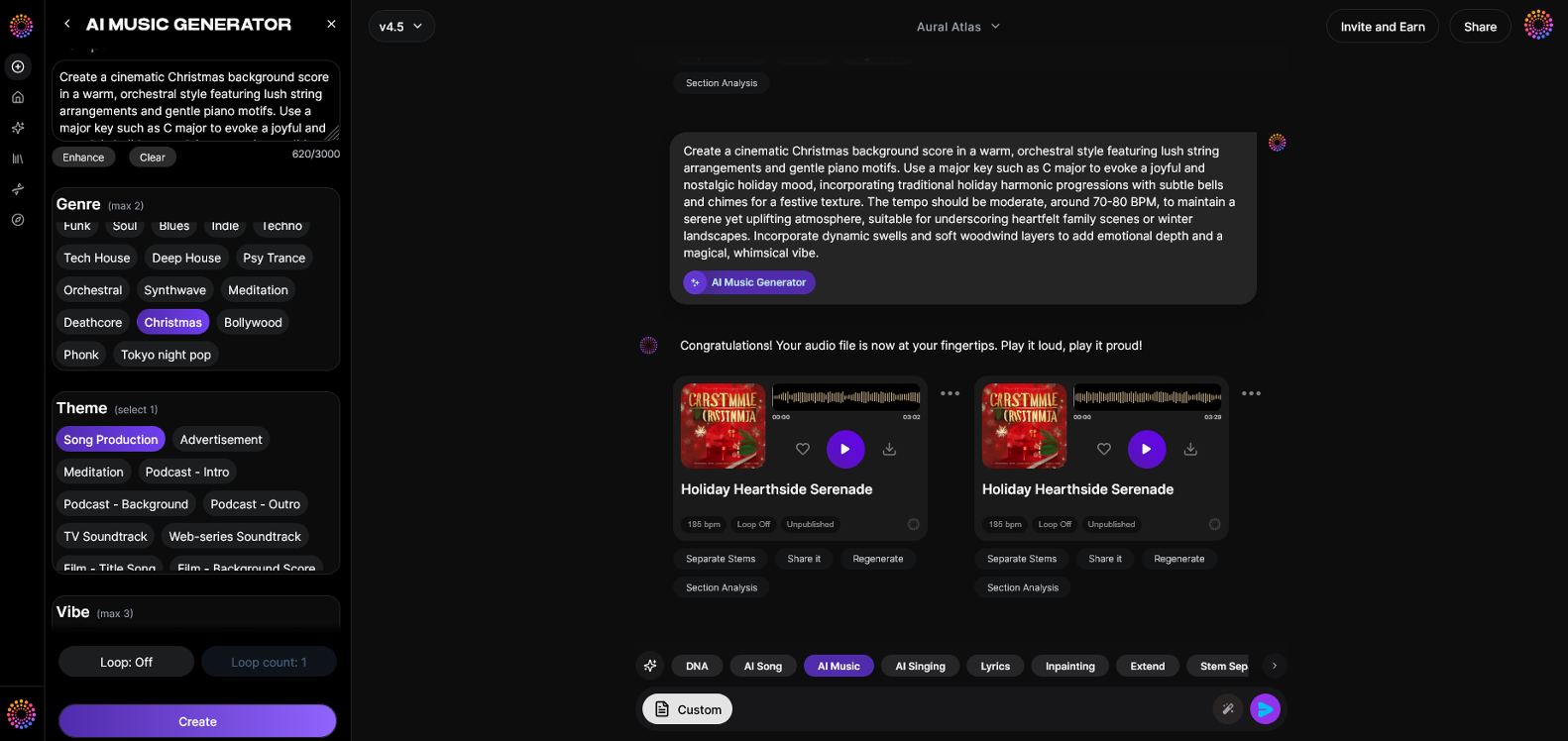
The Soundverse AI Music Generator is designed to create fully produced instrumental tracks directly from text prompts. Whether you need a short loop for your video intro or a dynamic orchestral soundscape for a cinematic AI film, this tool lets you control genre, mood, and instrumentation with precision.
Soundverse AI Music Generator Key Features
- Text-to-Music Generation: Convert written descriptions into complete, fully produced audio instantly.
- Loop Mode: Create seamless loops perfect for background scores or short-form video platforms.
- Genre, Mood, and Instrument Control: Customize the sound environment—from ambient drones to upbeat rhythms.
- V4 and V5 Models: Choose between versions depending on your desired sound sophistication and realism.
- Ideal Use Cases: Background music for videos, game loops, meditation tracks, advertising scores, and more.
If you're working across AI video generation tools, the Soundverse AI engine ensures that your soundtrack matches the visual tone through precision control of rhythm and energy. This makes it invaluable for modern AI content creation workflows. For a hands-on example of AI composition, watch our Soundverse Tutorial Series - 9. How to Make Music.
Step 1: Feature Overview
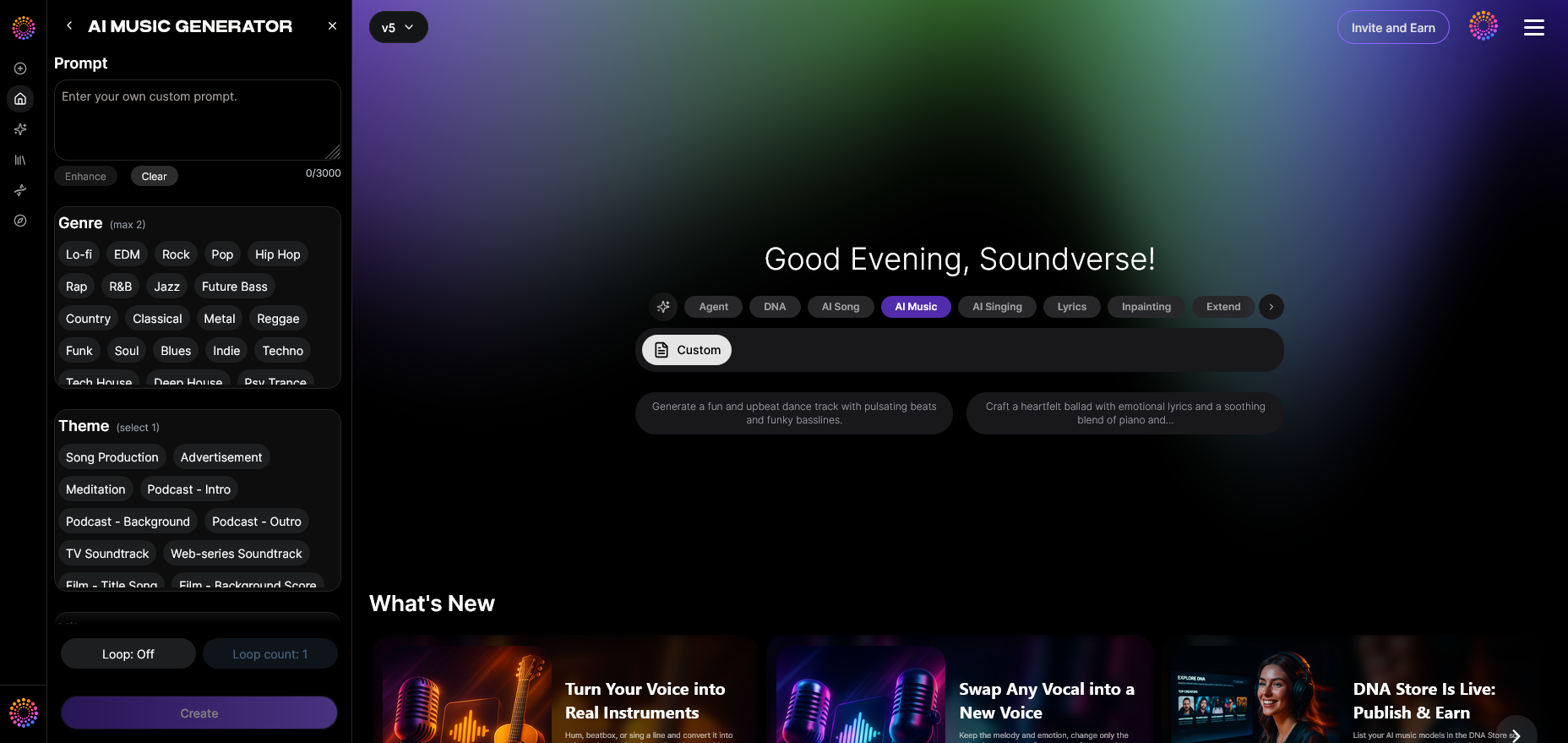
Access the AI Music Generator directly from the Soundverse main menu. The platform’s interface allows you to start fresh compositions or select existing projects to enhance. For synchronization purposes, it’s helpful to define your video’s tempo and emotional tone ahead of time.
Step 2: Description Input
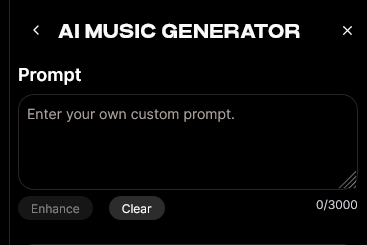
Enter a clear and descriptive text prompt for your desired soundtrack. For example: “Dreamy synthwave track for a futuristic cityscape” or “Calm acoustic guitar loop for nature documentary.” The richer your prompt, the more tailored your music will be. You can reference techniques from how to create AI-generated music to refine your descriptions.
Step 3: Style & Duration
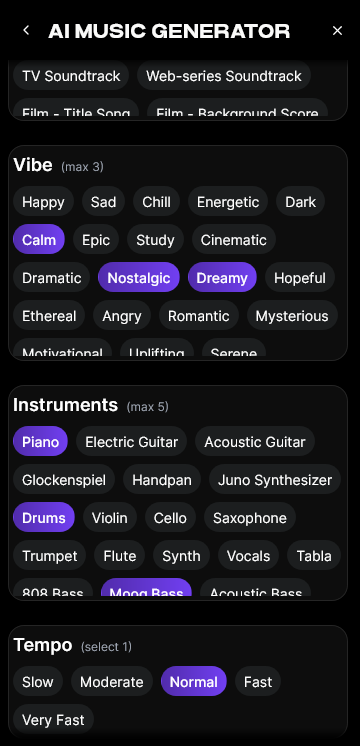
Choose the right music style, tempo, and track duration. If your visuals are 30 seconds long, use Soundverse’s precise duration selector. For looping ambient pieces, enable Loop Mode for continual playback without noticeable seams—ideal for longer visual sequences.
Step 4: Generation
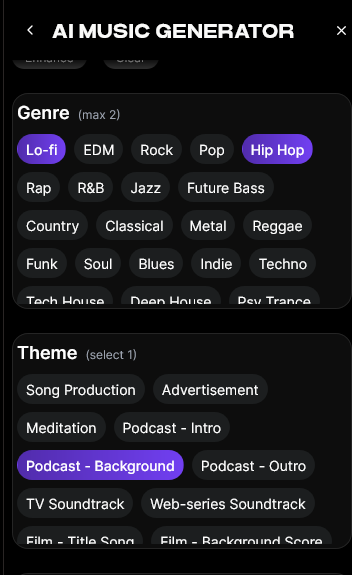
Click Generate to process your request. The AI composes an instrumental track based on your inputs, blending genre rules and acoustic balance. When working on AI video generation, downloading a few variations allows you to test synchronization options easily.
Step 5: Export Options
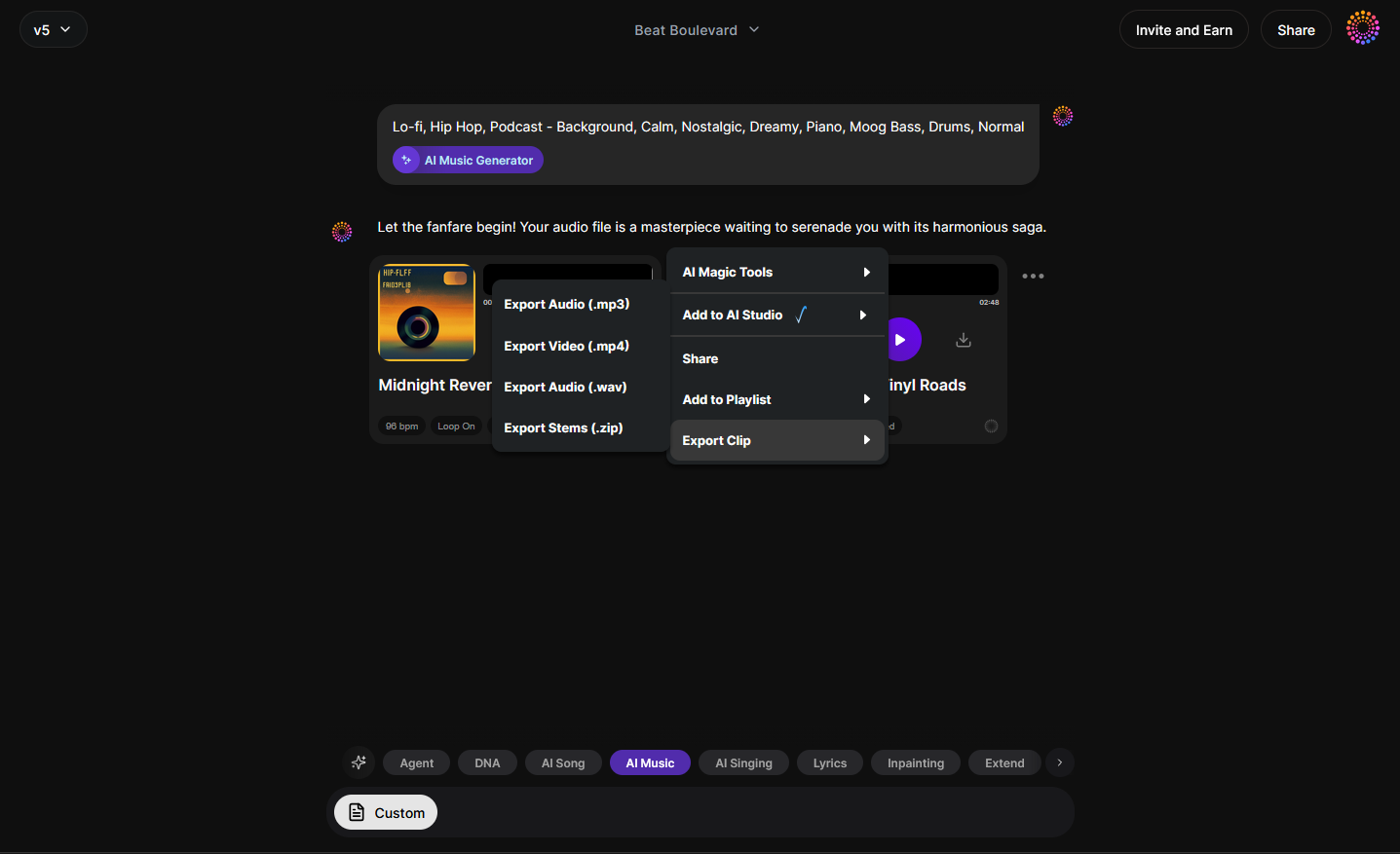
Once your music is ready, export your track in your preferred format. Soundverse supports seamless integration for editing software like Adobe Premiere Pro, Final Cut, and DaVinci Resolve. You can also combine it with external visuals created using tools like Runway or Kaiber.
What are the key steps in syncing AI music with AI visuals?
Synchronization is both an art and a science. When using AI music, timing and mood alignment are crucial. Here are the fundamental steps to ensure successful AI music synchronization:
- Define the Core Concept: Determine the story, mood, and emotional goal of the visual piece. Is it mysterious, uplifting, or tranquil?
- Generate Matching Music: Use descriptive terms reflecting tempo, intensity, and mood in the Soundverse AI Music Generator.
- Map Audio Markers: Identify key video moments—like transitions or emotional cues—and align beats accordingly in your editing timeline.
- Adjust Tempo and Mood as Needed: Using audio editing software, fine-tune timings or fade-ins to improve pacing.
- Iterate for Flow: Render previews and observe if the music complements visual transitions naturally.
For advanced creators, pairing Soundverse outputs with visual timing techniques—like “hit points” used in film scoring—enhances emotional synergy. For deeper learning about sync methods, check Music Sync and Beat-Matching in AI Video.
What tools can help enhance AI music synchronization in 2026?
In 2026, AI ecosystems are evolving rapidly, offering tools that merge video and audio automation:
- Runway and Pika Labs: AI tools designed for visual generation; adding Soundverse-generated tracks offers narrative depth.
- Kaiber: Allows dynamic animation of still images, ideal for syncing ambient or experimental Soundverse compositions.
- Soundverse Extend Music: Increase the duration of your existing soundtrack seamlessly to match lengthier visuals.
- Soundverse Similar Music Generator: Generate alternative tracks with similar energy or key for multi-scene consistency.
- Soundverse API: Integrate Soundverse tools programmatically into bigger production ecosystems or your own apps for automation.
For more inspiration, explore recent trends in AI music from How AI-generated music is transforming the music industry. You might also enjoy our Soundverse Tutorial Series - 10. Make Deep House Music.
How to ensure your AI-generated music aligns perfectly with visuals?
Perfect alignment depends on three main factors: timing, mood correspondence, and sound dynamics. Here’s how to fine-tune each:
- Timing: Use video cues or motion rhythm as timing anchors for your beat placement.
- Mood Correspondence: Match musical tone to color grading—warm visuals pair with organic sounds, while cool visuals fit better with electronic or ambient tones.
- Sound Dynamics: Adjust volume, bass, or reverb based on visual intensity peaks.
These details might seem minor but contribute heavily to immersion and emotional impact. Check out Soundverse AI Magic Tools for more automation options that simplify post-production. For visual alignment ideas, view AI Music Video Creation in 2026.
Pro Tips for Perfect AI Music Synchronization
- Use Loop Mode for Shorts: Ideal for content under 60 seconds; ensures fluid repetition without hard cuts.
- Create Music Variants: Generate multiple takes using different moods or tempos; test each for the best sync.
- Start with Storytelling: Align musical progression with narrative flow—intro, buildup, climax, resolution.
- Integrate Cross-Tool Workflows: Combine Soundverse tracks with outputs from video tools like Runway ML for endless stylistic experiments.
- Export in Lossless Formats: Ensures quality preservation during editing.
If you want to take your AI compositions further, check how other creators use Soundverse for genre specialization, such as creating Jazz music with AI or healing meditation music. You can also explore the Soundverse Tutorial Series - 8. "Explore" Tab for browsing music creation tools.
Start Syncing AI Music With Stunning Visuals Today
Bring your projects to life by blending AI-generated music with dynamic, AI-crafted visuals. Experience effortless synchronization and creative freedom with Soundverse's advanced AI music tools.
- The Role of AI Music in Film and Television — Discover how AI-generated music is shaping soundtracks and emotional storytelling in modern media.
- How an AI Music Generator Inspires Creative Fusion — Explore how AI tools spark collaboration between sound, visuals, and artistic imagination.
- Enhancing YouTube Content With Royalty-Free and Copyright-Free Music Using Soundverse AI — Learn how to elevate your video content using royalty-free AI music designed for creators.
- Soundverse AI Revolutionizing Music Creation for New-Age Content Creators — Find out how Soundverse's AI features empower creators to produce custom soundtracks effortlessly.
Here's how to make AI Music with Soundverse
Video Guide

Here’s another long walkthrough of how to use Soundverse AI.
Text Guide
- To know more about AI Magic Tools, check here.
- To know more about Soundverse Assistant, check here.
- To know more about Arrangement Studio, check here.
Soundverse is an AI Assistant that allows content creators and music makers to create original content in a flash using Generative AI. With the help of Soundverse Assistant and AI Magic Tools, our users get an unfair advantage over other creators to create audio and music content quickly, easily and cheaply. Soundverse Assistant is your ultimate music companion. You simply speak to the assistant to get your stuff done. The more you speak to it, the more it starts understanding you and your goals. AI Magic Tools help convert your creative dreams into tangible music and audio. Use AI Magic Tools such as text to music, stem separation, or lyrics generation to realise your content dreams faster. Soundverse is here to take music production to the next level. We're not just a digital audio workstation (DAW) competing with Ableton or Logic, we're building a completely new paradigm of easy and conversational content creation.
TikTok: https://www.tiktok.com/@soundverse.ai
Twitter: https://twitter.com/soundverse_ai
Instagram: https://www.instagram.com/soundverse.ai
LinkedIn: https://www.linkedin.com/company/soundverseai
Youtube: https://www.youtube.com/@SoundverseAI
Facebook: https://www.facebook.com/profile.php?id=100095674445607
Join Soundverse for Free and make Viral AI Music

We are constantly building more product experiences. Keep checking our Blog to stay updated about them!