How to Write Song Lyrics: A Complete Guide for Beginners (2026 Edition)
Learn how to write song lyrics with Soundverse AI Lyrics Writer. Step-by-step lyric writing tips for beginners.
How to Make Your Own Song Lyrics
Writing your own song lyrics can feel like opening a door to endless creativity. Whether you’re a musician crafting your next big hit or an aspiring songwriter seeking ways to express your emotions through words, understanding how to write song lyrics effectively is the foundation of musical storytelling. In 2026, with AI-assisted tools like Soundverse becoming central to music creation, lyric writing is more accessible than ever. Let’s explore how to create original lyrics from scratch, combine emotional expression with technical structure, and use modern tools to accelerate your songwriting process.
Why Writing Song Lyrics Matters More Than Ever in 2026
Song lyrics remain the soul of music. While production, melody, and arrangement have evolved dramatically with AI and automation, lyrics are what connect listeners on an emotional level. From pop to jazz, and even emerging genres like AI-generated ambient soundscapes, words still drive meaning and connection.
Aspiring songwriters often struggle with writer’s block or the fear of not being "poetic enough." But today, with AI-based creative tools, anyone can overcome these hurdles. The art of lyrical storytelling hasn’t changed—it’s just the process that’s become smarter, faster, and more intuitive.

How to Make Your Own Song Lyrics with Soundverse AI Lyrics Writer
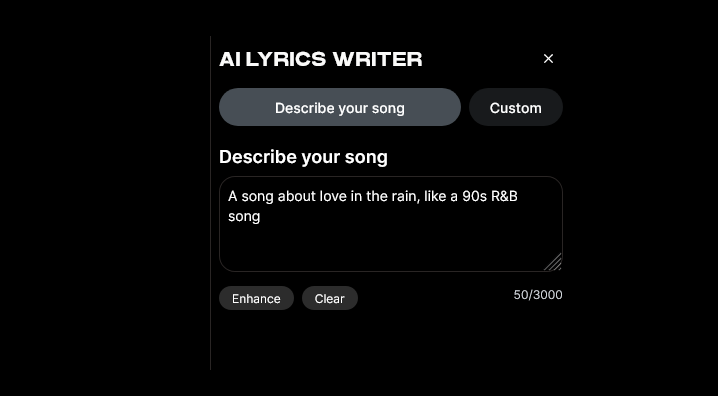
Soundverse introduces one of the most advanced writing assistants for musicians — the AI Lyrics Writer. Designed specifically for lyric creation, it helps you instantly generate structured song lyrics based on tone, theme, and genre. Integrated directly into Soundverse’s ‘Help Me Write’ feature, this tool supports both amateur and professional workflows.
What Makes AI Lyrics Writer Unique
- Structure Generation: You can automatically build verses, choruses, and bridges without worrying about formatting. This is especially useful for newcomers learning how to write song lyrics.
- Mood and Genre Customization: Set the emotional tone (for example, hopeful, nostalgic, dramatic) and select a musical genre (pop, country, EDM, or acoustic ballad) to tailor your lyrics.
- Partial Lyric Completion: Start with just a few lines and let the AI complete your song while respecting your style.
- Integrated Writing Help: Collaborate with other Soundverse tools such as AI Song Generator and AI Singing Generator for a full production pipeline—from lyric writing to vocal and instrumental generation.
Soundverse is not only a lyric-writing assistant—it’s a creative ecosystem. Once your lyrics are complete, you can use the AI Song Generator to transform them into finished songs with backing tracks and vocals.
For a deeper dive into applied examples, explore the Soundverse Tutorial Series - 9. How to Make Music.
Step-by-Step Guide: How to Write Song Lyrics Using Soundverse
This tutorial is designed for beginners who want to start writing original lyrics with guidance and inspiration.
Step 1: Access AI Lyrics Writer
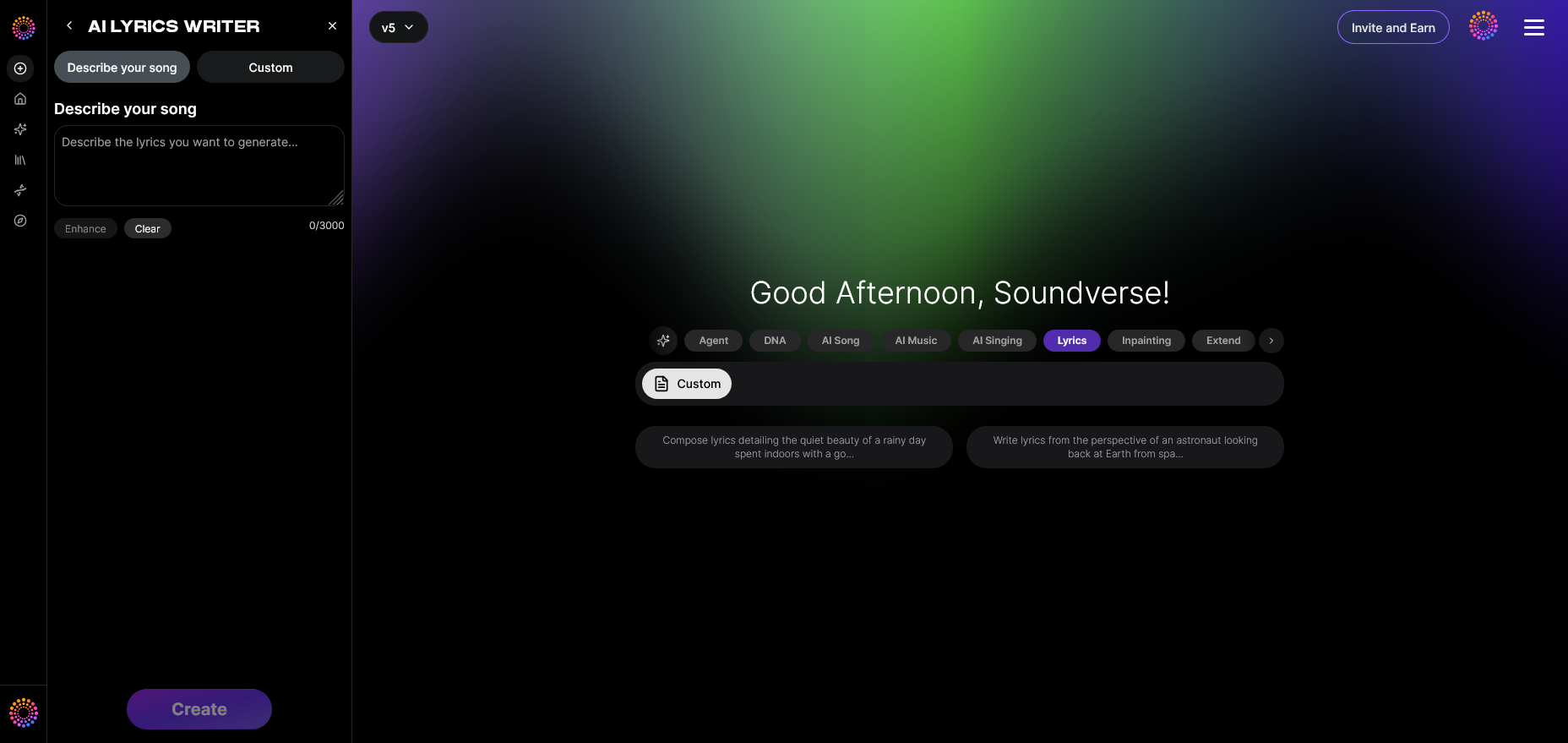
Begin by opening Soundverse and selecting the AI Lyrics Writer from the available tools. You’ll find it inside the ‘Help Me Write’ feature. This is where you can choose your desired tone, genre, and lyrical complexity. For instance, if you’re inspired to write a heartfelt ballad, select themes like love, reflection, or longing.
Step 2: Enter Your Song Theme or Mood
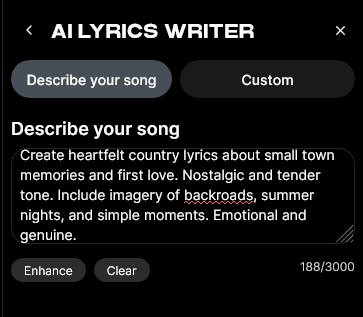
The next step is setting the emotional direction. Decide what you want your song to express. The AI writer thrives on strong themes—such as resilience, heartbreak, discovery, or freedom. Typing a few keywords or phrases gives the system context to base its lyrical generation on. For beginners, this step helps train your creative intuition because you start thinking intentionally about tone and message rather than just rhyming words.
Step 3: Generate Lyrics Based on Your Theme
Once your theme and genre are entered, click Generate. The AI will produce structured lyrics complete with verses, choruses, and bridge sections. You can review or edit individual lines, combine generated stanzas, or regenerate new ideas until you find something that resonates.
As the output is processed asynchronously, the tool ensures each set of lyrics is crafted intelligently based on your input rather than random word generation. When satisfied, export or save the lyrics to continue enhancing them inside other Soundverse modules.
For complementary writing guidance, check out Writing Lyrics to Own Song or the Berklee Online Take Note guide.
Pro Lyric Writing Tips for Beginners
If you’re just starting your songwriting journey, understanding how to write song lyrics can take time. The following lyric writing tips will help refine your craft:
- Start With Emotion, Not Rhyme: Rhyming is secondary to meaning. Begin by writing what you feel—honesty always connects better with listeners.
- Think in Pictures: Use imagery and sensory details. Instead of saying “I’m sad,” write about the color of rain, the sound of empty streets, or the weight of silence.
- Embrace Repetition: Choruses often succeed through repetition. Don’t be afraid to echo your strongest phrases.
- Keep Verses Conversational: The best verses often read like thoughts or dialogue. Listen to how people speak naturally and adapt that rhythm.
- Write First, Edit Later: Don’t block your creative flow worrying about line length or rhyme structure in the first draft. Refine after ideas come naturally.
Explore various lyric forms; story-driven ballads differ greatly from rhythmic hip-hop verses or poetic jazz infusions. To learn how genres influence lyrics, read more about music industry trends shaping songwriting methods in 2026.
Creative Writing for Music: Turning Ideas Into Songs
The difference between a good lyric and a great one lies in transformation. Creative writing for music means converting raw emotion into rhythm and sound. Once you’ve generated lyrics through Soundverse, experiment with pacing and melodic phrasing.
Use the AI Singing Generator to add vocals and test melody ideas. This helps determine how your lyrics fit with tempo and instrumentation. For example, a slow and emotional verse will interact differently with a high-energy EDM track.
Building Complete Songs: From Lyrics to Production
Using Soundverse, you can compose your own songs end-to-end. After writing with AI Lyrics Writer, integrate with the AI Song Generator, which creates instrumentals and mixes that match your words. If you want to push creativity further, employ the AI Singing Generator for customized vocal textures.
You can also craft unique compositions using modern prompts, as seen in Soundverse’s AI Magic Tools, which allow precise genre and vibe selection. For example, if you want to write introspective folk lyrics that evoke desert imagery, try themed inspiration ideas from how to create music evoking the desert.
For visual guidance, watch Soundverse Tutorial Series - 10. Make Deep House Music for production workflow insights.
How Songwriting Evolved Between 2024–2026
Two years ago, lyric writing largely relied on manual brainstorming. Today, AI systems like Soundverse have introduced structured creativity — meaning writers can focus on refinement and originality rather than repetitive drafting. Instead of replacing artists, these tools act as co-writers. They simplify technical formulation while expanding artistic potential.
Themes in 2026 are more dynamic and global. Artists blend cultural narratives, emotional honesty, and digital aesthetics to connect diverse audiences. Learning how to write song lyrics now involves collaboration—with machines, audiences, and emotional resonance itself.
Start Writing Lyrics with AI Today
Unlock the power of Soundverse’s intelligent music creation tools to turn your words into captivating songs effortlessly. Bring your ideas to life and compose lyrics that resonate with any audience.
Related Articles
- How to Make Good Rap Lyrics: Discover expert techniques to craft memorable and impactful rap lyrics using modern songwriting approaches.
- Generate AI Music with Soundverse Text-to-Music: Learn how to transform lyrical inspiration into full songs with Soundverse’s text-to-music technology.
- What AI Can Generate Songs: Explore different AI platforms that can help you generate original songs and lyrics effortlessly.
- The Benefits of Composing with AI Music Generator: Find out how AI tools can enhance your songwriting process and improve creative productivity.
Here's how to make AI Music with Soundverse
Video Guide

Here’s another long walkthrough of how to use Soundverse AI.
Text Guide
- To know more about AI Magic Tools, check here.
- To know more about Soundverse Assistant, check here.
- To know more about Arrangement Studio, check here.
Soundverse is an AI Assistant that allows content creators and music makers to create original content in a flash using Generative AI.
With the help of Soundverse Assistant and AI Magic Tools, our users get an unfair advantage over other creators to create audio and music content quickly, easily and cheaply.
Soundverse Assistant is your ultimate music companion. You simply speak to the assistant to get your stuff done. The more you speak to it, the more it starts understanding you and your goals.
AI Magic Tools help convert your creative dreams into tangible music and audio. Use AI Magic Tools such as text to music, stem separation, or lyrics generation to realise your content dreams faster.
Soundverse is here to take music production to the next level. We're not just a digital audio workstation (DAW) competing with Ableton or Logic, we're building a completely new paradigm of easy and conversational content creation.
TikTok: https://www.tiktok.com/@soundverse.ai
Twitter: https://twitter.com/soundverse_ai
Instagram: https://www.instagram.com/soundverse.ai
LinkedIn: https://www.linkedin.com/company/soundverseai
Youtube: https://www.youtube.com/@SoundverseAI
Facebook: https://www.facebook.com/profile.php?id=100095674445607
Join Soundverse for Free and make Viral AI Music

We are constantly building more product experiences. Keep checking our Blog to stay updated about them!