How to Make Your Own Rap: A Complete 2026 Guide for Aspiring Hip-Hop Artists
Learn how to make your own rap, craft lyrics, and create DIY hip-hop tracks using beginner tips and Soundverse AI tools.
How to Make Your Own Rap
Rap music continues to stand as one of the most dominant forces in global music culture in 2026. From independent creators posting freestyle snippets on social media to full-scale albums built through AI collaboration, making your own rap is easier and more accessible than ever before. Whether you're just starting or already experimenting with beats and bars, learning how to make your own rap requires a balance of creativity, rhythm, and awareness of modern production tools.
What does making your own rap involve?
Creating rap music is a multi-layered process that involves writing lyrics, designing a flow, constructing beats, arranging tracks, and producing polished audio. For beginners, the challenge often lies in connecting all these creative pieces smoothly. You may have great lyric ideas but struggle with rhythm or production. Luckily, with accessible digital tools and platforms like Soundverse, you can connect every stage of rap creation from concept to final mix.
How do you start writing rap lyrics?
Writing rap lyrics begins with expression—honesty, storytelling, and rhythm are your primary weapons. Here’s how you can start shaping your verses:
- Find your theme and voice: Decide on what your rap represents—confidence, struggle, humor, or motivation. Your lyrical tone sets the foundation for how listeners connect to your story.
- Study rhyme and wordplay: Rap thrives on clever rhymes and punchlines. Practice multisyllabic rhyme schemes and word associations to level up your lyrical depth. Resources like the How to Make Good Rap Lyrics article can walk you through structure and word choice.
- Balance flow and rhythm: Rap is rhythm-driven poetry. Experiment with different tempos—fast, slow, or hybrid flows—and see what matches your personality and style.
- Create a consistent hook: Your hook or chorus gives identity to the track. It should be memorable, often repeated, and summarize your song’s emotional vibe.
You don’t need to write perfect lyrics the first time—drafting multiple versions and refining your rhythm helps. When you're comfortable, platforms like Soundverse’s AI Lyrics Writer can support idea generation by helping structure lines or finding alternate phrases fitting your theme.
What are essential beginner rap tips for 2026?
The landscape of rap in 2026 continues evolving with AI-powered production and digital collaboration. Beginners can take advantage of this technological revolution while maintaining creativity and originality. Consider these tips:
- Start with short verses: Begin with 8 or 16-bar verses to practice flow and timing.
- Use free instrumentals: Explore royalty-free beat libraries before investing in full production. Check out Soundverse’s generate AI music with text-to-music guide to learn how to generate starter beats.
- Keep your tone authentic: Don’t mimic your idols—find your own rhythm and emotional truth.
- Experiment with tempo: Slower tempos help beginners master delivery before switching to complex flows.
- Record drafts frequently: Listen to your own recordings to refine pronunciation, breath control, and rhythm alignment.
By following these foundational rap songwriting strategies, you’ll gradually develop lyrical confidence and performance skill.
How do you make your own hip-hop track?
Once your lyrics are ready, it's time to build your sound. Rap thrives on instrumental synergy—beats, basslines, and elements that move listeners. There are two main paths: creating beats manually using DAWs like FL Studio or Ableton, or employing AI-assisted generation tools like Soundverse to speed up creation.
A basic hip-hop track setup includes:
- Drum patterns: The heartbeat of your rap. Experiment with different kick-snare combinations inspired by East Coast boom-bap, West Coast funk, or modern trap styles.
- Bass groove: Adds depth and weight. Balance sub-bass elements with melodic mids for impact.
- Melodic samples: Integrate piano rolls, vocal chops, or synth loops.
- Mixing and mastering: Equalize and compress sounds for clarity and loudness without distortion.
To explore other genre combinations, check out related Soundverse tutorials like How to Create Jazz Music with Soundverse AI or How to Create EDM with Soundverse AI to study how hybrid styles apply to rap.
For additional learning, explore resources such as Beat Making 101: How to Make a Beat, or watch beginner guides like Hip Hop Production For Beginners (Step By Step Masterclass).
For a deeper dive, watch our Soundverse Tutorial Series - How to Make Music.
Why is DIY rap music exploding in 2026?
According to digital music trend reports (see music industry trends), the rap and hip-hop creator scene has surged due to two factors:
- AI democratization: New music tools enable even non-musicians to craft studio-quality songs.
- Social media virality: Platforms like TikTok and YouTube Shorts promote quick rap clips, rewarding originality and relatability more than technical perfection.
This combination makes DIY rap more exciting than ever. You can compose beats, record vocals, and distribute final songs—all independently. The accessibility of production software and AI co-creators has made self-expression limitless, regardless of traditional studio access.
How to make your own rap with Soundverse AI Song Generator

Now that you understand the fundamentals of rap creation, here’s how you can craft a full song instantly using Soundverse.
Step 1: Feature Overview

Access the AI Song Generator from the Soundverse main menu. This tool transforms written lyrics or text prompts into complete songs with AI-generated vocals and instrumentals. It’s ideal for songwriting demos, rap prototyping, or creative experiments.
Step 2: Lyrics Input
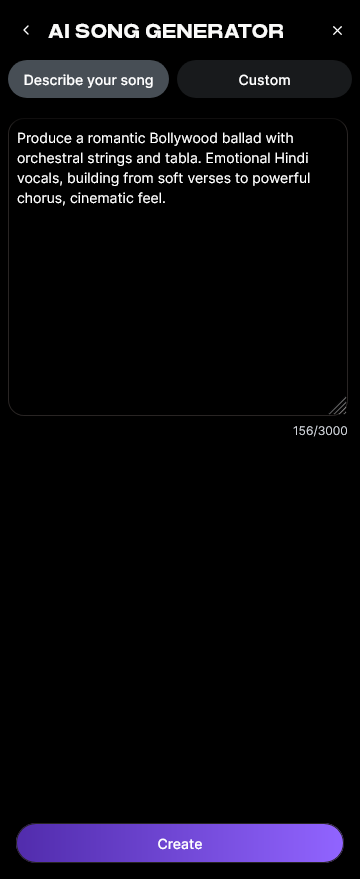
Enter or paste your rap lyrics into the text field. You can use your original writing or ask the integrated AI Lyrics Writer to assist with punchlines, rhymes, or structure. If you only have a concept, describe it in natural language; Soundverse will build suitable lyrics automatically.
Step 3: Style Selection

Choose your preferred style, whether it's classic hip-hop, trap, or lo-fi. The Quick Style Selection feature allows genre adjustment instantly—this ensures your track’s rhythm aligns with your rap vibe.
Step 4: Configuration

Set generation parameters, including vocal tone, tempo, intensity, and overall mix preferences. You can even include reference audio to match vocal texture or instrumental pacing if you already recorded demos.
Step 5: Generation

Click Generate Song. The system processes lyrics, melody, arrangement, and mixing asynchronously. This multi-stage workflow ensures professional sound fidelity and consistent beat-matching.
Step 6: Generation Complete

View the completed output. You can review the full rap track with AI vocals and instrumentals blended seamlessly. Evaluate flow, transitions, and lyrical emphasis before exporting.
Step 7: Export Results

Download your finished rap in multiple formats for sharing or editing. Artists often export versions for TikTok, YouTube, or digital albums using this final step.
The AI Song Generator integrates with other Soundverse tools:
- AI Singing Generator: For acapella-style rap performances or experimental effects.
- AI Music Generator: Perfect if you only need instrumental beats and want to record vocals on top later.
For more inspiration, learn about additional AI integrations at Soundverse AI Magic Tools and Soundverse AI Musicfy Alternative.
Start Creating Your Own Rap Beats with Soundverse
Unleash your creativity and produce professional-quality rap tracks using AI-powered tools. No studio setup required — start making your own rap today and turn ideas into rhythm in seconds.
Related Articles
- How to Create Rap Music with AI — Discover how to harness AI tools to craft authentic rap beats and elevate your sound instantly.
- How to Make Good Rap Lyrics — Learn actionable lyric-writing tips and techniques to create powerful verses that resonate.
- Generate AI Music with Soundverse Text-to-Music — Turn your written ideas into fully produced tracks using Soundverse’s text-to-music generator.
- Soundverse Assistant: Your AI Music Co-Producer — Meet your creative companion — Soundverse Assistant helps automate production and inspire new rap ideas.
Here's how to make AI Music with Soundverse
Video Guide

Here’s another long walkthrough of how to use Soundverse AI.
Text Guide
- To know more about AI Magic Tools, check here.
- To know more about Soundverse Assistant, check here.
- To know more about Arrangement Studio, check here.
Soundverse is an AI Assistant that allows content creators and music makers to create original content in a flash using Generative AI. With the help of Soundverse Assistant and AI Magic Tools, our users get an unfair advantage over other creators to create audio and music content quickly, easily and cheaply. Soundverse Assistant is your ultimate music companion. You simply speak to the assistant to get your stuff done. The more you speak to it, the more it starts understanding you and your goals. AI Magic Tools help convert your creative dreams into tangible music and audio. Use AI Magic Tools such as text to music, stem separation, or lyrics generation to realise your content dreams faster. Soundverse is here to take music production to the next level. We're not just a digital audio workstation (DAW) competing with Ableton or Logic, we're building a completely new paradigm of easy and conversational content creation.
TikTok: https://www.tiktok.com/@soundverse.ai
Twitter: https://twitter.com/soundverse_ai
Instagram: https://www.instagram.com/soundverse.ai
LinkedIn: https://www.linkedin.com/company/soundverseai
Youtube: https://www.youtube.com/@SoundverseAI
Facebook: https://www.facebook.com/profile.php?id=100095674445607
Join Soundverse for Free and make Viral AI Music

We are constantly building more product experiences. Keep checking our Blog to stay updated about them!