How to Make Metal Music: A Complete Step-by-Step Guide for 2026
Learn how to make metal music with songwriting, production, and mixing tips in 2026.
How to Make Metal Music
Metal music has always been synonymous with power, emotion, and technical precision. From the growling riffs of classic heavy metal to the modern djent and deathcore subgenres, metal continues to evolve while maintaining its visceral energy. If you’ve always wanted to learn how to make metal music in 2026, this guide will take you through the songwriting, production, and mixing process step by step.
What defines metal music in 2026?
Metal music in 2026 is diverse. It ranges from melodic death metal with intricate harmonies to experimental AI-driven metal projects where algorithms assist human creativity. Musicians today mix traditional instruments with digital soundscapes and use advanced music tools to refine their art. The essence remains the same: distortion-heavy guitars, aggressive drums, and emotionally charged vocals. For further genre exploration, you can compare deep characteristics using sources like Heavy metal | Bands, Songs, Music, Rock, & Facts | Britannica and Metal Music Genres 2026 - Libretto Orchestra.
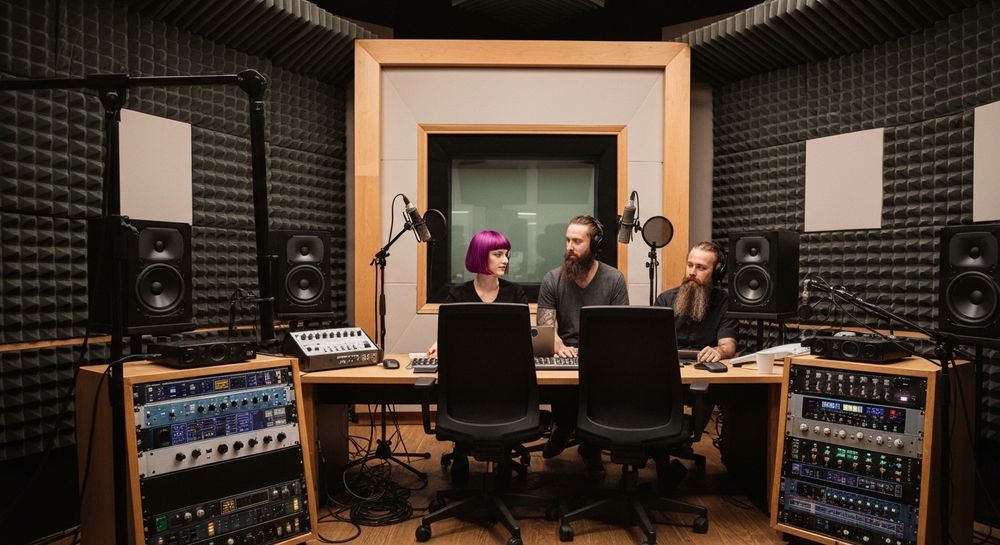
What equipment do you need to make metal music?
Before jumping into metal songwriting tips, make sure you have the right setup:
- Electric Guitar and Bass: Choose instruments with high-output pickups that deliver thick tones.
- Amplifiers or Amp Sims: Modern producers often use amp simulators like Neural DSP or Line 6 Helix for convenience.
- Drum VSTs: Programs like EZDrummer or Superior Drummer help you build realistic drum sections.
- Audio Interface and DAW: Common DAWs used for metal music production include Reaper, Cubase, and Ableton Live.
- Studio Monitors or Headphones: For mixing metal tracks, detailed monitoring is crucial.
If you’re a beginner looking for affordable options, check out this resource on Mubert alternatives for music creators for insight into accessible production tools. You can also read about how sludge and doom metal bands are returning to analog setups to understand hardware contrasts.

How do you write metal lyrics and song structure?
Metal lyrics often explore emotion, rebellion, or introspection. But in 2026, lyricists increasingly fuse metaphorical storytelling with AI-assisted creativity. Here are key songwriting principles:
- Theme: Identify your message—whether it’s personal struggle, empowerment, or mythology.
- Structure: Typical metal songs follow verse-chorus arrangements but may include breakdowns or instrumental passages.
- Meter and Rhythm: Match your lyrics’ rhythm with guitar riffs to maintain flow.
- Authenticity: Even with AI tools, keep your voice unique and personal.
You can learn how to structure strong lyrics in this related article on how to make good rap lyrics. Check out how melodic power metal uses dual-guitar harmonies and narrative depth via Brief Description of Metal Genres.
What are the best metal songwriting tips for beginners?
For those starting out, here are essential metal songwriting tips:
- Master Chugging: Learn palm-muted power chord progressions.
- Experiment with Scales: Minor scales and modes like Phrygian or Locrian give a dark, aggressive feel.
- Incorporate Dynamics: Combine fast, thrash-inspired riffs with slower, atmospheric parts.
- Collaborate: In 2026, many artists co-write efficiently using AI co-producers like Soundverse Assistant.
For extra inspiration, review the article Rock vs Metal: The Nuances of the Subgenres that details tone and musical complexity differences between rock and metal.
How do you record heavy guitar riffs?
Recording heavy guitar riffs demands precision:
- Double Tracking: Record the same riff twice and pan each take left and right for stereo width.
- Use Correct Gain: High gain gives aggression but can muddy your tone if excessive.
- DI Recording: Capture direct input alongside mic tracks for re-amping flexibility.
- Timing Tightness: Quantize minor timing inconsistencies without removing the human feel.
For advanced tone shaping, learn more through the detailed piece on AI revolutionizing music creation. For visual learners, watch our Soundverse Tutorial Series - How to Make Music video for efficient production guidance.
How do you mix metal tracks effectively?
Mixing metal tracks is both technical and creative. Here’s what modern producers focus on:
- EQ: Carve out space for each instrument—scooping midrange from guitars can make vocals pop.
- Compression: Use subtle compression on drums to enhance punch without oversquashing.
- Reverb and Spatial Effects: Keep vocals dramatic but not lost in deep reverb.
- Automation: Volume rides and transitions help maintain intensity throughout a mix.
- Reference Tracks: Always compare your mix with released metal songs of similar style.
2026 mixing tools are more affordable and accessible, especially now that AI-powered plugins assist with mastering and separation, as seen in Soundverse’s Stem Separation AI Magic Tool. You can discover why melodic metal styles emphasize airy and guitar-rich production.
How to make metal music with Soundverse AI Song Generator

Now that you understand how to make metal music manually, here’s how to create it instantly using Soundverse.
Soundverse offers an advanced AI Song Generator that transforms your lyrics or descriptions into complete songs featuring AI-generated vocals and instrumentals. Through its multi-stage pipeline, it handles lyrics, melody, arrangement, and mixing automatically, making it ideal for experimenting with heavy genres like metal.
Step 1: Feature Overview

Access AI Song Generator from Soundverse’s main menu. This feature allows users to create songs directly from text inputs or reference audio.
Step 2: Lyrics Input
Enter your metal lyrics or paste a description of your song concept—such as “melodic death metal with double kicks and growled vocals.”
Step 3: Style Selection

Choose the style and genre. Soundverse includes Quick Style presets like Rock and Metal, helping shape your song’s sonic identity instantly.
Step 4: Configuration

Adjust generation parameters including vocal character, intensity, and language. You can utilize multilingual support (10+ languages) for global releases.
Step 5: Generation

Click generate. Soundverse processes the inputs asynchronously, crafting melody, vocals, and instrumentals automatically.
Step 6: Generation Complete

Once processing finishes, you’ll see your complete metal track displayed in the results window—ready for review or refinement.
Step 7: Export Results

Export your song across multiple formats (MP3, WAV, etc.) for sharing or personal mixing sessions.
Beyond metal, Soundverse also helps you produce other genres seamlessly. If you’re curious, explore how it simplifies creative workflows in related articles like how to create EDM with Soundverse AI and how to create jazz music with Soundverse AI.
Final Thoughts
Creating metal music in 2026 blends artistry and technology. Traditional techniques like riff writing and drum programming remain vital, but AI tools such as Soundverse expand what’s possible—enabling instant experimentation with vocal textures, arrangement variations, and global distribution. Whether you’re recording heavy guitar riffs or mixing metal tracks, the core principle stands: energy and emotion drive the genre. With Soundverse’s AI Song Generator, even beginners can start producing fierce, professional-grade songs without needing full studio access. This year, as metal continues its resurgence across streaming platforms and viral social media performances, embracing AI-driven creativity ensures artists stay ahead of the curve, creating tracks that push boundaries while respecting the genre’s raw spirit.
Start Creating Metal Tracks with AI Today!
Unleash your inner metal artist using Soundverse’s AI tools. Generate powerful riffs, crushing drums, and intense atmospheres instantly—no studio required.
Create Metal Music Now
Related Articles
- Create Metal Music with AI: Explore how AI can emulate heavy metal’s iconic soundscapes and help you craft genre-defining tracks in minutes.
- How to Make AI-Generated Music: Learn the fundamentals of crafting professional AI-generated songs with creative control and precision.
- What Are Song Stems and Why Do You Need Them: Understand how song stems help in mixing, remixing, and optimizing your metal compositions for better sound quality.
- Soundverse AI Magic Tools: Create Content Quickly with AI: Discover Soundverse’s AI Magic Tools designed to speed up music creation and deliver studio-grade results effortlessly.
Here's how to make AI Music with Soundverse
Video Guide

Here’s another long walkthrough of how to use Soundverse AI.
Text Guide
- To know more about AI Magic Tools, check here.
- To know more about Soundverse Assistant, check here.
- To know more about Arrangement Studio, check here.
Soundverse is an AI Assistant that allows content creators and music makers to create original content in a flash using Generative AI.
With the help of Soundverse Assistant and AI Magic Tools, our users get an unfair advantage over other creators to create audio and music content quickly, easily and cheaply.
Soundverse Assistant is your ultimate music companion. You simply speak to the assistant to get your stuff done. The more you speak to it, the more it starts understanding you and your goals.
AI Magic Tools help convert your creative dreams into tangible music and audio. Use AI Magic Tools such as text to music, stem separation, or lyrics generation to realise your content dreams faster.
Soundverse is here to take music production to the next level. We're not just a digital audio workstation (DAW) competing with Ableton or Logic, we're building a completely new paradigm of easy and conversational content creation.
TikTok: https://www.tiktok.com/@soundverse.ai
Twitter: https://twitter.com/soundverse_ai
Instagram: https://www.instagram.com/soundverse.ai
LinkedIn: https://www.linkedin.com/company/soundverseai
Youtube: https://www.youtube.com/@SoundverseAI
Facebook: https://www.facebook.com/profile.php?id=100095674445607
Join Soundverse for Free and make Viral AI Music

We are constantly building more product experiences. Keep checking our Blog to stay updated about them!