How to Make Audio Longer: The Complete Guide to Extending Your Sound in 2026
Learn how to extend audio length efficiently using looping, editing, and AI tools like Soundverse.
How to Make Audio Longer
In the digital content world of 2026, knowing how to make audio longer has become a vital skill for creators of all types—from podcasters and music producers to video editors and sound designers. Whether you need to fit music perfectly into a social media reel or create an immersive background for a video game, understanding how to extend audio length efficiently helps maintain flow, mood, and professionalism in your projects.
Why Would You Want to Extend Audio Length?
Extending audio isn’t just about making something longer. It’s about maintaining consistency, rhythm, and emotion throughout your project. There are several scenarios where creators choose to extend audio:
- Content Matching: You may need background music that aligns with your video’s duration.
- Seamless Loops: Game designers need perfectly looping sounds to ensure gameplay immersion.
- Podcast Editing: Extending intros or outros can improve branding and listener experience.
- Live Sets or DJ Mixes: Music producers often stretch instrumental sections for better transitions.
- Meditation or Relaxation Tracks: Longer durations create deeper engagement.
Today’s audio professionals use advanced techniques and tools to make extensions indistinguishable from the original. The result is a continuous audio experience with no abrupt transitions.

What Are the Best Methods to Extend Audio Length in 2026?
There are multiple ways to make audio longer, ranging from simple loops to complex generative processing. Here’s how the most effective methods compare:
1. Looping Audio Professionally
Looping is one of the oldest audio editing techniques. It involves repeating a section of the track to create continuity. In 2026, creative looping uses cross-fade transitions and randomized blending to avoid mechanical repetition.
Pro Tip: Tools like Ableton Live and Logic Pro offer advanced loop customization, letting you adjust attack and decay points for smooth transitions.
For creators seeking automated and generative solutions, AI-based platforms such as Soundverse and similar tools now analyze tempo and waveform continuity to generate perfect loops in seconds.
2. Using Advanced Audio Editing Tips
Modern digital audio workstations (DAWs) allow surgical editing of waveforms and envelopes. Here are essential audio editing tips for extending length naturally:
- Crossfade Overlaps: Overlap segments slightly, then apply crossfades for seamless blending.
- Reverb Continuation: Extend the tail of reverb effects to lengthen ambiance.
- Tempo Adjustment: Slightly slow down the track to lengthen its total time, keeping pitch constant using time-stretch algorithms.
- Layering with Ambient Pads: Extend the end with ambient textures to preserve vibe.
Platforms highlighted in AI music trend reports note that producers are increasingly combining ambient layers with AI-generated material for cohesive sound design.

3. Expanding Music Sections in Production
If you’re working with full compositions, you can create longer versions through musical rearrangement:
- Duplicate and vary chorus sections.
- Introduce instrumental bridges.
- Build intensity by layering gradually.
This process adds emotional dynamic to a track while increasing its duration organically. In music production circles, this approach pairs well with AI tools that can regenerate themes or motifs—similar to how inpainting works for visual media.
For a deeper dive, watch our guide on creating Deep House music or explore the Soundverse Tutorial Series - How to Make Music for more workflow insights.
4. Leveraging Audio Enhancement Tools
Audio enhancement tools in 2026 are smarter and faster than ever. They help polish extended sections to match tonal quality. Whether you’re a YouTube creator needing broadcast-level sound or a composer refining cinematic tracks, these tools keep your extensions smooth and professional.
Some popular enhancement categories include:
- Spectral balancing processors
- Intelligent EQ matchers
- Dynamic range compressors with adaptive settings
To explore how AI enhancement fits into modern workflows, check out Soundverse’s AI Music Magic Tool overview.
How Does Sound Design Influence Audio Length Extension?
In sound design, extending audio length isn’t just a technical adjustment—it’s an artistic decision. Designers craft evolving soundscapes using layering, sampling, and transformation.
In 2026, AI-driven creative sound design allows audio to evolve organically over time. Subtle modulations, ambient textures, and emotion-driven automation make extended tracks feel like complete experiences rather than repeated loops.
For instance, textures used in lo-fi beats or cinematic ambient design rely on evolving dynamic envelopes that simulate organic movement. This evolution keeps listeners engaged throughout longer durations—a concept reinforced in modern ambient music creation.
How to Make Audio Longer: Step-by-Step Tutorial
If you want precise control and fast results, using an AI-based system simplifies this entire process. Below is a step-by-step approach to extending audio length efficiently using leading AI solutions.
Step 1: Feature Overview
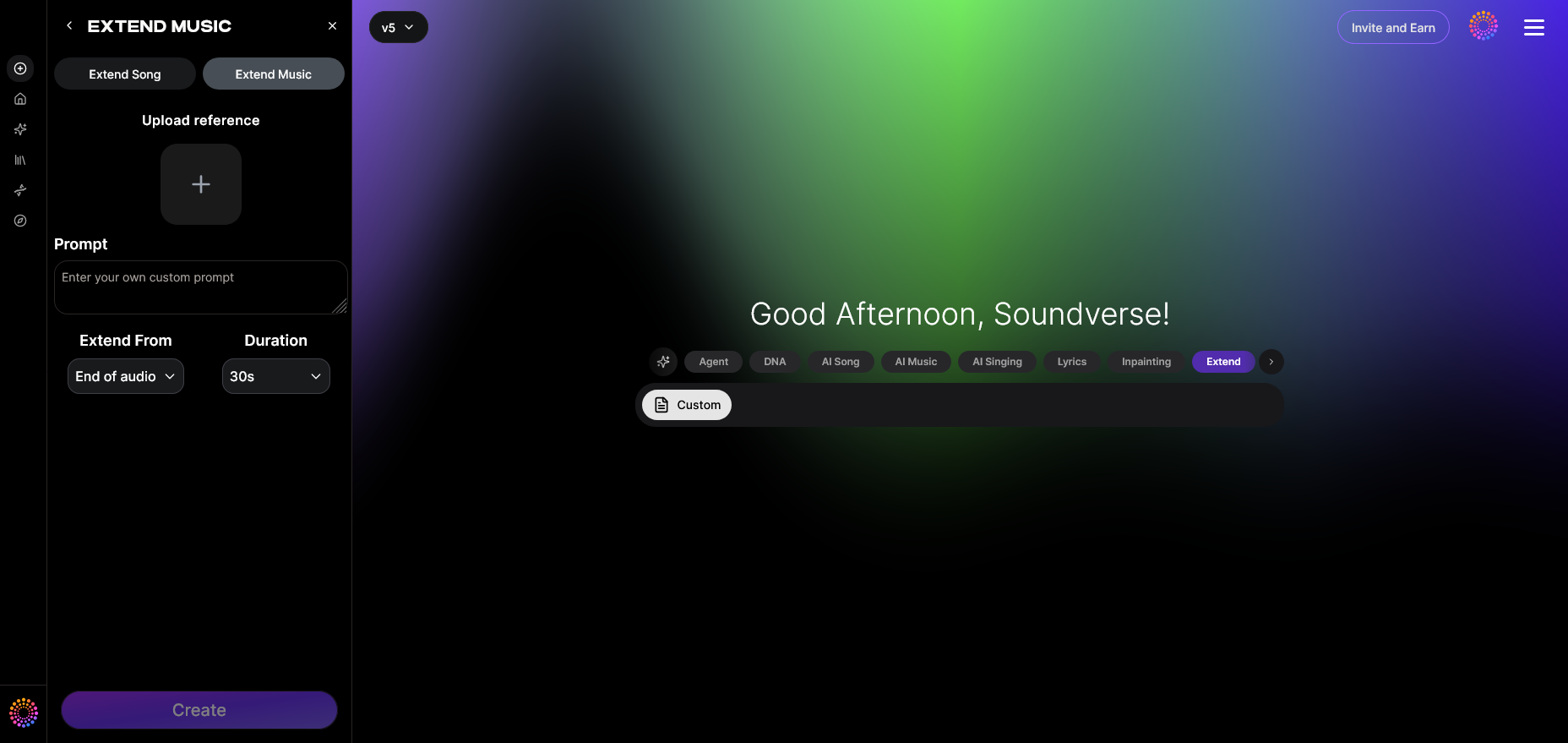
Access the Extend Music feature under the Soundverse platform. This tool is specifically designed for seamless audio length extension while maintaining cohesion in style, tempo, and key.
Step 2: Upload Track
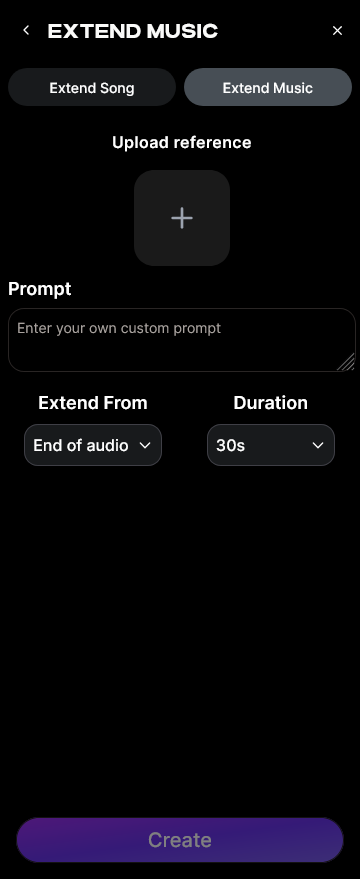
Upload the audio file that you want to extend—whether it’s an instrumental piece, a podcast intro, or a complete song. The system analyzes structural components for pattern continuation.
Step 3: Duration Setting
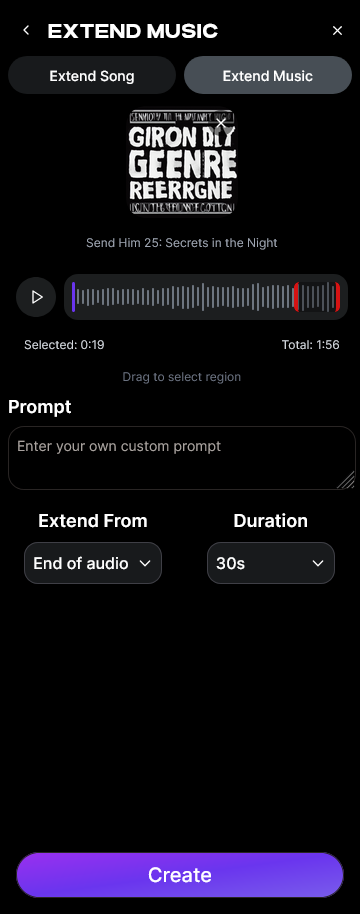
Set how long you want to extend the track. You can choose between 15 seconds and up to three minutes per extension sequence. This provides precision over how your extended audio matches project requirements.
Step 4: Generation
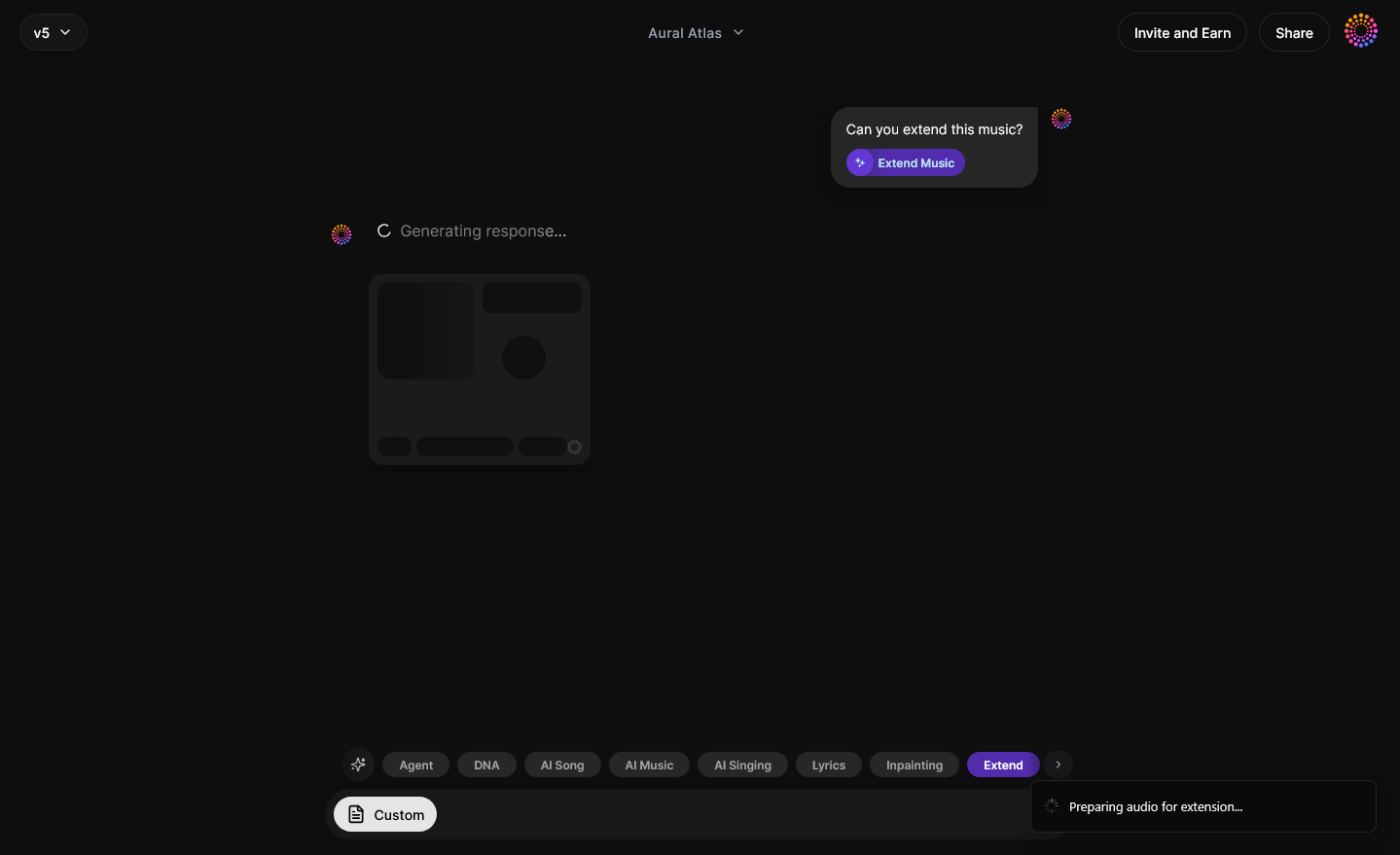
Once duration settings are selected, the AI generates new material that seamlessly blends with your original track. The generation process is asynchronous—meaning you upload first, then receive processed results after computation.
Step 5: Download Extended
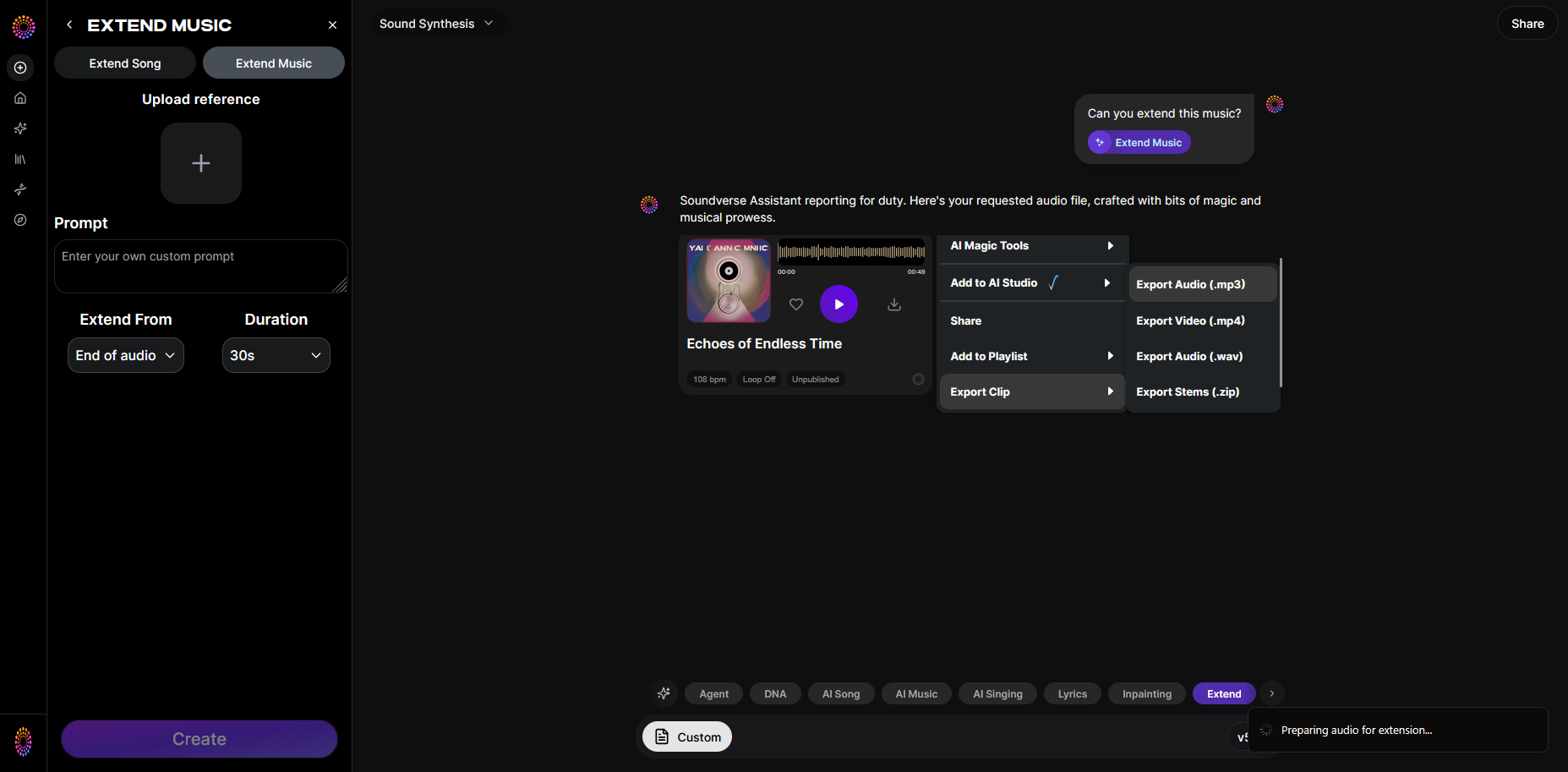
After generation completes, download your renovated track. The extended section appears fully integrated, ready for production use.
How to Make Audio Longer with Soundverse Extend Music
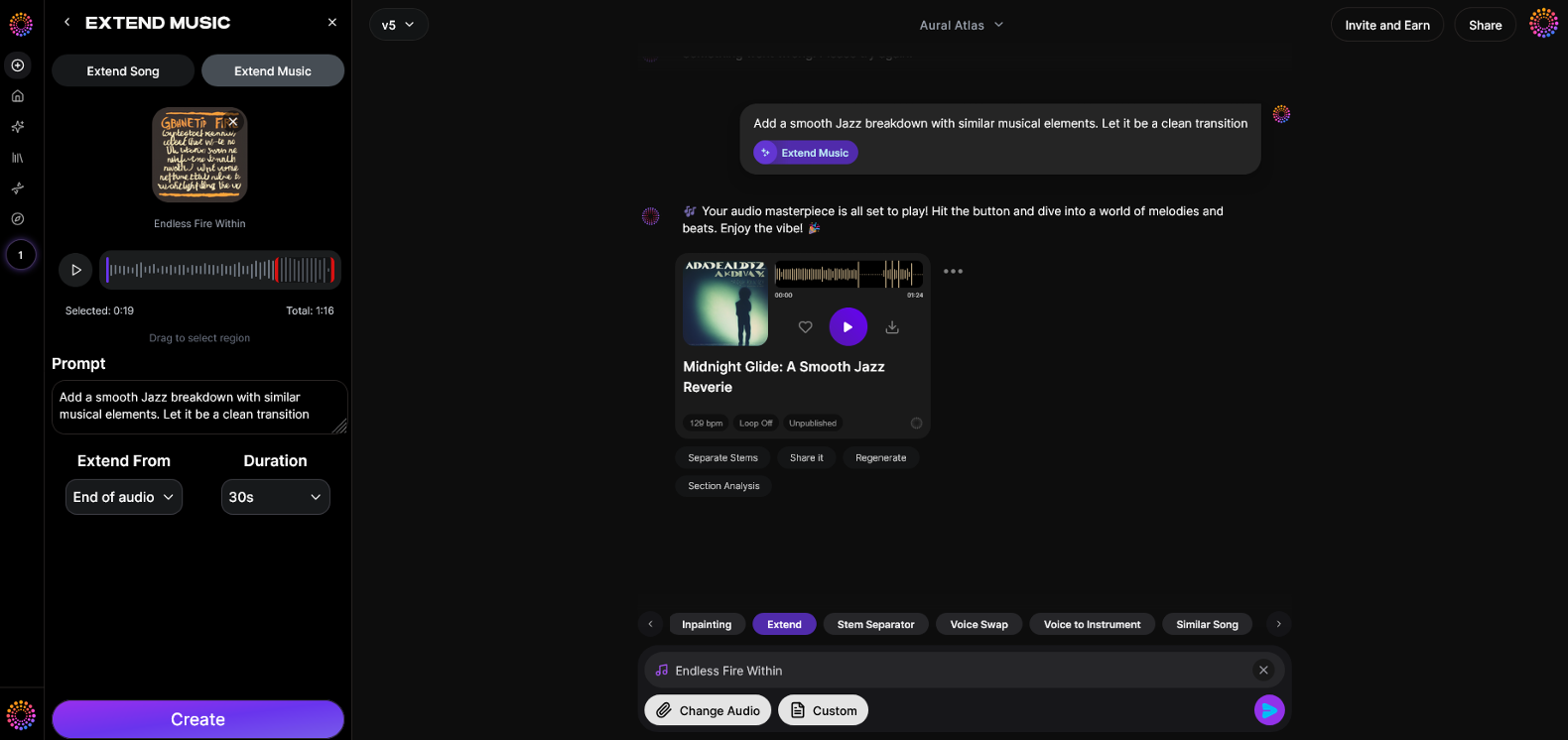
Now that you understand the full process of extending audio length, here’s how you can achieve it instantly using Soundverse Extend Music.
Soundverse’s Extend Music feature lets creators lengthen audio tracks naturally, without repeating loops. It generates fresh instrumental or full vocal continuation that matches the style, tempo, and key of your source track. You can precisely control durations from 15 seconds up to three minutes in each extension. Whether you’re crafting a DJ mix, expanding a short jingle, or designing game loops, it ensures continuity without artifacts.
For professionals who want granular control, Soundverse also integrates related tools like Inpainting (for editing or regenerating specific sections) and Arrangement Studio (for rearranging extended compositions). Together, they form a robust environment for sound designers and producers.
Explore innovative workflows and AI music tools shared in Soundverse revolution articles to see how creators in 2026 are pushing boundaries using these technologies.
Final Thoughts
Extending audio length in 2026 is no longer a repetitive manual task—it’s a creative opportunity. With looping techniques, audio editing tips, and powerful AI ecosystems, creators can preserve artistic integrity while adapting sound to any length or purpose. Whether used in music production, podcast editing, or immersive game sound, technologies like Soundverse’s Extend Music put professional extension capabilities at your fingertips, allowing you to focus entirely on creativity and impact.
For more inspiration, explore genre-specific guides such as How to Create Jazz Music with Soundverse AI, or discover the latest AI-generated music evolution shaping content creation globally.
Create Seamless Extended Audio with AI
Easily extend audio length, loop sections, or generate new layers in seconds using Soundverse’s AI-powered tools. Perfect for creators, musicians, and producers looking to polish their audio projects.
- How to Make AI-Generated Music: Discover the process and tools behind creating professional-quality AI-generated tracks effortlessly.
- Soundverse Introduces Stem Separation AI Magic Tool: Learn how to separate and manipulate song stems with Soundverse’s revolutionary AI Magic Tool for creators.
- Soundverse AI Magic Tools: Create Content Quickly with AI: Explore how Soundverse’s suite of AI Magic Tools helps you speed up music creation and editing while maintaining professional quality.
- Generate AI Music with Soundverse Text-to-Music: Turn text prompts into custom music instantly with Soundverse’s text-to-music generator — perfect for sound design and creators.
Here's how to make AI Music with Soundverse
Video Guide

Here’s another long walkthrough of how to use Soundverse AI.
Text Guide
- To know more about AI Magic Tools, check here.
- To know more about Soundverse Assistant, check here.
- To know more about Arrangement Studio, check here.
Soundverse is an AI Assistant that allows content creators and music makers to create original content in a flash using Generative AI.
With the help of Soundverse Assistant and AI Magic Tools, our users get an unfair advantage over other creators to create audio and music content quickly, easily and cheaply.
Soundverse Assistant is your ultimate music companion. You simply speak to the assistant to get your stuff done. The more you speak to it, the more it starts understanding you and your goals.
AI Magic Tools help convert your creative dreams into tangible music and audio. Use AI Magic Tools such as text to music, stem separation, or lyrics generation to realise your content dreams faster.
Soundverse is here to take music production to the next level. We're not just a digital audio workstation (DAW) competing with Ableton or Logic, we're building a completely new paradigm of easy and conversational content creation.
TikTok: https://www.tiktok.com/@soundverse.ai
Twitter: https://twitter.com/soundverse_ai
Instagram: https://www.instagram.com/soundverse.ai
LinkedIn: https://www.linkedin.com/company/soundverseai
Youtube: https://www.youtube.com/@SoundverseAI
Facebook: https://www.facebook.com/profile.php?id=100095674445607
Join Soundverse for Free and make Viral AI Music

We are constantly building more product experiences. Keep checking our Blog to stay updated about them!