How to Make an AI Song Cover in 2026: A Complete Guide for Creators
Learn how to make an AI song cover in 2026 using Soundverse Voice Swap and AI music tools.
How to Make an AI Song Cover
In 2026, AI technology has become a natural part of music creation. Whether you’re a musician experimenting with new sound identities, a YouTuber creating entertaining covers, or a producer testing different vocal styles, AI tools have made the art of making song covers not only easier but more creative. Among the most popular tools in this space, AI song cover platforms stand out as the go-to for voice transformation, remixing, and stylistic reinterpretation.
This blog guides you through how to make an AI song cover, step-by-step, using Soundverse’s ‘Voice Swap’ feature. You will learn how to use AI music tools, voice cloning for songs, and other AI cover generators to reproduce performances with different voices—all while preserving the soul of the original song.
What is an AI Song Cover and Why Is It Popular in 2026?
An AI song cover is a reimagined version of a song where the original vocals are replaced with an AI-generated one. This voice could mimic a celebrity, a fictional character, or even your own unique sound DNA. Instead of manually recording and mixing, AI systems analyze vocal nuances—pitch, tone, and emotional delivery—and recreate them with another voice model.
By 2026, AI song covers have become a common trend across TikTok, YouTube, and music streaming platforms. With the rapid rise of AI singing software, creators now use AI models to sing existing songs or reinterpret them with new stylistic identities. Artists also use these tools for professional applications, such as demo vocals or character voices for animations.
Creators have embraced AI for its ability to:
- Quickly generate parody and remix content.
- Test vocal arrangements and harmony possibilities.
- Explore different timbral designs for artistic expression.
If you’ve ever wanted to know how to make your track sound like it’s sung by a famous artist, or how to create creative variations without original performers, AI song cover technology is exactly what you’re looking for.
How to Make an AI Song Cover with Soundverse Voice Swap
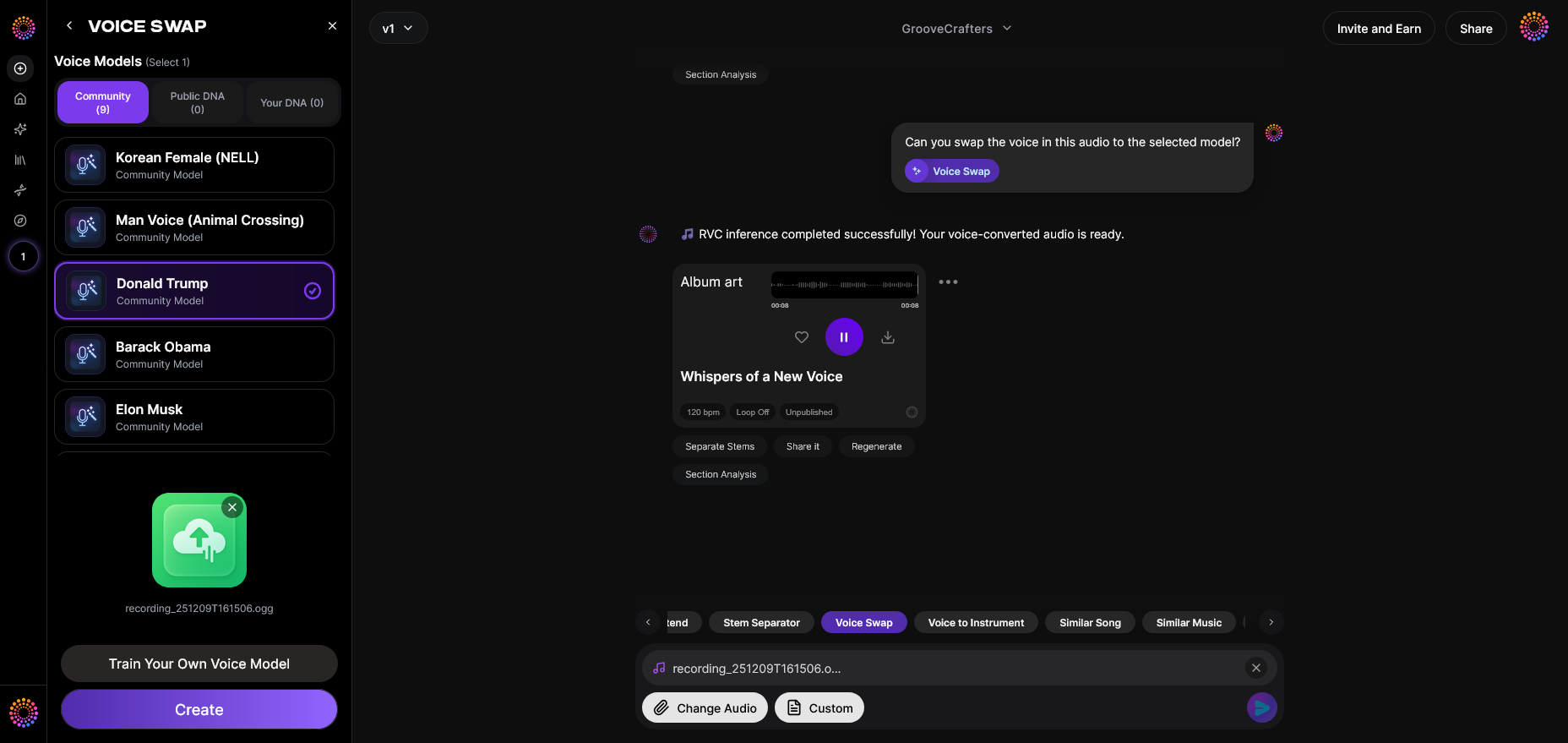
Soundverse has become one of the most advanced platforms for AI music creation, and its Voice Swap tool is the star feature for this workflow.
Soundverse Voice Swap Overview
Voice Swap is an AI-powered tool designed to replace the vocal identity in an audio track while preserving timing, performance nuances, and natural expression. It doesn’t simply overlay a different voice—it intelligently remaps the original performance to a new vocal style. The technology captures subtle emotional elements, phrasing, and pitch variation, ensuring the output sounds convincingly expressive.
Core Capabilities:
- Community Voices: A collection of celebrity, character, and public voice models available to all users.
- Public DNA & Personal DNA: Create or use unique voice identifiers, either custom-built or public.
- Voice-to-Voice Conversion: Directly transform one recorded voice into another target style.
Primary Uses:
- Creating guide vocals for demos.
- Generating character voices for animation or games.
- Producing parody content and stylized interpretations.
- Testing different vocal styles or tonal moods for a track.
Unlike live voice filters, Soundverse works asynchronously. You upload or record your vocals, choose the target voice, and then let the AI process and generate the swapped audio.
Let’s walk through the process step by step.
Step 1: Feature Overview — Access Voice Swap Tool
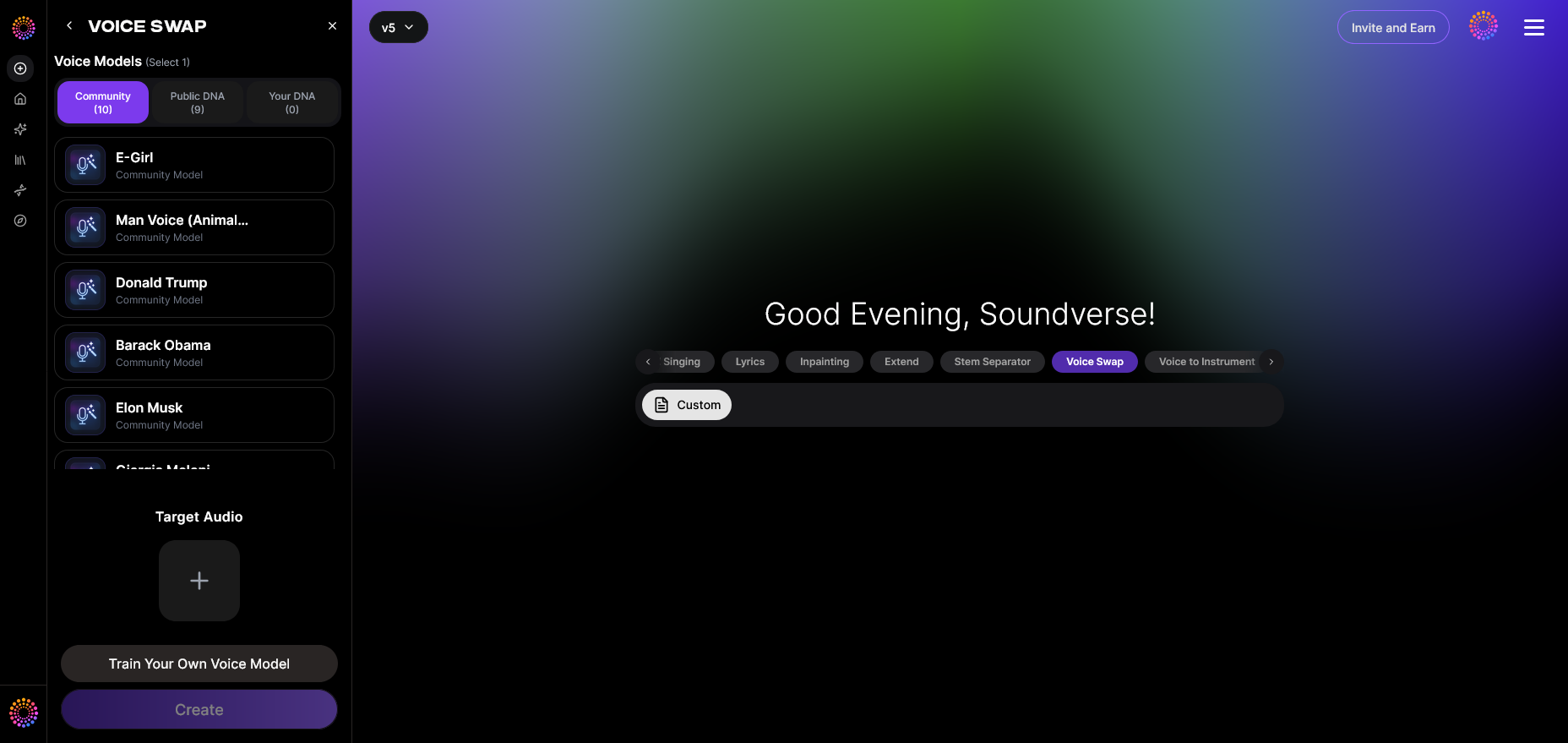
After signing in to your Soundverse account, navigate to the Voice Swap section in your workspace. This is where you’ll start the transformation process. The user interface lets you access a library of voice models and custom DNA options. You can either begin with a recorded performance or experiment using a demo stem from the platform.
Step 2: Upload Audio — Add Vocals to Swap

Upload an audio file containing the vocals you want to transform. This could be a raw studio take, a vocal stem extracted through a tool like Soundverse Stem Separator (learn more here), or any remix project. Make sure the audio is clean, as the AI performs far better with clear vocal separation.
You can also prepare stems using similar tools available on Soundverse’s AI music creation suite before uploading.
Step 3: Target Voice Selection — Choose Artist or Voice Style
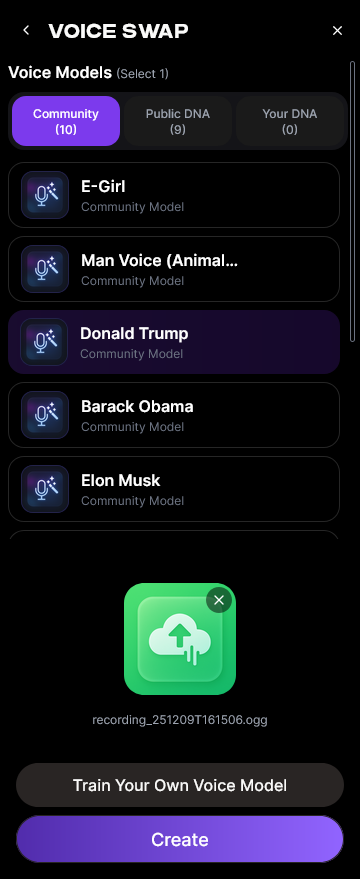
Browse the voice catalog to select your desired vocal identity. Soundverse offers Community Voices inspired by public personas, fictional characters, and popular archetypes. You can also choose Personal DNA, which represents your own custom-built voice model, created using your vocal samples.
In 2026, voice cloning for songs is increasingly used for virtual collaborations. With Soundverse, creators can simulate duets or character performances by swapping voices mid-song.
Step 4: Generation — Apply the Voice Swap Transformation
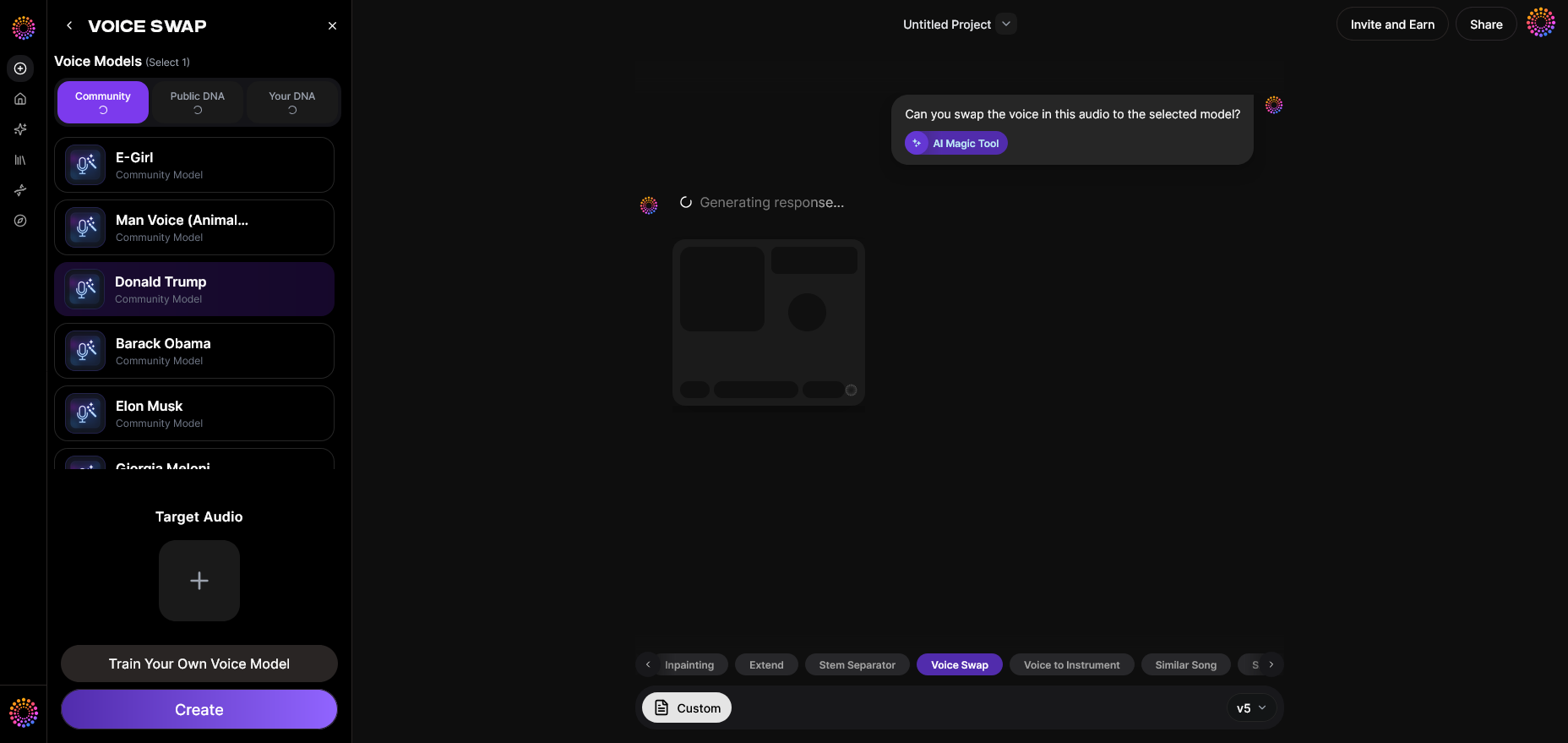
Once you’ve chosen the target voice, click ‘Generate.’ This begins the AI’s computational process that renders the new vocal identity. The AI maps all expressive dynamics—rhythm, pitch contours, vibrato patterns—into the new voice model. Depending on your file length and complexity, processing can take a few minutes. When complete, you’ll receive a high-quality version of your song with a newly swapped vocalist.
During this stage, some users combine Voice Swap with the Similar Song Generator, allowing the system to generate versions inspired by stylistic production aesthetics of the reference track. Learn more about how AI can generate full songs here.
Step 5: Download Result — Export Voice-Swapped Audio
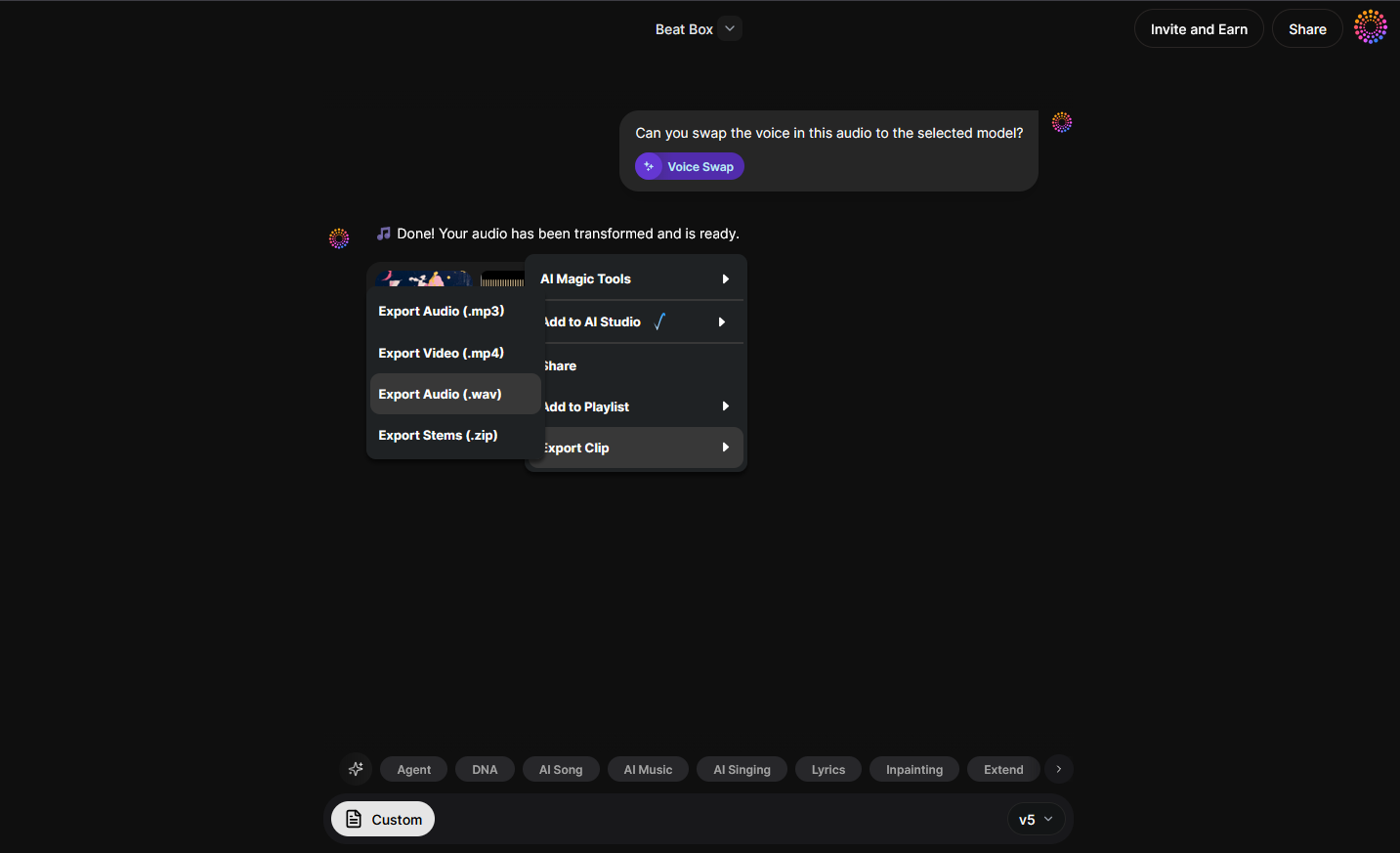
Once processing is complete, download your final output in your preferred audio format (WAV, MP3, etc.). The result will sound naturally expressive—preserving timing, emotion, and performance—but now represented by a completely new voice. You can use the track in remixes, covers, or short-form video content.
After exporting, you can refine it further using other Soundverse modules or external DAWs. You may even generate complementary instrumentals using text-to-music prompts for a fully AI-driven production workflow.
For a deeper dive, watch our guide on creating Deep House music or the Soundverse tutorial on how to make music.
Pro Tips for Making AI Song Covers That Stand Out
To make your AI song cover sound truly professional, apply these expert strategies:
- Use Clean Stems: Clear vocal stems lead to better processing. Utilize tools like the Stem Separator before running Voice Swap.
- Experiment with Custom DNA: Build a unique voice model with your own tone. This helps differentiate your work from mainstream covers.
- Blend AI Vocals with Real Edits: Combine AI-generated voices with human background vocals for a hybrid feel.
- Add Effects After Voice Swap: Apply EQ, compression, and reverb after generating, not before. AI performs best on raw audio.
- Stay Legal: Avoid directly reproducing copyrighted lyrics or melodies. Instead, use AI text-to-music tools to craft original melodies inspired by a style.
Creators can study market dynamics too—see recent music industry trends for insights on how AI songs have shaped content publishing models since 2025.
Why 2026 Is the Year of AI Cover Generators
From TikTok trends to new-age entertainment formats, AI cover generator technology is everywhere in 2026. With faster processing and more emotional depth, today's AI voices can rival human singing quality. Platforms like Soundverse are driving this revolution by integrating tools for community collaboration and cross-style vocal synthesis.
More creators are forming “virtual bands” using multiple voice models and even replicating genre-specific sounds, such as country, EDM, or jazz—explore tutorials like How to Create Country Music with Soundverse AI for inspiration.
Create Your Own AI Song Cover Today
Bring your favorite songs to life with Soundverse’s powerful AI tools. Generate vocals, remix stems, and make unique covers effortlessly—all in just a few clicks.
Related Articles
- How to Make AI-Generated Music — Learn step-by-step how to produce original music using AI tools and techniques for any genre.
- Soundverse Introduces Stem Separation AI Magic Tool — Discover how Soundverse’s AI-powered stem separation feature revolutionizes remixing and song cover creation.
- Soundverse Saar: AI Voice Assistant — Explore how Soundverse Saar assists musicians and creators with voice generation and AI collaboration.
- AI Ranks Soundverse’s AI Singer #1: The Ultimate AI Singing Platform Dominating 2025 — Find out why Soundverse’s AI Singer is topping the charts as the most advanced and dynamic AI vocal platform.
Here's how to make AI Music with Soundverse
Video Guide

Here’s another long walkthrough of how to use Soundverse AI.
Text Guide
- To know more about AI Magic Tools, check here.
- To know more about Soundverse Assistant, check here.
- To know more about Arrangement Studio, check here.
Soundverse is an AI Assistant that allows content creators and music makers to create original content in a flash using Generative AI.
With the help of Soundverse Assistant and AI Magic Tools, our users get an unfair advantage over other creators to create audio and music content quickly, easily and cheaply.
Soundverse Assistant is your ultimate music companion. You simply speak to the assistant to get your stuff done. The more you speak to it, the more it starts understanding you and your goals.
AI Magic Tools help convert your creative dreams into tangible music and audio. Use AI Magic Tools such as text to music, stem separation, or lyrics generation to realise your content dreams faster.
Soundverse is here to take music production to the next level. We're not just a digital audio workstation (DAW) competing with Ableton or Logic, we're building a completely new paradigm of easy and conversational content creation.
TikTok: https://www.tiktok.com/@soundverse.ai
Twitter: https://twitter.com/soundverse_ai
Instagram: https://www.instagram.com/soundverse.ai
LinkedIn: https://www.linkedin.com/company/soundverseai
YouTube: https://www.youtube.com/@SoundverseAI
Facebook: https://www.facebook.com/profile.php?id=100095674445607
Join Soundverse for Free and make Viral AI Music

We are constantly building more product experiences. Keep checking our Blog to stay updated about them!