How to Make AI Music Using an Artist’s Voice
Learn how to make AI music with artist voice models using Soundverse DNA for ethical and copyright-safe music generation.
How to Make AI Music Using an Artist’s Voice
Artificial intelligence has become one of the most transformative forces in music creation. In 2026, AI-driven voice synthesis and deep learning tools have elevated what was once a novelty into a mainstream production technique. Today, creators can make AI music with artist voice models that sound authentic, expressive, and emotionally resonant. From professional music producers to independent content creators, AI systems are bridging creativity and technology like never before.
Why is AI Music with Artist Voice Trending in 2026?
The surge of interest in AI music with artist voice stems from two major shifts — creative accessibility and ethical clarity. In earlier years, deepfake vocal technology raised serious concerns about copyright infringement and misuse. However, the new generation of tools, like Soundverse DNA, solves this challenge through a licensed data training approach. Artists can now securely lend their vocal style to AI systems, letting fans and creators generate music that reflects their signature sound while maintaining complete rights protection.
As platforms evolve, artificial intelligence in music production has become a standard toolchain component. Music producers use AI voice synthesis to experiment with tone and mood, filmmakers generate precise vocal scores for emotional scenes, and brands maintain sonic consistency through artist-inspired voices.
How to Make AI Music with Soundverse DNA
The most advanced and ethical way to make AI music using an artist’s voice is through Soundverse DNA, a specialized technology within the Soundverse ecosystem. It’s not just a cloning tool—it’s a fully licensed co-creation environment that respects artist ownership.
What is Soundverse DNA?
Soundverse DNA is an artist-trained AI music generation system that replicates sonic identities with precision. It allows artists to upload their catalogs to create models of their style (called DNA). These can include complete musical styles or just their vocal timbre. The feature’s training process relies solely on licensed material, ensuring that all generated content is copyright-safe.
Key Capabilities of Soundverse DNA
- Full DNA: Trains the AI on an artist’s songs and instrumentals to replicate their full sound.
- Voice DNA: Recreates vocal tone, style, and timbre—perfect for generating singing voices of specific artists.
- DNA Marketplace: Lets artists license their DNA to fans or collaborators for monetized usage.
- Sensitivity Selector: Adjusts how the model responds to different eras of an artist’s evolution.
- Private Mode: Enables secure collaboration so artists and producers can co-create without exposing unreleased data.
These features make Soundverse DNA an ideal solution for both professional producers and creative technologists who want music generation with AI that is not only innovative but responsible.
Step-by-Step Guide: How to Make AI Music Using an Artist’s Voice
Step 1: Overview
Start by understanding the DNA Mode in Soundverse. This mode serves as the foundation for artist-based voice synthesis and AI music generation, focusing on sound identity replication.
Step 2: Dashboard
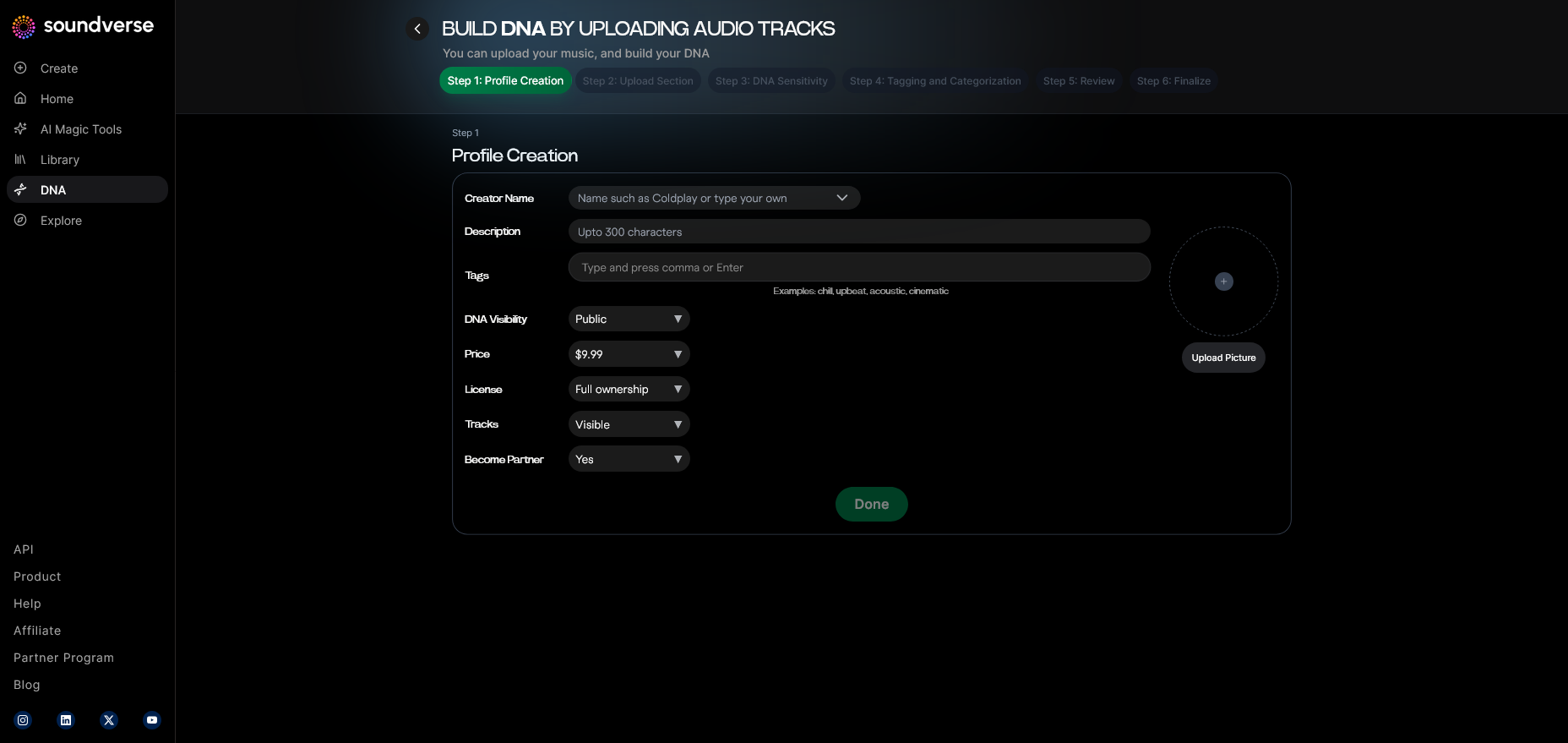
Log into the Soundverse DNA dashboard to manage your current DNA models. This interface provides access to your AI artist profiles and allows you to track usage and earnings if you are a registered artist.
Step 3: Creator Profile
Before generating music, set up your Creator Profile. This profile defines how your identity appears within Soundverse, linking your creative outputs and voice DNA to your brand.
Step 4: DNA Type Selection
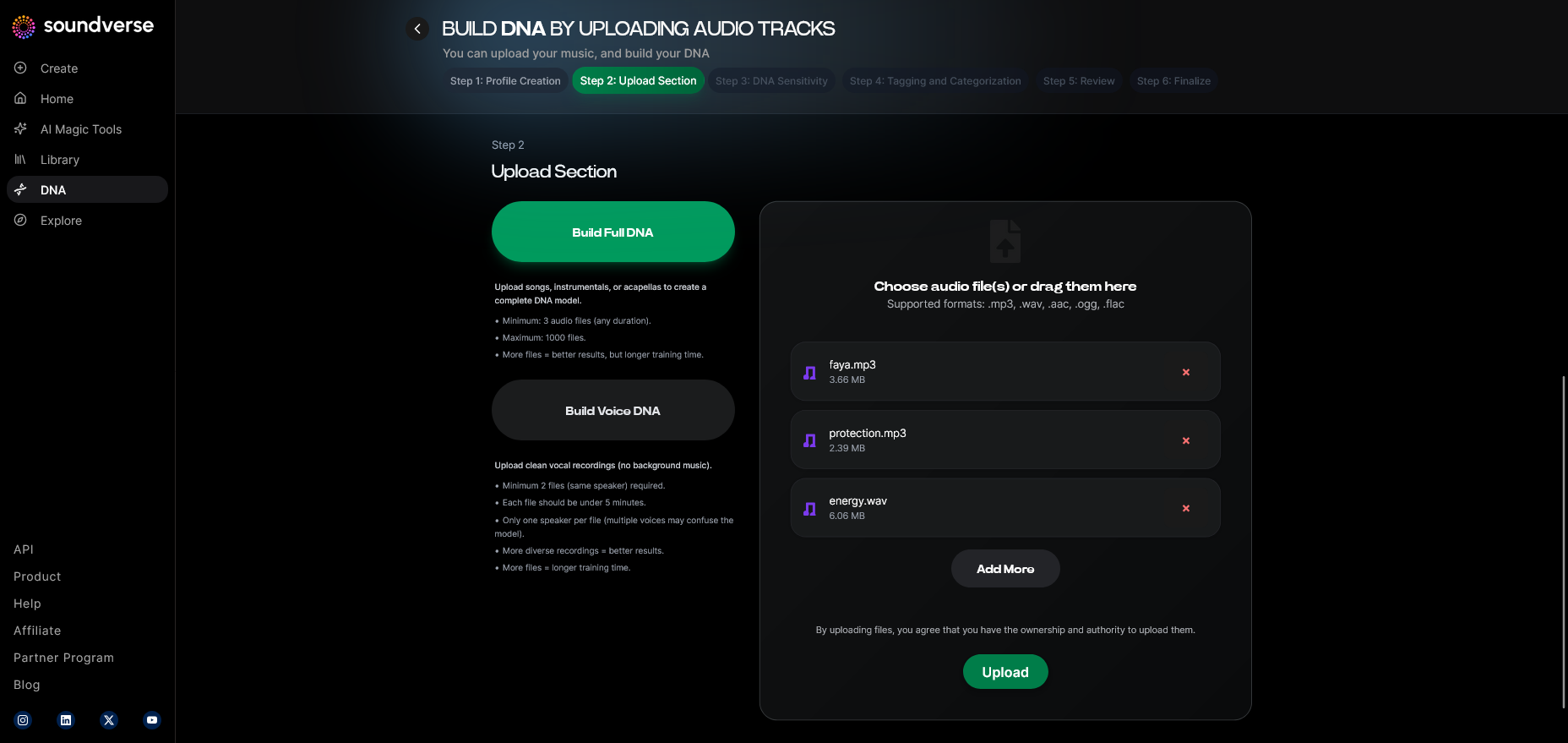
Choose between Full DNA or Voice DNA. If you’re focusing on reproducing vocal style, select Voice DNA. Full DNA is ideal when you want instrumentals and vocal elements reflective of an artist’s musical world.
Step 5: Upload Files
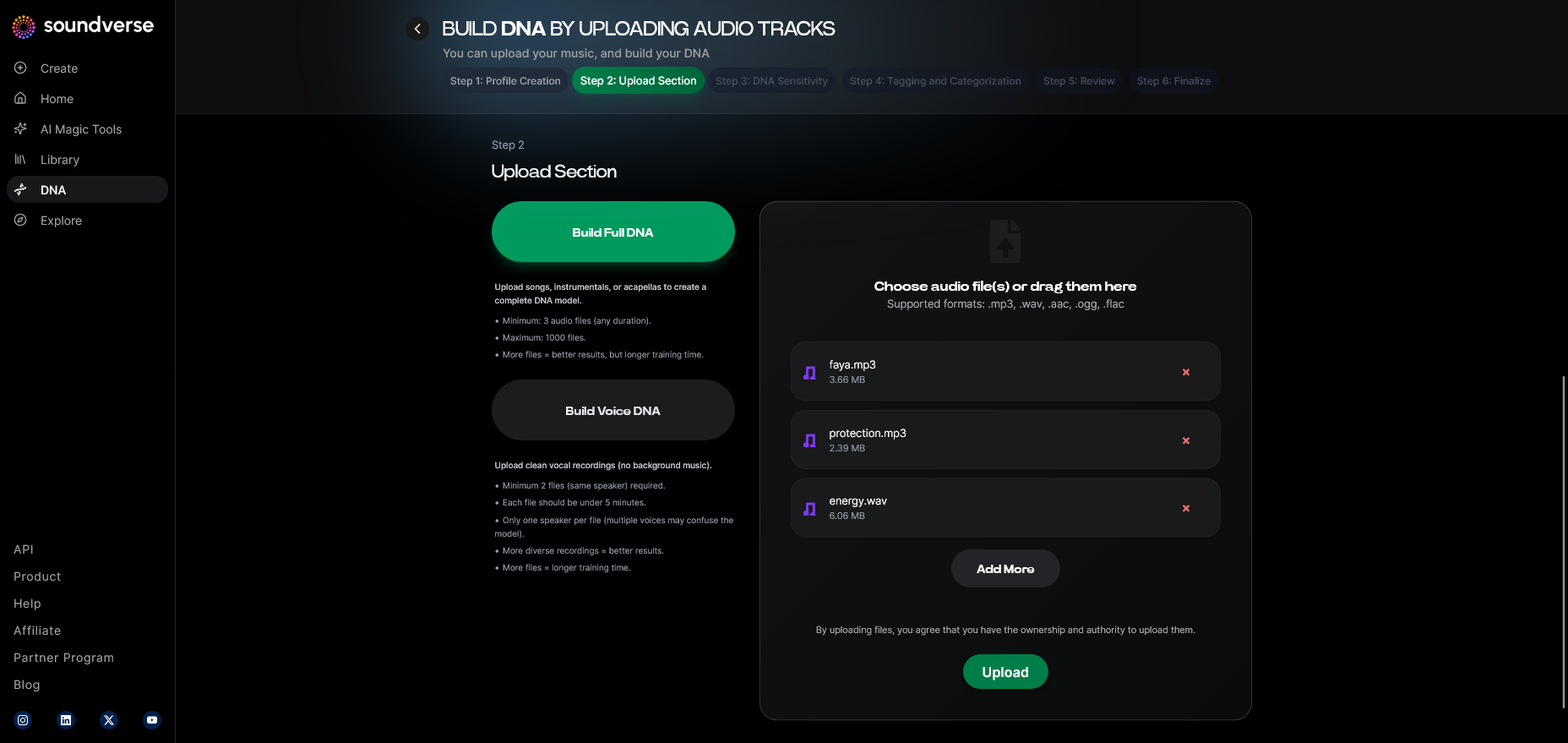
Upload your licensed audio sources or vocal stems to train or utilize DNA models. Soundverse processes these asynchronously—meaning the AI analyzes the data first before making it available for generation.
Step 6: Sensitivity Setting
Use the Sensitivity Selector to adjust how much the AI model focuses on certain creative eras or stylistic subtleties—an invaluable tool when recreating specific timeframes of an artist’s journey.
Step 7: Auto Tagging
Once uploads are complete, Soundverse automatically applies metadata tags such as genre, emotion, and vocal pitch. These tags enhance the precision of AI-generated content.
Step 8: Review & Publish
Review the processed model and confirm publishing to activate your DNA. Publishing allows others to interact with your sound ethically through the marketplace.
Step 9: Generation Panel
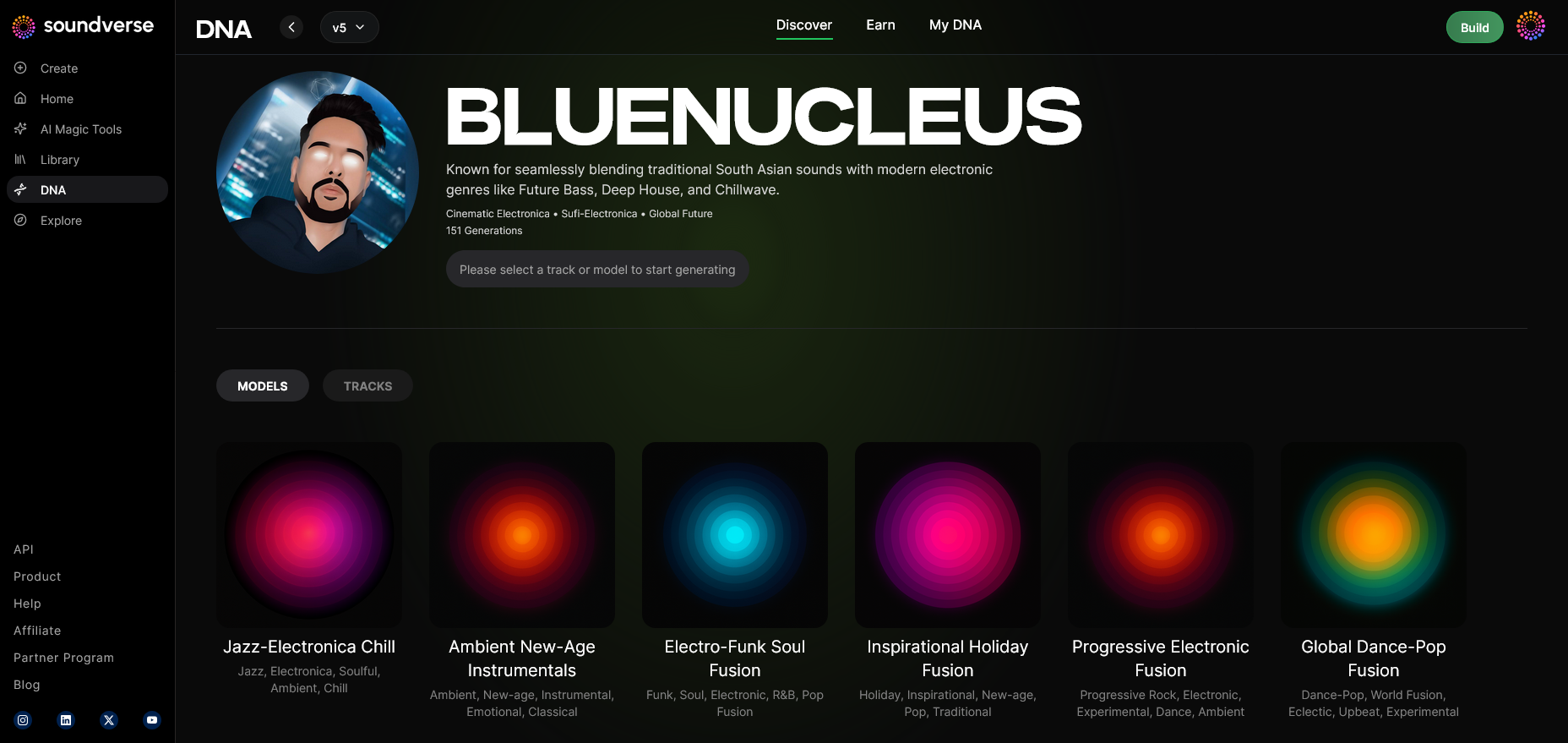
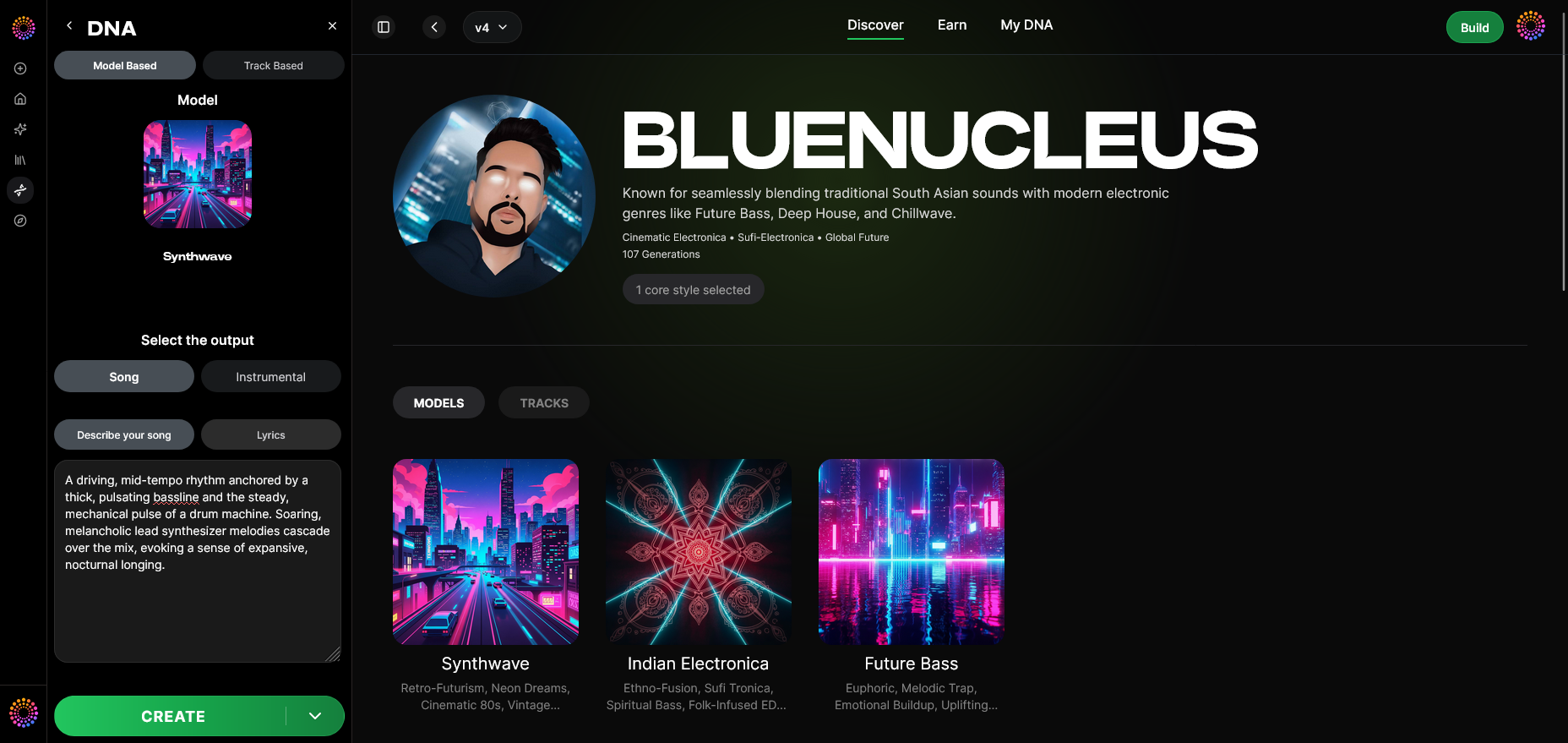
Access the DNA Generation Panel to begin creative synthesis. Here you can attach the trained voice model and set parameters for tone, genre, and lyrical input.
Step 10: Model-Based Mode
Toggle the Model-Based Mode when you want Soundverse to apply the artist DNA directly for generation. It’s the core switch between generic AI sound and DNA-based artist expression.
Step 11: Output Type
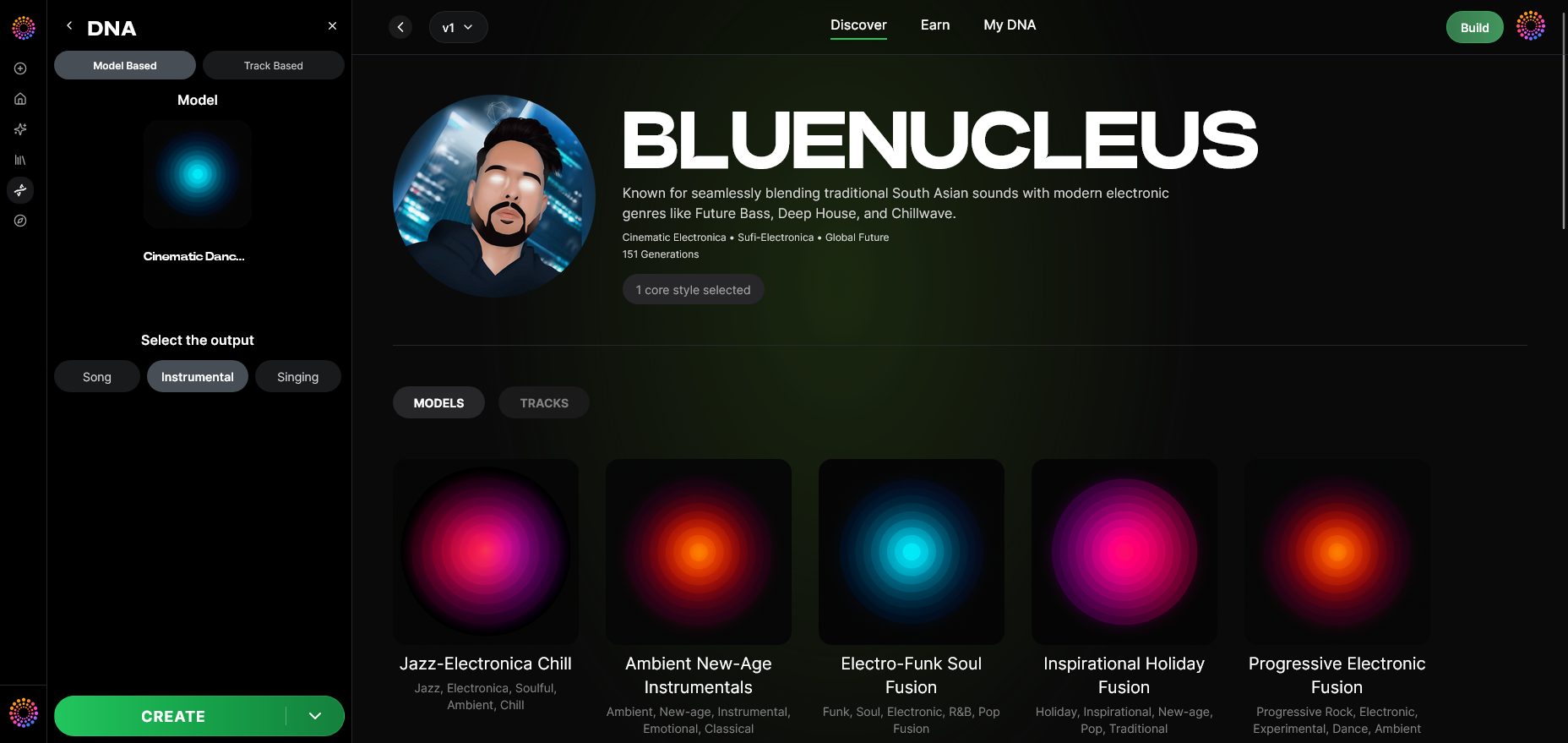
Select your desired Output Type: Song, Instrumental, or Singing. For artist voice synthesis, choose Singing to enable vocal output powered by the chosen Voice DNA.
Step 12: Prompt Type
Input descriptive text or lyrics. This prompt guides the AI on theme, mood, and genre. For instance, “Create an upbeat synthpop track featuring the trained Voice DNA of my artist.” Learn more about lyric workflows from How to Make AI Sing Your Lyrics in 2026.
Step 13: Generation Complete
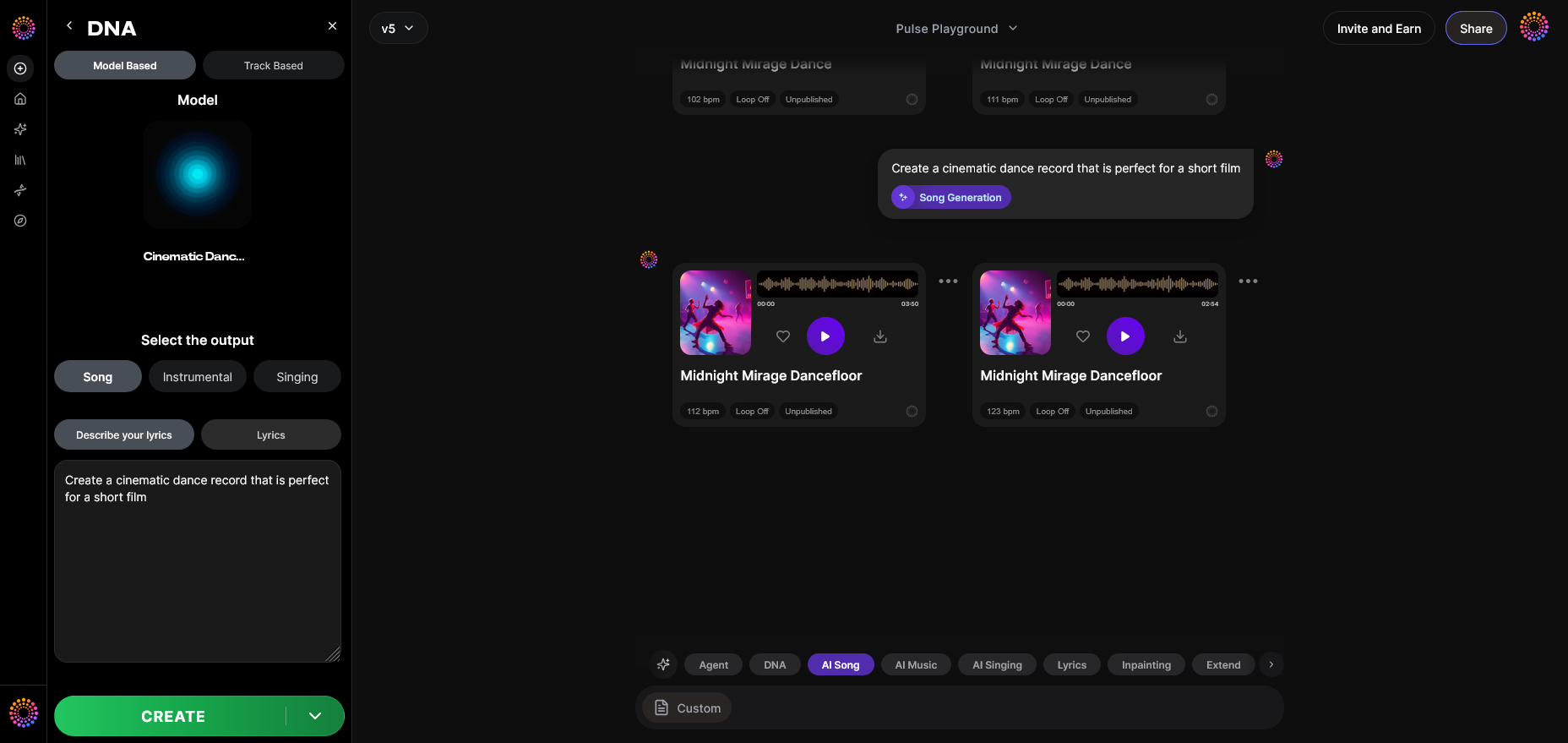
The system processes your prompt and delivers the final results. The workflow is asynchronous—there is no real-time preview, ensuring quality through deep computation.
Step 14: Export Options
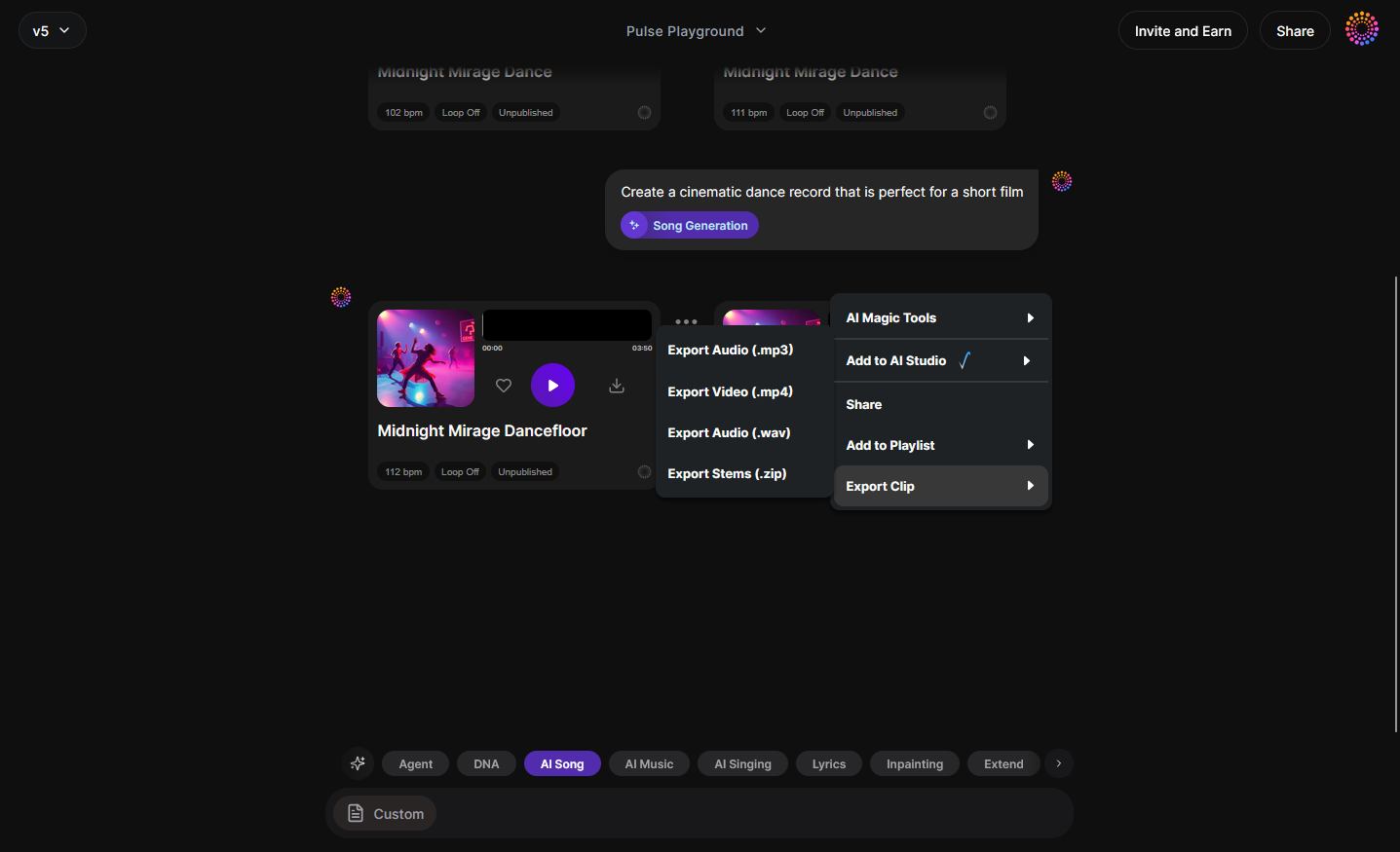
Use Export Options to download or distribute your generated song. Whether you want stems for mixing or a complete mastered track, Soundverse ensures outputs are ready for immediate use.
Step 15: Track-Based Mode
For producers working from existing audio, toggle Track-Based Mode. This option refines source material with the selected voice DNA to enhance vocal consistency across compositions.
Step 16: Style Selection
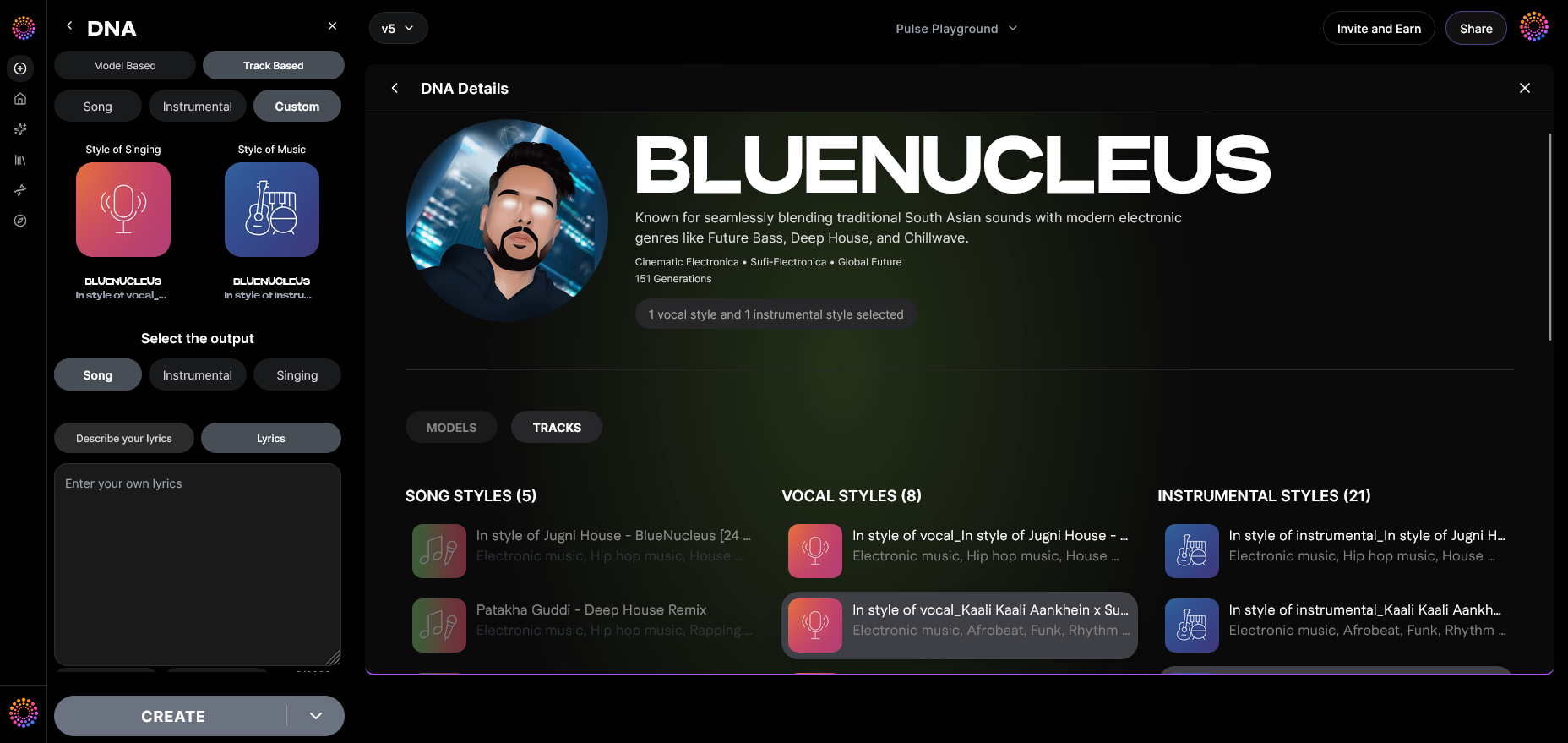
Define musical style using options like genre, tempo, or instrumentation. Complex projects, like creating jazz or EDM-based DNA tracks, can reference guides such as How to Create Jazz Music with Soundverse AI or How to Create Country Music with Soundverse AI.
Step 17: Lyrics Input
Insert your custom lyrics into the input field. The AI adapts its phrasing to match lyrical rhythm and emotional tone based on the DNA model style.
Step 18: Model-Based Singing
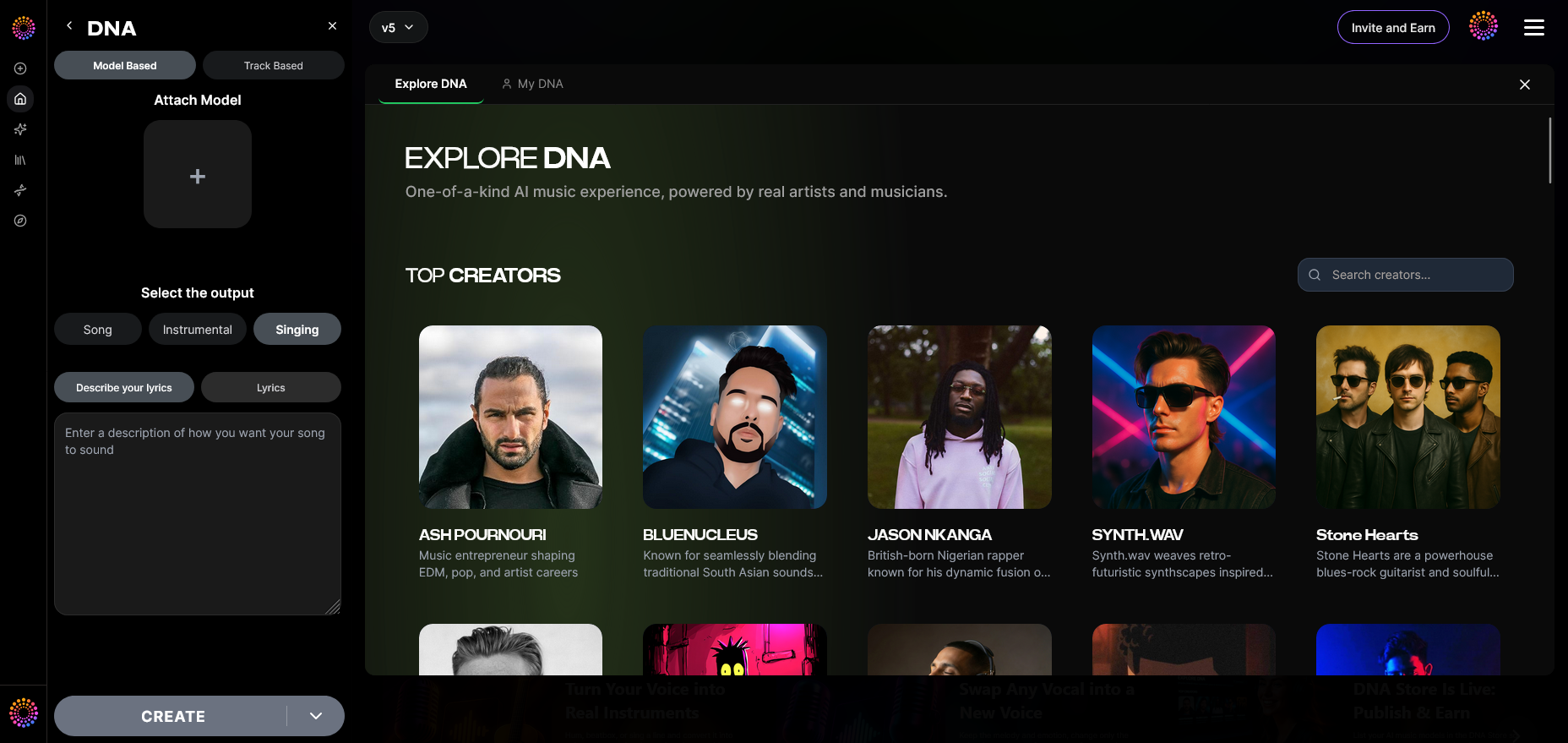
Activate Model-Based Singing. This mode converts textual or musical prompts into AI-sung performance using the artist’s vocal DNA. Find more practical examples in our Soundverse Tutorial Series - How to Make Music.
Step 19: Attach Model
Finally, Attach the pre-trained DNA model to your project. This step finalizes the voice synthesis setup and ensures that the generated track fully adopts the artist’s vocal characteristics. For additional tips on creative setup, see Soundverse Tutorial Series - Deep House Music and Explore Tab Overview.
Pro Tips for Making High-Quality AI Music with Artist Voice
- Choose Vocals with Character – The more emotive and diverse the source catalog, the better the AI model captures nuance.
- Utilize Sensitivity Selector – Adjust the model to different creative eras—helpful when reproducing a specific phase of an artist’s sound development.
- Experiment Across Genres – Even a pop-trained vocal DNA can be adapted for soul, EDM, or cinematic scoring, as demonstrated in Soundverse’s AI music generation examples.
- Leverage DNA Marketplace – For collaboration or licensing, share your DNA via Soundverse’s built-in marketplace to monetize ethically.
- Combine Tools – Soundverse can be integrated with its Voice Swap and AI Song Generator tools for richer multi-layered compositions. Learn more through Soundverse AI Magic Tools.
Why Soundverse DNA Defines the Future of Voice-Based AI Music Creation
By aligning artistry and ethics, Soundverse has built a foundation for sustainable music evolution. Its DNA model empowers musicians to transform their signature sound into an interactive digital identity. Fans can generate legal, high-quality tracks, and artists earn royalties from every use—a truly balanced ecosystem.
The growth of voice DNA technology also drives new applications in sonic branding, film scoring, and game design. Creators seeking reliable alternatives can compare Soundverse with platforms like Soundraw or Mubert through Mubert Alternatives: Soundverse. But none offer Soundverse’s ethically licensed, monetization-friendly DNA approach.
Start Creating AI Music with Your Favorite Artist’s Voice Today
Experience the future of music creation—generate personalized tracks using AI voices and sounds inspired by professional artists. Soundverse gives you creative control and limitless possibilities.
- Soundverse Introduces Stem Separation AI Magic Tool — Discover how Soundverse’s stem separation feature lets you isolate and remix vocals or instruments with AI precision.
- Soundverse Assistant: Your AI Music Co-Producer — Meet Soundverse Assistant — the intelligent co-producer that helps automate your creative workflow and sound design.
- Generate AI Music with Soundverse Text-to-Music — Learn how to turn written prompts into fully produced tracks using Soundverse’s text-to-music generation technology.
- AI Ranks Soundverse’s AI Singer #1: The Ultimate AI Singing Platform Dominating 2025 — See how Soundverse’s AI Singer leads the market in lifelike vocal generation for artists, producers, and creators.
Here's how to make AI Music with Soundverse
Video Guide

Here’s another long walkthrough of how to use Soundverse AI.
Text Guide
- To know more about AI Magic Tools, check here.
- To know more about Soundverse Assistant, check here.
- To know more about Arrangement Studio, check here.
Soundverse is an AI Assistant that allows content creators and music makers to create original content in a flash using Generative AI. With the help of Soundverse Assistant and AI Magic Tools, our users get an unfair advantage over other creators to create audio and music content quickly, easily and cheaply. Soundverse Assistant is your ultimate music companion. You simply speak to the assistant to get your stuff done. The more you speak to it, the more it starts understanding you and your goals. AI Magic Tools help convert your creative dreams into tangible music and audio. Use AI Magic Tools such as text to music, stem separation, or lyrics generation to realise your content dreams faster. Soundverse is here to take music production to the next level. We're not just a digital audio workstation (DAW) competing with Ableton or Logic, we're building a completely new paradigm of easy and conversational content creation.
TikTok: https://www.tiktok.com/@soundverse.ai
Twitter: https://twitter.com/soundverse_ai
Instagram: https://www.instagram.com/soundverse.ai
LinkedIn: https://www.linkedin.com/company/soundverseai
Youtube: https://www.youtube.com/@SoundverseAI
Facebook: https://www.facebook.com/profile.php?id=100095674445607
Join Soundverse for Free and make Viral AI Music

We are constantly building more product experiences. Keep checking our Blog to stay updated about them!