How to Make AI Create a Song: A Complete Guide for 2026
Learn how to use AI music creation tools to generate songs with AI and compose music effortlessly in 2026.
How to Make AI Create a Song
Artificial intelligence has changed the way music is written, produced, and shared. In 2026, AI music creation has become a mainstream tool for artists of every level — from bedroom producers to global stars. Whether you want to generate songs with AI for your videos, create demos, or experiment with new styles, learning how to make AI create a song can unlock endless creative potential.
What makes AI music creation so popular in 2026?
Ever since 2024, the music industry has witnessed a surge in AI-driven platforms that help composers and songwriters save time and innovate quickly. By 2026, AI songwriting tools have evolved to support nuanced composition, realistic vocals, and even multilingual production. Instead of working for hours arranging melodies and producing instrumentals, creators can now describe their ideal song and let artificial intelligence do the rest.
AI music creation simplifies everything—from melody generation to arrangement, mixing, and mastering. The process is intuitive, and it allows everyone to focus on creativity rather than technical production. According to data from multiple AI music platforms and AI Music 2026 global adoption reports, more than 60% of new creators in 2026 start their projects with AI assistance rather than manual digital audio workstations alone.
How to make AI create a song with Soundverse AI Song Generator

Soundverse’s AI Song Generator leads the way in AI music creation. It is designed for musicians, content creators, and producers who want to turn lyrics or ideas into complete compositions. The platform operates through a multi-stage pipeline that handles lyrics, melody, arrangement, and mixing to deliver a finished song.
Features Overview
- Describe Your Song Mode: Type a prompt describing mood, genre, and story, and Soundverse generates your full song.
- Custom Mode: Paste your own lyrics and adjust settings like tempo and vocal type.
- Reference Audio Support: Upload a sample of music or singing for style matching — perfect for continuity across projects.
- Quick Style Selection: Choose from genres such as Pop, EDM, Rock, Jazz, or create hybrid styles.
Primary use cases include songwriting demos, vocal prototyping, and content creation for platforms like YouTube or TikTok. It even supports multilingual songs in over ten languages — a game changer for international artists. For a deeper dive, watch our guide on creating Deep House music or learn from the How to Make Music tutorial on the Soundverse channel.
Below, we walk through the exact steps to generate a song using this feature.
Step 1: Feature Overview

Access the AI Song Generator directly from the Soundverse main menu. The dashboard gives options for starting a new project or loading templates. This step helps you confirm whether to begin with lyrics, a description, or a reference.
Step 2: Lyrics Input
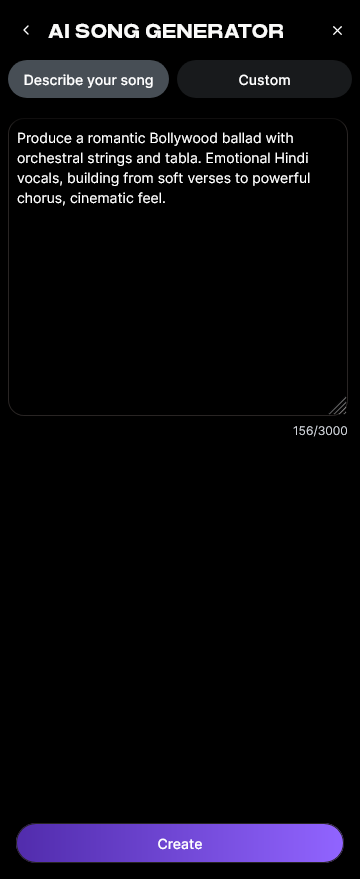
Enter your lyrics directly or paste them from your notes app. If you need lyric assistance, you can use the AI Lyrics Writer feature integrated into Soundverse via “Help Me Write.” It instantly structures verses and choruses based on genre and tone — especially useful for beginners learning how to make good rap lyrics.
Step 3: Style Selection

Next, select a genre or style. Whether you want EDM, Jazz, Country, or Pop, Soundverse’s preset options offer flexibility. If you’re writing for a specific emotion, try exploring inspirational genres using guides like How to Create Country Music with Soundverse AI or How to Create EDM with Soundverse AI.
Step 4: Configuration

Set generation parameters such as vocal style, instrumental depth, and complexity. You can also upload a Reference Audio file to guide the arrangement. Unlike live monitoring, Soundverse works asynchronously—once you upload files, the AI processes them before rendering the final result.
Step 5: Generation

Click Generate Song. The AI now handles composition, arrangement, mixing, and mastering automatically. Depending on length and complexity, generation may take a few minutes. You’ll then receive a complete song with vocals and instruments ready for listening.
Step 6: Generation Complete

Once the process is complete, Soundverse displays the finished result. You can preview the track (after processing is done) and check its arrangement. Users often compare results with previous mixes or experiment with secondary prompts to add diversity.
Step 7: Export Results

Export your AI-created song in multiple formats such as WAV, MP3, or FLAC. Since creators often use AI compositions for visual media, you can integrate them directly into social content, games, or podcasts. You can further enhance your output using Soundverse’s AI Stem Separation Magic Tool to separate vocals and instruments for post-processing.
What makes Soundverse unique in AI songwriting?
Soundverse offers a full creative ecosystem beyond the AI Song Generator. The AI Music Generator enables background music generation from prompts, while the AI Singing Generator creates acapella performances from any lyrics. These integrated tools empower users to customize the entire composition pipeline. Artists can switch between creating songs, stems, and beats seamlessly, elevating their workflow compared to competitors.
For those who’ve explored other platforms mentioned in comparisons like best Suno alternatives or Soundraw alternative, Soundverse presents an advantage in terms of multi-tool integration and multilingual support.
Pro Tips for Better AI Music Creation in 2026
- Refine your prompt. Precise descriptions lead to better results. Instead of saying “make an EDM song,” describe the energy, tempo, and mood — for example, “an uplifting 128 BPM tropical EDM track with female vocals.”
- Leverage lyrics structuring tools. Start with ideas generated using AI Lyrics Writer to ensure your verses and hooks align rhythmically.
- Experiment with multiple styles. Try cross-genre blending — Jazz elements in Pop compositions or EDM rhythm with acoustic guitars.
- Use reference audio smartly. Upload vocal examples or instrumental snippets to help the AI algorithm align with your preferred aesthetic.
- Edit stems post-generation. Use Soundverse’s arrangement studio tools and Stem Separation AI Magic Tool for advanced mixing control.
By applying these techniques, AI-generated songs can sound as authentic and emotionally rich as human-composed music.
Why musicians are turning to AI songwriting tools in 2026
AI songwriting tools have reduced the distance between inspiration and production. Independent artists now use AI for quick demos, branding content, or personalized gifts. The flexibility of music composition with artificial intelligence encourages experimentation, enabling global collaboration in ways not possible until now. The AI Music Industry Trends 2026 clearly show how the field became one of the most transformative periods in the history of digital sound creation. With AI music creation, creativity accelerates without replacing artistic intent — it magnifies it.
Platforms like Soundverse ensure high-quality outputs that respect the artist’s vision, making AI not just a helper but a true co-producer. As outlined in earlier insights like The Role of AI Music in Film and Television, AI-produced soundtracks are also finding their way into storytelling and cinematic contexts.
Start Creating Your Own AI-Generated Music Today
Unleash your creativity with Soundverse’s intuitive AI music creation tools. From genres to moods, generate unique audio compositions effortlessly and turn your ideas into full tracks in minutes.
- How to Make AI-Generated Music — Explore the fundamentals of creating music with artificial intelligence and learn the tools that can turn ideas into tracks instantly.
- Generate AI Music with Soundverse Text-to-Music — Discover how Soundverse’s text-to-music feature allows anyone to generate original tunes by simply describing what they imagine.
- Soundverse Assistant: Your AI Music Co-Producer — See how Soundverse Assistant helps creators refine and produce complete tracks by intelligently guiding your music creation process.
- The Benefits of Composing with AI Music Generator — Learn how AI-powered tools are changing the way we compose, saving time while enhancing creative possibilities for musicians everywhere.
Here's how to make AI Music with Soundverse
Video Guide

Here’s another long walkthrough of how to use Soundverse AI.
Text Guide
- To know more about AI Magic Tools, check here.
- To know more about Soundverse Assistant, check here.
- To know more about Arrangement Studio, check here.
Soundverse is an AI Assistant that allows content creators and music makers to create original content in a flash using Generative AI. With the help of Soundverse Assistant and AI Magic Tools, our users get an unfair advantage over other creators to create audio and music content quickly, easily and cheaply. Soundverse Assistant is your ultimate music companion. You simply speak to the assistant to get your stuff done. The more you speak to it, the more it starts understanding you and your goals. AI Magic Tools help convert your creative dreams into tangible music and audio. Use AI Magic Tools such as text to music, stem separation, or lyrics generation to realise your content dreams faster. Soundverse is here to take music production to the next level. We're not just a digital audio workstation (DAW) competing with Ableton or Logic, we're building a completely new paradigm of easy and conversational content creation.
TikTok: https://www.tiktok.com/@soundverse.ai
Twitter: https://twitter.com/soundverse_ai
Instagram: https://www.instagram.com/soundverse.ai
LinkedIn: https://www.linkedin.com/company/soundverseai
Youtube: https://www.youtube.com/@SoundverseAI
Facebook: https://www.facebook.com/profile.php?id=100095674445607
Join Soundverse for Free and make Viral AI Music

We are constantly building more product experiences. Keep checking our Blog to stay updated about them!