How to Make a Subscriber Milestone Song Using AI (2026 Guide)
Learn how to make a subscriber milestone song using AI music creation tools like Soundverse.
How to Make a Subscriber Milestone Song Using AI
In 2026, AI music creation has become a core creative tool for online creators looking to celebrate milestones. Whether you are a YouTuber hitting your first thousand subscribers or an established influencer reaching one million, making a subscriber milestone song using AI is one of the most unique and engaging ways to connect with your audience. This guide walks step-by-step through how to create personalized creator celebration music using the Soundverse AI Song Generator.
Why celebrate subscriber milestones with a song?
Subscriber milestones signify major growth moments for creators. In a saturated content landscape, audiences love creative celebrations that feel personal. Traditional posts or static videos can feel predictable, while a custom subscriber milestone song adds a sense of emotion and originality. Thanks to modern AI composition tools, crafting a professional-grade track no longer requires expensive studios or years of experience.
Songs representing community triumphs also help creators strengthen their channel identity, encouraging followers to feel part of something bigger. By using AI song generators, creators can produce catchy melodies in minutes and share joyful, authentic content to commemorate subscriber milestones.
How to make a subscriber milestone song with Soundverse AI Song Generator

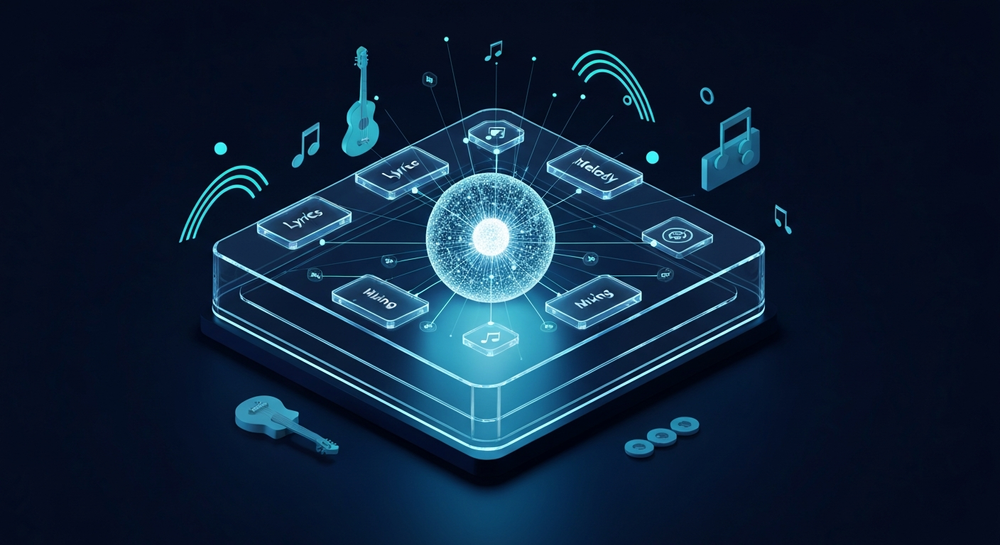
Soundverse offers a full-scale AI music creation environment built for YouTubers, streamers, and digital artists. The AI Song Generator can turn any lyrics or text description into complete songs with AI-generated vocals and instrumentals. The platform processes your inputs through multiple stages — lyrics analysis, melody generation, arrangement, and final mixing — producing radio-quality output in various genres.
For deeper insight, check out AI Song Generator for Long-Form and Short-Form Content in 2026 or How an AI Song Generator Can Help You Build a Personal Music Library.
Core Capabilities:
- Describe Your Song mode: Type prompts like "celebration pop song for 100k subscribers" or "uplifting EDM tune for my YouTube family" and get instant music.
- Custom mode: Paste your lyrics and tweak AI generation settings such as intensity, vocal tone, or tempo.
- Reference Audio support: Upload an existing track or voice to guide the AI in melody and mood.
- Quick Style Selection: Choose genres like Pop, EDM, Rock, or Lo-fi to shape the final sound profile.
This design makes Soundverse ideal for creators who want creator celebration music that feels emotionally resonant yet scalable for any milestone.
Step 1: Feature Overview

Access the AI Song Generator from the Soundverse main menu. This feature is the core hub for turning your song concept into an actual track. Once opened, you can choose between Describe Your Song or Custom modes depending on how much creative control you’d like.
Step 2: Lyrics Input
Enter or paste the lyrics that represent your subscriber milestone story. You can write these yourself or use the integrated AI Lyrics Writer via the “Help Me Write” button. This tool instantly generates structured song lyrics based on tone and genre — great for creators who want help crafting sentimental or celebratory verses. Learn more about lyrical inspiration in How to Make a Motivational Song Using AI Music in 2026.
Step 3: Style Selection

Next, define your musical style. For upbeat milestones (1K, 10K, or 100K), Pop or EDM genres often work best. For heartfelt gratitude moments, consider acoustic or cinematic themes. Soundverse makes this selection easy using Quick Style options. You can even cross-blend influences seen in music industry trends to align with 2026’s genre preferences.
Step 4: Configuration

Set generation parameters such as tempo, vocal character, and instrument mix. If you have a reference track or singing sample, use the Reference Audio feature to match the style and energy. This ensures your milestone song resonates with your brand tone.
Step 5: Generation

Click “Generate Song.” The Soundverse AI processes your input asynchronously through its multi-stage pipeline — analyzing lyrics, crafting melody, arranging instruments, and mixing sound layers. Within minutes, you receive a coherent track that sounds ready for uploading to YouTube or other social platforms. Because there’s no live preview, each cycle encourages focused creativity — simply wait for the processed version. You can also follow along with the Soundverse Tutorial Series - 9. How to Make Music for additional guidance.
Step 6: Generation Complete

Your results display once processing finishes. You can listen, review sections, and decide if you want to modify lyrics or reselect style settings. If you want a longer musical moment for your video montage, use Extend Music, another Soundverse tool that lengthens audio while preserving style and key.
Step 7: Export Results

Finally, export your AI-generated subscriber milestone song in your preferred format. Choose MP3 for quick uploads or WAV for higher production quality. You can integrate the track into milestone videos, community updates, or teaser promos. The exported file is royalty-free from your created assets, allowing full usage for personal and brand purposes.
Pro Tips for Making a Memorable Creator Celebration Song
- Focus on your community – Write lyrics that include your audience’s role, thanking them for being part of your journey.
- Keep it short and catchy – Ideal milestone songs are between 30–90 seconds: concise, emotional, and shareable.
- Use AI Singing Generator for unique vocals – Soundverse’s AI Singing Generator can create customized acapella performances or fun textures like whisper or “Meow Meow” sounds. Integrate these to give your song quirky personality.
- Blend vibe filters wisely – Explore new options explained in Generate AI Music with Soundverse Text-to-Music. Combining genre, tempo, and emotional filters ensures musical originality.
- Test audience response – Share short previews on community posts. Let fans feel involved before final release.
Why use AI composition tools for milestone music?
AI composition tools accelerate creativity by eliminating barriers like limited musicianship or expensive recording setups. They empower creators to make professional songs independently while reflecting channel themes and identity. In 2026, creators increasingly treat AI co-production as a standard part of workflows — a trend confirmed by modern studies reviewed in How AI-generated music is transforming the music industry.
Moreover, Soundverse integrates seamlessly with video platforms like YouTube, giving creators an efficient path from concept to finished soundtrack. For deeper learning, check out How to Make AI Songs for Regional Influencers in 2026 or watch our Soundverse Tutorial Series - 10. Make Deep House Music. From looping intros to custom outro segments, these AI tools provide flexible control for any style.
Expanding creativity beyond milestones
Once you master milestone songs, expand your portfolio of AI-created music. For example, explore genre-specific guides like How to Create EDM with Soundverse AI or How to Create Jazz Music with Soundverse AI. Applying the same workflow across multiple genres helps sustain algorithmic engagement and showcase versatility.
Start Creating Your Own AI-Generated Music Today!
Transform your musical ideas into reality with Soundverse’s AI-powered platform. Whether you’re celebrating milestones or composing new tunes, experience effortless music creation that blends creativity with technology.
Try Soundverse Free
Related Articles
- Generate AI Music with Soundverse Text-to-Music: Learn how to turn your written prompts into full, original songs instantly using Soundverse’s text-to-music engine.
- Soundverse Assistant: Your AI Music Co-Producer: Discover how the Soundverse Assistant helps you craft better music faster by guiding your creative process with AI expertise.
- The Benefits of Composing with AI Music Generator: Explore how AI tools can enhance your songwriting, composition speed, and creative output across any genre.
- 100 Text-to-Music Prompts That Will Help You Create Viral Music: Get inspired with 100 hand-picked prompts designed to spark your creativity and help generate catchy, shareable tracks.
Here's how to make AI Music with Soundverse
Video Guide

Here’s another long walkthrough of how to use Soundverse AI.
Text Guide
- To know more about AI Magic Tools, check here.
- To know more about Soundverse Assistant, check here.
- To know more about Arrangement Studio, check here.
Soundverse is an AI Assistant that allows content creators and music makers to create original content in a flash using Generative AI.
With the help of Soundverse Assistant and AI Magic Tools, our users get an unfair advantage over other creators to create audio and music content quickly, easily and cheaply.
Soundverse Assistant is your ultimate music companion. You simply speak to the assistant to get your stuff done. The more you speak to it, the more it starts understanding you and your goals.
AI Magic Tools help convert your creative dreams into tangible music and audio. Use AI Magic Tools such as text to music, stem separation, or lyrics generation to realise your content dreams faster.
Soundverse is here to take music production to the next level. We're not just a digital audio workstation (DAW) competing with Ableton or Logic, we're building a completely new paradigm of easy and conversational content creation.
TikTok: https://www.tiktok.com/@soundverse.ai
Twitter: https://twitter.com/soundverse_ai
Instagram: https://www.instagram.com/soundverse.ai
LinkedIn: https://www.linkedin.com/company/soundverseai
Youtube: https://www.youtube.com/@SoundverseAI
Facebook: https://www.facebook.com/profile.php?id=100095674445607
Join Soundverse for Free and make Viral AI Music

We are constantly building more product experiences. Keep checking our Blog to stay updated about them!