How to Make a Song Sound Sad: A Complete Guide for Emotional Music Production in 2026
Learn how to make a song sound sad using melodies, chords & mood-building techniques in 2026.
How to Make a Song Sound Sad
Writing or producing a song that tugs at the listener’s heartstrings is one of the most rewarding challenges in music creation. Whether you are composing for film, writing a heartfelt ballad, or creating emotionally rich ambient music, understanding how to make a song sound sad is a vital skill. In 2026, emotional music production continues to thrive as artists and producers explore AI-assisted workflows, advanced DAWs, and innovative composition frameworks to evoke deep feelings.
Why Do Certain Songs Sound Sad?
Sad songs often evoke emotions through a combination of musical, lyrical, and production elements. The human brain associates certain tonal intervals, rhythms, and sonic textures with melancholy or longing. Factors like slower tempos, minor scales, and poignant lyrical themes contribute to that feeling.

While emotion in music is subjective, sadness generally emerges when a soundscape encourages reflection rather than excitement. Think of lonely chords, gentle strings, sparse arrangements, and an intimate vocal performance. Understanding these building blocks helps you create genuinely emotional atmosphere in music.
What Elements Make a Song Sound Sad?
To master sad song composition, you must analyze each dimension of your project—melody, harmony, rhythm, instrumentation, and production mood. Here are key characteristics:

- Minor Keys and Melancholic Chord Progressions: Most sad songs use minor scales or modal variations like Dorian or Aeolian. Common sad progressions include Am–F–C–G or Em–C–G–D. These sequences evoke longing and unresolved tension.
- Slow Tempos and Sparse Rhythms: Tempo influences emotion. Lower BPM (around 60–90) allows room for expressive phrasing and reflective pacing.
- Sad Melody Techniques: Use descending melodic lines, sustained notes, and unexpected rests to simulate emotional pauses or sighs. Chromatic movement or unresolved notes add depth.
- Soft Dynamics and Gentle Timbre: Piano, cello, pad synths, and soft vocals create an intimate atmosphere. Avoid excessive brightness or over-compression; let the natural resonance breathe.
- Lyrical Themes: Words like loss, nostalgia, distance, or introspection resonate emotionally. Even instrumental tracks can suggest these ideas through tonal design.
How to Create Emotional Atmosphere in Music Production
Building an emotional environment extends beyond chords or lyrics. It’s about balancing contrast, texture, and space.
- Reverb and Delay: Longer tail reverbs or subtle echoes add dreamlike sadness and simulate solitude. Watch our Soundverse Tutorial Series - 9. How to Make Music for a walkthrough on crafting emotionally resonant soundscapes.
- Instrumentation Choices: Piano and strings remain classic, but in 2026, hybrid synth textures and ambient guitars are increasingly used to modernize the mood.
- Arrangement Flow: Keep arrangements uncluttered. Allow silence and isolated notes to accent emotional gravity.
- Mixing & EQ: Focus on smooth low mids (around 200–500Hz) for warmth; reduce harsh frequencies above 3kHz to soften emotional edges.
For producers exploring cross-genre fusions, Soundverse introduces stem separation AI magic tool, enabling creators to isolate elements like vocals or strings for recontextualized sad arrangements.
Step-by-Step Guide: How to Make a Song Sound Sad
Creating a sad song involves both artistic intuition and technical precision. Follow these fundamental steps.
Step 1: Define Your Emotional Direction

Decide whether your song should feel heartbreakingly personal, cinematic, or ambient. Writing prompts based on emotion—like “lonely evening by the sea”—help anchor your tone.
Step 2: Choose a Minor Key or Modal Variation
Select a scale such as A minor or E Dorian. Play with intervals to find combinations that naturally evoke melancholy. Modal interchange adds color without breaking tonal continuity.
Step 3: Compose the Melody Using Sad Techniques

Experiment with descending lines and expressive phrasing. For instance, let certain notes linger longer to simulate emotional tension. A small melodic leap followed by a drop creates an impression of sighing. Learn more in How to Make Sad Trap Pop (RILEY, Chase Atlantic, blackbear) for production tone examples.
Step 4: Build Chord Progressions That Enhance Mood

Try patterns like i–VI–III–VII. Don’t rush cadences; delay the resolution. Melancholic chord progressions thrive on uncertainty.
Step 5: Shape the Arrangement Slowly

Layer instruments gradually. Begin minimalist—piano or ambient pad—and introduce subtle string harmonies or whispered vocals later.
Step 6: Adjust Tempo and Rhythm

Set tempo around 70–80 BPM. Use sustained notes or long rhythmic gaps. This pacing invites introspection.
Step 7: Mix for Emotion, Not Loudness

Balance frequencies delicately. Avoid compression that flattens dynamics. Create contrast by letting certain moments sound raw or imperfect.
For additional insight on evolving production aesthetics, explore music industry trends that highlight how emotional AI compositions are reshaping how audiences engage with sound in 2026.
How to Make a Sad Song Using AI Tools
As emotional music production evolves, AI plays a major role in helping artists translate feeling into form. Platforms like Soundverse simplify this process with text-to-song capabilities that generate complete compositions, including vocals, instrumentals, and mixing layers.
Soundverse’s ecosystem also includes related tools such as AI Lyrics Writer and Similar Song Generator, designed for creators seeking inspiration or technical assistance in crafting emotionally rich songs. Check out Ultimate Guide - Best AI Sad Song Generator 2026 for comparative insights.
How to make a song sound sad with Soundverse AI Song Generator

Now that you understand the foundations of how to make a song sound sad, here’s how to achieve it instantly using Soundverse AI Song Generator.
Step 1: Feature Overview
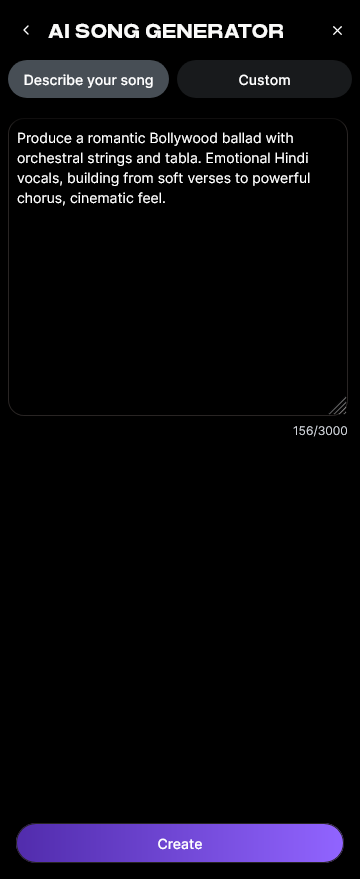
Access AI Song Generator from the main menu. It allows users to turn lyrics or text prompts into full songs with AI-generated vocals and instrumentals.
Step 2: Lyrics Input
Paste your lyrics or provide a short emotional description (for example, “a sorrowful memory fading into distance”). The generator uses this input to design composition and mood. For emotional depth, review Make Sad Songs That Touch the Soul - YouTube for insights.
Step 3: Style Selection
Choose a music style such as Pop Ballad, Indie Acoustic, or Ambient Piano. These styles suit melancholic projects.
Step 4: Configuration
Set generation parameters—key, tempo, vocal tone, and emotional feel. Opt for minor keys and slower tempos for sadness.
Step 5: Generation
After you click generate, Soundverse’s multi-stage pipeline processes the request through lyrics, melody, arrangement, and mixing.
Step 6: Generation Complete
The generated sad song appears in your results panel. You can preview the audio and review emotional accuracy.
Step 7: Export Results
Download in multiple formats for further post-production or sharing.
This workflow enables instant prototyping of emotional songs without complex manual arrangement. For producers interested in faster ideation, read Soundverse AI Magic Tools Create Content Quickly to discover complementary features.
Why Use Soundverse for Sad Song Composition in 2026
As AI-driven music platforms mature, Soundverse remains a standout solution for songwriters and content creators. With multilingual support, quick style selection, and reference audio prowess, it facilitates personalized expressions of emotion. Whether crafting sad pop ballads, cinematic ambient tracks, or introspective folk songs, the tool’s sophistication helps turn emotional ideas into full compositions effortlessly.
Additionally, creators focused on stylistic diversity can explore guides like How to Create Country Music with Soundverse AI or How to Create Jazz Music with Soundverse AI to expand their production techniques.
Turn Your Emotions Into Music Instantly
Create deeply emotional, sad, or moody tracks with just a few words using Soundverse AI’s powerful text-to-music generator. Capture every feeling and make your melodies unforgettable.
Related Articles
- How to Create Jazz Music with Soundverse AI: Discover how Soundverse AI can help you craft smooth, emotive jazz compositions with ease.
- How to Create Healing Meditation Music with Soundverse AI: Learn how to create soothing and peaceful meditation tracks that evoke calmness using Soundverse AI.
- How to Create Music Evoking the Desert: Explore techniques for composing atmospheric desert-themed music filled with emotion and mood.
- Generate AI Music with Soundverse Text-to-Music: Learn how to quickly generate unique music tracks from text prompts using Soundverse AI.
Here's how to make AI Music with Soundverse
Video Guide

Here’s another long walkthrough of how to use Soundverse AI.
Text Guide
- To know more about AI Magic Tools, check here.
- To know more about Soundverse Assistant, check here.
- To know more about Arrangement Studio, check here.
Soundverse is an AI Assistant that allows content creators and music makers to create original content in a flash using Generative AI.
With the help of Soundverse Assistant and AI Magic Tools, our users get an unfair advantage over other creators to create audio and music content quickly, easily and cheaply.
Soundverse Assistant is your ultimate music companion. You simply speak to the assistant to get your stuff done. The more you speak to it, the more it starts understanding you and your goals.
AI Magic Tools help convert your creative dreams into tangible music and audio. Use AI Magic Tools such as text to music, stem separation, or lyrics generation to realise your content dreams faster.
Soundverse is here to take music production to the next level. We're not just a digital audio workstation (DAW) competing with Ableton or Logic, we're building a completely new paradigm of easy and conversational content creation.
TikTok: https://www.tiktok.com/@soundverse.ai Twitter: https://twitter.com/soundverse_ai Instagram: https://www.instagram.com/soundverse.ai LinkedIn: https://www.linkedin.com/company/soundverseai Youtube: https://www.youtube.com/@SoundverseAI Facebook: https://www.facebook.com/profile.php?id=100095674445607
Join Soundverse for Free and make Viral AI Music

We are constantly building more product experiences. Keep checking our Blog to stay updated about them!