How to Make a Remix Song in a Different Language Using AI
Learn step-by-step how to create a multilingual AI remix song easily with Soundverse tools in 2026.
How to Make a Remix Song in a Different Language Using AI
Remixing music has always been a creative process — it’s the art of taking what already exists and shaping it into something new. But in 2026, the game has changed dramatically. Artificial intelligence has given musicians and producers the ability to create multilingual versions of their favorite tracks, fusing global cultures and languages in ways that were unimaginable just a few years ago. If you’ve ever wondered how to make a remix song in a different language using AI, this guide will break down the process, the best tools for remixing songs with AI, and practical steps to achieve industry-level results.
Why Remixing Songs Across Languages Is Trending in 2026
Global collaboration in music is at an all-time high. Artists aren’t limited by location or language, and AI music translation tools are helping songs cross borders faster than ever. Multilingual remixing empowers creators to connect with wider audiences — imagine taking an English hit and transforming it into a Spanish, Japanese, or Hindi version while keeping its original emotional core. This approach boosts engagement, cultural relevance, and fan reach.
Platforms like Soundverse have fueled this revolution by making high-quality AI remix song creation tools accessible to both independent producers and professional studios. With features that enable precise stem separation and vocal manipulation, you can rebuild musical compositions layer by layer.

How to Make AI Remix Songs in a Different Language: The Creative Framework
Remixing in another language involves more than just translating lyrics. It requires thoughtful adaptation: reinterpreting rhythm, tone, and emotional delivery so they align naturally with the new language. This framework combines technology and artistry:
- Extract and isolate song elements. Use AI stem separation tools to isolate vocals, drums, bass, and instruments from the original mix.
- Translate or rewrite lyrics. Work with native speakers or use AI song generators to convert lyrics meaningfully — keeping poetic flow intact.
- Replace the original vocals. With AI voice modeling, you can recreate vocals in a new language while retaining the original performance timing.
- Rearrange and mix. Adjust instrumental layers and textures to fit the rhythm and emotion of the new language version.
Now, let’s dive deeper into using Soundverse to make this process smooth, accurate, and artistically rich.

How to Make a Multilingual Remix Song with Soundverse Stem Separator
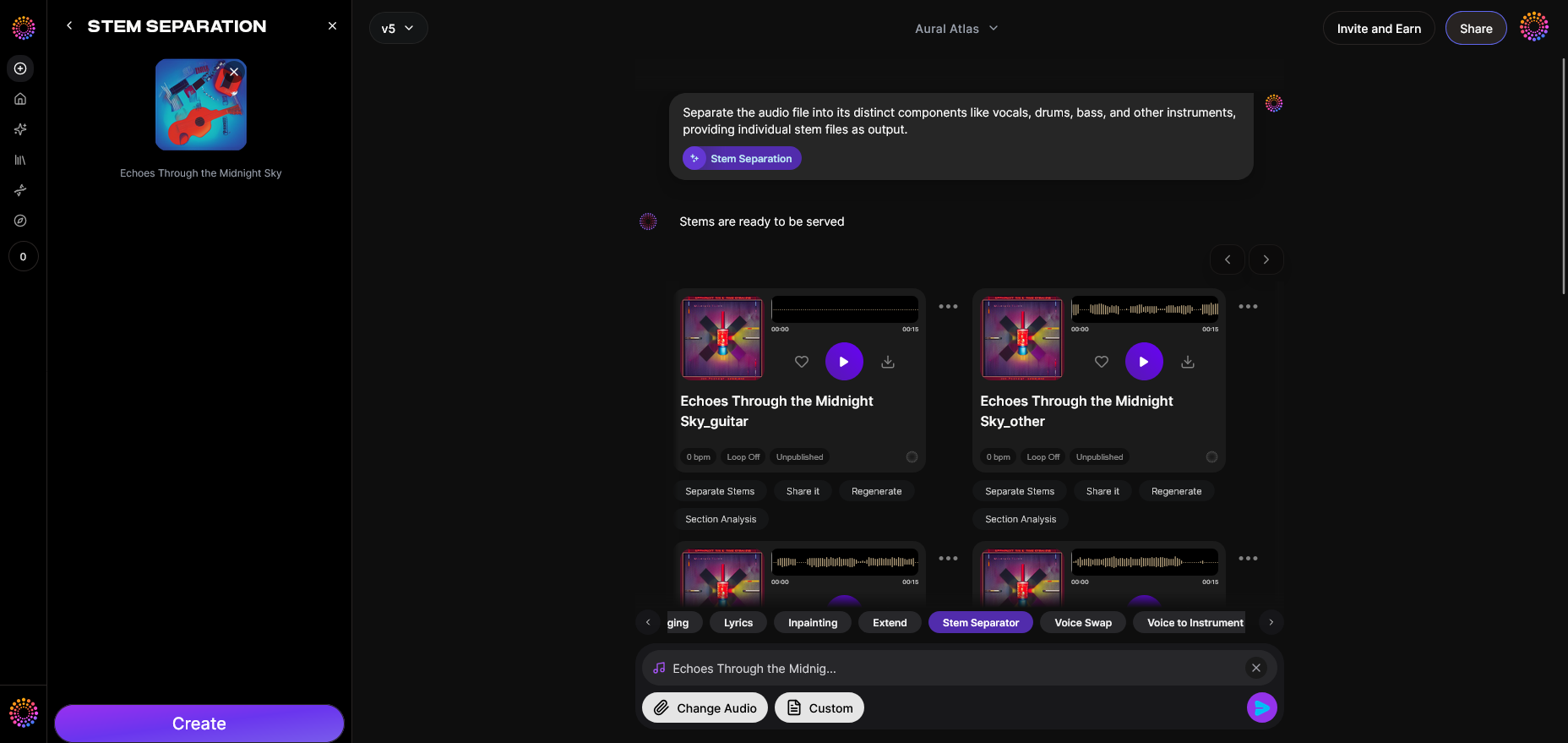
Soundverse’s Stem Separator is the key technology enabling AI remix song creation in different languages. This intelligent feature dissects mixed audio into up to six separate editable stems — Vocals, Drums, Bass, Guitar, Accompaniment, and additional background layers. Each stem can then be processed individually.
What Makes Stem Separator Ideal for Language Remixing
It supports uploads from URLs, local files, or direct recordings, delivering high-quality isolation regardless of input source. This flexibility allows producers to start remixing with any existing song — whether it’s a studio track or a live recording.
Key stem separation benefits include:
- Precise Isolation: Each stem retains its fidelity, making remixing cleaner.
- Multi-stem Editing: Perfect for swapping vocals or rearranging instrument layers.
- Versatile Inputs: Supports various formats and sources for a seamless workflow.
Once stems are separated, Soundverse gives creators control to use additional tools like Voice Swap and Inpainting, expanding editing possibilities beyond simple remixing.
Step 1: Upload Interface
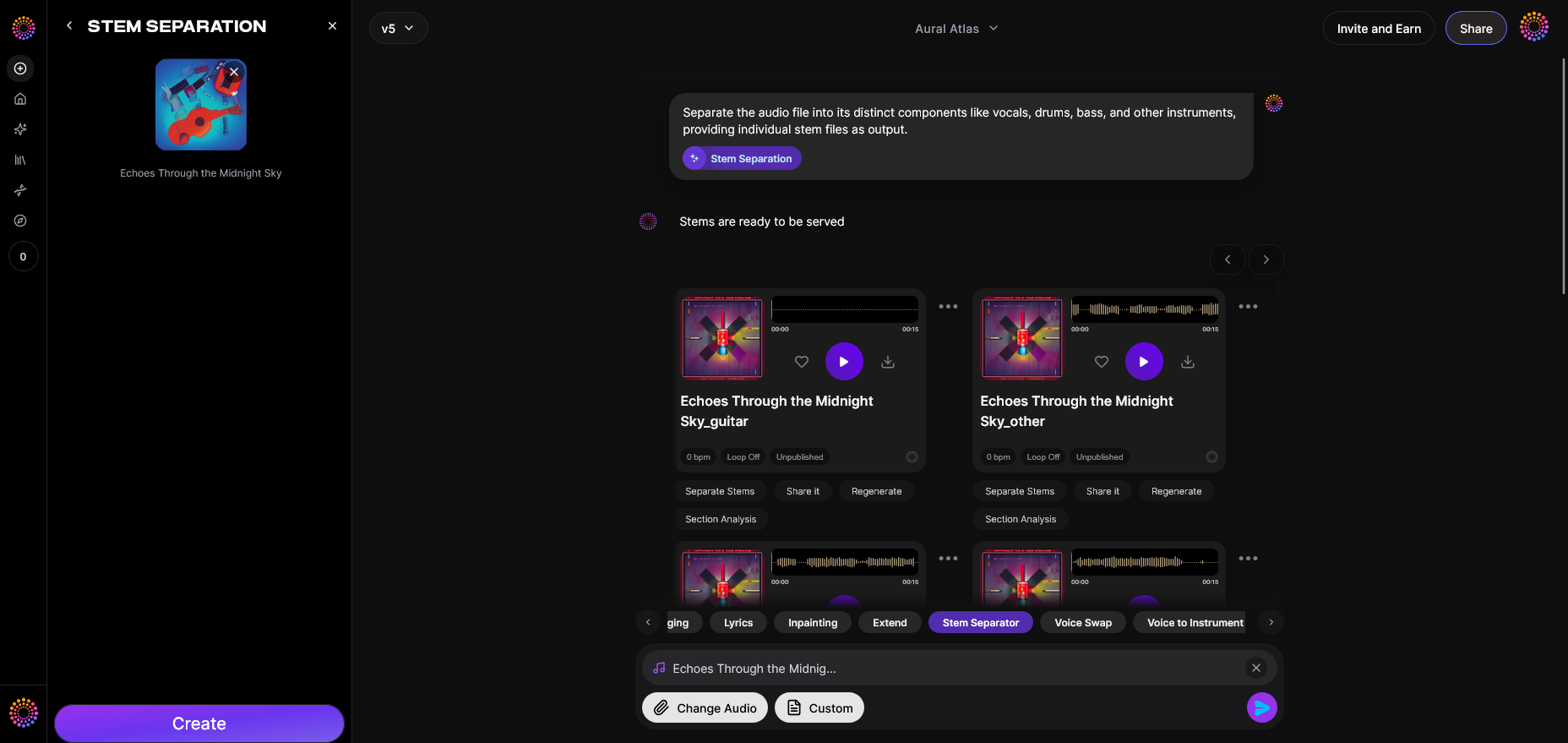
Start in Soundverse’s upload dialog. You can drag and drop your audio file, paste a URL, or record directly within the interface. This step initiates the AI stem separation process, making it possible to isolate components of your track without manual audio engineering.
Step 2: Additional References
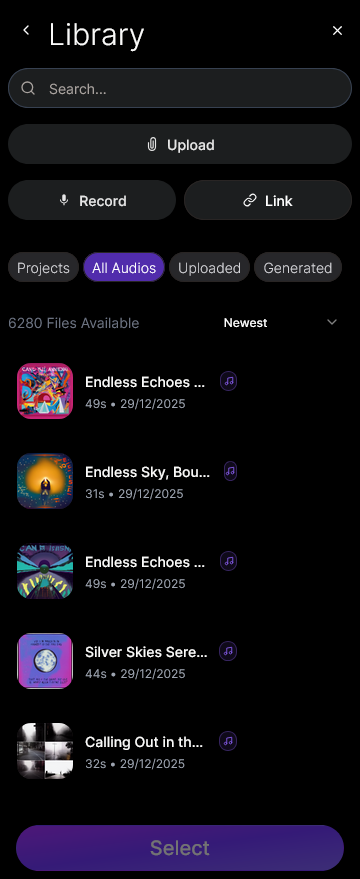
If you have other tracks that represent the desired language or vocal tone, upload them as reference inputs. This helps guide AI remixing by creating stylistic or linguistic consistency. The more contextual information provided, the better AI handles transitions, pronunciation, and tonal alignment.
Step 3: Results Display
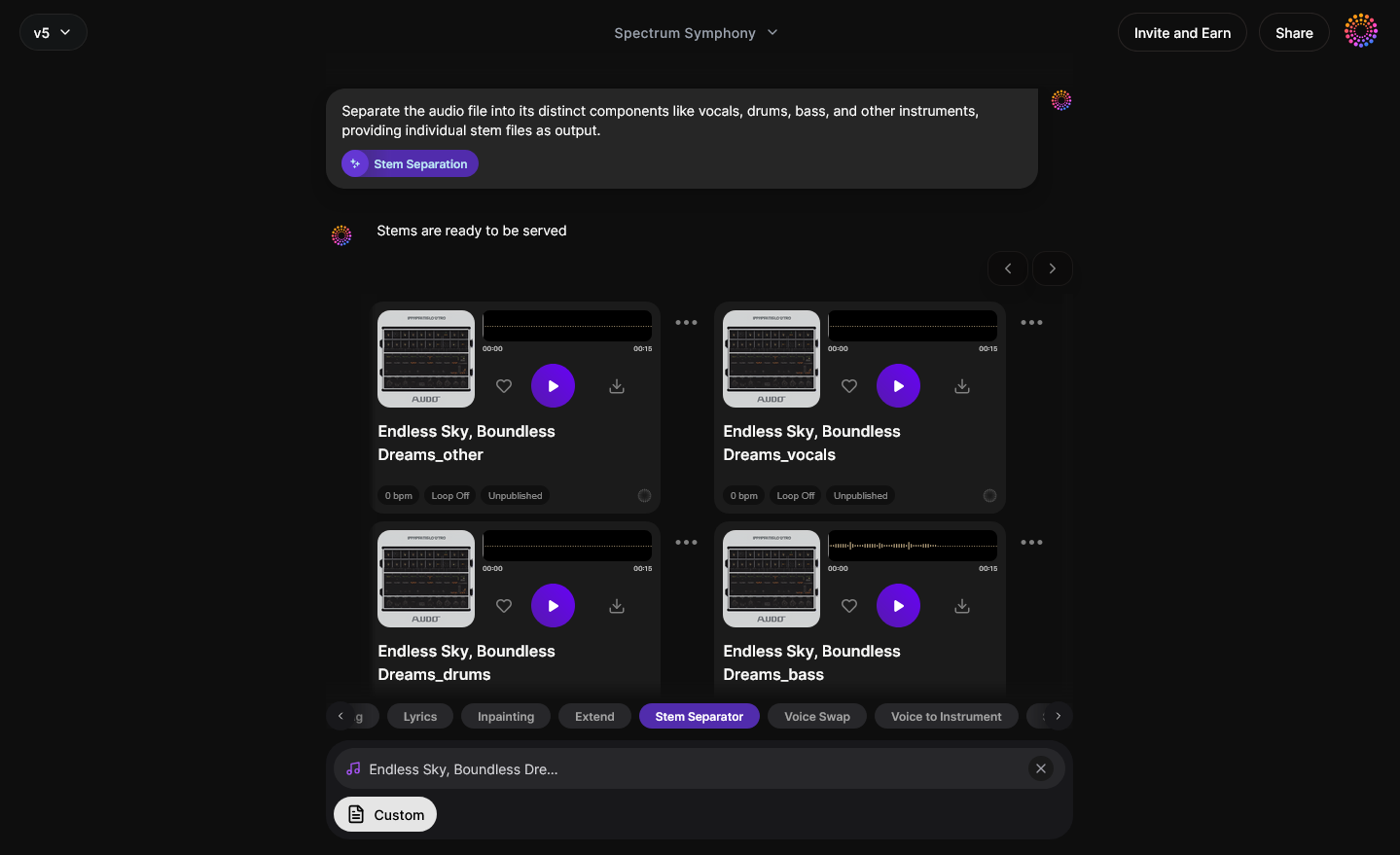
Once processed, Soundverse displays individual separated stems, including vocals, drums, bass, and more. These can be previewed sequentially (not in real-time) so you can analyze and identify which segments need replacement or editing.
Step 4: Download Stems
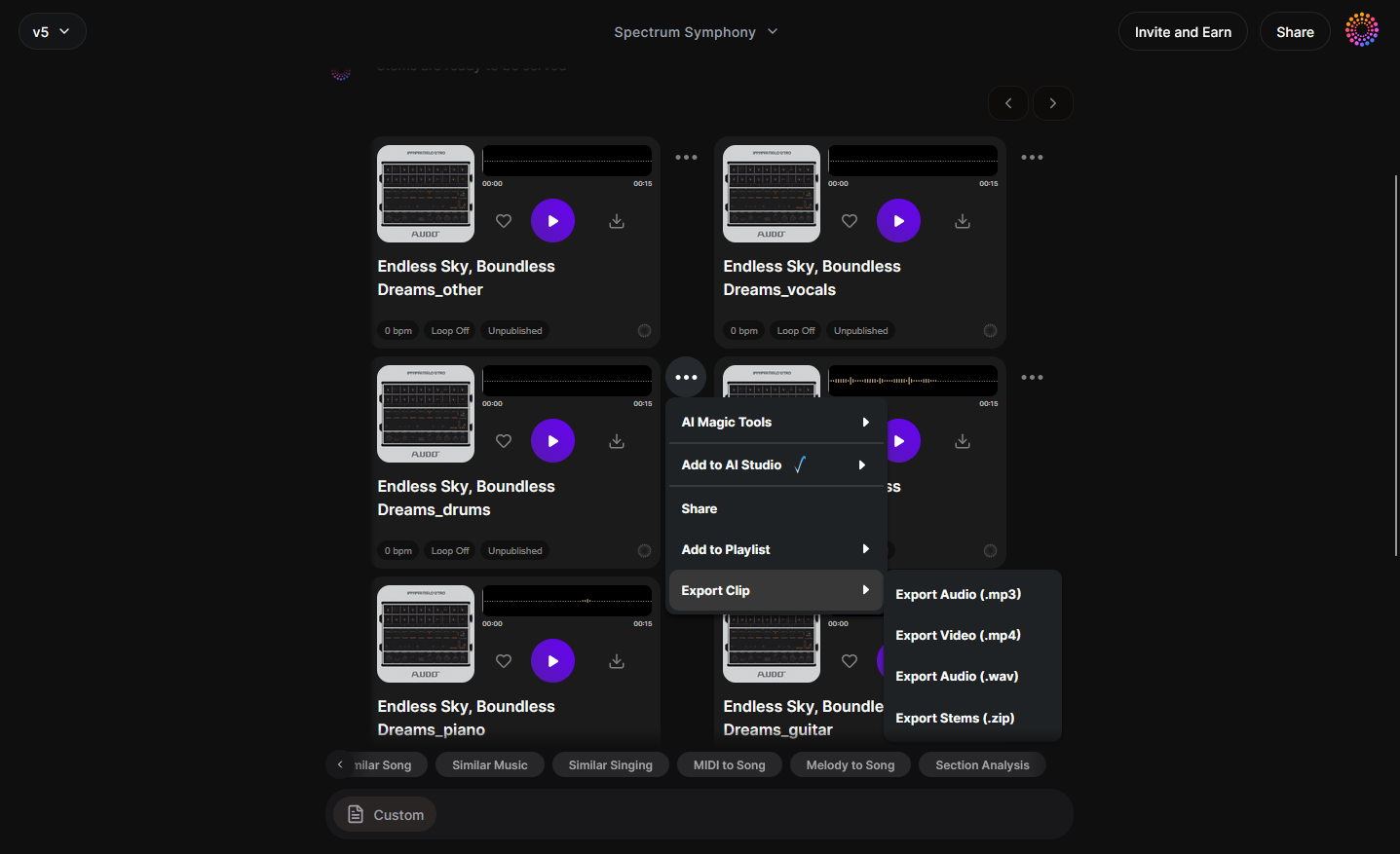
Finally, download the stems you need for remixing. For a multilingual remix, focus primarily on vocals and accompaniment stems. You can then replace or regenerate vocals using Voice Swap to achieve natural-sounding performances in another language.
Using AI Tools to Translate and Regenerate Your Remix
After you’ve extracted stems, you’ll need to create or translate lyrics. The AI Song Generator from Soundverse can produce full songs based on text prompts or translated lyrics. It uses a multi-stage pipeline to handle melody, arrangement, and mixing automatically. (Explore how AI song generators are transforming multilingual music creation for a global audience in 2026).
To adjust just parts of the song, apply Inpainting — a precision tool designed for surgical editing. For instance, if only certain lines need to be changed to match a new language, you can regenerate those regions without disturbing the rest of the composition.
For vocals, Voice Swap completes the transformation. Upload your isolated vocals and choose a voice model in the target language. The system retains emotion, timing, and pronunciation while seamlessly converting language identity. For a deeper dive into AI workflows, watch our Soundverse Tutorial Series - How to Make Music.
Pro Tips for AI Language Remix Creation in 2026
- Test pronunciation variations: Each language has unique phonetic nuances. Allow the AI to analyze pronunciation patterns to ensure a natural delivery.
- Leverage dynamic tempo adjustments: Use AI mixing to slightly modify tempo or pitch to better fit translated lyric structures.
- Blend cultural instruments: You can enhance authenticity by adding local instrument layers using AI-generated accompaniment from the Soundverse AI Song Generator.
- Reference music trends: Keep arrangements aligned with current global genres. Explore AI Music in the USA or learn about Music Industry Trends to identify 2026 sound directions.
- Avoid direct lyrics reproduction: Instead of copying songs verbatim, rewrite or paraphrase phrases to adapt cultural tone while maintaining meaning.
Why AI Remixing Has Become Vital for Global Artists
In 2026, creators are using AI remix song creation tools for multilingual outreach more actively than any time before. It democratizes the music industry — no need for giant translation studios or multilingual vocalists. A single producer can create multiple regional versions for different streaming territories.
Beyond artistic advantages, it’s also a marketing asset. Multilingual remixes drive higher engagement across social media, streaming platforms, and fan communities. Using Soundverse’s suite that includes Stem Separator, Voice Swap, and AI Song Generator, independent musicians can achieve world-class results faster than traditional workflows.
Start Creating Your Own AI Remix Songs Today!
Join thousands of music creators using Soundverse to remix, translate, and reinvent songs across languages—all powered by cutting-edge AI. Unleash your music without boundaries.
Create with Soundverse AI →
Related Articles
- Generate AI Music with Soundverse Text-to-Music: Discover how to turn simple text prompts into professional-quality music using Soundverse’s AI technology.
- Soundverse AI Magic Tools: Create Content Quickly with AI: Learn how Soundverse’s Magic Tools streamline your creative process and help generate music in minutes.
- Soundverse Introduces Stem Separation AI Magic Tool: Explore how Soundverse’s Stem Separation tool lets you isolate vocals and instruments for seamless remixing.
- How AI-Generated Music Is Transforming the Music Industry: Find out how AI-generated music is reshaping creativity, production, and collaboration across the global music scene.
Here's how to make AI Music with Soundverse
Video Guide

Here’s another long walkthrough of how to use Soundverse AI.
Text Guide
- To know more about AI Magic Tools, check here.
- To know more about Soundverse Assistant, check here.
- To know more about Arrangement Studio, check here.
Soundverse is an AI Assistant that allows content creators and music makers to create original content in a flash using Generative AI. With the help of Soundverse Assistant and AI Magic Tools, our users get an unfair advantage over other creators to create audio and music content quickly, easily and cheaply. Soundverse Assistant is your ultimate music companion. You simply speak to the assistant to get your stuff done. The more you speak to it, the more it starts understanding you and your goals. AI Magic Tools help convert your creative dreams into tangible music and audio. Use AI Magic Tools such as text to music, stem separation, or lyrics generation to realise your content dreams faster. Soundverse is here to take music production to the next level. We're not just a digital audio workstation (DAW) competing with Ableton or Logic, we're building a completely new paradigm of easy and conversational content creation.
TikTok: https://www.tiktok.com/@soundverse.ai
Twitter: https://twitter.com/soundverse_ai
Instagram: https://www.instagram.com/soundverse.ai
LinkedIn: https://www.linkedin.com/company/soundverseai
Youtube: https://www.youtube.com/@SoundverseAI
Facebook: https://www.facebook.com/profile.php?id=100095674445607
Join Soundverse for Free and make Viral AI Music

We are constantly building more product experiences. Keep checking our Blog to stay updated about them!