How to Make a Kids School Play Song Using AI in 2026
Learn how to create fun school play songs using AI music creation for kids with Soundverse in 2026.
How to Make a Kids School Play Song Using AI
Creating original songs for a school play used to require extensive musical experience — from writing lyrics to composing melody and arranging instruments. In 2026, artificial intelligence has revolutionized this process with AI music creation for kids, allowing teachers, parents, and school coordinators to produce delightful, age-appropriate songs in minutes. Whether you are developing a song for a fairy tale adaptation, a science-themed performance, or a seasonal event, AI tools like Soundverse make it simple, fun, and customized for children’s performances.
Why is AI Music Creation for Kids Transforming School Plays in 2026?
AI-generated music has matured significantly over the last few years. What was considered an experimental feature in 2024 became a reliable creative tool by 2026. For educators and parents, the main benefits include:
- Accessibility for Non-Musicians: You don’t need to be a music teacher to craft beautiful tunes for your play. AI handles melody composition, backing tracks, and even vocals.
- Customization for Age and Theme: Using AI music creation for kids, you can create cheerful pop, gentle piano ballads, or upbeat dance tracks suited to kindergarten or elementary-level performances.
- Cost-Effective Production: Instead of hiring composers or renting studio time, AI songwriting tools produce professional results at a fraction of the cost.
- Multilingual and Inclusive: Platforms like Soundverse generate songs in over ten languages, helping schools celebrate diversity.
- Encouraging Creativity: Kids can be involved in describing the music and even in writing simple lyrics, making them co-creators rather than just performers.
In 2026, AI has become an everyday part of education. From AI-generated art projects to storytelling with digital assistants, AI enhances learning experiences—and music is no exception.
How to Make a Kids School Play Song with Soundverse AI Song Generator


Soundverse’s AI Song Generator is designed for song creation from simple prompts or lyric inputs. It transforms your ideas into complete tracks, including melody, arrangement, mixing, and vocals. The platform supports two primary modes: Describe Your Song, where you provide a prompt like “a happy tune about friendship for second graders,” and Custom Mode, for teachers or parents who already have lyrics. Supporting various styles such as pop, rock, and classical, this makes Soundverse ideal for music for children’s performances.
The system processes through multiple stages—lyrics understanding, melody generation, arrangement, and mixing—to deliver a polished final result. Whether you want AI to create entirely new music or build upon a reference audio, Soundverse can work both ways. Plus, with Quick Style Selection, you can pick the tone that fits your performance best, from whimsical storytelling soundtracks to cheerful pop tunes. Check out the Soundverse Tutorial - How to Make Music for a practical demo of song creation workflows.
Now let’s explore the step-by-step process of how to use Soundverse to create your kids’ school play song.
Step 1: Feature Overview

Begin by logging into your Soundverse account and selecting AI Song Generator from the main dashboard. This tool is the centerpiece for anyone working on school play songs. You’ll quickly notice that it allows both text-based prompts and lyric uploads, catering to a wide range of users—teachers who prefer text description and musically inclined coordinators who already have lyrics.
Step 2: Lyrics Input
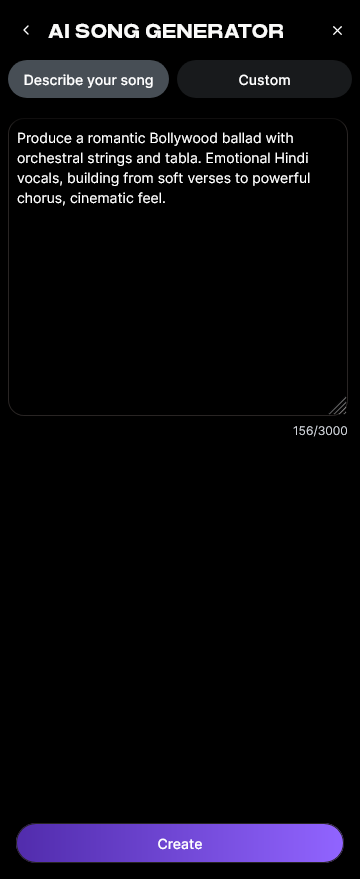
Next, enter the lyrics. If you’ve written a fun, educational song, paste it into the lyrics box. Alternatively, if you need help generating appropriate words, use the AI Lyrics Writer, integrated into Soundverse. This feature helps you create lyrics that match your theme—like friendship, seasons, adventure, or discovery—while keeping the tone age-appropriate.
Step 3: Style Selection

At this stage, choose your musical style. For children’s performances, you might select gentle pop, acoustic, folk, or even upbeat electronic styles for dance-heavy plays. Style selection shapes the rhythm and mood of your AI-generated song. Teachers often choose cheerful tempos and light instrumentals to keep the atmosphere lively and engaging.
Step 4: Configuration

Fine-tune your settings before generating the song. You can specify genre, language, tempo, mood (like energetic, calming, or magical), and vocal tone. This step ensures your song aligns perfectly with the storyline of the play. For instance, a fantasy scene might benefit from a magical orchestral feel, while a science presentation might use a rhythmic, futuristic beat.
Step 5: Generation

Once configuration is complete, click Generate Song. The Soundverse AI Song Generator processes your input through its pipeline—combining lyric interpretation, melody generation, arrangement, and mixing with AI-generated vocals and instruments. Within minutes, the full track is ready for review.
Step 6: Generation Complete

After generation, your completed track will appear within the workspace. Listen carefully and assess how well it matches your play’s tone. If a section doesn’t feel right, you can modify the lyrics or style and regenerate specific parts using Inpainting, Soundverse’s advanced editing feature that allows localized fixes without altering the entire song.
Step 7: Export Results

When you’re satisfied, proceed to export. Soundverse offers multiple output formats for maximum compatibility—great for use in school auditorium sound systems or classroom audio players. Export the song as MP3, WAV, or any other supported format.
Creative Tips for Making Engaging Children Performance Music
- Keep it Simple: Write lyrics and melodies that children can remember. Simplicity enhances participation.
- Use Educational Themes: Link songs to lessons—science songs, historical tunes, or cultural celebrations.
- Encourage Student Input: Have kids suggest lines or actions; it heightens engagement and ownership.
- Incorporate Movement: Rhythmic songs make it easier for students to dance or act along.
- Test in Small Groups: Play the generated song for teachers and kids before finalizing to ensure it fits the intended tone.
Bonus: Complementary AI Tools for Perfecting School Play Songs
- AI Lyrics Writer: Perfect for generating child-friendly lyrics that rhyme and fit your theme.
- AI Singing Generator: Produces professional-quality AI vocals—from soft lullabies to cartoonish tones.
- Inpainting Tool: Lets you edit specific portions of your track to change a verse or fix timing issues.
Together, these tools create a full end-to-end ecosystem for AI music creation for kids.
Pro Tips for Maximizing Your AI-Generated School Play Song
- Experiment with Styles: If pop doesn’t fit your play, try classical or folk variations. Use Quick Style Selection to explore different moods.
- Combine AI with Live Performance: Have children sing along to AI-generated background tracks for a hybrid performance.
- Use for Other Activities: These AI songs can double as theme songs for class videos or learning projects.
- Stay Updated: Check the latest AI music trends to incorporate 2026’s popular educational genres.
Learn More About AI Music Creation
If you want to dive deeper into creative possibilities, see our related guides:
- Generate AI Music with Soundverse Text-to-Music
- Explore Soundverse AI Magic Tools
- Alternative Platforms Compared: Mubert vs. Soundverse
- Discover How AI Music is Transforming Creativity
Create Your First AI-Powered Kids’ Song Today!
Turn classroom creativity into catchy soundtracks with Soundverse’s easy AI music tools. Compose, customize, and share your school play songs—all without needing musical expertise.
Start Creating Free
Related Articles
- Generate AI Music with Soundverse Text-to-Music — Discover how Soundverse’s text-to-music tool helps you turn simple prompts into perfectly produced tracks in seconds.
- Soundverse AI Magic Tools: Create Content Quickly with AI — Learn how to speed up your creative process using Soundverse’s AI Magic Tools designed for music educators and creators alike.
- Soundverse Assistant: Your AI Music Co‑Producer — Meet your AI co‑producer that helps arrange, refine, and guide your musical ideas into polished pieces.
- What Are Song Stems and Why Do You Need Them? — Understand how using song stems can help kids and teachers remix and experiment creatively in the classroom.
Here's how to make AI Music with Soundverse
Video Guide

Here’s another long walkthrough of how to use Soundverse AI.
Text Guide
- To know more about AI Magic Tools, check here.
- To know more about Soundverse Assistant, check here.
- To know more about Arrangement Studio, check here.
Soundverse is an AI Assistant that allows content creators and music makers to create original content in a flash using Generative AI.
With the help of Soundverse Assistant and AI Magic Tools, our users get an unfair advantage over other creators to create audio and music content quickly, easily and cheaply.
Soundverse Assistant is your ultimate music companion. You simply speak to the assistant to get your stuff done. The more you speak to it, the more it starts understanding you and your goals.
AI Magic Tools help convert your creative dreams into tangible music and audio. Use AI Magic Tools such as text to music, stem separation, or lyrics generation to realise your content dreams faster.
Soundverse is here to take music production to the next level. We're not just a digital audio workstation (DAW) competing with Ableton or Logic, we're building a completely new paradigm of easy and conversational content creation.
TikTok: https://www.tiktok.com/@soundverse.ai
Twitter: https://twitter.com/soundverse_ai
Instagram: https://www.instagram.com/soundverse.ai
LinkedIn: https://www.linkedin.com/company/soundverseai
Youtube: https://www.youtube.com/@SoundverseAI
Facebook: https://www.facebook.com/profile.php?id=100095674445607
Join Soundverse for Free and make Viral AI Music

We are constantly building more product experiences. Keep checking our Blog to stay updated about them!