How to Make a Festival Parade Song Using AI
Learn how to create vibrant festival parade songs using AI music creation tools from Soundverse in 2026.
How to Make a Festival Parade Song Using AI
In 2026, AI music creation has reached an era where musicians, event planners, and artistic directors no longer need a full studio team to create professional-sounding parade music. The energy of a marching band, the joy of festival crowds, and the flair of celebratory soundscapes can be synthesized with precision using AI songwriting tools. If you’re planning an event march or festival parade this year, learning how to use AI for musicians is not just optional—it’s the fastest and most creative way to produce your soundtrack.
Whether your festival is cultural, corporate, or community focused, the right music can define the spirit of the event. Parade songs—filled with rhythmic percussion, upbeat melodies, and joyous chants—set the emotional tone. This guide will walk you through how to use Soundverse’s AI Song Generator to make lively, engaging, and memorable parade songs using cutting-edge festival music production methods.
Why are parade songs perfect for AI music creation in 2026?
In recent years (2024–2025), AI-based music generation evolved from simple beat creation to full-structure songwriting, capable of handling lyrics, melody, instrumentation, and mixing. By 2026, this technology has matured enough to support event-scale compositions such as festival and parade music.
AI music creation excels at building festive marches because it can instantly create:
- Catchy, loop-friendly rhythms suitable for long parades.
- Precise tempo alignment across instrumental layers.
- Multilingual lyrical support for global audiences.
- Quick experimentation in genres like pop, rock, EDM, or ethnic traditional styles.
This adaptability is vital for event organizers creating crowd-friendly tracks that can loop seamlessly during celebrations or transitions between performances.
How to make a parade festival soundtrack with Soundverse AI Song Generator

Before diving into step-by-step instructions, it’s important to understand what the Soundverse AI Song Generator is capable of and how it differs from typical AI music tools.
What makes Soundverse’s AI Song Generator ideal for event march music?
Soundverse’s AI Song Generator is a multi-stage intelligent pipeline that turns your lyrics or text descriptions into complete songs. It generates both AI vocals and instrumentals—ideal for full parade soundtracks where voice, rhythm, and melody need to be emotionally synchronized.
Core capabilities include:
- Describe Your Song Mode: Input a simple text prompt (like “energetic parade march with brass and drums”) and watch the AI interpret it musically.
- Custom Mode: Provide detailed lyrics and configure settings (pitch, vocal style, tempo, etc.).
- Reference Audio Support: Upload a sample file to match the feel of a past parade or regional sound.
- Quick Style Selection: Choose music styles—from Pop and Rock to EDM or Orchestral—to suit your festival’s vibe.
It’s also embedded in the larger Soundverse ecosystem, where complementary tools enhance creativity:
- AI Lyrics Writer: Helps generate structured parade lyrics in multiple languages.
- AI Music Generator: Useful for creating background instrumentals and looping sections.
- Soundverse Trace: Applies rights protection and transparent attribution—crucial when expanding your music to multiple commercial events.
Now, let’s explore the detailed process of festival music production step-by-step.
For a deeper dive, watch our guide on creating Deep House music or explore other related tutorials like How to Make Music and Explore Tab Overview.
Step 1: Feature Overview — Access AI Song Generator from the main menu

Log into your Soundverse account and select AI Song Generator from the dashboard. This tool is dedicated to full song generation with vocals and instruments. Instantly recognizable in the UI, it’s your central hub for parade soundtrack creation.
Step 2: Lyrics Input — Enter or paste your festival lyrics
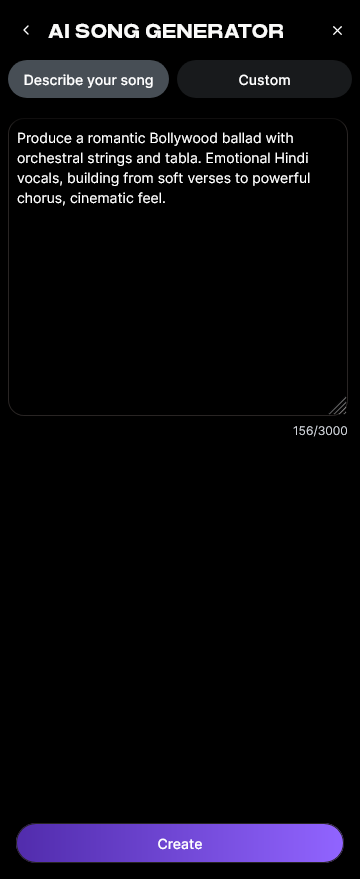
Your parade song likely revolves around themes of unity, fun, and cultural identity. You can write lyrics manually or use Soundverse’s integrated AI Lyrics Writer by clicking “Help Me Write.” Input a few descriptors—like “sunny festival,” “street dancing,” or “celebration march”—and the AI will generate lyrics that fit the desired atmosphere.
Step 3: Style Selection — Choose music style and genre

Next, pick a genre suited to your event march music. Parade soundtracks often lean toward upbeat rock, EDM, or orchestral pop fusion. For multicultural parades, you might choose regional influences. Soundverse’s Quick Style Selection enables rapid experimentation. For inspiration on genre choice, explore related reading like How to Create Country Music with Soundverse AI or How to Create EDM with Soundverse AI.
Step 4: Configuration — Set generation parameters

At this stage, specify tempo, vocal settings, and arrangement preferences. For parade soundtracks, a moderate-fast BPM (120–140) works well. Adjust mixing depth for clarity when played outdoors, ensuring brass and percussion dominate. Remember, Soundverse operates asynchronously—you configure these elements, submit generation, and wait for AI to process and return the final mix.
Step 5: Generation — Generate song with vocals and instruments

Once setup is complete, click Generate. The AI Song Generator now interprets your input through its melody, lyrics, arrangement, and mixing stages. Within minutes, you’ll have a realistic, professionally mixed festival track. You can review the sound, make notes for minor edits, or generate additional variations.
Step 6: Generation Complete — Review the finished parade music

When generation finishes, the completed composition will appear in your library. Use the player within Soundverse to listen and decide whether it fits your event’s flow. If needed, create alternate versions—perhaps a morning march tone versus an evening festival tone. Related resources such as generate AI music with Soundverse text-to-music can help you experiment further.
Step 7: Export Results — Download generated song in multiple formats

Finally, export your song. Soundverse offers several file types for download, like high-quality stereo .wav or compressed .mp3. These are compatible with PA systems, video editing suites, or streaming schedules. Employ Soundverse Trace for rights management across live performances and digital uploads.
What are pro tips for making stunning parade music with AI?
- Layer live instruments with AI mix-downs. You can combine human-performed trumpet or drum lines with AI backbone tracks for authenticity.
- Use looping segments. Parade marches often require extended playback—generate loopable portions using Soundverse’s AI Music Generator.
- Create multilingual lyrics. Since the AI Song Generator supports 10+ languages, include multiple verses or chants appealing to diverse crowds.
- Incorporate crowd sync cues. Design rhythmic breaks or pauses where audiences can clap or chant along.
For deeper creative tricks, see how AI-generated music is transforming the music industry and how Soundverse AI tools create content quickly.
How AI accelerates festival music production in 2026
AI removes traditional creative bottlenecks. Instead of renting rehearsing time or depending on human mixing engineers for each version, you can now create dozens of unique tracks per event using descriptive text. This puts full creative control back in the hands of musicians and organizers.
Additionally, AI music creation is more sustainable. It minimizes resource usage by eliminating travel and setup needs while delivering studio-quality arrangements at scale.
Start Creating Your Own AI Festival Anthem Today!
Experience how Soundverse turns your text prompts into vibrant, crowd-moving music in minutes. Perfect for festivals, parades, and creative soundtracks that captivate your audience.
Related Articles
- How to Create EDM with Soundverse AI — Discover how to generate energetic EDM tracks instantly using AI-powered composition tools.
- Generate AI Music with Soundverse Text-to-Music — Learn the simple steps to transform text descriptions into complete musical tracks using Soundverse.
- Soundverse AI Revolutionizing Music Creation for New-Age Content Creators — Explore how Soundverse empowers modern creators to produce high-quality, original music combining technology and creativity.
- The Benefits of Composing with AI Music Generator — Understand how AI music generation simplifies composition, saves time, and enhances creative possibilities.
Here's how to make AI Music with Soundverse
Video Guide

Here’s another long walkthrough of how to use Soundverse AI.
Text Guide
- To know more about AI Magic Tools, check here.
- To know more about Soundverse Assistant, check here.
- To know more about Arrangement Studio, check here.
Soundverse is an AI Assistant that allows content creators and music makers to create original content in a flash using Generative AI.
With the help of Soundverse Assistant and AI Magic Tools, our users get an unfair advantage over other creators to create audio and music content quickly, easily and cheaply.
Soundverse Assistant is your ultimate music companion. You simply speak to the assistant to get your stuff done. The more you speak to it, the more it starts understanding you and your goals.
AI Magic Tools help convert your creative dreams into tangible music and audio. Use AI Magic Tools such as text to music, stem separation, or lyrics generation to realise your content dreams faster.
Soundverse is here to take music production to the next level. We're not just a digital audio workstation (DAW) competing with Ableton or Logic, we're building a completely new paradigm of easy and conversational content creation.
TikTok: https://www.tiktok.com/@soundverse.ai
Twitter: https://twitter.com/soundverse_ai
Instagram: https://www.instagram.com/soundverse.ai
LinkedIn: https://www.linkedin.com/company/soundverseai
Youtube: https://www.youtube.com/@SoundverseAI
Facebook: https://www.facebook.com/profile.php?id=100095674445607
Join Soundverse for Free and make Viral AI Music

We are constantly building more product experiences. Keep checking our Blog to stay updated about them!