How to Isolate Instruments in a Song: The Complete 2026 Guide
Learn how to isolate instruments in a song using advanced AI stem isolation software and audio editing techniques in 2026.
How to Isolate Instruments in a Song
Isolating instruments in a song has become one of the most sought-after techniques in modern audio production. Whether you’re remixing, sampling, creating performance backing tracks, or studying a mix for educational purposes, being able to separate vocals, drums, bass, guitar, and other layers gives you complete creative control. In 2026, advances in AI-driven audio processing have made this process faster and more precise than ever before.
Why Do Musicians Want to Isolate Instruments in a Song?
The ability to isolate instruments in a song opens up endless creative and technical possibilities:
- Remixing and sampling: Producers can extract clean stems to remix tracks or integrate them into new compositions.
- Educational analysis: Students and sound engineers can study mixing techniques in detail.
- Performance prep: Musicians can remove vocals or specific instruments to create backing tracks for live shows.
- Audio restoration: Engineers can clean up old or noisy recordings by isolating useful elements from corrupted mixes.
By isolating instruments, creators can reimagine existing music. Whether you’re experimenting with AI music generation tools like those compared in Mubert alternatives or working on original projects using AI-generated stems, mastering this technique is essential.
What Are Music Separation Tools?
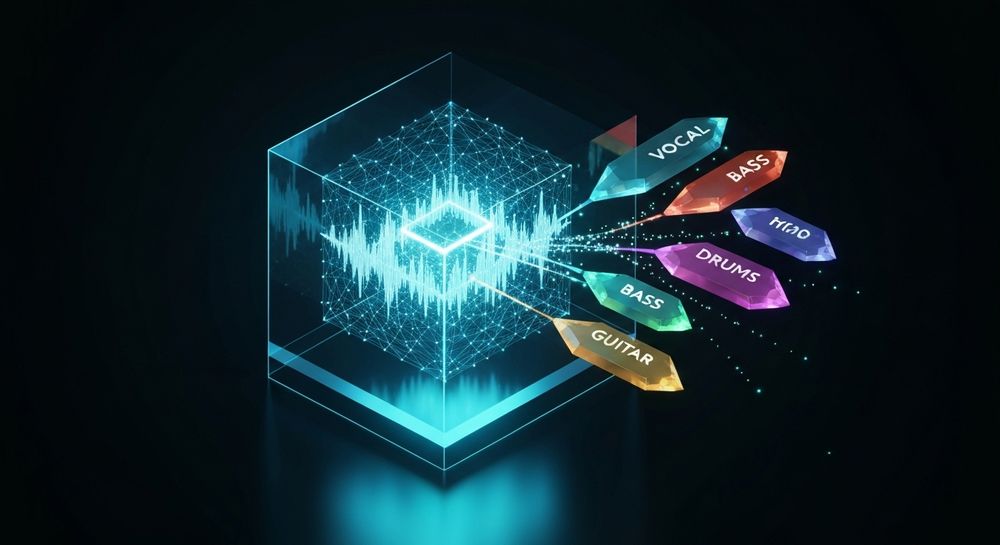
Music separation tools (also known as stem isolation software) are applications powered by AI algorithms that can deconstruct a stereo mix into multiple elements or stems. Each stem represents a different portion of the audio—vocals, drums, bass, guitar, and accompaniment.
In earlier years (2024–2025), music separation was performed using frequency-based filters and phase inversion, which produced inconsistent results. In 2026, deep learning models have matured, allowing precise detection of sound sources based on millions of training examples. This evolution mirrors broader music industry trends around AI-assisted production workflows.
How Does AI Music Separation Work?
AI music separation focuses on source detection. Neural networks analyze frequency signatures, transient behavior, and phase information to distinguish overlapping sounds. The algorithms predict which regions of the audio spectrogram correspond to different instruments, and reconstruct them into individual files. This process is fully automated, and within minutes, creators receive isolated stems ready for mixing or studying.
Techniques used include:
- Spectral unmixing: Breaking down the frequency spectrum layer by layer.
- Temporal modeling: Tracking rhythm and timing to separate percussive elements.
- Context learning: AI models understand how instruments interact, maintaining natural coherence once separated.
These methods have been refined through continuous AI innovation, echoing advances discussed in how AI-generated music is transforming the music industry. For a deeper dive, watch our guide on how to make music or explore the “Explore” tab walkthrough.
What Audio Editing Techniques Help Improve Isolation Quality?
Even with high-end AI tools, professional results depend on complementary editing techniques:
- Pre-clean your source: Remove noise or normalize the track before processing.
- Use multiband EQ after separation: Adjust tonal balance between stems.
- Time-align stems: Prevent phasing issues when recombining parts.
- Apply spectral repair: Fill minor gaps or glitches post-separation.
- Use dedicated software like RX or Audacity for fine-tuning.
Post-processing gives separated stems clarity and professional polish. Tools such as Soundraw alternative and Soundverse AI technologies help optimize workflow for producers in 2026.
How to Remove Vocals from a Song
Removing vocals is one of the most popular forms of isolation. Many users want instrumental versions for karaoke or remixing. To remove vocals:
- Use AI stem separation software capable of extracting a vocal stem.
- Mute or delete the vocal track when remixing.
- Apply EQ and compression adjustments to fill frequency gaps left by deleted vocals.
- Export the remaining stems as a complete instrumental.
This process is particularly useful for content creators producing copyright-free music, as described in navigating the world of royalty-free and copyright-free music using Soundverse AI.
The Evolution of AI Music Separation in 2026
Between 2024 and 2026, stem isolation evolved from simple frequency filtering into machine learning-driven separation. Modern AI now promises accuracy exceeding 95% across typical pop and rock mixes. The trend toward multi-stem separation (up to six channels) supports creative tasks like hybrid remixing, sampling, and instrumentation analysis. As AI-driven DAWs and platforms continue expanding, musicians integrate these capabilities into daily production activities.
Step-by-Step Guide: How to Isolate Instruments in a Song
The process can be broken down into several practical actions.
Step 1: Upload Interface

Begin by launching your preferred stem isolation software. In Soundverse, you can upload any mixed audio through the upload dialog. The tool supports several input types including URL, local files, and direct recordings. Once uploaded, the AI begins processing the track for separation.
Step 2: Additional References

Optionally, upload reference audio tracks to help the system understand tonal or stylistic nuances. This step improves accuracy if you are isolating instruments from complex arrangements. The AI compares patterns from the reference to optimize separation quality.
Step 3: Results Display

After processing, the application presents a visualization of separated stems—Vocals, Drums, Bass, Guitar, Accompaniment, etc. Each stem appears as an independent waveform where you can listen individually or make edits before exporting.
Step 4: Download Stems

Finally, download individual stem files. You can import them into your DAW to remix, recompose, or analyze the mix structure. For professional workflow, save all stems labeled precisely (e.g., Bass.wav, Drums.wav) for organized project management. For detailed creative examples, watch our tutorial on making Deep House music.
How to Make Instrument Isolation Instantly with Soundverse Stem Separator

Now that you understand the concept and workflow, here is how to create instrument isolation instantly using Soundverse Stem Separator.
Soundverse Stem Separator is an advanced AI-powered feature that dissects mixed audio into up to six individual editable stems—Vocals, Drums, Bass, Guitar, and Accompaniment. It supports input from URLs, uploaded files, and live recordings. Each stem produced maintains high quality and clarity, making it ideal for remixing, sampling, educational analysis, and cleaning up audio for detailed editing.
For producers, this tool offers accuracy and speed while remaining intuitive. Once stems are isolated, they can be combined with other Soundverse tools:
- Section Analysis: Detects and labels song structure sections like Intro, Verse, Chorus, Bridge, and Outro.
- Inpainting: Regenerates specific sections with surgical precision, allowing you to fix mistakes or creatively alter arrangements.
Together, these features empower musicians and creators to develop original content efficiently. Explore more workflows with resources such as Soundverse introduces stem separation AI magic tool and Soundverse assistant: your AI music co-producer.
Start Isolating Instruments Instantly with Soundverse AI
Unlock the power of AI stem separation and remix capabilities. Separate vocals, drums, and melodies from any track to create new mixes, mashups, or clean stems in seconds.
Related Articles
- Soundverse Introduces Stem Separation AI Magic Tool — Discover how Soundverse’s advanced AI separates instruments and vocals with stunning clarity.
- What Are Song Stems and Why Do You Need Them — Learn the fundamentals of song stems and how they empower music creators to remix and edit freely.
- Soundverse AI Magic Tools: Create Content Quickly with AI — Explore Soundverse’s suite of AI Magic Tools designed to simplify and accelerate your music production workflow.
- Soundverse Revolutionizing Music Creation for New Age Content Creators — See how Soundverse is reshaping how artists and creators compose, edit, and isolate music parts through AI innovation.
Here's how to make AI Music with Soundverse
Video Guide

Here’s another long walkthrough of how to use Soundverse AI.
Text Guide
- To know more about AI Magic Tools, check here.
- To know more about Soundverse Assistant, check here.
- To know more about Arrangement Studio, check here.
Soundverse is an AI Assistant that allows content creators and music makers to create original content in a flash using Generative AI.
With the help of Soundverse Assistant and AI Magic Tools, our users get an unfair advantage over other creators to create audio and music content quickly, easily and cheaply.
Soundverse Assistant is your ultimate music companion. You simply speak to the assistant to get your stuff done. The more you speak to it, the more it starts understanding you and your goals.
AI Magic Tools help convert your creative dreams into tangible music and audio. Use AI Magic Tools such as text to music, stem separation, or lyrics generation to realise your content dreams faster.
Soundverse is here to take music production to the next level. We're not just a digital audio workstation (DAW) competing with Ableton or Logic, we're building a completely new paradigm of easy and conversational content creation.
TikTok: https://www.tiktok.com/@soundverse.ai
Twitter: https://twitter.com/soundverse_ai
Instagram: https://www.instagram.com/soundverse.ai
LinkedIn: https://www.linkedin.com/company/soundverseai
Youtube: https://www.youtube.com/@SoundverseAI
Facebook: https://www.facebook.com/profile.php?id=100095674445607
Join Soundverse for Free and make Viral AI Music

We are constantly building more product experiences. Keep checking our Blog to stay updated about them!