How to Find the Beat of a Song: A Complete Guide for Beginners (2026)
Learn how to find the beat of a song, identify rhythm, and master tempo with Soundverse tools.
How to Find the Beat of a Song
Understanding how to find the beat of a song is one of the most important skills for anyone beginning their musical journey. Whether you’re a hobbyist, new producer, or music student, mastering rhythm will improve your timing, coordination, and creative decisions. In 2026, with the rise of AI-assisted music tools like Soundverse, identifying rhythm and structure is easier and more intuitive than ever.
Why is it important to find the beat of a song?
Every piece of music is built around rhythm — the underlying pulse that drives the track and connects all instruments. When you can accurately find the beat, you gain the ability to play along with other musicians, remix songs, or understand where transitions happen in a composition. It’s the foundation of timing and groove. Without rhythm awareness, even the best melodies can sound disconnected.

Finding the beat of a song also enhances song structure comprehension. In pop, hip-hop, and electronic genres, the beat shapes the energy flow. Musicians and producers rely on this understanding to cue loops, transitions, and drops. As the music industry in 2026 continues its blend of traditional and AI-driven workflows (read more here), rhythm literacy remains fundamental. Learning rhythm can be improved through techniques such as simple hand-tapping or foot-tapping exercises, which connect physical movement with musical timing.
How to make beat identification easy with Soundverse Section Analysis
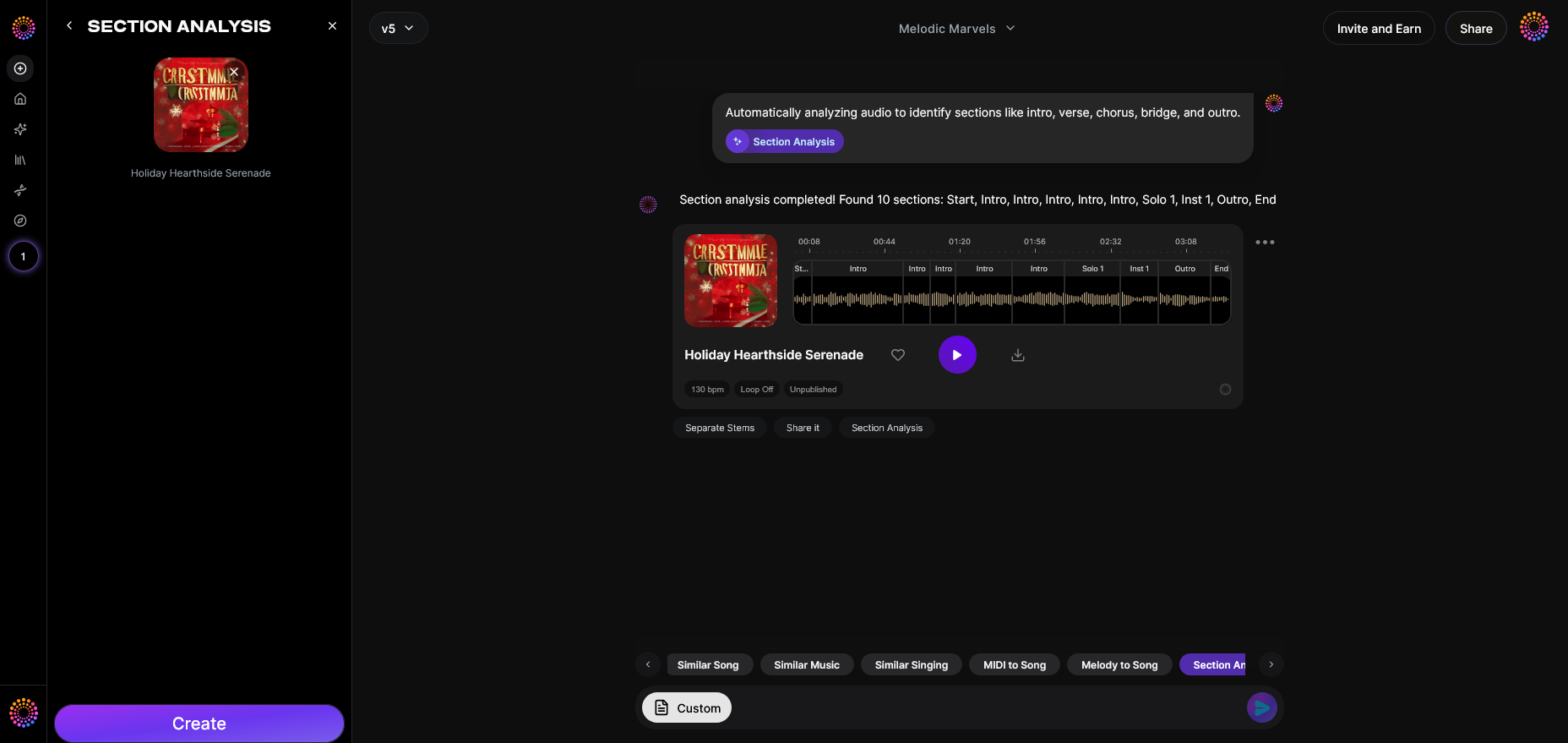
Soundverse’s Section Analysis tool is designed to automate the process of understanding a song’s rhythm flow and structure. It doesn’t just identify the beat; it labels each song section — Intro, Verse, Chorus, Bridge, and Outro — along with precise timestamps.
What Section Analysis does
- Automated structure detection: Instantly scans your uploaded track and identifies song sections.
- Visual roadmap generation: Displays a clear editing map showing exactly where sections start and end.
- Timestamp export: Lets you export section timing data into your mixing or editing projects.
These capabilities are ideal for remixing, DJ cue setting, or learning song timing. Users preparing for cover versions can use this roadmap to practice along with precisely identified section changes, improving their beat tracking effectiveness. For a deeper dive, watch our Soundverse Tutorial Series - 9. How to Make Music to see how producers leverage rhythm structure in practice.
For producers interested in deeper audio breakdowns, Soundverse pairs well with its Stem Separator — an AI tool that divides full tracks into individual instruments such as vocals, drums, bass, and guitar (explore this guide). When combined, these tools allow beginners to both isolate rhythm elements and identify beat placement.
Step 1: Feature Overview — Access Section Analysis tool
To start, open Soundverse and navigate to the Section Analysis feature. This tool enables you to upload a song for rhythmic breakdown. You can use it on any genre—from classical to EDM—making it ideal for studying tempo and song timing.
Step 2: Upload Audio — Prepare your song for analysis
Click the upload button and select the audio file you want to analyze. You can use practice tracks, demo songs, or full-length compositions. Once uploaded, Soundverse begins processing asynchronously. This means you’ll get results after processing, not in real-time.
Step 3: Analysis — AI examines song structure and rhythm
At this stage, the system identifies structural sections and calculates timestamps. You’ll see how long each part lasts and how the rhythm sections connect. This process helps you perform song rhythm identification with precision, ensuring your practice focuses on the correct beat flow.
Step 4: Results Display — View identified sections and timings
Once analysis is complete, the platform displays a full layout with marked intros, verses, choruses, and outros. You’ll understand not only how beats progress but also when transitions happen. Export this timing data if you wish to integrate it into remix sessions or music learning materials.
How to count beats in music manually
While AI analysis simplifies things, understanding manual beat counting is crucial for developing internal rhythm skills:
- Listen actively: Focus on drum patterns. The steady pulse typically marks the beat.
- Tap along: Use your foot or hand to tap with the rhythm. Most songs follow a 4/4 pattern, meaning four beats per measure.
- Count out loud: Start with “1-2-3-4.” This helps internalize the tempo and structure.
- Use a metronome or tempo app: These help reinforce timing consistency.
- Identify tempo changes: Songs sometimes shift pace — learning to detect those changes will improve your rhythm flexibility.
Combining basic training with Soundverse’s automated analysis helps beginners quickly align natural beat perception with technical accuracy.
What role does tempo play in finding the beat?
Tempo refers to how fast or slow a song’s beat repeats, usually measured in BPM (beats per minute). A slow tempo gives a relaxed feel (common in ballads), while higher BPM creates energy typical of dance tracks. Understanding tempo is key to accurate beat recognition. Tools like Soundverse provide timestamps that indirectly reflect tempo shifts. Creators looking to study BPM differences can benefit from practical rhythm exercises such as those found in the Get Rhythm: Finding the Beat - Musical U guide.
For creators experimenting with genre-based tempo variations, AI music generator tools such as Soundverse’s AI Music Generator can produce beat examples based on text prompts. Check out examples in this related blog on how to generate AI music. You could request “a chill lo-fi beat at 80 BPM” or “an energetic EDM pattern at 128 BPM.” For genre preparation, see also our Soundverse Tutorial Series - 10. Make Deep House Music.
Pro tips for beat training beginners in 2026
- Practice daily with various genres: Rhythm perception improves through exposure to different styles.
- Record and replay yourself: Hearing your timing objectively helps spot inconsistencies.
- Use Soundverse for structure reference: Align your practice with real section transitions.
- Pair with AI-generated backing tracks: Create custom rhythm exercises using text-to-music prompts (see examples here).
- Focus on the downbeat: The “1” beat in each measure is the anchor point — everything else revolves around it.
Why rhythm identification matters more in 2026
With musicians increasingly working across remote collaborations and AI-driven composition platforms, timing synchronization has become essential. In 2026, cross-genre music production often involves automated workflows, and accurate rhythmic understanding prevents errors during multitrack merging. Beginners who can find the beat of a song efficiently remove guesswork from their practice workflow. You can also explore Soundverse’s rhythm layout using the Explore Tab tutorial.
How to use Soundverse with other tools for deeper rhythm learning
Once your beat identification skills improve, explore Soundverse’s other AI tools for more creative control:
- Stem Separator: Separate instruments to hear the drum and bass clearly for rhythm focus.
- AI Music Generator: Create reference soundscapes to test your tempo awareness.
- Arrangement Studio: Integrate timestamps for section reshaping — learn how structure influences beat flow (learn what Arrange Studio does).
These tools streamline rhythm visualization and enhance your tempo intuition, making music learning more interactive.
Start Creating Music That Moves You Today
Discover how easy it is to turn your ideas into beats with Soundverse. Use AI tools designed to help you find rhythm, craft melodies, and produce professional music in minutes.
Related Articles
- Generate AI Music with Soundverse Text-to-Music: Learn how to instantly turn written prompts into beautiful music compositions using Soundverse’s advanced text-to-music technology.
- Soundverse AI Revolutionizing Music Creation for New-Age Content Creators: Explore how Soundverse is reshaping the music industry by empowering creators to produce original tracks effortlessly with AI.
- The Benefits of Composing with AI Music Generator: Understand the advantages of using AI tools like Soundverse to enhance creativity, speed, and precision in music composition.
- Soundverse Assistant: Your AI Music Co-Producer: Meet Soundverse Assistant — the intelligent co-producer that helps you refine rhythm, structure, and overall sound quality in your tracks.
Here's how to make AI Music with Soundverse
Video Guide

Here’s another long walkthrough of how to use Soundverse AI.
Text Guide
- To know more about AI Magic Tools, check here.
- To know more about Soundverse Assistant, check here.
- To know more about Arrangement Studio, check here.
Soundverse is an AI Assistant that allows content creators and music makers to create original content in a flash using Generative AI. With the help of Soundverse Assistant and AI Magic Tools, our users get an unfair advantage over other creators to create audio and music content quickly, easily and cheaply. Soundverse Assistant is your ultimate music companion. You simply speak to the assistant to get your stuff done. The more you speak to it, the more it starts understanding you and your goals. AI Magic Tools help convert your creative dreams into tangible music and audio. Use AI Magic Tools such as text to music, stem separation, or lyrics generation to realise your content dreams faster. Soundverse is here to take music production to the next level. We're not just a digital audio workstation (DAW) competing with Ableton or Logic, we're building a completely new paradigm of easy and conversational content creation.
TikTok: https://www.tiktok.com/@soundverse.ai
Twitter: https://twitter.com/soundverse_ai
Instagram: https://www.instagram.com/soundverse.ai
LinkedIn: https://www.linkedin.com/company/soundverseai
Youtube: https://www.youtube.com/@SoundverseAI
Facebook: https://www.facebook.com/profile.php?id=100095674445607
Join Soundverse for Free and make Viral AI Music

We are constantly building more product experiences. Keep checking our Blog to stay updated about them!