How to Extend an Audio File: A Complete Guide for Creators in 2026
Learn how to extend audio files, lengthen clips, and fit soundtracks perfectly using modern audio editing tools.
How to Extend an Audio File
Extending an audio file has become one of the most common needs among musicians, podcasters, sound designers, and video creators in 2026. Whether you are trying to lengthen a song to match a specific video sequence, create a loop for gaming environments, or remix a short tune into a full track, understanding how to extend an audio file effectively is crucial.
Why do creators need to extend an audio file?
Extending an audio file can serve multiple purposes for different audio-based professions:
- Musicians: To create extended mixes or new arrangements without re-recording sessions.
- Podcasters: For seamless background loops or transitions between segments.
- Sound designers: To match ambient soundscapes with animation or game mechanics.
- Content creators: To align background music precisely with video duration.
In 2026, the demand for flexible audio editing and manipulation is higher than ever. Modern AI-powered tools are transforming how professionals handle this process, offering smarter ways to lengthen sound clips or extend MP3 durations while maintaining perfect audio quality.

What methods can you use to extend an audio file?
Before exploring advanced solutions, it’s worth understanding the traditional methods of audio editing that existed before AI-driven tools matured.
- Manual looping: Repeating sections of a track within a digital audio workstation (DAW) such as Ableton Live, Audacity, or Logic Pro. This method works well for instrumentals or minimalistic compositions.
- Crossfading: Smoothing the transition between repeated sections using fade-in and fade-out techniques to avoid noticeable repetition.
- Time-stretching: Adjusting playback speed to lengthen duration without changing pitch. However, too much stretching often introduces artifacts.
- Remixing or overdubbing: Adding new layers or sections to naturally expand the composition.
- AI-based generation: Using intelligent algorithms to continue music seamlessly without loops or speed manipulation.

Why AI audio extension prevails in 2026
Since 2024, AI music generation has taken enormous strides, leading to smoother, context-aware extensions. By 2026, the most effective way to extend an audio file involves using AI-assisted composition. These tools analyze tempo, tonal structure, rhythm, and emotion, enabling automatic generation of new audio segments that integrate perfectly with the original track.
For example, creators using next-generation generators such as Soundverse Extend Music can generate realistic continuations, making it possible to lengthen a complete song—including vocals and lyrics—without compromising consistency. For a deeper dive, watch our guide on creating Deep House music.
How to extend an audio file easily: A step-by-step guide
If you want to extend an audio file professionally and precisely, follow these structured steps. These apply to using AI audio manipulation solutions and modern editing practices.
Step 1: Feature Overview — Access Extend Music tool
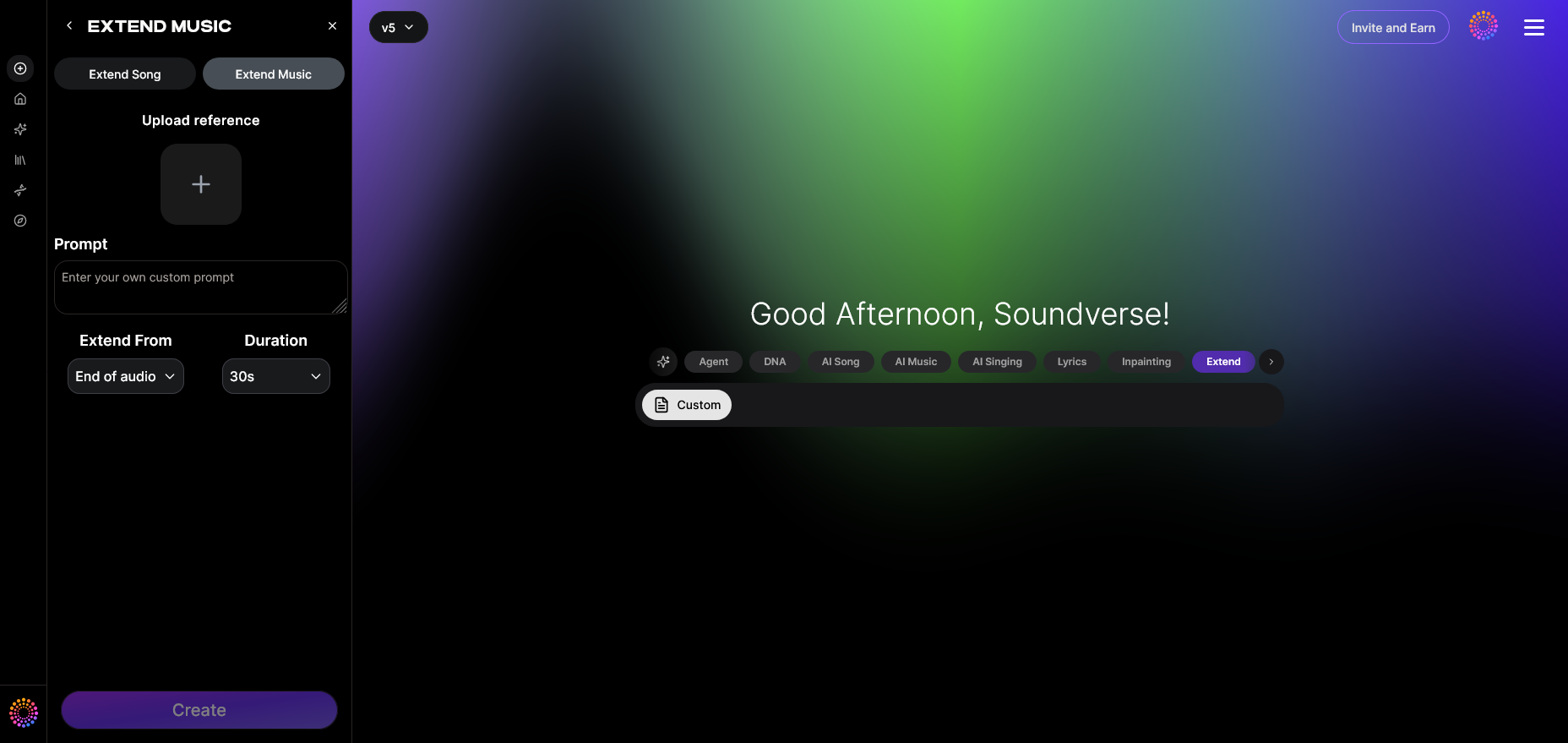
Begin by launching your preferred creation platform. In this case, Soundverse offers a specialized feature called Extend Music, designed specifically for audio continuation tasks. This feature enables instrumental expansion and full song continuation modes.
Step 2: Upload Track — Upload audio file to extend
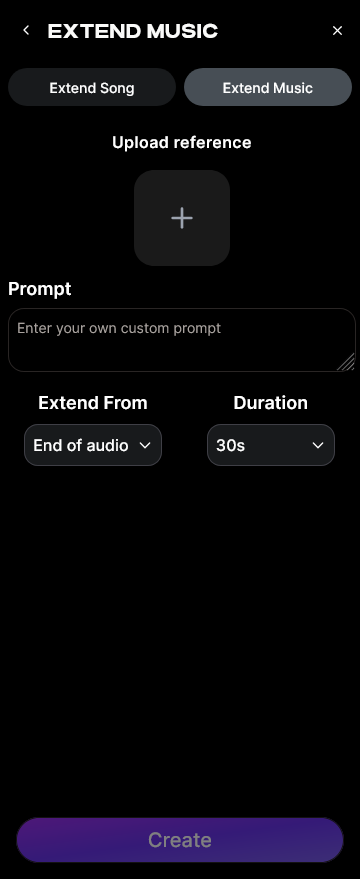
Upload the original audio track you want to lengthen. Supported formats usually include MP3, WAV, and other common options. The system processes the file structure, identifying rhythm, melody, and key signatures.
Step 3: Duration Setting — Set extension length and duration
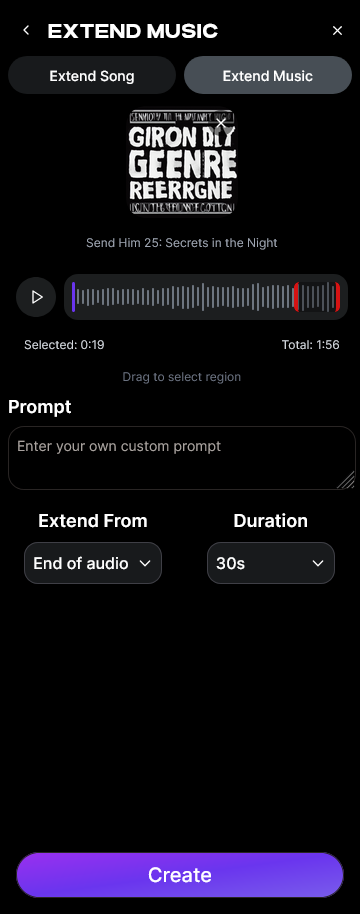
Choose how long you want the track to be extended. Soundverse allows control between 15 seconds up to 3 minutes per extension cycle, giving flexibility depending on whether it’s a short loop expansion or full remix.
Step 4: Generation — AI extends music seamlessly
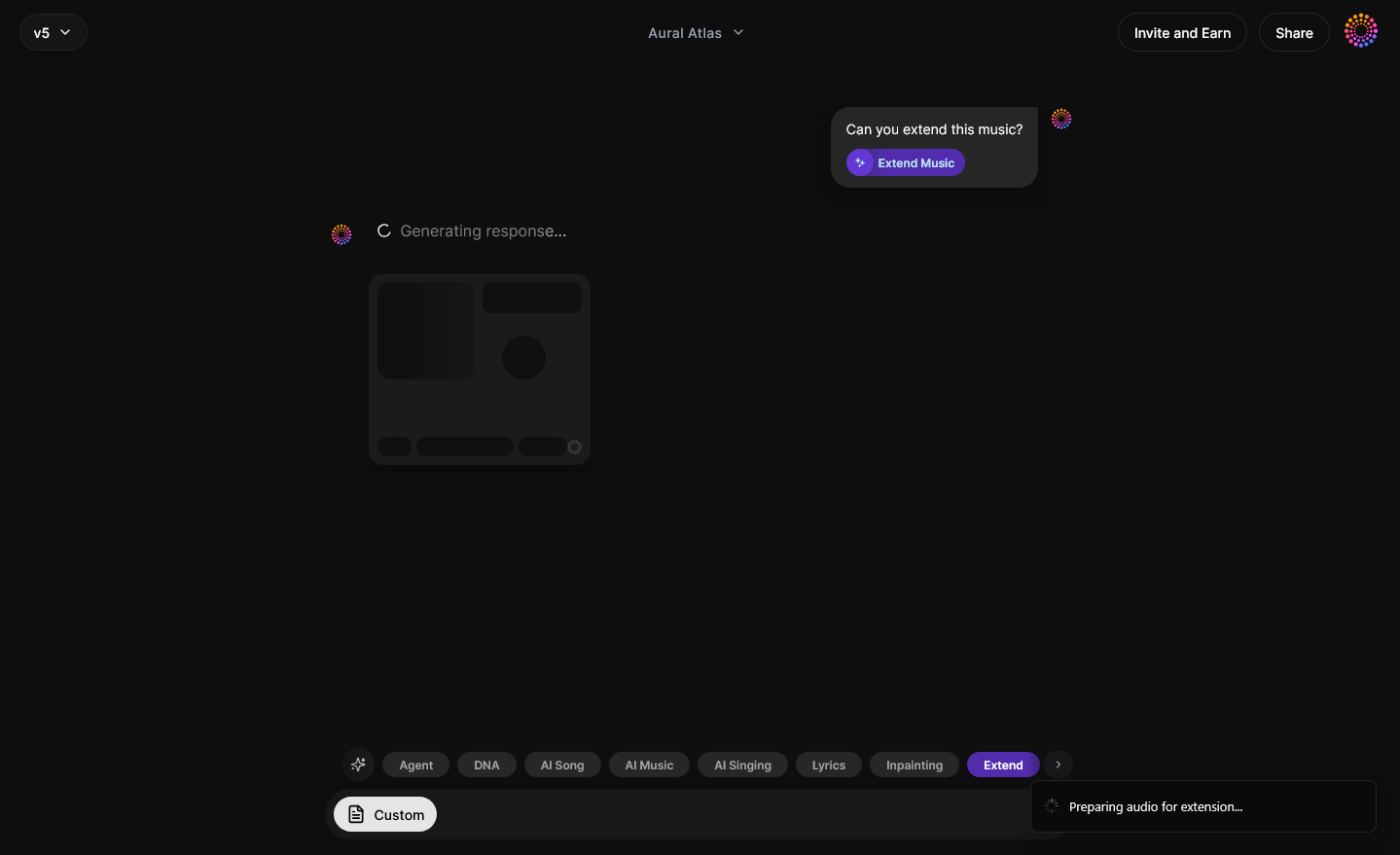
Once duration settings are confirmed, the AI engine analyzes your audio and builds new segments that match the style and texture. This eliminates the mechanical repetition common in manual looping. The system does not offer real-time preview but processes your file asynchronously for best-quality output.
Step 5: Download Extended — Export extended audio track
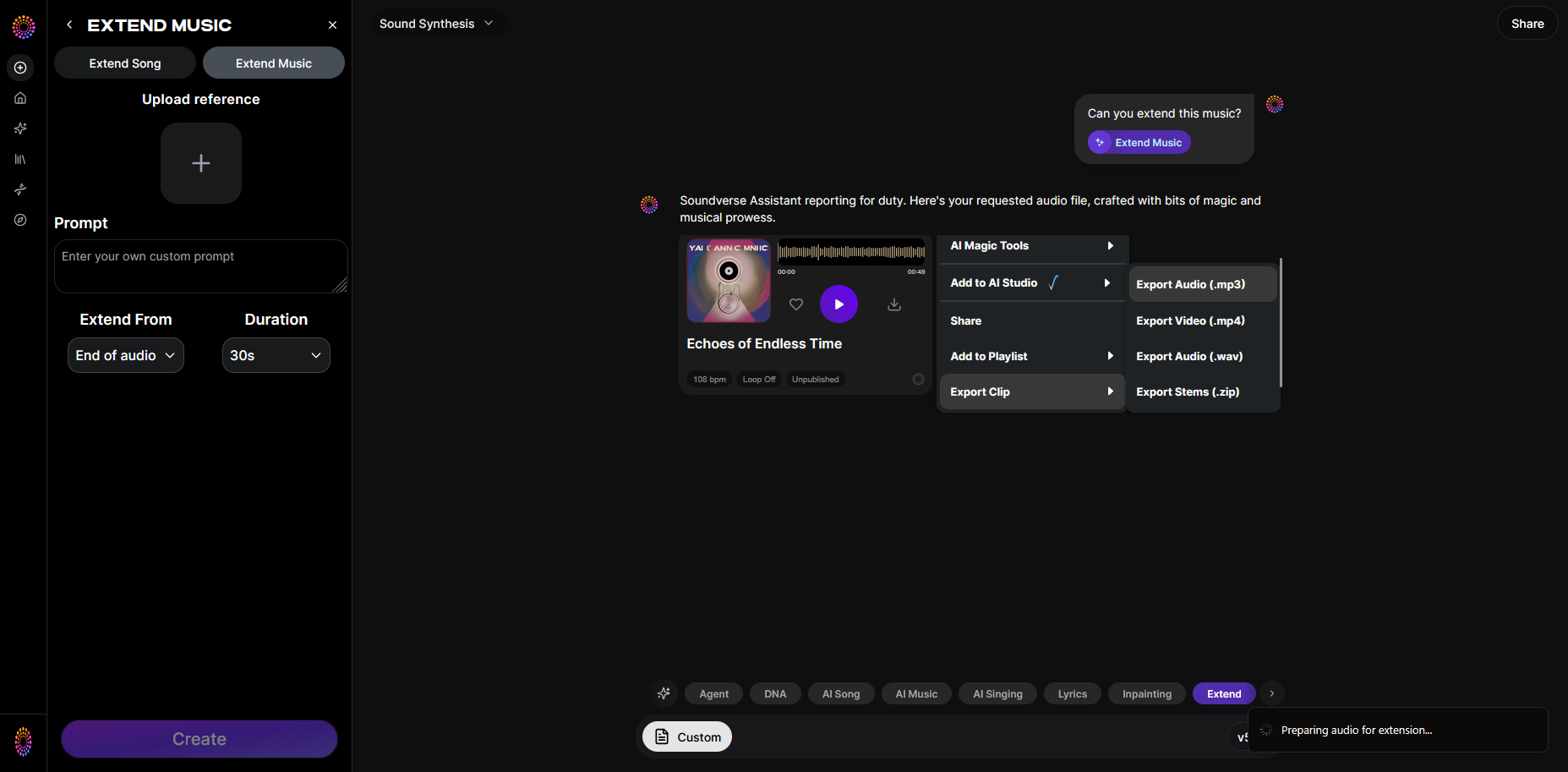
After generation completes, you can download your smooth, extended version. It can now fit perfectly in your intended context—be it a film soundtrack, background music loop, or podcast segment. For more on practical sound extension workflows, you can watch our music creation tutorial.
Music production tips when extending audio files
Here are some practical production insights that help maximize the final sound quality:
- Maintain consistent mastering levels: Ensure the extended section matches your previous mix dynamics to avoid volume shifts.
- Use stem separation for refinement: Break the original track into stems using a dedicated tool like Soundverse’s Stem Separator. This helps isolate instruments and regenerate them selectively.
- Employ inpainting for correction: For precision editing, tools like Soundverse’s Inpainting function let you revise only specific moments rather than regenerating the entire track.
- Adapt tempo creatively: When extending instrumentals, consider minor tempo adjustments for natural pacing; use this technique when building cinematic loops.
- Cross-reference multiple AI tools: Compare audio manipulation outputs from different platforms. Check Soundraw and Mubert alternatives for comparison and style understanding.
What challenges occur when you extend an audio file manually?
Even experienced producers face some drawbacks when handling manual extension:
- Audible repetition: Loops can sound monotonous.
- Mismatched transitions: Without advanced crossfading, sections may feel abrupt.
- Time consumption: Editing audio manually requires significant effort and detailed listening.
- Limited creative expansion: The original file doesn’t naturally evolve or introduce new instrumental variations.
That’s why AI-assisted software became such an industry staple from 2025 onward. It eliminates unnatural boundaries between existing material and newly generated content. You can also learn more about track continuation in our Explore Tab walkthrough.
How to make extended audio tracks with Soundverse Extend Music
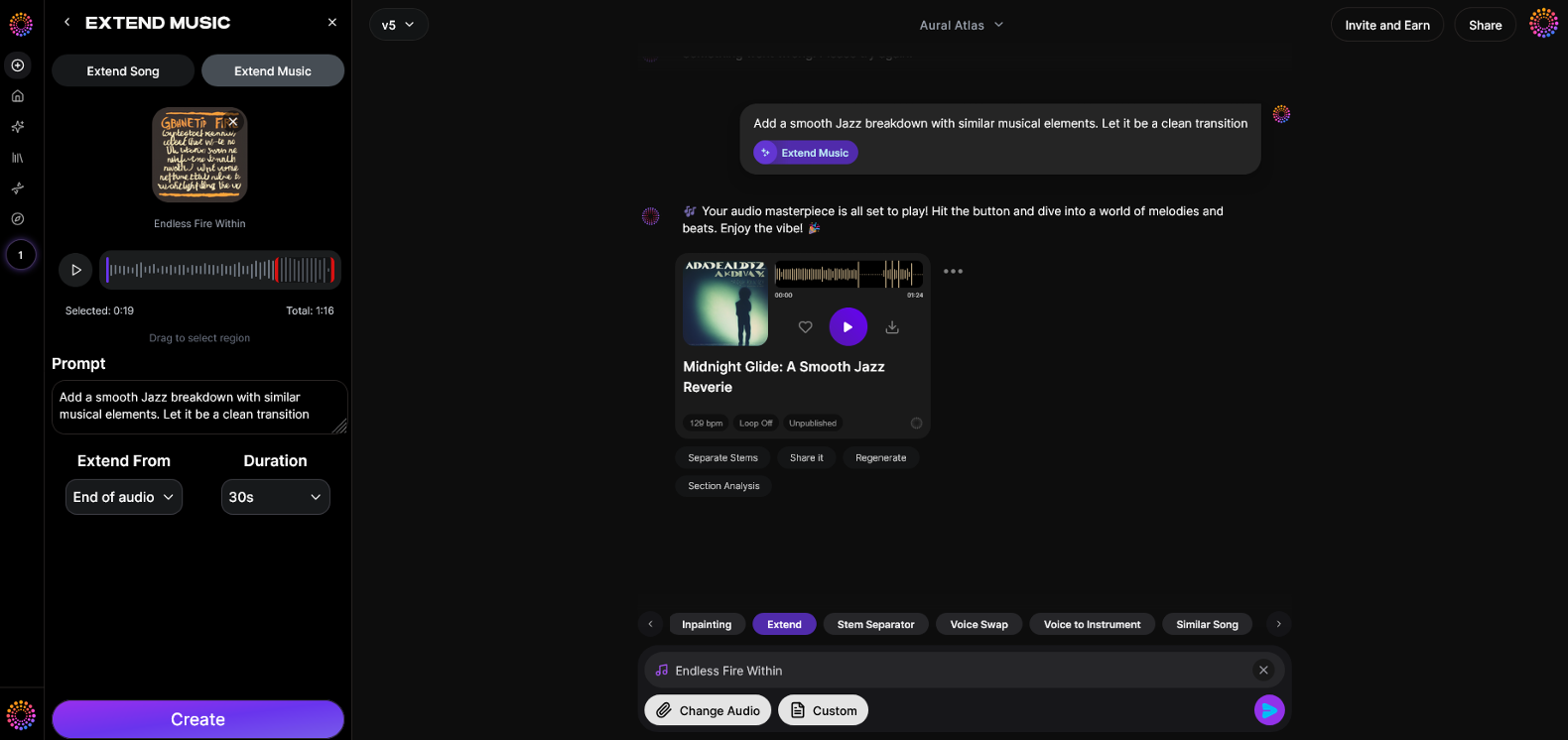
Now that you understand how audio file extension works, here’s how Soundverse enables you to create it instantly.
Extend Music by Soundverse is an intelligent solution engineered for seamless audio continuation. It automatically generates stylistically aligned material while respecting tempo, rhythm, and tonality of your uploaded track. Options include:
- Extend Song (Vocals + Music): Continue full tracks including lyrics.
- Extend Music (Instrumental only): Focus on extending the musical bed without vocals.
- Duration Control: Choose lengths between 15 seconds and 3 minutes per operation.
- Loop Extension: Create perfect seamless repetitions for games or podcasts.
Soundverse’s asynchronous workflow ensures efficiency: you upload your audio, configure duration, let the system process, and download high-quality extended versions ready for use in any production.
When combined with other AI music features available on Soundverse—such as text-to-music generation and creative AI Magic Tools—creators achieve end-to-end production capability from initial draft to mastered final output.
If you’re exploring broader applications like creating specific genre music (for example, EDM production or country music), Soundverse integrates naturally with these workflows, allowing your extended files to become the foundation for new compositions.
Extend Your Audio Seamlessly with Soundverse
Create longer tracks, smooth loops, and perfect transitions—all powered by advanced AI. Experience effortless audio editing and generation with a few clicks.
Try Soundverse Free
Related Articles
- Soundverse Introduces Stem Separation AI Magic Tool: Discover how Soundverse’s AI tool lets you split your tracks into stems for deeper mixing and audio customization.
- Soundverse AI Magic Tools: Create Content Quickly with AI: Learn how Soundverse’s suite of AI Magic Tools can speed up music creation and elevate your sound instantly.
- Generate AI Music with Soundverse Text-to-Music: Turn ideas into full-length compositions with Soundverse’s text-to-music technology that generates unique, royalty-free tracks.
- What Are Song Stems and Why Do You Need Them: Understand the role of song stems in audio editing and how they can help you extend or reshape music efficiently.
Here's how to make AI Music with Soundverse
Video Guide

Here’s another long walkthrough of how to use Soundverse AI.
Text Guide
- To know more about AI Magic Tools, check here.
- To know more about Soundverse Assistant, check here.
- To know more about Arrangement Studio, check here.
Soundverse is an AI Assistant that allows content creators and music makers to create original content in a flash using Generative AI.
With the help of Soundverse Assistant and AI Magic Tools, our users get an unfair advantage over other creators to create audio and music content quickly, easily and cheaply.
Soundverse Assistant is your ultimate music companion. You simply speak to the assistant to get your stuff done. The more you speak to it, the more it starts understanding you and your goals.
AI Magic Tools help convert your creative dreams into tangible music and audio. Use AI Magic Tools such as text to music, stem separation, or lyrics generation to realise your content dreams faster.
Soundverse is here to take music production to the next level. We're not just a digital audio workstation (DAW) competing with Ableton or Logic, we're building a completely new paradigm of easy and conversational content creation.
TikTok: https://www.tiktok.com/@soundverse.ai
Twitter: https://twitter.com/soundverse_ai
Instagram: https://www.instagram.com/soundverse.ai
LinkedIn: https://www.linkedin.com/company/soundverseai
Youtube: https://www.youtube.com/@SoundverseAI
Facebook: https://www.facebook.com/profile.php?id=100095674445607
Join Soundverse for Free and make Viral AI Music

We are constantly building more product experiences. Keep checking our Blog to stay updated about them!