How to Create an AI-Generated Song: A Complete Guide for Musicians in 2026
Learn how to create an AI-generated song using Soundverse AI Song Generator and discover 2026’s best practices.
How to Create an AI-Generated Song
In 2026, AI song creation has moved from experimental novelty to a mainstream production workflow used by artists, producers, and digital creators across every genre. The fusion of artificial intelligence and music production tools has reshaped the creative process—allowing anyone to create full songs, complete with vocals and instrumentals, by typing in a few lines of lyrics or descriptive text.
This guide will show musicians and producers exactly how to create an AI-generated song using Soundverse’s flagship feature—the AI Song Generator. We’ll explore the step-by-step process, best practices, and pro tips to help you create polished, emotionally compelling music using AI composition software.
Why are AI-generated songs trending in 2026?
AI-powered audio production gained traction in 2024 and matured significantly through 2025. By 2026, the conversation has shifted from “can AI make music?” to “how do we refine and personalize what AI generates?” Modern musicians now use AI music generators for rapid prototyping, multilingual songwriting, and content creation for platforms like YouTube and TikTok.
AI songwriting tools also became more integrated into the production pipeline. Artists use them to draft lyrics, experiment with melodies, and quickly mock up production styles without booking studio time. Creators report that AI helps overcome writer’s block, enabling spontaneous creativity through prompt-based song generation.
How to make an AI-generated song with Soundverse AI Song Generator

Soundverse’s AI Song Generator stands at the center of this new creative era. It allows you to turn lyrics or even text descriptions into complete, fully mixed songs. The tool operates through a multi-stage pipeline that handles every critical phase: lyrics interpretation, melody generation, arrangement, and final AI audio production.
Soundverse AI Song Generator – Overview
Official Description: The AI Song Generator is built to turn lyrics or text descriptions into complete songs featuring AI-generated vocals and instrumental backing. It operates through a multi-stage generation pipeline, ensuring cohesive lyrical, melodic, and arrangement synthesis.
Core Capabilities include:
- Describe Your Song mode: Generate music by simply describing your desired theme, mood, or scenario.
- Custom mode: Paste your own lyrics, select genres, and refine output settings for maximum control.
- Reference Audio support: Upload a sample track or singing performance for style or tone guidance.
- Quick Style Selection: Access genre presets such as Pop, EDM, Rock, and more.
Primary Use Cases: Songwriting demos, vocal prototyping, social media content creation, personalized greetings or gifts, and multilingual compositions supporting 10+ languages.
Now that you understand the tool’s capabilities, let’s walk through exactly how to create your first AI-generated song.
Step 1: Feature Overview

Begin by accessing the AI Song Generator from Soundverse’s main interface. The feature is prominently listed alongside complementary tools like the AI Lyrics Writer and AI Singing Generator. If you’re new to Soundverse, you can explore guides such as How to Create Country Music with Soundverse AI to understand how different genres are handled.
For video tutorials, check out our guide on creating Deep House music and How to Make Music series.
Step 2: Lyrics Input
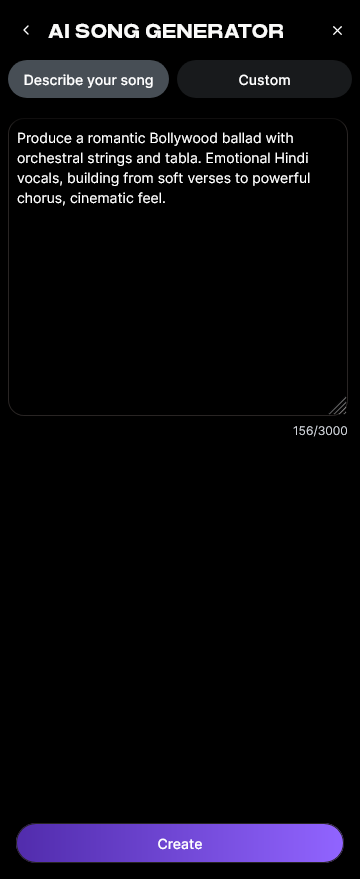
Once inside the AI Song Generator, you’ll be prompted to enter or paste your lyrics. If you don’t have lyrics yet, use the integrated AI Lyrics Writer, which automatically generates structured verses and choruses based on tone and genre. For example, when creating an EDM-style track, you can tweak descriptors for mood and tempo to guide the AI toward euphoric or introspective results.
Soundverse is known as an ethical and artist-friendly AI-powered music studio in a pocket.
Step 3: Style Selection

Next, choose your preferred music style and genre. The Quick Style Selection panel allows you to choose preset categories—Pop, Rock, Hip-Hop, EDM, and more. This stage determines the arrangement and instrumentation the AI will use. If you’re exploring diverse textures, you can refer to related content like How to Create Desert-Inspired Music for inspiration about thematic composition choices.
For a visual walkthrough, see our Explore Tab video on YouTube.
Step 4: Configuration

In the configuration phase, set parameters for generation length, vocal tone, and AI mixing intensity. You can optionally upload reference audio—such as an existing instrumental track or recorded vocal—to let the AI align the new composition with your preferred energy and timbre. Remember that Soundverse’s workflow is asynchronous, meaning the system processes your input first before producing the final output; there’s no real-time monitoring or live feedback. You can learn more in How to Make a Song Using AI: A Step-by-Step Guide for 2026.
Step 5: Generation

After configuring, hit the Generate Song button. The AI will begin composing a melody, arranging instrumentation, and rendering a vocal performance that matches your inputs. This asynchronous process takes a short moment while Soundverse’s engine interprets your lyrics and contextual mood, functioning as a voice AI music assistant.
Step 6: Generation Complete

Once the song is complete, Soundverse will present the generated result page. Here, you can preview your entire track—AI vocals, backing instruments, and mix balance included. You can also use Soundverse’s Inpainting tool if you want to refine any portion of the song; for instance, replacing a verse line or adjusting the bridge while preserving the rest of the arrangement intact.
Step 7: Export Results

Finally, export your generated song in multiple formats suitable for sharing or post-production. Soundverse allows downloads for universal formats compatible with digital audio workstations (DAWs). Whether the track will be released on streaming platforms or used as demo material, professional creators appreciate that AI composition software produces mix-ready audio without requiring advanced engineering skills.
Pro Tips for AI Song Creation in 2026
As AI becomes central to creative workflows, efficiency lies in learning how to communicate with the AI effectively:
- Use detailed prompts: The more expressive your description, the better your generated song will match emotional tone and genre expectations.
- Leverage reference audio wisely: If you admire a specific groove or vocal phrasing, upload short samples to guide the engine’s style.
- Combine AI tools: Pair the AI Song Generator with the AI Singing Generator for custom acapella versions, or use Inpainting to rebuild specific sections post-generation.
- Stay genre aware: You can explore advanced genre crafting via resources such as The Benefits of Composing with an AI Music Generator or Generate AI Music from Text.
- Focus on storytelling: Even though AI handles the technical side of composition, the emotional narrative—the story you want to tell through music—still depends on your creative vision.
The Role of Soundverse in Modern AI Audio Production
Soundverse has emerged as one of the most comprehensive ecosystems for AI-assisted music creation by combining intelligent lyric writing, emotion-aware melodic composition, and automated mixing. Creators can easily jump from idea to output without deep production experience.
According to AI Music Industry Trends 2026, Soundverse bridges technical gaps while maintaining artistic individuality. In an age where short-form videos, podcasts, and interactive digital experiences dominate, AI-enabled personalization—such as embedding multilingual vocals or choosing audience-specific sonic styles—has become vital.
Additionally, as the music industry continues to expand the use of AI voice and style generation, tracks made with Soundverse are finding their way onto platforms employing royalty-free frameworks similar to those discussed in Navigating Royalty-Free Music Creation.
Start Creating Your AI-Generated Song Today
Unlock limitless creativity with Soundverse. Generate original songs, mix genres, and experiment with lyrics and melodies—all with the power of AI.
Related Articles
- Generate AI Music with Soundverse Text-to-Music — Discover how to turn written ideas into fully produced tracks using Soundverse’s text-to-music technology.
- How AI-Generated Music Is Transforming the Music Industry — Explore how AI tools are revolutionizing music creation, production, and distribution worldwide.
- Soundverse Assistant: Your AI Music Co-Producer — Learn how Soundverse Assistant can guide your music creation process from concept to mastered track.
- What AI Can Generate Songs — Find out which AI tools and platforms can generate complete songs for any genre or mood.
Here's how to make AI Music with Soundverse
Video Guide

Here’s another long walkthrough of how to use Soundverse AI.
Text Guide
- To know more about AI Magic Tools, check here.
- To know more about Soundverse Assistant, check here.
- To know more about Arrangement Studio, check here.
Soundverse is an AI Assistant that allows content creators and music makers to create original content in a flash using Generative AI.
With the help of Soundverse Assistant and AI Magic Tools, our users get an unfair advantage over other creators to create audio and music content quickly, easily and cheaply.
Soundverse Assistant is your ultimate music companion. You simply speak to the assistant to get your stuff done. The more you speak to it, the more it starts understanding you and your goals.
AI Magic Tools help convert your creative dreams into tangible music and audio. Use AI Magic Tools such as text to music, stem separation, or lyrics generation to realise your content dreams faster.
Soundverse is here to take music production to the next level. We're not just a digital audio workstation (DAW) competing with Ableton or Logic, we're building a completely new paradigm of easy and conversational content creation.
TikTok: https://www.tiktok.com/@soundverse.ai
Twitter: https://twitter.com/soundverse_ai
Instagram: https://www.instagram.com/soundverse.ai
LinkedIn: https://www.linkedin.com/company/soundverseai
Youtube: https://www.youtube.com/@SoundverseAI
Facebook: https://www.facebook.com/profile.php?id=100095674445607
Join Soundverse for Free and make Viral AI Music

We are constantly building more product experiences. Keep checking our Blog to stay updated about them!