How to Create a Song from Lyrics Online for Free (2026 Guide)
Learn how to create a song from lyrics online free using AI tools like Soundverse. Step-by-step guide for musicians and creators in 2026.
How to Create a Song from Lyrics Online for Free
Creating music has never been easier than in 2026. With the rise of AI-driven tools and free online song makers, lyricists and aspiring musicians can now transform their written words into fully produced songs — all without needing expensive studio time or specialized software. This comprehensive guide will show you exactly how to create a song from lyrics online free, explore available tools, and finish with the easiest way to make it happen using Soundverse’s AI Song Generator.
Why create a song from lyrics online free in 2026?
By 2026, artificial intelligence has evolved beyond simple beat generation to full music composition, vocal synthesis, and professional mixing. For creators working on tight budgets or testing ideas quickly, free online song generation has become a lifeline. Whether you are a lyricist wanting to hear your words come alive or a content creator seeking quick, royalty-free tracks for social media, AI platforms now allow seamless song creation within minutes.
These tools democratize music production, bridging the gap between imagination and execution. Instead of relying on studio engineers or session musicians, you can use AI to turn your lyrics into music instantly.

What do you need before you start turning lyrics into music?
Before learning how to create a song from lyrics online free, make sure you have the essentials ready:
- Your Lyrics – Structured verses, chorus, and bridge are ideal, but even a short poem will work.
- A Musical Idea or Genre – Decide the mood: pop, EDM, rock, jazz, or country.
- Objective – Are you making a demo, social media content, or a personalized gift?
- Internet Access – These tools run online, so a stable connection ensures smooth generation.
Once you have these prepared, you’re ready to move forward.
What are the best free online song makers in 2026?
There are numerous free platforms available to help you compose songs online. Below are some of the most used options:
- Soundverse – Advanced AI music platform capable of converting lyrics into full compositions (discussed in detail later).
- Soundation (soundation.com) – Good for manual music projects and collaborations.
- Audiotool (audiotool.com) – Browser-based studio for EDM and electronic artists.
- BandLab (bandlab.com) – Blends cloud recording with social collaboration tools.
- Beatoven.ai (beatoven.ai) – AI composer that matches emotion and tone.
For creators interested in AI-driven automation and lyric-to-song conversion, Soundverse leads the 2026 market. It serves both beginners and professionals looking to prototype full vocal tracks rapidly. You can learn more about how AI music is revolutionizing the creative process here. As confirmed in the Soundverse AI Review: Everything You Need to Know About It - Tad AI, Soundverse stands out with AI Singing generation capabilities that convert lyrics into realistic singing vocals. Soundverse’s App Store listing also highlights real-time collaboration and remix features.
For an in-depth comparison, check Suno vs Udio vs Soundverse: Which AI Music Generator Reigns Supreme, covering how these major players stack up in 2026.
How to write good lyrics that work well with an AI song generator
A polished lyrical foundation will help the AI perform better. Here’s how to ensure your lyrics are music-ready:
- Maintain Rhythm and Flow – Write lines with consistent syllable counts where possible.
- Define Emotion and Tone – AI responds better when lyrics carry clear sentiment (joy, sadness, hope, etc.).
- Use Genre-Specific Keywords – Mention dance, love, road trips, heartbreak if aiming for certain genres.
- Keep Structure Simple – Verse–Chorus–Bridge structure works best.
You can use free lyric-writing assistants such as the Soundverse AI Lyrics Writer to polish your text before generating the full song.
How to create a song from lyrics online free (step-by-step guide)
Now, let’s explore the exact workflow for making your own song from lyrics online using AI-based platforms.
Step 1: Feature Overview

Access the AI Song Generator tool through the main dashboard. This component is designed specifically to transform your lyrics or text prompts into full audio productions.
Step 2: Lyrics Input
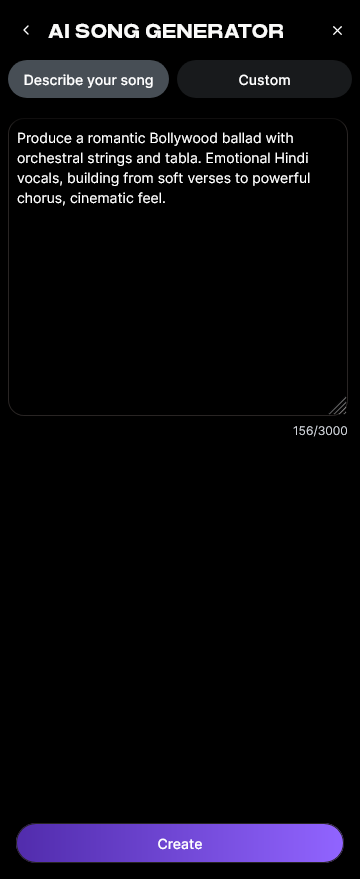
Paste your lyrics into the designated field. The tool analyzes tone, word patterns, and rhythm for building melody outlines.
Step 3: Style Selection

Choose from available genres such as Pop, EDM, Rock, Jazz, or Country. Each style changes instrumentation, tempo, and vocal energy.
Step 4: Configuration

Define generation parameters. Adjust whether you want vocals included, select chorus structure, and configure tempo or key settings.
Step 5: Generation

The AI processes the lyrics through multiple stages including melody composition, arrangement, and mixing. This automated pipeline yields a cohesive song with instrumentals and AI vocals.
Step 6: Generation Complete

Once processing finishes, the system presents your song preview with playback options. It’s asynchronous, meaning the audio result displays after computation finishes.
Step 7: Export Results

Export the final audio file in formats such as MP3 or WAV. You can then share it on social media or integrate into video projects.
This workflow takes only minutes and requires no musical equipment or coding. You simply provide lyrics and style – AI takes care of everything else. For a deeper dive, watch our Soundverse Tutorial Series - How to Make Music from the official Soundverse channel.
You can read other guides like how to create country music with Soundverse AI or generate AI music with Soundverse text-to-music to expand your learning.
How to make your own song for free without installations
All modern AI music tools, especially cloud-based ones, allow direct access from web browsers. You don’t need heavy DAWs or installation packages. Using such services helps:
- Save storage space.
- Speed up creative flow.
- Avoid hardware compatibility issues.
Platforms like Soundverse also support multilingual creation, letting you compose tracks in more than ten languages. That’s especially useful for global creators developing regional content.
How to make a song with Soundverse AI Song Generator

Now that you understand the overall process of creating music online, here’s how to do it effortlessly using Soundverse.
Soundverse’s AI Song Generator is a cutting-edge feature built for automatic lyric-to-song transformation. You can choose between Describe Your Song mode (prompt-based), Custom Mode (with precise lyric and music settings), and Reference Audio support for matching tone or vocal timbre from an uploaded file.
Core Capabilities:
- Converts lyrics or text prompts into fully mixed songs.
- Generates both instrumental and vocal tracks automatically.
- Offers Quick Style Selection across genres like Pop, EDM, Rock, and more.
- Handles songwriting demos, content creation, and personalized gifts.
- Supports multilingual production in 10+ languages.
Use Cases:
- Songwriting Demos: Ideal for lyricists testing new compositions.
- Content Creation: Perfect for YouTube or TikTok creators seeking customizable background music.
- Vocal Prototyping: Hear how your lyrics sound with different singing styles.
- Custom Greetings: Generate AI singing messages for birthdays, weddings, or seasonal content.
You can explore related Soundverse innovations like the Soundverse Stem Separation AI Magic Tool or Soundverse Assistant, your AI Music Co-Producer for extended workflows. For creators comparing options, check out Soundverse vs Soundraw alternatives and Mubert alternatives featuring Soundverse.
Turn Your Lyrics into a Song Instantly — For Free!
Use Soundverse to transform your written lyrics into a complete track with vocals and instrumentals in seconds. No studio, no software — just pure creativity powered by AI.
Create My Song Now
Related Articles:
- Generate AI Music with Soundverse Text-to-Music — Learn how Soundverse’s text-to-music tool lets you create full songs from simple text prompts instantly.
- What AI Can Generate Songs — Discover which AI platforms can turn your ideas and lyrics into full-fledged songs — and how Soundverse stands out.
- Soundverse AI Magic Tools: Create Content Quickly with AI — Explore Soundverse’s suite of AI Magic Tools designed to help creators produce music and audio content faster than ever.
- Best Udio Alternative: Soundverse AI Free Sign Up — See why Soundverse is the top free alternative to Udio for anyone looking to generate songs online easily.
Here's how to make AI Music with Soundverse
Video Guide

Here’s another long walkthrough of how to use Soundverse AI.
Text Guide
- To know more about AI Magic Tools, check here.
- To know more about Soundverse Assistant, check here.
- To know more about Arrangement Studio, check here.
Soundverse is an AI Assistant that allows content creators and music makers to create original content in a flash using Generative AI. With the help of Soundverse Assistant and AI Magic Tools, our users get an unfair advantage over other creators to create audio and music content quickly, easily and cheaply. Soundverse Assistant is your ultimate music companion. You simply speak to the assistant to get your stuff done. The more you speak to it, the more it starts understanding you and your goals. AI Magic Tools help convert your creative dreams into tangible music and audio. Use AI Magic Tools such as text to music, stem separation, or lyrics generation to realise your content dreams faster. Soundverse is here to take music production to the next level. We're not just a digital audio workstation (DAW) competing with Ableton or Logic, we're building a completely new paradigm of easy and conversational content creation.
TikTok: https://www.tiktok.com/@soundverse.ai
Twitter: https://twitter.com/soundverse_ai
Instagram: https://www.instagram.com/soundverse.ai
LinkedIn: https://www.linkedin.com/company/soundverseai
Youtube: https://www.youtube.com/@SoundverseAI
Facebook: https://www.facebook.com/profile.php?id=100095674445607
Join Soundverse for Free and make Viral AI Music

We are constantly building more product experiences. Keep checking our Blog to stay updated about them!