How to Create a Song from Lyrics: A Complete 2026 Guide for Aspiring Musicians
Learn how to create a song from lyrics with expert songwriting tips and Soundverse AI tools in 2026.
How to Create a Song from Lyrics
Creating a song from lyrics is one of the most exciting steps in the songwriting journey. In 2026, artists and creators have more tools than ever to turn their written words into full-fledged musical compositions. Whether you’re developing your first track or refining your production workflow, understanding how to convert lyrics into music opens up limitless creative possibilities.
What does it mean to create a song from lyrics?
To create a song from lyrics is to transform a written narrative or emotional expression into a dynamic musical experience. Lyrics represent the heart and soul of a song—they tell a story, capture feelings, or communicate ideas. But for those lyrics to truly come alive, they need melody, rhythm, and accompaniment. Turning lyrics into a song involves several interconnected stages, from building melodies and harmonies to shaping arrangements and selecting instrumentation.

Why is 2026 an ideal time to learn songwriting and production?
The music industry in 2026 has embraced AI-driven automation more deeply than at any point before. Platforms like Soundverse, Mubert, and Soundraw have made the songwriting process more accessible for beginners. Creators can now prototype songs in minutes, experiment with genres, and even generate realistic vocals using AI. According to recent insights from the music industry trends report, digital songwriting tools are becoming essential learning aids for up-and-coming musicians.
Whether you’re writing pop, country, or EDM, technology serves as a co-producer, streamlining composition and arrangement. You no longer need an extensive studio setup—just clear lyrics, a creative vision, and the right digital toolset.
How to start creating a song from lyrics: the songwriting process
When you begin to turn lyrics into music, following a structured approach helps maintain both creativity and coherence. Here’s an overview of the critical phases:
- Understand your lyrical theme. Determine the tone, story, and emotional arc. Are your lyrics introspective or energetic? This foundation guides melody and arrangement.
- Identify your song structure. Most popular songs follow verse–chorus–verse–bridge formats. Defining this layout ensures your melody has flow and that the lyrics fit naturally.
- Experiment with rhythmic phrasing. Read lyrics aloud to understand syllabic patterns. Rhythm informs melody—it decides whether a song feels groovy, soulful, or dramatic.
- Compose melody lines. Try humming potential tunes, or use instruments like piano or guitar to find melodic phrasing that matches lyrical emotion. In 2026, many creators use AI-assisted melody suggestion tools for inspiration.
- Choose chords and harmony. Music composition tips include testing chord progressions around emotional anchors of lyrics. Minor chords enhance melancholy; major ones amplify brightness and hope.
- Arrange musical backing. Think of instrumentation as your atmosphere—smooth pads for dreamy pop, edgy synths for EDM, organic strumming for acoustic genres. Refer to your preferred sound palette.
- Record and refine. Even rough demos provide direction. Layer vocals, tweak tempos, and add harmonies until your vision feels right.
Once this foundational work is done, you’ll have everything you need to produce a full arrangement or use AI tools to accelerate the creative process. For a deeper dive, watch our guide on how to make music or explore the tutorial on creating Deep House music.
What are the best music composition tips for lyrical adaptation?
Turning lyrics into music is both art and technique. These practical recommendations help bridge creative gaps:
- Match emotional intensity: Let music mirror sentiment. Joyful lyrics deserve bright instrumentation; sorrowful verses benefit from softer tones.
- Use dynamics smartly: Gradual crescendos highlight climactic moments, while quieter stanzas keep a listener engaged.
- Think in vocal range: Compose melodies that match the singer’s natural pitch and expression.
- Employ motifs and repetition: Memorable hooks come from small recurring phrases—great for choruses.
- Draw inspiration from references: Study how different genres (Pop, Rock, Jazz, Lo-fi) interpret words and tone. Articles like most popular music genres reveal current audience preferences that can influence sonic direction.
What are common challenges in turning lyrics into music?
Many beginners struggle to go beyond lyrics because they don’t yet know how to express emotion through sound. Common issues include:
- Choosing an appropriate tempo and rhythm – Matching language flow with musical timing.
- Maintaining lyrical clarity – Avoiding overcrowded instrumentation that masks vocals.
- Finding the right tone or genre – Determining whether your lyrics fit Pop or Rock environments.
- Production perfectionism – Spending too long mixing without a clear benchmark.
In 2026, AI technology tackles many of these issues by offering intelligent generation pipelines that suggest arrangements automatically based on textual descriptions, as seen in platforms like Soundverse AI Assistant.
How to make a song from lyrics with Soundverse AI Song Generator

Now that you understand the creative process, here is how to create it instantly using Soundverse. The Soundverse AI Song Generator transforms lyrics or text prompts into complete songs featuring vocals and instrumental backing. This system works through a detailed generation pipeline involving melody design, arrangement synthesis, and AI-powered mixing.
Let's walk through the platform’s steps for crafting your first AI-assisted composition:
Step 1: Feature Overview

Access the AI Song Generator from Soundverse’s main menu. This tool is purpose-built to turn lyrics and ideas into polished musical pieces. It provides the flexibility to operate in either Describe Your Song mode (using creative prompts) or Custom mode (uploading actual lyrics).
Step 2: Lyrics Input
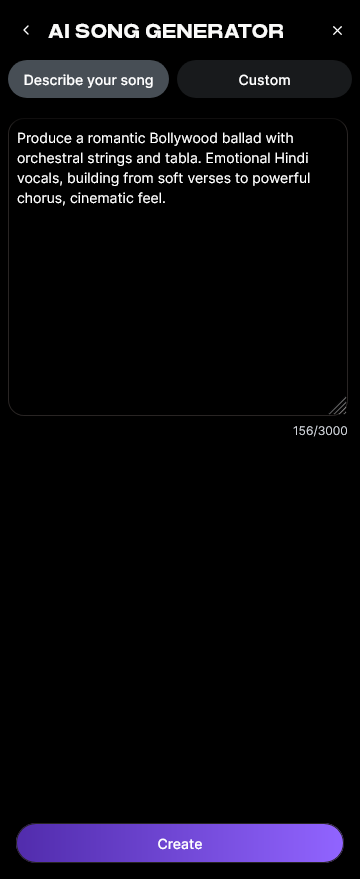
Paste or type your lyrics into the input box. In Custom mode, the generator interprets themes, emotions, and structure from your text. You can also use the integrated AI Lyrics Writer for earlier drafts or inspiration. For a similar workflow, check the AI Song Lyric Generator on Canva or see How to Generate Song Lyrics in MusicCreator AI.
Step 3: Style Selection

Choose your music genre or style—Pop, EDM, Rock, or others—from the Quick Style Selection interface. This defines tempo and instrumentation automatically.
Step 4: Configuration

Adjust generation parameters such as vocal tone, mood, and arrangement intensity. You can upload a reference audio file (music, singing, or both) for stylistic influence. Soundverse supports over ten languages, enabling multilingual song creation.
Step 5: Generation

Click “Generate.” The platform begins processing your input asynchronously—handling melody creation, arrangement building, and AI mixing in separate stages.
Step 6: Generation Complete

When the process finishes, Soundverse displays the completed composition including vocals and instrumentals. You can preview, refine, or regenerate segments if desired. For more advanced production, see Udio’s guide on how to make a full song or test LyricLab's workflow to turn lyrics into songs.
Step 7: Export Results

Download your final song as audio files in multiple formats for easy sharing or further mixing. Users often export demos for YouTube content, social media posts, or performance prototyping.
This workflow delivers professional-quality compositions without needing complex studio setups, making it perfect for beginners and creators seeking fast results. Additional AI tools like the AI Singing Generator allow solo artists to design custom vocal tracks, including realistic singing or creative experimental effects.
For further exploration, see articles such as generate AI music with Soundverse text-to-music or Soundverse introduces stem separation AI magic tool to enhance arrangement flexibility and production capability.
Turn Your Lyrics into a Full Song Today!
Stop letting lyrics sit idle—bring your words to life with Soundverse’s AI-powered music creation tools. Instantly generate melodies, arrangements, and vocals that match your vision.
- Generate AI Music with Soundverse Text-to-Music — Discover how Soundverse’s text-to-music feature instantly transforms your written words into professional-sounding songs.
- Soundverse Assistant: Your AI Music Co-Producer — Learn how the Soundverse Assistant helps streamline your creative process from lyrics to full musical productions.
- 100 Text-to-Music Prompts That Will Help You Create Viral Music — Get inspired with creative prompt ideas that turn simple text into hit-worthy musical compositions.
- How to Make Good Rap Lyrics — Master the art of crafting engaging, rhythmic lyrics that resonate deeply with listeners.
Here's how to make AI Music with Soundverse
Video Guide

Here’s another long walkthrough of how to use Soundverse AI.
Text Guide
- To know more about AI Magic Tools, check here.
- To know more about Soundverse Assistant, check here.
- To know more about Arrangement Studio, check here.
Soundverse is an AI Assistant that allows content creators and music makers to create original content in a flash using Generative AI.
With the help of Soundverse Assistant and AI Magic Tools, our users get an unfair advantage over other creators to create audio and music content quickly, easily and cheaply.
Soundverse Assistant is your ultimate music companion. You simply speak to the assistant to get your stuff done. The more you speak to it, the more it starts understanding you and your goals.
AI Magic Tools help convert your creative dreams into tangible music and audio. Use AI Magic Tools such as text to music, stem separation, or lyrics generation to realise your content dreams faster.
Soundverse is here to take music production to the next level. We're not just a digital audio workstation (DAW) competing with Ableton or Logic, we're building a completely new paradigm of easy and conversational content creation.
TikTok: https://www.tiktok.com/@soundverse.ai
Twitter: https://twitter.com/soundverse_ai
Instagram: https://www.instagram.com/soundverse.ai
LinkedIn: https://www.linkedin.com/company/soundverseai
Youtube: https://www.youtube.com/@SoundverseAI
Facebook: https://www.facebook.com/profile.php?id=100095674445607
Join Soundverse for Free and make Viral AI Music

We are constantly building more product experiences. Keep checking our Blog to stay updated about them!