How to Create a DJ Intro Song Using AI in 2026
Learn how to create a custom DJ intro song using AI tools like Soundverse’s AI Music Generator.
How to Create a DJ Intro Song Using AI
Creating a DJ intro song in 2026 is easier, faster, and more creative than ever, thanks to the power of artificial intelligence. Whether you’re a club DJ, event performer, or online music producer, setting the right energy from the moment your set begins is essential. This is where AI DJ intro creation comes into play — using smart tools to generate professional-grade hype music ai that matches your style perfectly.
Why Are DJs Turning to AI for Custom Intro Songs in 2026?
The global rise of AI music production is reshaping how DJs and creators start their sets. In the past, producers had to hire sound engineers or spend hours designing custom loops and drops. By 2026, tools like AI beat makers and DJ intro generators allow DJs to craft professional intros in minutes instead of days. For artists who want unshakable branding and unforgettable openings, AI-generated intros deliver both consistency and flexibility.
AI DJ intro creation merges creativity with technology, letting DJs achieve radio-quality production without expensive studio sessions. It’s also ideal for those integrating AI-driven hype music ai segments into their live performances, Twitch streams, or social content.
How to Make a DJ Intro Song with Soundverse AI Music Generator
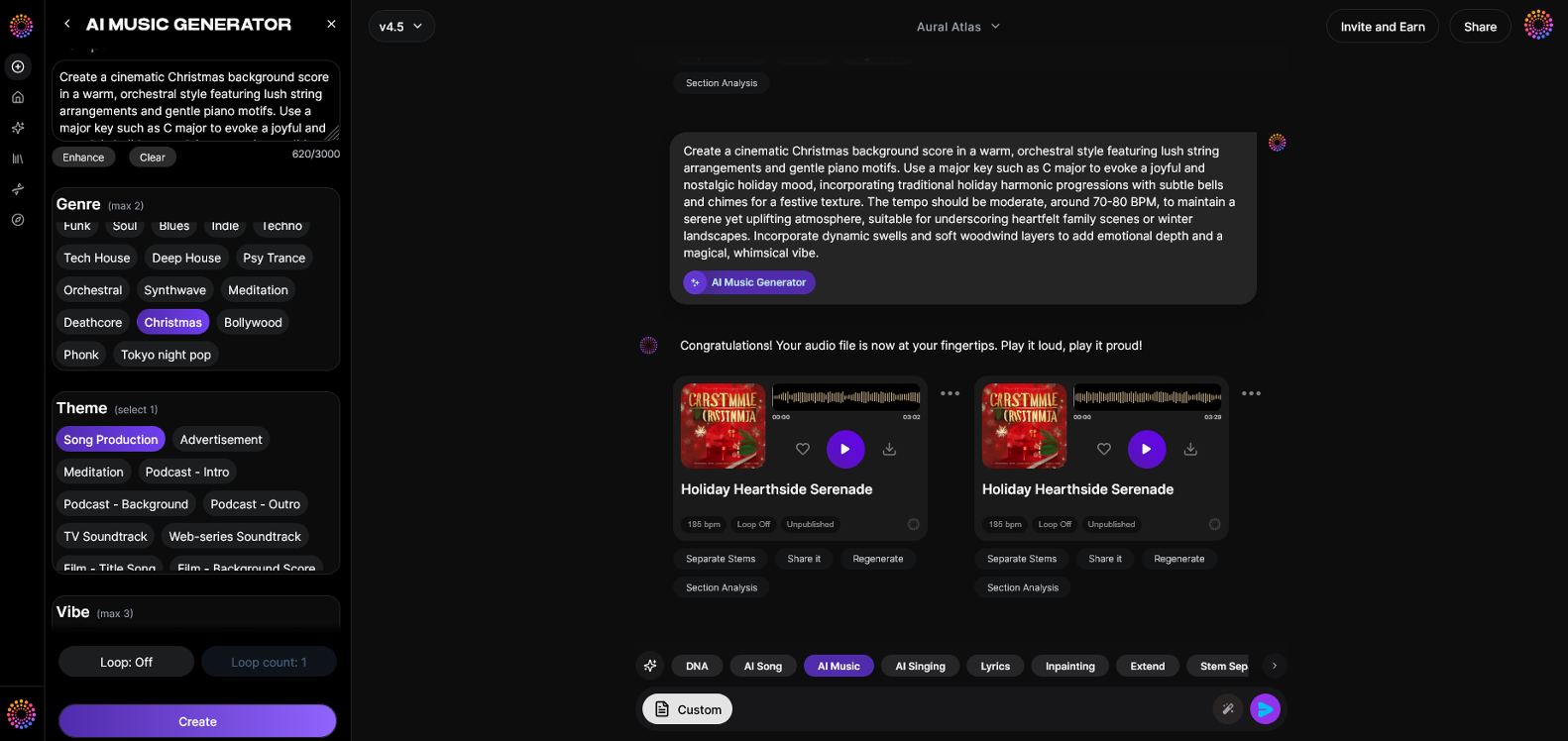
Soundverse stands at the forefront of AI music production, providing an efficient, text-driven solution that lets you design custom intro music based on emotion, energy, and genre.
The AI Music Generator by Soundverse enables creators to transform text descriptions into fully produced, instrumental soundscapes. The tool is ideal for DJs who want to craft unique intro or build-up sections that reflect their musical identity.
Key Features:
- Text-to-Music Creation: Describe your ideal intro — such as “epic EDM drop with rising tension and heavy kick” — and the AI instantly generates a high-quality instrumental based on your prompt.
- Loop Mode: Perfect for DJs who want seamless transitions or looping builds within their intro.
- Genre and Mood Control: Select from a wide range of genres like EDM, hip-hop, house, or techno, and fine-tune the emotional energy.
- Model Versions (V4 & V5): Choose between versions to emphasize richer sound design or rhythm complexity.
- Flexible Outputs: Create intros, background instrumentals, or full-length hype tracks.
By combining this with tools like Extend Music (to make your intro longer) and Section Analysis (to break down sections for remixing), Soundverse offers a complete workflow for modern DJs.
Step 1: Access AI Music Generator from the Main Menu
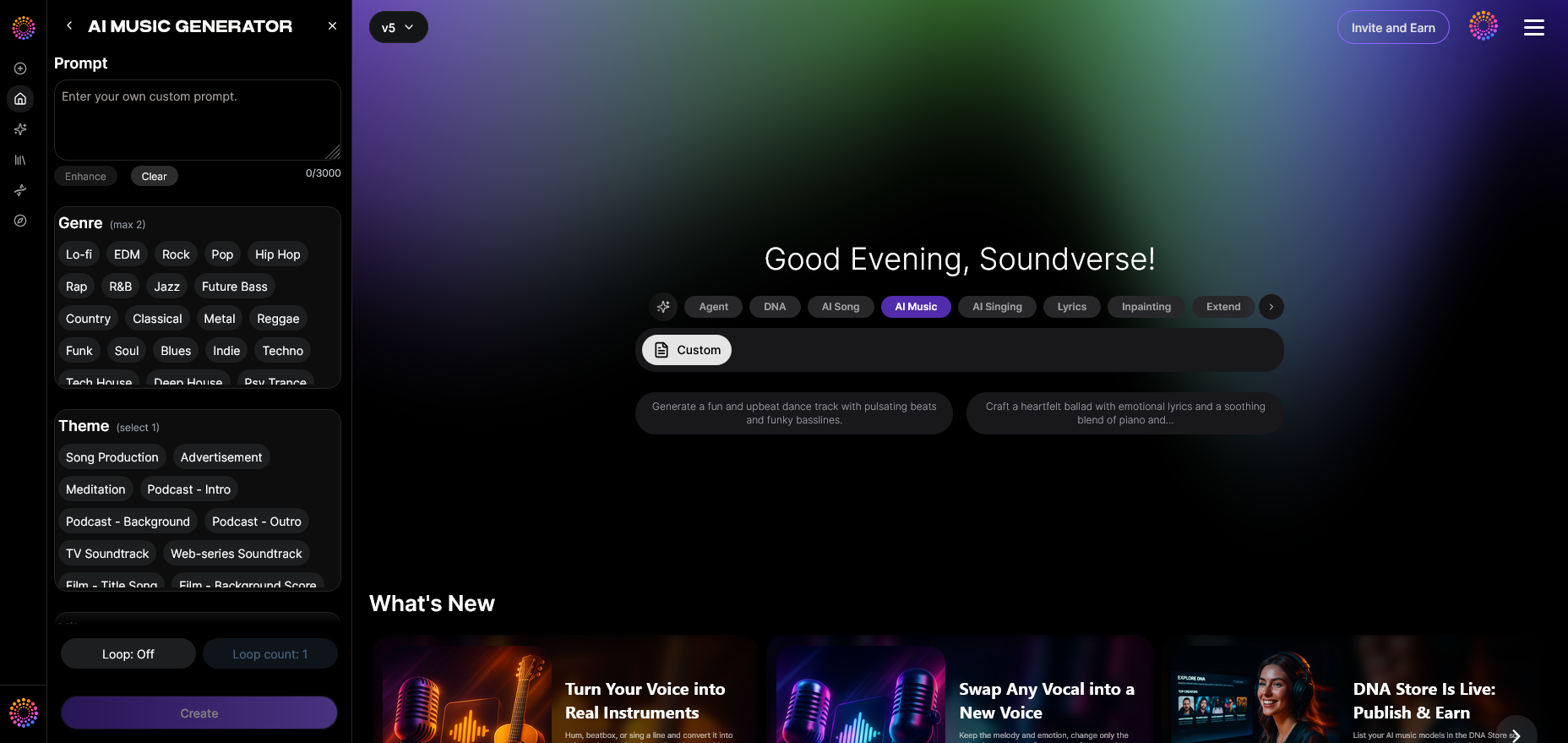
Once inside Soundverse, navigate to the AI Music Generator from the main menu. This is your creative hub for all instrumental generation. You don’t need advanced production software; everything happens in the browser. The simplicity of this interface empowers DJs at every technical level.
Step 2: Enter a Text Description of Your Desired Music
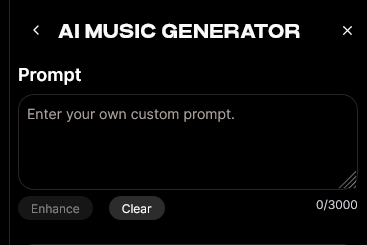
Start by typing a detailed prompt that captures the tone and vibe you want. For a DJ intro, describe the atmosphere — for example:
- “High-energy trap build-up with sirens and powerful bass riser.”
- “Futuristic techno intro with layered synths and slow tempo buildup.”
- “Epic cinematic EDM intro with rising tension and heavy percussion.”
Your text prompt becomes the creative DNA of your track, translating your concept directly into sound.
Step 3: Select Music Style and Duration
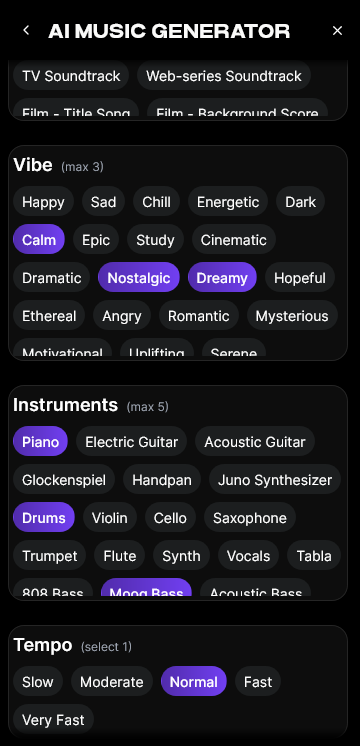
Here’s where control matters. Choose the tempo, genre, and mood that fit your set. The AI supports various musical moods, so whether it’s dark and intense or bright and energetic, it will adapt accordingly. Set the duration — typically 20–60 seconds for DJ intros — and decide whether to loop.
Step 4: Generate Instrumental Music Based on Description
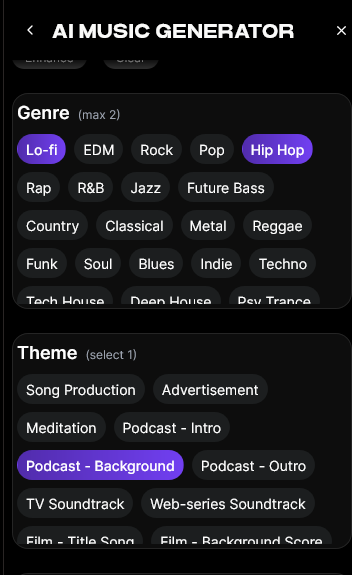
After refining your settings, click Generate. The AI processes your request and produces an instrumental that mirrors your described sound vision. Generation takes a short time — ideal for creative iteration when experimenting with different vibes.
Step 5: Download and Export Your Intro Track
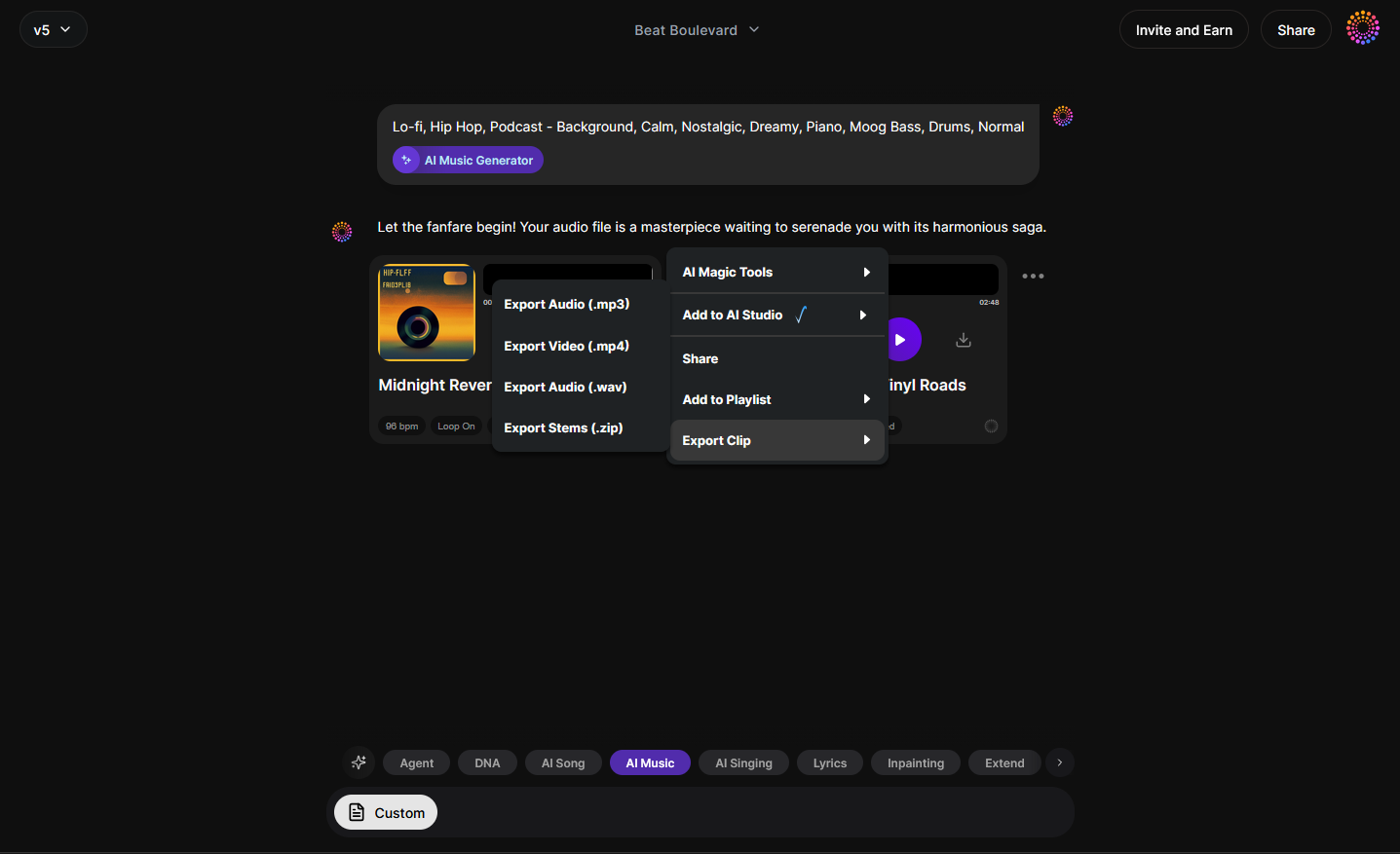
Once your track is ready, download it in your preferred format. You can integrate it into your DAW (Digital Audio Workstation), use it in your live set, or extend it further using Extend Music. If you plan to remix parts, tools like Section Analysis will automatically pinpoint valuable segments.
What Makes Soundverse Perfect for AI DJ Intro Creation?
Soundverse isn’t just a random beat generator — it’s built to empower musicians. DJs benefit from its precise control over genre and energy while still leaving room for experimentation. Whether you want your intro to match trends in AI-generated music or classic festival vibes, Soundverse’s system ensures professional-level production every time.
- Consistency Across Sets: Maintain signature sound branding across shows.
- Speed: Go from idea to playable intro in under five minutes.
- Variety: Create multiple intros for different themes or moods without hiring producers.
- Integration: Every generated track can blend seamlessly into your live or recorded performances.
By combining this with inspiration from tools like AI beat makers or innovative filters like genre and vibe selection (learn more), DJs can unlock endless creativity for their performances. For a deeper dive, watch our guide on creating Deep House music or explore how to make music with Soundverse.
Pro Tips for Crafting Powerful AI DJ Intros in 2026
- Focus on Emotion: Audiences respond best when intros build suspense and release energy. Use prompts describing intensity and texture, e.g., “gradual buildup,” “bass tension,” “cinematic sweep.”
- Leverage Loop Mode: For live mixing, set your intro to seamlessly loop until you’re ready for the drop.
- Match Energy Levels: Align your AI-produced intro with the BPM and vibe of your first track to ensure smooth transitions.
- Personalize the Sound: Use the Similar Music Generator to design intros that match your signature style but remain fully original.
- Use Extensions: If your intro feels short, use Extend Music to expand it without losing cohesion.
The Future of AI-Driven DJ Performance
The integration of AI into DJ culture marks a major creative shift. By 2026, it’s become an industry standard to use AI for everything from beat matching to track enhancement. The AI DJ intro creation process allows DJs to focus on performance and audience engagement instead of repetitive sound design. As AI tools grow capable of understanding mood, crowd energy, and context, expect even more intelligent automation that enhances rather than replaces human creativity.
Start Crafting Your AI DJ Intro Today
Bring your sets to life with one-of-a-kind AI-generated intros and transitions. Soundverse empowers you to create, customize, and perfect your signature sound in minutes.
Create with Soundverse
Related Articles
- How to Create EDM with Soundverse AI: Discover how Soundverse’s AI can help you shape high-energy EDM tracks tailored to your unique style.
- Generate AI Music with Soundverse Text-to-Music: Learn how to turn text prompts into professional-grade music tracks using Soundverse’s text-to-music generator.
- Soundverse Assistant: Your AI Music Co-Producer: Meet your AI co-producer that helps you arrange, refine, and finalize tracks seamlessly.
- How an AI Music Generator Inspires Creative Fusion: Explore how AI tools merge technology and creativity, reshaping the future of music composition.
Here's how to make AI Music with Soundverse
Video Guide

Here’s another long walkthrough of how to use Soundverse AI.
Text Guide
- To know more about AI Magic Tools, check here.
- To know more about Soundverse Assistant, check here.
- To know more about Arrangement Studio, check here.
Soundverse is an AI Assistant that allows content creators and music makers to create original content in a flash using Generative AI.
With the help of Soundverse Assistant and AI Magic Tools, our users get an unfair advantage over other creators to create audio and music content quickly, easily and cheaply.
Soundverse Assistant is your ultimate music companion. You simply speak to the assistant to get your stuff done. The more you speak to it, the more it starts understanding you and your goals.
AI Magic Tools help convert your creative dreams into tangible music and audio. Use AI Magic Tools such as text to music, stem separation, or lyrics generation to realise your content dreams faster.
Soundverse is here to take music production to the next level. We're not just a digital audio workstation (DAW) competing with Ableton or Logic, we're building a completely new paradigm of easy and conversational content creation.
TikTok: https://www.tiktok.com/@soundverse.ai
Twitter: https://twitter.com/soundverse_ai
Instagram: https://www.instagram.com/soundverse.ai
LinkedIn: https://www.linkedin.com/company/soundverseai
Youtube: https://www.youtube.com/@SoundverseAI
Facebook: https://www.facebook.com/profile.php?id=100095674445607
Join Soundverse for Free and make Viral AI Music

We are constantly building more product experiences. Keep checking our Blog to stay updated about them!