How to Convert a Song into a Lofi Track (2026 Guide)
Learn how to convert a song to lofi with expert tips on lofi music production, mixing, and sound design.
How to Convert a Song into a Lofi Track
Lofi music has transformed from a niche aesthetic into a global creative movement for musicians and producers. Its warm textures, nostalgic tones, and downtempo rhythms make it perfect for study playlists, background videos, and creative content. In 2026, converting an existing song into a lofi track is easier than ever, thanks to accessible tools and AI-based music generators. This comprehensive guide will teach you how to convert song to lofi, explore the fundamentals of lofi music production, and show you how to do it instantly with Soundverse.
What makes a song sound 'lofi' in 2026?
Lofi music—short for 'low fidelity'—embraces imperfections. Instead of chasing pristine studio-quality audio, it highlights vinyl crackle, tape hiss, subtle distortion, and vintage filtering. The goal is to create an intimate, nostalgic mood reminiscent of analog recordings. In 2026, producers mix this nostalgic vibe with digital precision for ultra-smooth listening experiences across streaming platforms and creative projects.

Key lofi elements include:
- Soft drum loops: mellow kick-snare patterns with relaxed swing.
- Warm saturation: tape-style compression and analog distortion.
- Ambient textures: vinyl crackle, environmental sounds, and field recordings.
- Simple melodies: piano, guitar, or Rhodes riffs with emotional depth.
- Chill tempo: usually between 60–90 BPM.
Understanding these sonic traits helps you decide how to reinterpret a song into a lofi version.
Why should you convert a song to lofi style?
Converting existing songs into lofi versions serves multiple creative and functional goals:
- Content creators: need background music free of peak frequencies and distractions.
- Streaming artists: use lofi remixes to expand catalog diversity.
- Audio engineers: experiment with texture and analog mixing practices.
- Filmmakers and podcasters: pair lofi soundscapes with visual storytelling.

In 2026, this stylistic shift is not just trend-driven—it's a recognized method for reimagining music appealingly across creative disciplines.
How do you prepare a song before converting it to lofi?
Before applying lofi transformations, you must isolate the song components. Ideally, you should separate vocals, drums, bass, and other stems for flexible editing. Tools like Soundverse’s Stem Separator allow you to extract individual stems from any mixed track, enabling targeted adjustments without affecting the full mix.
Preparation tips:
- Identify the core melody and chords you want to preserve.
- Reduce excessive brightness from cymbals or guitars.
- Cut unnecessary effects like reverb tails or high-frequency synths.
- Decide the emotional tone: moody, dreamy, or calm.
These steps set a solid foundation for generating a cohesive lofi transformation.
Step 1: Feature Overview — Access Similar Music Generator
Start your process by opening the Soundverse platform and selecting the Similar Music Generator tool. This AI feature produces unique instrumental compositions inspired by reference tracks. It excels in instrumental style transfer, meaning it learns details like tempo, key, and mood from your input audio to generate new music with a similar vibe.
If you are new to Soundverse, check guides such as How AI-generated music is transforming the music industry and Generate AI music with Soundverse Text-to-Music to understand how the broader creation ecosystem works.
For a visual demonstration, you can also watch the Soundverse Tutorial Series - 9. How to Make Music and learn workflow basics step-by-step.
Step 2: Reference Selection — Upload reference music track
Upload the song you want to convert into lofi style. The Similar Music Generator analyzes key musical attributes, including tempo, scale, and overall mood. This detailed analysis helps it generate an instrumental composition that reflects the essence of your original track but with lofi instrumentation and tone.
Tip: Choose reference material with strong melodic or harmonic motifs—simpler structures translate better into chill reinterpretations.
Step 3: Generation — Generate music in similar style
Once your track is uploaded, initiate the generation process. The AI creates instrumental music inspired by your reference track’s mood and vibe. It does not simply replicate but reinterprets the style through lofi filters and rhythmic patterns.
To enrich your final output, blend generated material with:
- Soft drum sampling: integrate muted snare hits or lazy jazz patterns.
- Lofi sound effects: add vinyl crackles, ambience, and low-pass filtering.
- EQ shaping: roll off highs above 7 kHz and enhance mid-lows.
For detailed insight on ambient composition workflows, see How to Create Music Evoking the Desert. It shows how mood and sound design interplay across styles.
Step 4: Download Music — Export generated instrumental
After generation completes, export your instrumental file. You can then mix or master it using your preferred DAW—like Ableton, Logic, or FL Studio. Apply compressor adjustments, stereo width controls, and reverb tails for balance. You can also use Soundverse’s Inpainting to replace any portion or regenerate sections selectively.
Once exported, try layering ambient textures or minor imperfections to give it that signature cozy vibe. Boost subtle analog saturation and reduce transient sharpness for smoother playback experiences.
For a deeper visual walkthrough, check the Soundverse Tutorial Series - 10. Make Deep House Music, which demonstrates AI generation output handling.
What are expert lofi mixing tips for producers in 2026?
Mixing lofi is about restraint and emotion, not precision. If you want professional results while maintaining imperfection:
- Use tape emulation: plugins emulating reel-to-reel tape add warmth and gentle distortion.
- Add field recordings: sprinkle environmental sounds (rain, streets, or cafés) for narrative depth.
- Apply low-pass filters: tone down digital clarity for analog softness.
- Balance volume gently: avoid aggressive compression; opt for gentle leveling.
- Experiment with delay and reverb: emphasize spatial depth and nostalgia.
These techniques combine old-school charm with modern tech, perfect for today’s streaming standards.
How to make lofi songs efficiently in 2026
Producers in 2026 increasingly depend on AI-assisted workflows. AI tools can accelerate creative construction, freeing time for artistic refinement. Platforms like Soundverse unify this philosophy by offering distinct modules—Stem Separator, Extend Music, and Inpainting—each addressing different phases of the production cycle.
Soundverse has become a keystone in digital lofi creation, often referenced in AI Music Generator and Human Composers: A Future Together. Its architecture supports genre blending, adaptive compositions, and faster turnaround for creators worldwide.
How to make lofi tracks with Soundverse Similar Music Generator
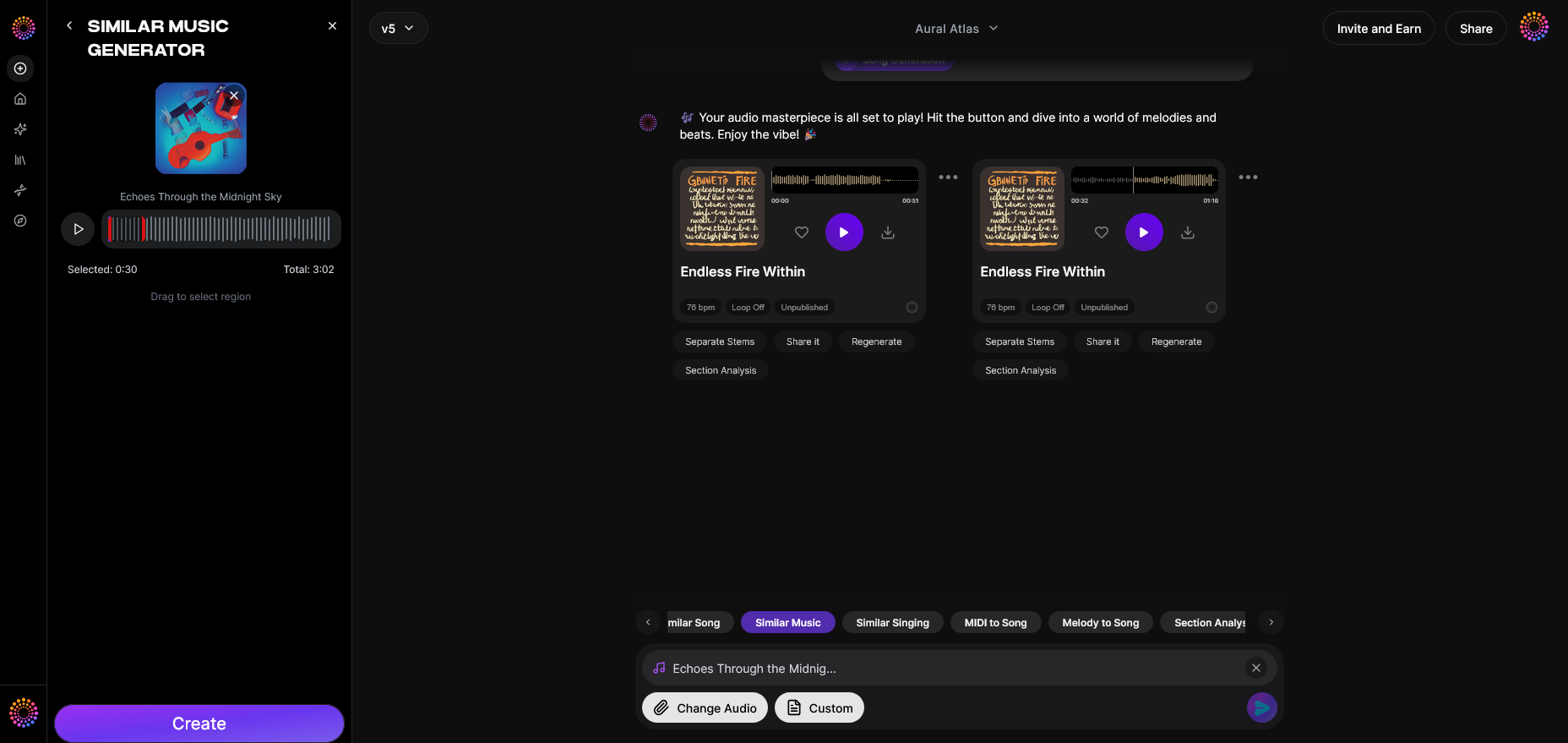
Now that you understand the fundamentals of converting songs into lofi style, here’s how you can create it instantly using Soundverse Similar Music Generator.
Soundverse’s Similar Music Generator produces original instrumental compositions inspired by any reference track. It performs a detailed musical analysis—examining tempo, key, and mood—to generate music loops that closely match your desired energy. Its instrumental style transfer is perfect for lofi music production, allowing creators to craft relaxed, jazzy, or ambient versions of existing compositions effortlessly.
Workflow Summary:
- Access the Similar Music Generator tool within Soundverse.
- Upload your selected reference song.
- Let the system analyze tempo, key, and emotional parameters.
- Generate your lofi-like instrumental in seconds.
- Download and integrate additional lofi sound effects for personal flair.
Soundverse’s ecosystem—including Stem Separator, Inpainting, and Extend Music—enables advanced refinements like extending loops, correcting sections, or isolating certain stems for customized mixing. Each function works asynchronously: you upload, the AI processes, and you receive the polished output.
For those pursuing long-term creative scalability, explore Soundverse Assistant: Your AI Music Co-Producer which outlines collaborative workflows built directly around AI-augmented creativity.
Transform Your Music with Soundverse AI
Convert any song into mesmerizing lofi tracks or explore countless genres using intuitive AI tools. Create unique, copyright-free music in minutes and bring your creative vision to life effortlessly.
Start Creating with Soundverse
Related Articles
- 40 Hand-Picked Lofi Text-to-Music Prompts for All Occasions — Discover a curated collection of lofi music prompts to inspire your next creative project and perfect your chill vibe.
- Soundverse Introduces Stem Separation AI Magic Tool — Learn how Soundverse’s advanced AI tool lets you isolate vocals and instruments from any track for seamless remixing.
- Generate AI Music with Soundverse Text-to-Music — Explore how Soundverse transforms text prompts into full-fledged music tracks with customizable genres and moods.
- What Are Song Stems and Why Do You Need Them — Understand the importance of song stems in music production and how they empower your remixing and editing process.
Here's how to make AI Music with Soundverse
Video Guide

Here’s another long walkthrough of how to use Soundverse AI.
Text Guide
- To know more about AI Magic Tools, check here.
- To know more about Soundverse Assistant, check here.
- To know more about Arrangement Studio, check here.
Soundverse is an AI Assistant that allows content creators and music makers to create original content in a flash using Generative AI. With the help of Soundverse Assistant and AI Magic Tools, our users get an unfair advantage over other creators to create audio and music content quickly, easily and cheaply. Soundverse Assistant is your ultimate music companion. You simply speak to the assistant to get your stuff done. The more you speak to it, the more it starts understanding you and your goals. AI Magic Tools help convert your creative dreams into tangible music and audio. Use AI Magic Tools such as text to music, stem separation, or lyrics generation to realise your content dreams faster. Soundverse is here to take music production to the next level. We're not just a digital audio workstation (DAW) competing with Ableton or Logic, we're building a completely new paradigm of easy and conversational content creation.
TikTok: https://www.tiktok.com/@soundverse.ai
Twitter: https://twitter.com/soundverse_ai
Instagram: https://www.instagram.com/soundverse.ai
LinkedIn: https://www.linkedin.com/company/soundverseai
Youtube: https://www.youtube.com/@SoundverseAI
Facebook: https://www.facebook.com/profile.php?id=100095674445607
Join Soundverse for Free and make Viral AI Music

We are constantly building more product experiences. Keep checking our Blog to stay updated about them!