How to Get Started With a Reliable AI Lyrics Writer and Singing Generator for Your New Demo Track
Get started with a reliable AI lyrics writer and singing generator: draft your lyrics, hear them sung and build a new demo track before you book a singer.
A reliable AI lyrics writer and singing generator for a new demo track should do two jobs well: give you a draft you can rewrite, then sing your edited words exactly as written. In Soundverse, AI Lyrics Writer drafts lyrics without using tokens, and AI Singing Generator or AI Song Generator sings them back.
Here's the setup from blank page to a demo you can send to a singer, a co-writer or your producer: what to look for, the exact steps, and how to judge the takes.
What makes an AI lyrics writer and singing generator reliable
For a demo, "reliable" comes down to four things.
- It sings your words as written. If the model rewrites your lines, you can't judge your song. AI Song Generator's Custom mode and Melody to Song Generator both sing your lyrics word for word.
- It writes one section at a time. Most demos are missing one part, often the chorus or a bridge. AI Lyrics Writer can write just the Intro, Verse, Chorus, Bridge or Outro.
- Its limits are stated. AI Singing Generator sings about the first 350 characters of your lyrics per take, roughly a verse and a chorus. Knowing that up front tells you which lines to lead with.
- The voice rules are clear. A voice reference has to be your own voice or one you have permission to use, and Soundverse won't start training a voice clone until you confirm consent.
Step 1: Draft the lyrics, then make them yours
- Open AI Lyrics Writer from AI Tools and fill in "What should the song be about?" The box takes up to 3,000 characters, so be specific about who is speaking, where they are and one concrete detail. "Driving home at 2 a.m. after the last shift, radio off, rehearsing what I'll say to her" gets you sharper lines than "a sad love song".
- Optionally pick one Mood, such as Romantic or Motivational, one Section, and one of 64 genres.
- Click Generate in Chat. The lyrics arrive as text you can copy.
- Ask for changes in a follow-up message: shorter verse lines, a hook that repeats, a different rhyme sound.
- Rewrite. Keep the lines that sound like you and replace the rest.
Drafting from the AI Lyrics Writer panel uses no tokens on any plan, including Free, so try three or four themes before you commit to one.
Step 5 matters beyond taste. In its January 29, 2025 report on AI and copyright, the U.S. Copyright Office concluded that "the outputs of generative AI can be protected by copyright only where a human author has determined sufficient expressive elements." Your edits are where your authorship shows, so make real ones.
Before you move on, mark the structure with section tags such as [Verse], [Chorus] and [Bridge]. AI Song Generator's Lyrics box reads them, and they keep your demo in the order you wrote it.
Step 2: Pick how you want to hear it sung
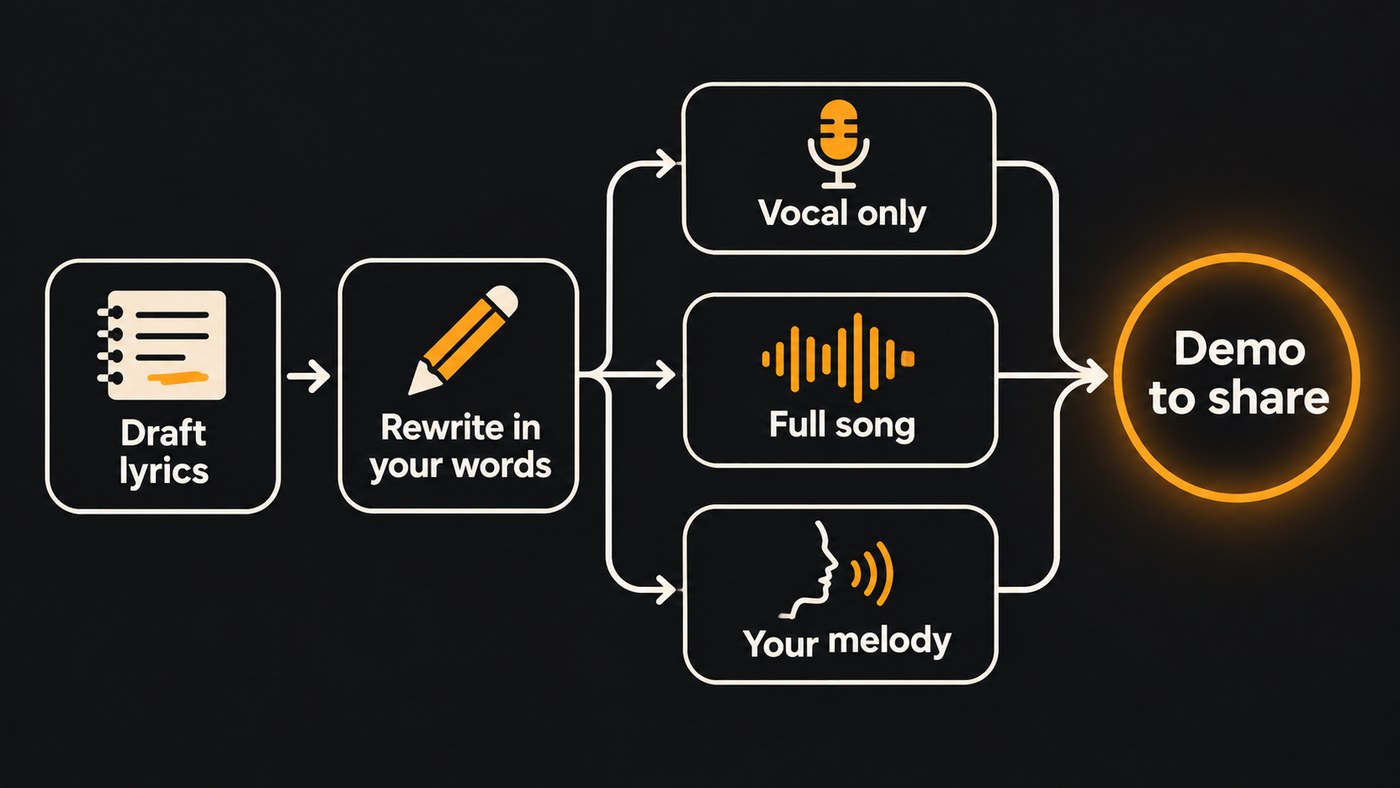
Choose by what your demo needs.
- A vocal on its own. AI Singing Generator sings your lyrics a cappella, with no music behind it. Pick a Vocal style such as Pop (Female), Pop (Male), Rap, Rock, Metal or Choir, or add a voice reference of at least 30 seconds so it sings in a similar voice. Use this when you already have a beat or a guitar part.
- A full song with your words. In AI Song Generator, switch Mode to Custom, paste the lyrics, and set a Style of Music plus up to five Quick Style tags. It sings your lyrics word for word over a full arrangement and adds a title and cover art.
- Your own melody. If you've already hummed the tune into your phone, Melody to Song Generator takes 5 to 60 seconds of humming, singing or playing, plus your lyrics, and builds a song that follows your melody.
- A vocal for an instrumental you made. AI Stem Generator can add a Vocals stem to a track you already have. Add lyrics, pick a vocal gender, and you get a sung part generated to fit.
- Your own voice. Train Voice Clone, on the Creator plan and above, turns one recording with at least 15 seconds of singing into a voice AI Song Generator can sing in.
On voices, follow the platforms' rules from day one. Spotify's policy, announced September 25, 2025, is direct: "Vocal impersonation is only allowed in music on Spotify when the impersonated artist has authorized the usage." Use your own voice, or a singer who has said yes.
Step 3: Generate takes and judge them like a producer
Every take comes out differently, so plan on several.
- Lead with your strongest lines. AI Singing Generator sings about the first 350 characters per take. If the chorus is the point of the song, put it first.
- Run the hook in two voices. Generate the same lyrics with Pop (Female) and then Pop (Male), and keep the one that suits the song.
- Try the lyric in three styles. Keep the lyrics in Custom mode and change only Style of Music, for example acoustic folk, synthwave and gospel. You'll hear quickly which genre the words want.
- Listen for lyric problems first. Crowded syllables, a stressed word landing on a weak beat, a chorus that never resolves. Fix the line, then generate again.
- Pick the model for the job. The Free plan sings on Soundverse v6. Soundverse v9, the newest version, is on Pro and Max, where AI Song Generator and Agent One start on it by default.
This demo shows AI Singing Generator turning lyrics into an a cappella vocal with no instrumental, guided by a vocal reference.
Step 4: Finish the demo
- Line it up in AI Studio. Generate in Studio puts the vocal on your AI Studio timeline at the playhead, without moving the clips already there. Pair it with an instrumental from AI Music Generator and stretch the clip to fit.
- Add your own parts. Open a song from AI Song Generator in AI Studio to record harmonies or ad-libs over it, then mix and export.
- Split it when you need to. Stem Separator, which you can start from the song's download menu, splits a song into vocals and music.
- Fix one section, keep the rest. Inpainting, on the Creator plan and above, rewrites one section of a song while leaving the rest as it is.
- Send a guide. Download the vocal and send it to your session singer, so they hear one way the lyrics can sit before the session.
For a longer walkthrough of the session itself, see our step-by-step guide to an AI vocal demo with lyrics.
Other reliable options
A few other tools do parts of this job well:
- Suno. Its Custom mode has a field for your own lyrics, and its help center says you keep ownership and rights to original lyrics you enter. A good fit if you mainly want full songs from your own words.
- ACE Studio. ACE Studio generates singing from MIDI and lyrics, so you write the melody note by note. A good fit for producers who want control over every note of the vocal line.
To compare lyric tools first, see which AI music generators allow the most control over lyric generation. For more ways to hear your words sung, read how to get AI to sing your lyrics.
Where Soundverse fits
Soundverse is an AI music platform that takes you from idea to audience, built for independent artists who release music. For a demo, the pieces sit in one place: AI Lyrics Writer for the first draft, AI Singing Generator for an a cappella in a set style or a voice like your reference, and AI Song Generator when you want your words sung over a full arrangement. Each result lands in your chat or on an AI Studio timeline, where you keep editing.
Where it's less suited: if you want to shape the vibrato on one held note, a note-based vocal tool gives you finer control. A sensible split is AI vocals for the demo, and your own voice or a session singer for the final take.
Licensing is set by plan: the Free plan is for personal use, and the Creator plan comes with a royalty-free license.
FAQ
Is the AI Lyrics Writer free? Yes. AI Lyrics Writer works on every plan, including Free, and drafting from its panel uses no tokens. Turning the lyrics into audio with AI Singing Generator or AI Song Generator does use tokens from your plan.
How much of my lyrics will the singing generator sing? AI Singing Generator sings about the first 350 characters per take, roughly a verse and a chorus, even though its Lyrics box takes up to 3,000 characters (400 on Free). For a full-length demo with every section, use AI Song Generator in Custom mode.
Can the demo be sung in my own voice? Yes, in two ways. Add a clean recording of your singing, at least 30 seconds long, as the voice reference in AI Singing Generator. Or train a reusable voice with Train Voice Clone on Creator and above, which needs 15 seconds or more of singing and your confirmation that the voice is yours.
What's the difference between an AI singing generator and an AI song generator? A singing generator gives you the vocal alone, to place over your own music. A song generator gives you a finished track with vocals and instruments together. Start with the song generator if you have no music yet, and the singing generator if you do.
Sign up for Soundverse free and hear your next lyric sung tonight. More songwriting guides on the Soundverse blog.
