Create · Free to try
Make a beat from a prompt, then build it out in your browser
Describe the beat or tag it Hip Hop, 808 Bass and Drums. Get an instrumental with a title and cover art, then add drums, 808s and chops in AI Studio.
1,000 free tokens to start · No card needed · Cancel paid plans anytime
Unlock more of AI Beat Maker with Creator — from $9.99/mo, or ₹399/mo in India. Soundverse v7 and Soundverse v8, WAV and FLAC downloads in the chat for beats made with the Soundverse models, and 8 AI Studio projects with 8 tracks each and stems export. Billed $119.88 a year, or $12.49 month to month.
What you get
A beat to write over
Every beat is an instrumental with no vocals, ready for your verse, hook or topline.
Yours to rework
Open it in AI Studio to add Drum Kit One hits, a Bass One 808 or Sampler One chops, or split it into stems.
Try it on the Free plan
Free accounts make beats with Soundverse v6: your first generation is free and sharing Soundverse unlocks two more. AI Studio's instruments are free on every plan.
Who it's for
Rappers and singers
Get a beat to write and record over, and record your takes in the same AI Studio project.
Beatmakers and producers
Start from a generated beat, or program one on Drum Kit One and Bass One in the piano roll, with snap on.
Content creators and streamers
Make a beat for a video, a stream or a short, with a commercial license on paid plans.
Songwriters
Sketch the groove under a new song, then pair it with a vocal from AI Singing Generator in AI Studio.
When to use it
- You have lyrics and nothing to rap or sing them over
- You want a quick beat to try a flow or a hook on
- Your chords need drums and an 808 under them
- You need a beat in a style you don't usually make
- You want a beat's stems to finish in your own DAW
- Your video or stream needs a beat behind it
What you can make with it
A dark trap beat
Describe a dark trap beat with rolling hi-hats and a gliding 808, or pick Hip Hop, the Dark vibe, 808 Bass and Drums, and set Tempo to Fast.
A lo-fi beat to study to
Pick Lo-fi with the Chill or Study vibe and Piano, Drums and Electric Bass for a mellow beat to write or study to.
A phonk beat
Pick the Phonk genre with the Dark vibe and 808 Bass, and describe the melody you want on top in the prompt.
A beat for your verse
Choose Hip Hop or R&B, the Song Production theme and 808 Bass with Drums, then write your verse over the result.
Drums programmed by hand
Open the Beat Making layout, pick the Trap or 808 Classic kit in Drum Kit One, and draw kicks, snares and hat rolls in the piano roll.
An 808 that slides
Load an 808 preset in Bass One, such as Trap Glide 808, set the voice to MONO or LEG and raise GLIDE so the notes slide.
Chops from a sample
Load an audio file you have the rights to into Sampler One, switch to SLICE for 16 equal slices, and play them from your keyboard.
Stems for your DAW
Split a beat into 6 stems with Stem Separator, then download the drums, bass and the rest to finish it in your own DAW.
A longer beat
If a beat ends too soon, Extend Music adds 5 to 120 seconds a run, continuing the same instrumental.
The BPM and key, checked
Run Tempo & Key Detector on a beat before you write a melody or sample over it, and set your AI Studio project to that BPM.
Screenshots
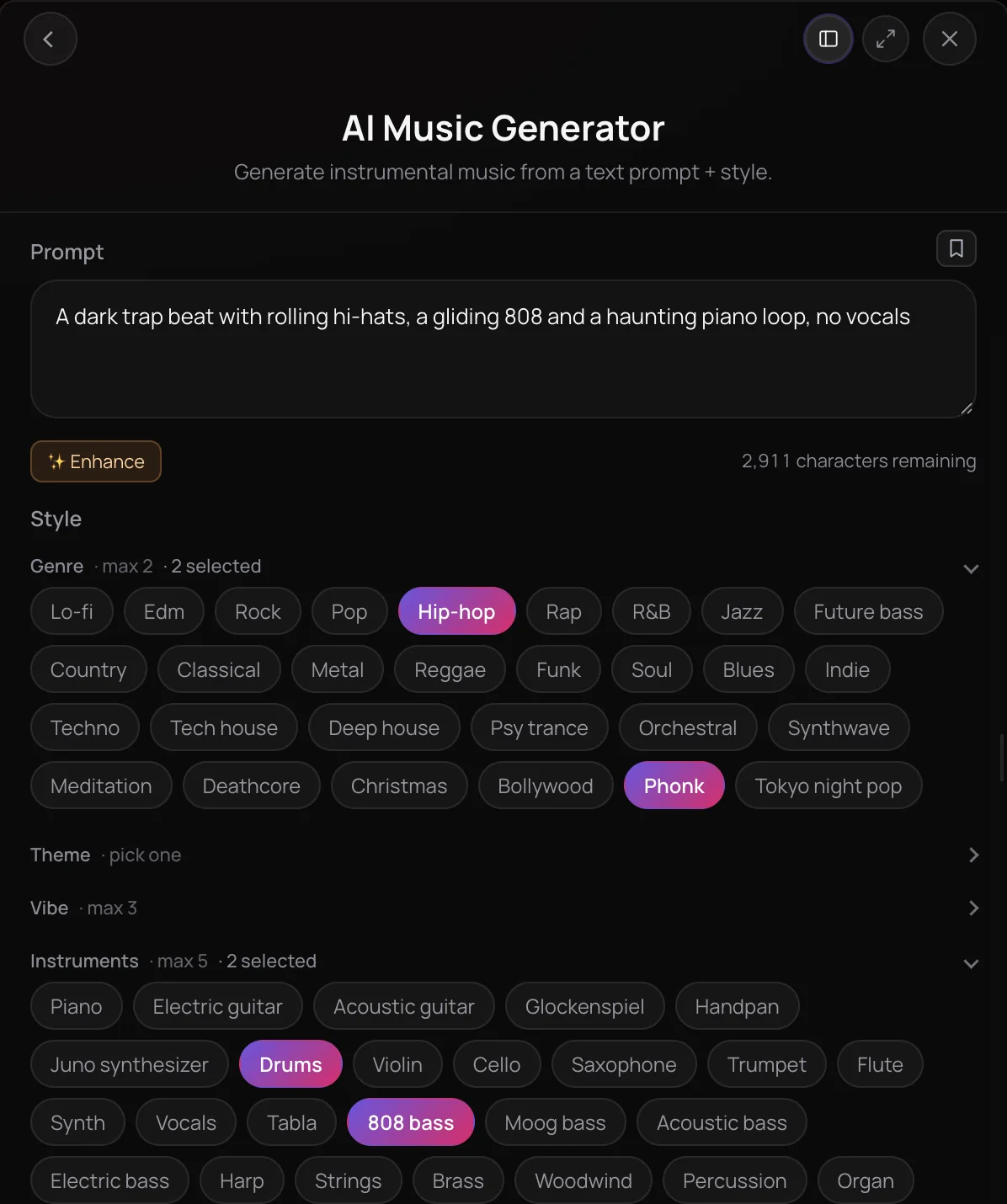
AI Beat Maker is how you make beats with AI on Soundverse: AI Music Generator turns a prompt and style tags into an instrumental with no vocals, and AI Studio's Beat Making layout opens Drum Kit One beside the piano roll, and you can add Bass One for 808s and Sampler One for chops. Program a beat or rework a generated one yourself, or ask Agent One to do either. It's for rappers, singers, producers and creators who need a beat to write over, with nothing to install.
See it in action
- Every AI Tool in Soundverse "Create": Songs, Vocals, SFX, Videos and More | Full Walkthrough From 0:17. The AI Music Generator part of Soundverse's Create walkthrough, where a beat starts: an instrumental from a prompt.
- Introducing Soundverse AI Studio: Instruments, Effects and Real-Time Collaboration in Your Browser A two-minute tour of AI Studio, including its built-in instruments and effects, all running in the browser with nothing to install.
What you can do
Generate a beat
AI Music Generator makes an instrumental from your words and tags.
Describe it
Type the beat you hear in your own words, such as the style, the drums and the mood, and click Enhance to expand a short idea.
- dark trap beat with rolling hi-hats and a gliding 808
- dusty boom-bap beat with a jazzy piano loop and vinyl crackle
- lo-fi hip-hop beat to study to, mellow keys and soft drums
Tag it
Pick up to two genres such as Hip Hop, Rap, R&B, Lo-fi or Phonk, one theme such as Song Production, up to three vibes, up to five instruments such as 808 Bass, Drums and Percussion, and a Tempo from Slow to Very Fast.
Pick a model
Soundverse v6 on the Free plan, Soundverse v7 and Soundverse v8 on Creator, and Soundverse v9, the newest, on Pro.
In the chat or on the timeline
Generate in Chat delivers the beat with a title and cover art. Opened inside AI Studio, Generate in Studio puts it on your timeline.
Build it in AI Studio
Program or rework a beat on AI Studio's instruments, with no tokens on any plan.
Beat Making layout
One click in the studio menu opens Drum Kit One beside the piano roll, with snap on.
Drum Kit One
16 synthesized pads and 10 kits, including 808 Classic and Trap, with tune, decay and level on every pad.
Bass One
40 bass presets, 808s among them, with glide and drive for sliding, gritty low end.
Sampler One
Load an audio file from your computer and play it across the keys, or chop it into 16 slices.
Parts from Agent One
With Agent One's Studio switch on, ask for drums or a bassline and it writes the notes onto Drum Kit One or Bass One. Agent One requests use tokens.
- Add an 8-bar lo-fi drum beat
- Add a trap hi-hat pattern with rolls
Finish and export
Stems, length, tempo and key, and the files you take away.
6 stems
Stem Separator splits a beat into vocals, drums, bass, guitar, piano and other, on every plan.
Every part, with MIDI (Creator+)
The maximum split puts every part on its own, with a MIDI file for each.
A longer beat
Extend Music adds 5 to 120 seconds a run, continuing the same instrumental.
BPM and key
Tempo & Key Detector reads a beat's tempo and key and saves them to your Library.
Mix and master
In AI Studio, Mix One's Auto-Place seats each track where its genre template puts it, and Mastering One's ✦ Master button masters the mix, with no tokens.
Lossless files and stems export (Creator+)
Every plan downloads MP3. On paid plans, the chat adds WAV and FLAC downloads for beats made with the Soundverse models, and Creator and above export WAV, FLAC, AAC, OGG and stems from AI Studio.
How it works
Describe the beat
Open AI Music Generator and describe the beat, such as a dark trap beat with rolling hi-hats and a gliding 808. Add tags: up to two genres such as Hip Hop or Phonk, up to five instruments such as 808 Bass and Drums, and a Tempo.
Pick a model and generate
Choose a Soundverse version in the Model menu, Soundverse v6 on the Free plan, and click Generate in Chat. The beat arrives in your chat with a title and cover art, ready to play or download.
Build it out in AI Studio
Click Open in AI Studio on the beat, then pick the Beat Making layout from the studio menu to open Drum Kit One beside the piano roll. Add Bass One or Sampler One, or ask Agent One for a drum or bass part.
Finish and export
Split the beat into stems with Stem Separator, lengthen it with Extend Music or check its BPM and key with Tempo & Key Detector, then download it or export your AI Studio project.
What each plan includes
| What | Free | Creator | Pro | Max |
|---|---|---|---|---|
| Soundverse models | Soundverse v6 | Soundverse v6 to Soundverse v8 | Soundverse v6 to Soundverse v9 | Soundverse v6 to Soundverse v9 |
| Beat downloads in the chat (WAV and FLAC for beats made with the Soundverse models. Beats from the two additional engines in the Model menu download as MP3, and one of them adds a WAV only when its model delivers one.) | MP3 | MP3, WAV, FLAC | MP3, WAV, FLAC | MP3, WAV, FLAC |
| AI Studio export | MP3 | MP3, WAV, FLAC, AAC, OGG and stems | MP3, WAV, FLAC, AAC, OGG and stems | MP3, WAV, FLAC, AAC, OGG and stems |
| AI Studio projects (Max allows 30 per Max level, from ×1 to ×5.) | 3 | 8 | 20 | 30 to 150 |
| Tracks per project (Each instrument takes one track; the master bus doesn't count.) | 3 | 8 | 20 | 30 to 150 |
| Agent One modes (Agent One runs use tokens. On Free, your first Agent One generation is free and sharing Soundverse unlocks two more.) | Lite | Lite, Standard, Pro | Lite, Standard, Pro | Lite, Standard, Pro |
| License (The Pricing page lists what each plan covers.) | Personal use | Commercial license | Commercial license | Commercial license |
Why use AI Beat Maker
From words to a beat
Say what you hear in plain words, or tap tags such as Hip Hop, Dark and 808 Bass. It all runs in your browser, with no gear, plugins or installs.
Built to keep shaping
Open any beat in AI Studio to arrange it, layer Drum Kit One hits or a Bass One 808, chop a sample in Sampler One, and mix it with Mix One.
Stems when you need them
Split a beat into drums, bass and the rest with Stem Separator, or export your AI Studio project's stems on Creator and above.
Start on the Free plan
Free accounts make beats with Soundverse v6, and AI Studio's instruments use no tokens on any plan. Creator adds Soundverse v7 and Soundverse v8, and Pro adds Soundverse v9.
What it costs
Free plan: beats with Soundverse v6, and Drum Kit One, Bass One and Sampler One at no token cost. Soundverse v7 and Soundverse v8, Google Lyria 3.5 and ElevenMusic v2.5 need Creator; Soundverse v9 needs Pro. New accounts get 1,000 free tokens, enough for about 3 beats. On the Free plan it runs through Agent One, which gives free accounts 3 runs in all; sharing unlocks the 2nd and 3rd.
Drum Kit One, Bass One and Sampler One in AI Studio: included on every plan, with no tokens.
- Instrumental with Soundverse v6: 300 tokens (about $0.75–$0.94 on Creator, or ₹30–₹37 in India).
- Instrumental with Soundverse v7: 400 tokens (about $1.00–$1.25 on Creator, or ₹40–₹50 in India).
- Instrumental with Soundverse v8: 400 tokens (about $1.00–$1.25 on Creator, or ₹40–₹50 in India).
- Instrumental with Soundverse v9: 500 tokens (about $1.25–$1.56 on Pro, or ₹52–₹65 in India).
- Instrumental with Google Lyria 3.5: 500 tokens (about $1.25–$1.56 on Creator, or ₹50–₹62 in India).
- 3-minute instrumental with ElevenMusic v2.5: 720 tokens at 4 tokens a second (about $1.80–$2.25 on Creator, or ₹72–₹90 in India).
Free: Soundverse v6, MP3 downloads, and 3 AI Studio projects with 3 tracks each.
Creator: Soundverse v7 and Soundverse v8, WAV and FLAC downloads in the chat for beats made with the Soundverse models, and 8 AI Studio projects with 8 tracks each and stems export.
Pro: Soundverse v9, and 20 AI Studio projects with 20 tracks each.
Max: 30 AI Studio projects with 30 tracks each on Max ×1, rising by 30 a level to 150 on Max ×5.
Agent One runs this tool for you, and the agent's own steps are metered on top of the tool's price: about 7 tokens a step in Lite mode, 54 in Standard mode and 128 in Pro mode, the default on paid plans.
Finishing a beat, at each tool's price
- Stem Separator — 6 stems: 300 tokens (about $0.75–$0.94 on Creator, or ₹30–₹37 in India).
- Extend Music — Extend an instrumental: 200 tokens (about $0.50–$0.62 on Creator, or ₹20–₹25 in India).
- Tempo & Key Detector — Tempo and key of one track: 30 tokens (about $0.07–$0.09 on Creator, or ₹3–₹4 in India).
Stem Separator splits a beat into stems, Extend Music makes it longer and Tempo & Key Detector reads its BPM and key. Each runs through Agent One, whose own steps are metered on top: about 7 tokens a step in Lite mode, 54 in Standard mode and 128 in Pro mode, the default on paid plans. Runs a month count the tool's own price.
Creator $12.49 a month, or $9.99 a month billed yearly ($119.88 a year) · Pro $31.24 a month, or $24.99 a month billed yearly ($299.88 a year) · Max from $72 a month, or $60 a month billed yearly ($720 a year).
In India (PayU): Creator ₹499 a month, or ₹399 a month billed yearly (₹4,788 a year) · Pro ₹1,299 a month, or ₹1,039 a month billed yearly (₹12,468 a year) · Max from ₹2,999 a month, or ₹2,399 a month billed yearly (₹28,788 a year).
Prices outside India are in US dollars, billed through Stripe; in India they are in rupees, billed through PayU. Monthly tokens reset each month and don't roll over.
Good to know
No exact BPM or key
AI Music Generator's Tempo tag runs from Slow to Very Fast, and there's no key setting. Tempo & Key Detector reads what you got, and AI Studio lets you set the project's BPM for beats you program.
One mixed file
A generated beat arrives as one track. For its parts, run Stem Separator, which uses tokens, or rebuild them on AI Studio's instruments.
Instrumentals only
AI Music Generator makes beats with no vocals or lyrics. For singing, use AI Singing Generator or AI Song Generator, and line the parts up in AI Studio.
Instruments in AI Studio only
Drum Kit One, Bass One and Sampler One run inside AI Studio, not as VST or AU plugins, and Drum Kit One has no step sequencer: draw hits in the piano roll or record them.
Frequently asked questions
Is AI Beat Maker free?
Yes, you can make beats on the Free plan: signing up for Soundverse is free, and new accounts get 1,000 starter tokens. A beat from AI Music Generator uses 300 tokens on Soundverse v6, the Free plan's model, and runs through Agent One, which adds a small charge and gives Free accounts three generations in total: the first right away, and the next two when you share Soundverse. Drum Kit One, Bass One and Sampler One in AI Studio use no tokens on any plan.
How good are the beats from AI Beat Maker?
That depends on the model and on how clearly you describe the beat. Free uses Soundverse v6, Creator adds Soundverse v7 and Soundverse v8, and Pro adds Soundverse v9, the newest Soundverse model. Each run makes one take, so if a beat misses, sharpen the prompt or tags and generate again. A generated beat is one mixed track, so to change a single part, split it with Stem Separator or rebuild that part on Drum Kit One or Bass One in AI Studio.
Can I use beats from AI Beat Maker commercially?
It depends on your plan. On the Free plan, beats you make with AI Beat Maker are for personal use. Paid plans include a commercial license; the Pricing page lists what each plan covers, and the Terms of Service set out what each license allows, such as selling a beat on its own or releasing a song on streaming services, so read them before you publish. You need the rights to anything you upload or sample.
What can't AI Beat Maker do?
AI Music Generator has no exact BPM or key setting: its Tempo tag runs from Slow to Very Fast, so describe the tempo in your prompt and check the result with Tempo & Key Detector. Its beats have no vocals, and on the Soundverse models the model decides the length, though Extend Music adds up to two minutes at a time. For an exact tempo, program the beat in AI Studio, where you set the project's BPM; its instruments run only there, not as plugins in another DAW.
What is AI Beat Maker on Soundverse?
AI Beat Maker is how you make beats with AI on Soundverse, with two tools that work together. AI Music Generator makes a finished instrumental from your prompt and tags, and AI Studio's Drum Kit One, Bass One and Sampler One let you program a beat or rework one in your browser. Agent One can run either for you, in the chat or inside AI Studio.
How do I make a beat with AI?
Open AI Music Generator in Soundverse and describe the beat, such as a lo-fi hip-hop beat with dusty drums and mellow keys. Add tags like Hip Hop, 808 Bass, Drums and a Tempo, pick a model and click Generate in Chat. Or ask Agent One in the chat, for example "make me a dark trap beat": it writes a style prompt, makes the instrumental and gives it a title and cover art.
Can I get the stems of a beat?
Yes. Run Stem Separator on the beat: 6 stems give you vocals, drums, bass, guitar, piano and other on every plan, and the maximum split, with every part on its own and a MIDI file for each, needs Creator or above. Each split uses tokens. In AI Studio, Creator and above can also export a project's tracks as stems.
What formats can I download a beat in?
In the chat, every plan downloads a beat as MP3. On paid plans, beats made with the Soundverse models also download as lossless WAV and FLAC files. Beats from the two additional engines in the Model menu download as MP3, and one of them adds a WAV only when its model delivers one. In AI Studio, the Free plan exports MP3, and Creator and above export WAV, FLAC, AAC and OGG, plus stems.
Can Agent One make the beat for me?
Yes. In the chat, ask Agent One for a beat and it makes an instrumental with AI Music Generator, with a title and cover art. In AI Studio, with Agent One's Studio switch on, ask for drums or a bassline and it writes the notes onto Drum Kit One or Bass One tracks that you can edit in the piano roll. Each Agent One request uses tokens.
Ready to make a beat?
Describe it or tag it, get an instrumental with a title and cover art, then build it out in AI Studio.
