How to Use AI to Make a Song: The Complete 2026 Guide to AI Music Creation
Learn how to create songs with AI music creation tools like Soundverse’s AI Song Generator.
How to Use AI to Make a Song
Artificial intelligence (AI) has revolutionized music production and songwriting in ways that were barely imaginable a few years ago. By 2026, AI music creation has evolved into a mature creative practice — musicians, producers, and content creators of every level are now leveraging AI songwriting tools to generate melodies, lyrics, and fully mixed tracks. This article is your comprehensive guide on how to use AI to make a song, from concept to final export.
Why Use AI for Music Creation in 2026?
The modern music landscape thrives on speed and innovation. In 2026, time-to-publish and originality are key metrics for success on streaming platforms and social media. AI music creation tools allow creators to rapidly prototype ideas, overcome writer’s block, and produce polished compositions without needing a full studio setup.
AI songwriting tools can analyze your text prompts, learn from reference tracks, and generate multiple musical interpretations. Whether you’re an experienced producer or a new creator looking to experiment, these technologies empower you to create songs with AI at any level of complexity.
How to Make a Song with Soundverse AI Song Generator

Soundverse’s AI Song Generator is a full-stack AI music production suite designed for creators who want to turn lyrics or text descriptions into complete songs. It uses a multi-stage pipeline covering lyrics, melody, arrangement, and mixing to deliver a professional-quality final result.
Key Features and Capabilities
- Describe Your Song Mode: Use text prompts to describe your song idea. For example, “a chill pop song about ocean waves” instantly becomes a musical piece with AI-generated vocals and instrumental backing.
- Custom Mode: Input your own lyrics and adjust detailed settings like tempo, energy, or vocal tone.
- Reference Audio Support: Upload or link music, singing, or both to guide tonal direction.
- Quick Style Selection: Choose from predefined genres like Pop, EDM, Rock, Jazz, or Country.
- Primary Use Cases: Ideal for songwriting demos, vocal prototyping, YouTube content, personalized song gifts, and multilingual tracks (available in 10+ languages).
Soundverse integrates with related tools such as:
- AI Lyrics Writer – Generates complete structured lyrics aligned with mood and genre.
- AI Singing Generator – Produces professional-quality acapella vocals.
- AI Music Generator – Creates instrumental tracks tailored to text prompts.
These capabilities form a seamless ecosystem for AI music creation, ensuring that artists can move from idea to full production efficiently. For a deeper dive, watch our guide on how to make music and explore how creators use the platform for diverse genres.
Step 1: Access the AI Song Generator

Start by opening your Soundverse dashboard and selecting the AI Song Generator from the main menu. This tool is the central hub for full AI music production. If you are new, sign up for free and explore additional tutorials like How to Create Country Music with Soundverse AI or Generate AI Music with Soundverse Text to Music.
Step 2: Enter Your Lyrics or Description
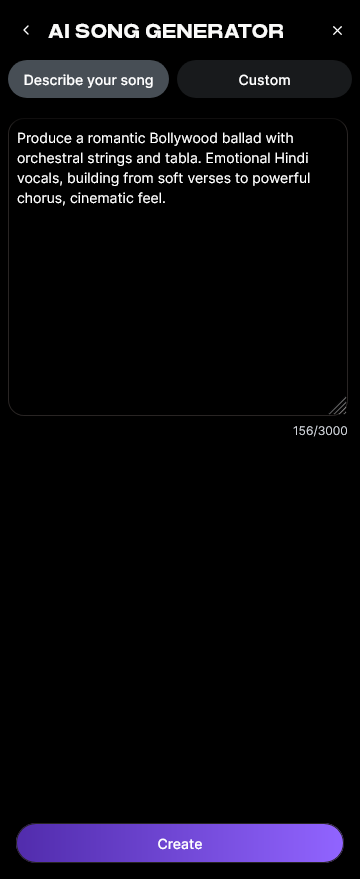
Paste your lyrics or write a short description of the song concept. The system supports both approaches. If you don’t have lyrics ready, you can use the integrated AI Lyrics Writer via the “Help Me Write” button to generate compelling verses, choruses, or bridges.
Step 3: Choose Your Music Style and Genre

Select a style that matches your creative intent — Pop, EDM, Rock, Jazz, or others. This step defines the tonal direction and instrumental arrangement. For experimental projects, try creating genre blends similar to examples found in AI Music Generator and Human Composers: A Future Together.
Step 4: Configure Advanced Settings

Adjust parameters like tempo, key, vocal character, or language. Soundverse makes it easy to tune these options for the atmosphere you want — for example, upbeat electronic tracks or mellow acoustic vibes. You can also upload reference audio for precision control. This asynchronous workflow ensures that after configuring, the AI processes your input automatically.
Step 5: Generate the Song

Click Generate to let the AI transform your inputs into a complete song. The multi-stage process synthesizes melody, arrangement, and mixing. The system analyzes lyrical flow and emotion to match a musical structure that feels cohesive and natural. For hands-on inspiration, watch Soundverse Tutorial Series - Make Deep House Music.
Step 6: Review the Completed Generation

Once processing concludes, Soundverse displays your generated results. You can play back the AI-produced track and decide whether to create alternate versions or modify the lyrics and style settings. While Soundverse doesn’t offer real-time preview, the asynchronous process ensures that every generation is high fidelity and optimized. To learn how exploration works, check out the Explore Tab tutorial.
Step 7: Export Your Song

Finally, export your track in multiple audio formats for streaming, sharing, or editing in your preferred DAW. Many artists in 2026 combine AI-generated compositions with human post-production — blending the creativity of AI with personal artistic finesse. External studies show that tools like Suno, Soundraw, and Udio have become mainstream collaborators in hybrid workflows.
Pro Tips for Effective AI Music Production
- Start Simple: Begin with a clear theme or emotional goal before adding complex prompts.
- Use Reference Audio Wisely: Upload short, stylistically aligned tracks instead of full songs for more focused results.
- Iterate Strategically: Re-generate variations to explore different vocal tones, instrumentation, or mixing levels.
- Combine Tools: Pair the AI Song Generator with the Soundverse Stem Separation AI Magic Tool to isolate elements for remixing.
- Follow Genre Trends: Stay inspired by current music industry updates through articles like Music Industry Trends.
How Soundverse Is Shaping the Future of AI Music Creation
From its multi-stage generation pipeline to seamless cross-tool integration, Soundverse embodies the evolution of AI music production. It supports creators across the creative spectrum — from viral YouTube musicians to established producers looking for rapid ideation and multilingual content output.
In 2026, AI songwriting tools no longer replace creativity — they augment it. Soundverse encourages collaboration between human emotion and computational intelligence, enabling new forms of storytelling through sound. Whether you aim to design genre-bending compositions or deliver personalized song gifts, this platform ensures high-quality results with minimal technical friction.
Start Creating Music with AI Today!
Unlock limitless creative potential by generating original tracks, lyrics, and stems with Soundverse AI. Turn your musical ideas into complete compositions in minutes using intelligent text-to-music technology.
Related Articles
- Generate AI Music with Soundverse Text-to-Music — Discover how Soundverse’s text-to-music tool can instantly transform your creative prompts into full, studio-quality tracks.
- How to Make AI-Generated Music — Learn step-by-step methods to create authentic, unique compositions using artificial intelligence and modern music technology.
- The Benefits of Composing with AI Music Generator — Explore the advantages of composing with AI and how it empowers creators to innovate, experiment, and produce faster.
- AI Music Generator and Human Composers: A Future Together — Learn how AI complements human artistry, creating a new era of collaboration between musicians and intelligent technology.
Here's how to make AI Music with Soundverse
Video Guide

Here’s another long walkthrough of how to use Soundverse AI.
Text Guide
- To know more about AI Magic Tools, check here.
- To know more about Soundverse Assistant, check here.
- To know more about Arrangement Studio, check here.
Soundverse is an AI Assistant that allows content creators and music makers to create original content in a flash using Generative AI.
With the help of Soundverse Assistant and AI Magic Tools, our users get an unfair advantage over other creators to create audio and music content quickly, easily and cheaply.
Soundverse Assistant is your ultimate music companion. You simply speak to the assistant to get your stuff done. The more you speak to it, the more it starts understanding you and your goals.
AI Magic Tools help convert your creative dreams into tangible music and audio. Use AI Magic Tools such as text to music, stem separation, or lyrics generation to realise your content dreams faster.
Soundverse is here to take music production to the next level. We're not just a digital audio workstation (DAW) competing with Ableton or Logic, we're building a completely new paradigm of easy and conversational content creation. TikTok: https://www.tiktok.com/@soundverse.ai Twitter: https://twitter.com/soundverse_ai Instagram: https://www.instagram.com/soundverse.ai LinkedIn: https://www.linkedin.com/company/soundverseai Youtube: https://www.youtube.com/@SoundverseAI Facebook: https://www.facebook.com/profile.php?id=100095674445607
Join Soundverse for Free and make Viral AI Music

We are constantly building more product experiences. Keep checking our Blog to stay updated about them!