How to Upload AI Music to Apple Music in 2026
Learn how to upload AI music to Apple Music in 2026, understand Apple’s AI policy, and distribute your songs safely with Soundverse Trace.
How to Upload AI Music to Apple Music
Uploading AI-generated music to Apple Music has evolved dramatically by 2026. As streaming platforms introduce new standards for transparency, musicians and AI creators must understand how to publish songs that meet compliance and distribution requirements. Whether you produce ambient soundscapes, full-length EDM tracks, or voice-assisted pop compositions with AI, the core question remains the same: how can you confidently upload AI music to Apple Music while protecting your rights and securing fair attribution?
Why uploading AI music to Apple Music matters in 2026

AI music has transformed from an experimental niche in 2024 into a mainstream creative force by 2026. Independent musicians and AI artists are now generating thousands of tracks monthly using platforms such as Soundverse, building full catalogs across multiple genres. With Apple Music’s expanding policies around AI content transparency, the process for distributing AI songs requires more diligence than ever.
Apple Music now expects uploads to follow strict provenance reporting powered by attribution frameworks, ensuring ethical generation, clear licensing, and rights metadata documentation. For creators, that means working with AI platforms that can provide a verifiable trust layer to avoid copyright problems and ensure distribution approval.
What is Apple Music’s AI policy in 2026?

Apple Music’s AI policy stipulates that any AI-generated content submitted through distributors must carry clear indication of authorship and data sources. The streaming service enforces a “provenance-first” rule, meaning tracks that cannot demonstrate data attribution may be rejected or delisted.
Apple now collaborates with leading ethical AI frameworks like Soundverse’s technology ecosystem to enable compliant uploads. This includes documentation showing where the AI model derived its training data and embedded watermarking so rights-holders can trace audio origins. If you plan to distribute AI music, understanding this framework is critical to staying aligned with Apple’s 2026 AI transparency initiative.
How to make compliant AI music with Soundverse Trace
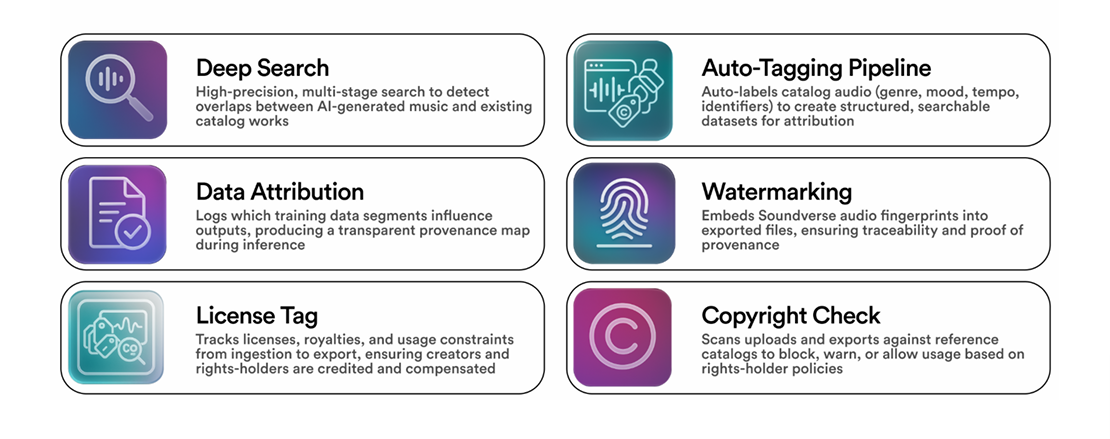
Soundverse Trace is the cornerstone for modern AI music compliance. It functions as a comprehensive trust layer designed specifically for sound creators who want to responsibly distribute AI-generated works.
Soundverse Trace embeds vital attribution and protection data directly into every exported track. Its key capabilities include:
- Deep Search: Ultra-precise scanning (1:1 and 1:N) to detect overlapping samples or potential copyright conflicts.
- Data Attribution: Maintains records of which training datasets influenced the generated output.
- Audio Watermarking: Adds robust, inaudible fingerprints to help identify and claim creations.
- License Tagging: Keeps rights metadata intact from ingestion to export ensuring proper royalty tracking.
When used before uploading to Apple Music, Soundverse Trace ensures every composition passes through a compliance filter that meets Apple’s submission standards. This trusted metadata layer helps distributors validate your song’s origin, preventing accidental copyright infringement and streamlines royalty management.
For creators exploring Soundverse features such as AI Music Generators, Text-to-Music Prompts, or innovative Stem Separation Tools, using Trace ensures full protection when tracks move to Apple Music and other streamers. For a deeper dive, watch our guide on creating Deep House music.
Step 1: Create or upload your AI track
Begin by producing your music using your preferred AI generation process within Soundverse or another tool. You can explore genre-based creation workflows similar to how Soundverse supports EDM or Jazz generation workflows through guides like How to Create EDM with Soundverse AI.
Once your composition is complete, export your track as a high-quality WAV or FLAC file. These formats retain audio fidelity and metadata compatibility.
Step 2: Apply Soundverse Trace for attribution and protection
Before distribution, run your composition through Soundverse Trace. This step embeds the compliance metadata necessary for Apple Music’s AI verification process. The deep search detects potential dataset overlaps, confirming ethical output, while watermarking adds a digital fingerprint used by streaming algorithms for provenance validation.
The result: an export-ready audio file containing embedded rights metadata that accompanies your track through every platform.
Step 3: Choose a distributor that supports AI metadata
To upload to Apple Music, you’ll need an approved distributor such as CD Baby, Ditto Music, or DistroKid. By 2026, most major distributors have integrated AI metadata support allowing uploads containing Soundverse Trace information.
When submitting your track, ensure the distributor’s form includes fields for AI authorship disclosure. Use your Soundverse Trace export report as part of your documentation. This step assures Apple Music that your work meets its ethical AI policy.
Step 4: Metadata tagging and description optimization
Accurate metadata helps your track gain visibility and avoid rejection. Include information about creative process, authorship details, and mention “Created using Soundverse AI and Soundverse Trace” in the description or credits section. This satisfies Apple’s 2026 emphasis on transparency.
You can also enhance discoverability by including genre-specific tags. For instance, if your track evokes cinematic landscapes, refer to creative inspiration techniques outlined in how to create music evoking the desert. Strategic tagging improves algorithmic placement across playlists.
Step 5: Submit and verify distribution
Once uploaded, distributors automatically forward your track along with metadata to Apple Music for approval. Review confirmation emails or dashboards showing successful verification. Apple’s system checks that your rights data aligns with its AI author identifiers.
The verification step may take several days due to asynchronous review processes, but Soundverse Trace’s embedded watermarking ensures quick validation compared to non-attributed tracks.
Step 6: Monitor analytics and streaming performance
After successful publishing, track your performance metrics and royalty statements. Apple Music dashboards now display AI-origin indicators, showing how transparent releases perform compared to conventional tracks.
Creators using Soundverse’s Ethical AI Music Framework gain access to automatic royalty attribution thanks to embedded license tagging. This system also connects to the Content Partner Program which allows rights-holders to receive usage-based royalties for contributed datasets.
Pro Tips for uploading AI music to Apple Music
- Confirm compliance early: Pass every project through Soundverse Trace before exporting.
- Avoid unlicensed datasets: Only use sample packs or AI training sets authorized through transparent models.
- Use genre-optimized prompts: Reference guides like 100 Text-to-Music Prompts to Create Podcast Intro and Outro Music to make distinct, publish-ready audio.
- Preserve master quality: Submit uncompressed audio; Apple Music’s high-resolution support demands professional fidelity.
- Stay updated with AI policy changes: Apple periodically refreshes its AI music guidelines; monitor official distributor portals for updates.
The future of streaming AI songs in 2026 and beyond
Streaming AI songs has become standard practice. Platforms are establishing new attribution protocols ensuring artists and dataset contributors share fair compensation. Soundverse’s Ethical AI Music Framework demonstrates how transparency allows innovation without sacrificing artistic integrity.
By integrating trust infrastructure at every stage—training, generation, attribution, and distribution—Soundverse empowers musicians to grow global catalogs safely across Apple Music, Spotify, and other services. This movement signals a lasting shift: AI music can be ethical, profitable, and creatively limitless.
Start Creating AI Music That Deserves to Be Heard
Produce, refine, and share your AI-generated tracks with Soundverse. Empower your music career by generating professional-quality audio ready for streaming platforms like Apple Music.
- Generate AI Music with Soundverse Text-to-Music — Learn how to turn your ideas into full tracks instantly using Soundverse's text-to-music technology.
- Navigating the World of Royalty-Free and Copyright-Free Music Using Soundverse AI — Discover how to ensure your AI music remains copyright-safe while distributing it to major platforms.
- The Role of AI Music in Film and Television — Explore how AI-produced music is reshaping soundtrack creation for digital media and streaming.
- How to Make AI-Generated Music — Step-by-step guide to creating professional-grade AI tracks ready for distribution and monetization.
Here's how to make AI Music with Soundverse
Video Guide

Here’s another long walkthrough of how to use Soundverse AI.
Text Guide
- To know more about AI Magic Tools, check here.
- To know more about Soundverse Assistant, check here.
- To know more about Arrangement Studio, check here.
Soundverse is an AI Assistant that allows content creators and music makers to create original content in a flash using Generative AI.
With the help of Soundverse Assistant and AI Magic Tools, our users get an unfair advantage over other creators to create audio and music content quickly, easily and cheaply.
Soundverse Assistant is your ultimate music companion. You simply speak to the assistant to get your stuff done. The more you speak to it, the more it starts understanding you and your goals.
AI Magic Tools help convert your creative dreams into tangible music and audio. Use AI Magic Tools such as text to music, stem separation, or lyrics generation to realise your content dreams faster.
Soundverse is here to take music production to the next level. We're not just a digital audio workstation (DAW) competing with Ableton or Logic, we're building a completely new paradigm of easy and conversational content creation. TikTok: https://www.tiktok.com/@soundverse.ai Twitter: https://twitter.com/soundverse_ai Instagram: https://www.instagram.com/soundverse.ai LinkedIn: https://www.linkedin.com/company/soundverseai Youtube: https://www.youtube.com/@SoundverseAI Facebook: https://www.facebook.com/profile.php?id=100095674445607
Join Soundverse for Free and make Viral AI Music

We are constantly building more product experiences. Keep checking our Blog to stay updated about them!
Image Steps: []