How to Make Extended Music Tracks: A Complete Guide for Producers in 2026
Learn how to make extended music using professional production tips and Soundverse Extend Music tool.
How to Make Extended Music Tracks
Creating extended music tracks is one of the most rewarding techniques for any producer or audio engineer in 2026. Whether you’re mixing a DJ set, designing looping soundscapes for games, or just want a full-length version of a short idea, learning how to make extended music can transform your workflow. Extended tracks offer flexibility, emotional depth, and broader utility across genres and platforms.
What makes extended music tracks so essential for producers in 2026?
Music consumption has evolved dramatically in the past few years. Long-form and extended tracks are now highly valued in areas such as electronic music, ambient compositions, streaming playlists, and digital content creation. Compared with short, radio-ready formats that dominated in 2024–2025, extended tracks allow creators to build immersive experiences.

For music producers, extended versions often serve several purposes:
- DJ Mixes: DJs can keep the flow going by using extended intros and outros for seamless transitions.
- Film and Game Audio: Developers need longer atmospheres and adaptable instrumental variations for dynamic scene scoring.
- Streaming and YouTube Content: Extended background scores help videos maintain consistent tone and rhythm.
- Creative Exploration: By looping and extending sections, producers can explore new arrangement techniques and sound layering ideas.
What are the fundamentals of making extended music?
Before diving into tools or AI workflows, it’s important to understand the art behind extension. Extended compositions rely on balance — maintaining listener interest while repeating the core musical themes effectively.

Key aspects include:
- Arrangement Variation: Rearrange verses, bridges, and instrumentals to create gradual evolution.
- Dynamic Layering: Introduce new elements like percussion fills or evolving pads every few bars.
- Loop Optimization: Proper looping keeps transitions natural and prevents noticeable repetition.
- Transitions & Breakdowns: Extended tracks need smooth flow between sections; breakdowns reset energy for the next phase.
By mastering these principles, you can create songs that feel cohesive even as they grow in length — something crucial for live sets or cinematic scoring.
How do arrangement and looping affect the creation of long tracks?
Arrangement is central to keeping extended music engaging. The best song arrangement techniques revolve around tension and release — alternating between sections that build energy and those that allow listeners to breathe.
- Start Simple: Begin with a core motif, then duplicate and vary it using automation, EQ changes, or stem layering.
- Use the Power of Loops: As discussed in many production guides like this one on AI music transformation, looping isn’t just repetition — it’s recontextualization. Think of loops as compositional anchors.
- Balance Predictability and Surprise: Introduce unexpected elements (such as reversed samples or chord substitutions) every few cycles.
- Edit Intelligently: Modern tools allow precise editing of phrases. For instance, Soundverse’s Inpainting tool can regenerate a small section without disturbing the rest of your arrangement.
Good looping for music producers ensures each repetition reinforces the song’s identity while subtly evolving the emotional landscape.
For a deeper dive, watch our guide on creating Deep House music.
What tools and techniques can help with audio editing for extended versions?
Extended tracks often require careful editing and transitions. Here’s how you can refine productions:
- Use Crossfades and Automation: Smooth volume or filter transitions between sections help maintain flow.
- Apply Creative Effects Gradually: Reverbs, delays, and modulation effects can evolve gradually to avoid stagnation.
- Employ Stem Separation: The Soundverse Stem Separator allows producers to split a mix into editable layers — vocals, drums, bass, guitar, and accompaniment. This enables long version remixes with isolated elements.
- Inspect Frequency Balance: Long tracks often expose frequency buildups; use dynamic EQ to manage low-end rumble or harsh highs.
- Render Variations: Experiment with instrumental-only sections or remix stems using alternative versions. This technique improves engagement over longer durations.
Audio editing for extended versions involves crafting transitions that feel natural, not forced, and ensure the piece remains emotionally coherent.
How can AI enhance extended music creation in 2026?
Artificial intelligence has become a cornerstone of music production. In 2026, AI systems can understand style, key, and rhythm context, making them invaluable for extending compositions intelligently.
Platforms like Soundverse offer dedicated tools for song extension. AI doesn’t just replicate sections; it generates compatible material, fills gaps, and maintains sonic consistency. You can start with a 30-second loop and transform it into a three-minute mix that sounds as though it was produced from scratch.
Compared to manual editing or slicing loops by hand, AI-powered tools enable innovation without compromising quality. This is particularly useful for independent artists who may not have time or technical expertise for complex DAW operations.
For a closer look, check our tutorial on How to Make Music.
Step-by-Step Guide: How to Make Extended Music Tracks
Creating long-form compositions involves both creative and technical effort. Here’s a structured workflow that combines traditional production techniques with AI assistance.
Step 1: Feature Overview — Access the Extend Music Tool
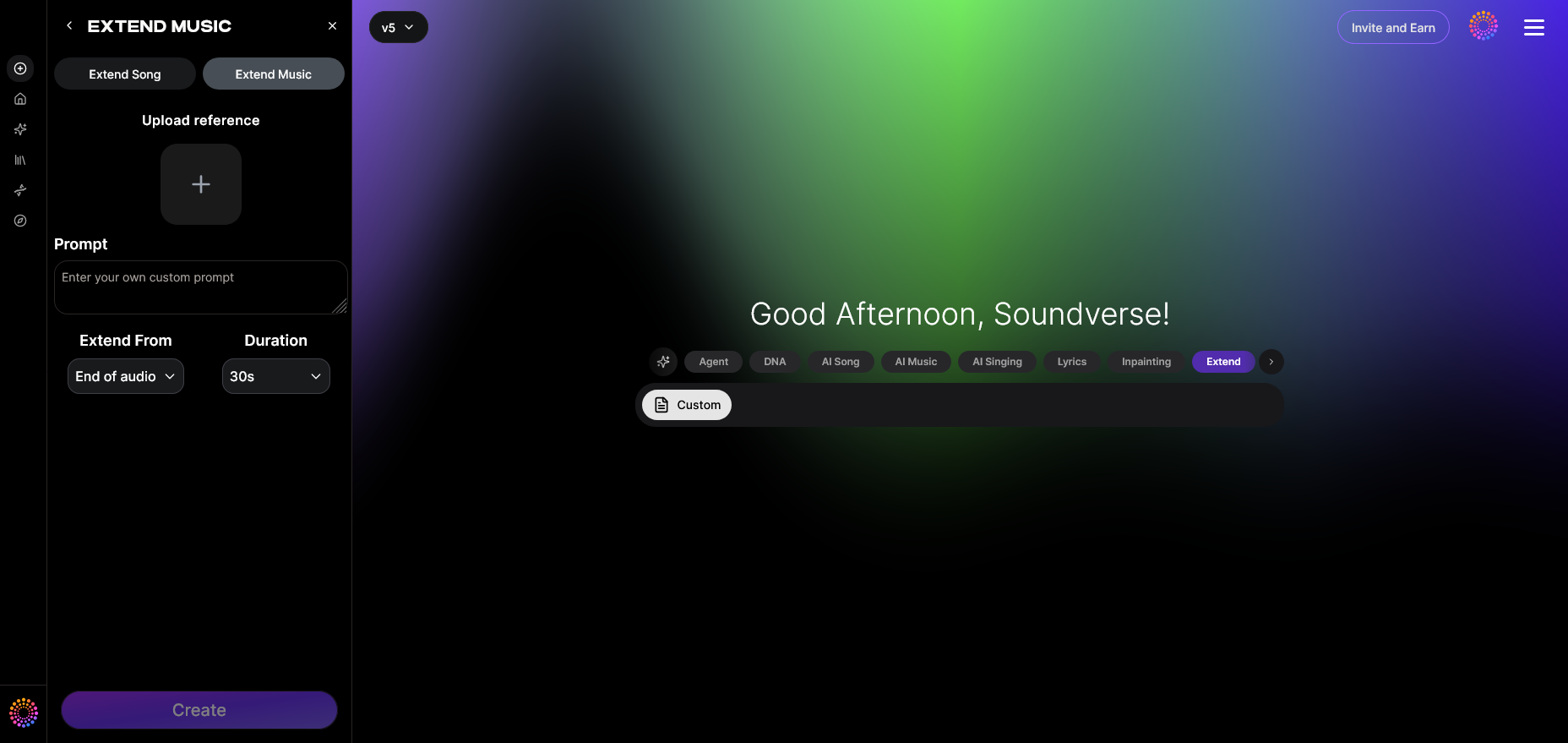
Begin by navigating to the Soundverse interface and selecting Extend Music. This feature focuses on lengthening your track seamlessly while maintaining original tone and tempo integrity.
Step 2: Upload Track — Import the Audio File
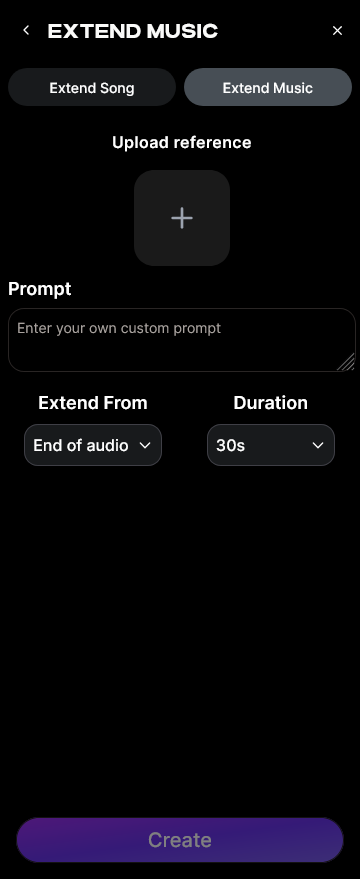
Upload your audio file into the Extend Music tool. You can use either full mixes or instrumental stems. For further refinement before upload, consider using Soundverse’s Stem Separator to isolate particular components.
Step 3: Duration Setting — Define the Extension Length
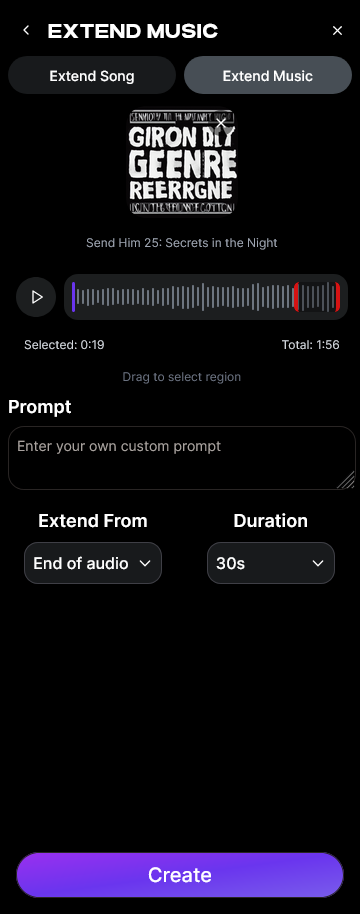
You can choose how much additional music you want to generate, from short extensions of 15 seconds up to 3 minutes per cycle. This helps tailor songs for use in DJ sets, streaming intros, or film segments.
Step 4: Generation — AI Extends Music Seamlessly
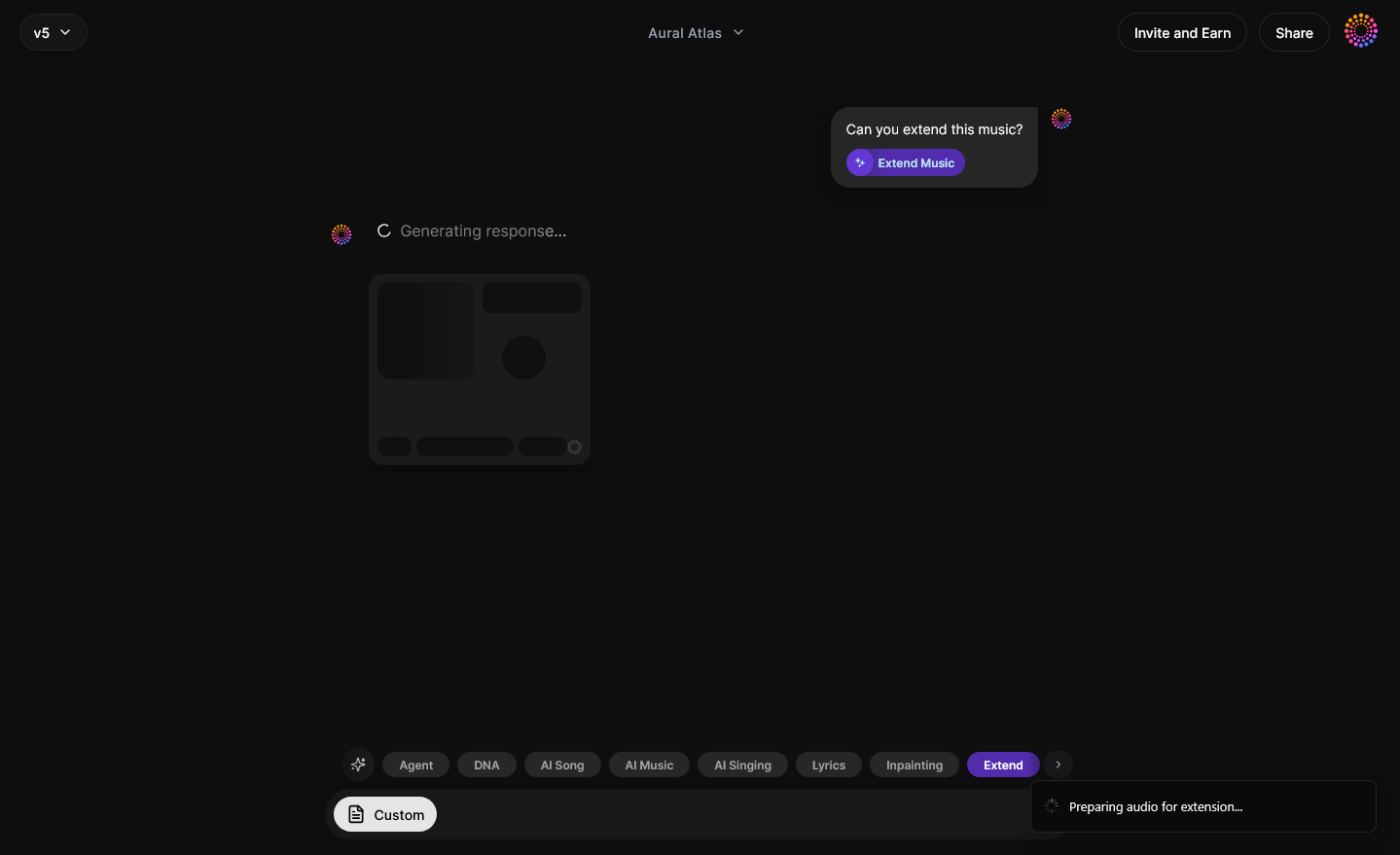
The AI analyzes your track’s rhythm, harmonics, and overall structure to generate new content that fits perfectly. It can extend instrumental parts, continue vocal lines, or loop entire sections naturally without overlap artifacts.
Step 5: Download Extended — Export Your Extended Audio
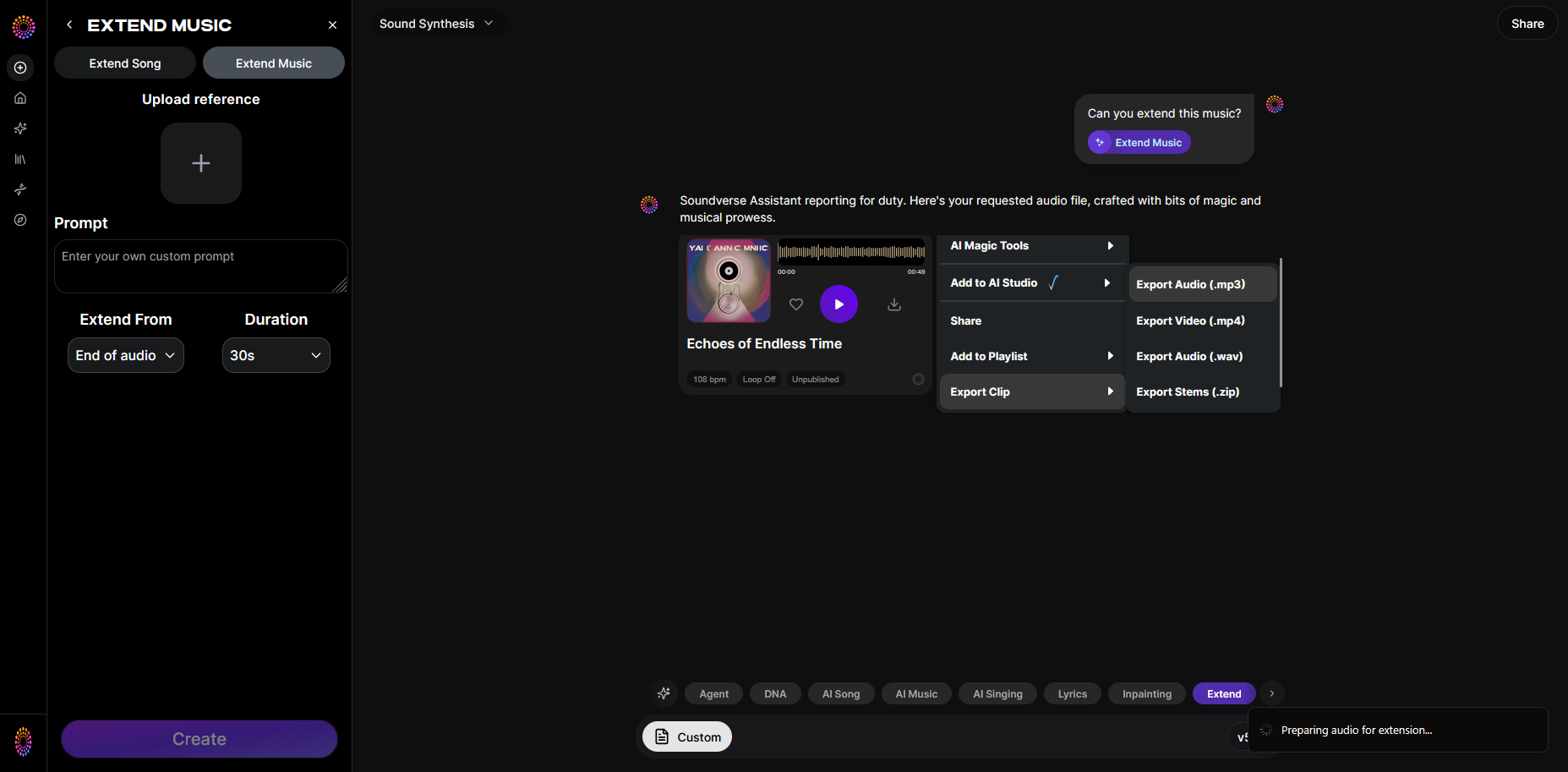
Once processing finishes, download your extended version. You can use it directly or bring it into your DAW for fine-tuning, transitions, and mastering. This workflow provides an efficient bridge between creative ideas and finished production.
How to make extended music with Soundverse Extend Music
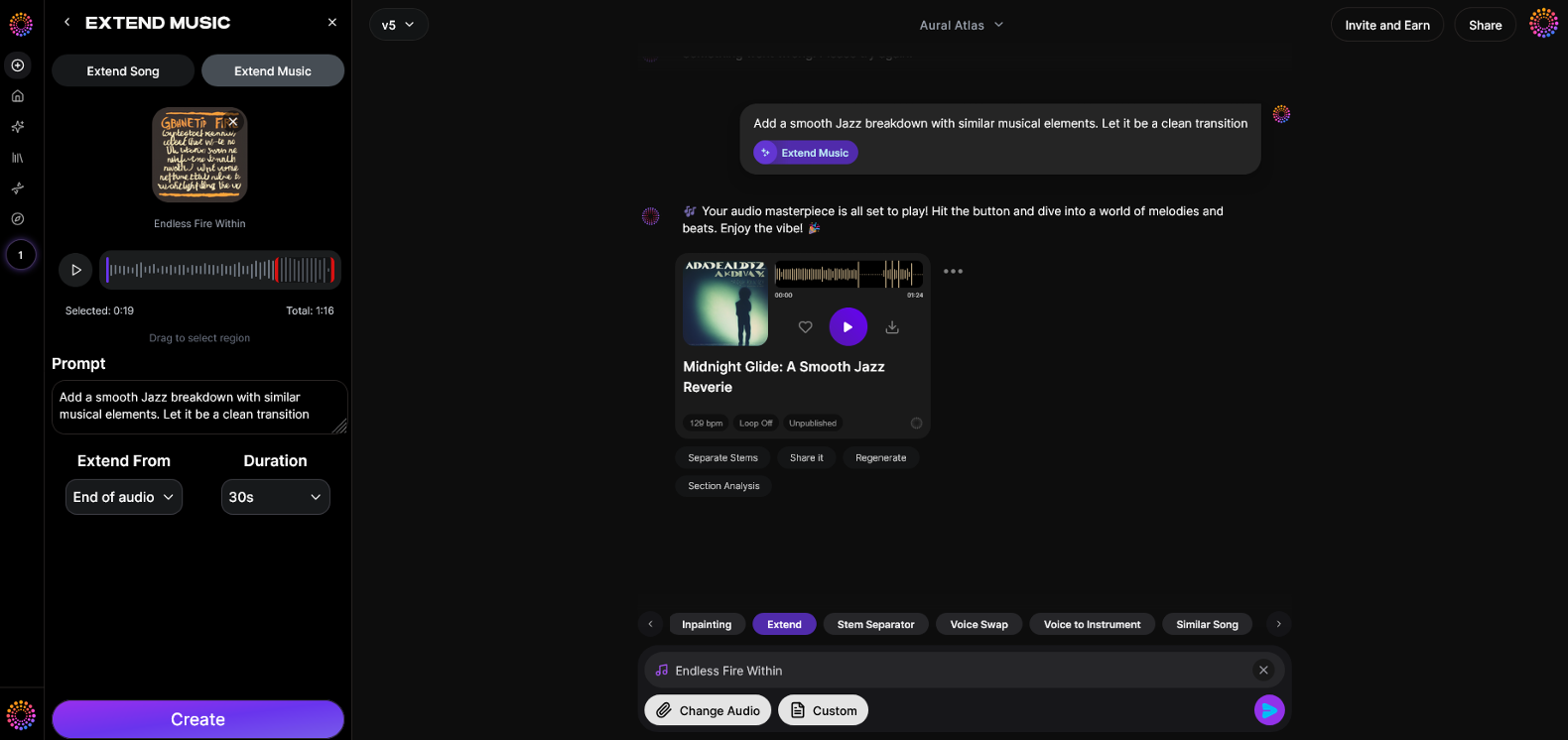
Now that you understand how to make extended music using traditional techniques, here’s how Soundverse simplifies the process:
The Extend Music feature automatically generates new audio segments matching your original track’s style, tempo, and key. It supports both instrumental extensions and full-song continuations with lyrics. Users can precisely control extension duration — from 15 seconds up to 3 minutes per addition — and apply loop extensions for endless playback.
Primary Use Cases:
- Fit tracks to video or commercial lengths.
- Create extended DJ mixes.
- Develop short loops into coherent full-length songs.
- Design seamless game audio loops.
Paired with the Inpainting tool for fine editing and Stem Separator for detailed control, Soundverse provides an integrated environment for producers in 2026 to craft long-format music. Together, these tools represent the next evolution of creative freedom in digital music production.
For more inspiration, explore articles such as What AI Can Generate Songs, Best AI Music Generator: Top Picks and Review, and The Role of AI Music in Film and Television. They demonstrate how extended music fits perfectly into today’s industry workflows.
Start Creating Extended Music Tracks with Soundverse Today! Unlock endless creativity using AI-powered tools that let you extend, remix, and refine your music effortlessly. Join thousands of artists already shaping the future of sound. Try Soundverse Free
Related Articles
- How to Make AI Generated Music — Discover how AI can help you build, mix, and customize tracks that sound professional and unique.
- Soundverse Introduces Stem Separation AI Magic Tool — Learn how to isolate, edit, and remix song elements for deeper creative control using Soundverse’s new AI Magic Tool.
- How AI Generated Music Is Transforming the Music Industry — Explore how artificial intelligence is reshaping how artists produce, share, and monetize their music globally.
- Generate AI Music with Soundverse Text-to-Music — Create bespoke music tracks simply by describing your desired style, emotion, and genre with Soundverse’s text-to-music feature.
Here's how to make AI Music with Soundverse
Video Guide

Here’s another long walkthrough of how to use Soundverse AI.
Text Guide
- To know more about AI Magic Tools, check here.
- To know more about Soundverse Assistant, check here.
- To know more about Arrangement Studio, check here.
Soundverse is an AI Assistant that allows content creators and music makers to create original content in a flash using Generative AI. With the help of Soundverse Assistant and AI Magic Tools, our users get an unfair advantage over other creators to create audio and music content quickly, easily and cheaply. Soundverse Assistant is your ultimate music companion. You simply speak to the assistant to get your stuff done. The more you speak to it, the more it starts understanding you and your goals. AI Magic Tools help convert your creative dreams into tangible music and audio. Use AI Magic Tools such as text to music, stem separation, or lyrics generation to realise your content dreams faster. Soundverse is here to take music production to the next level. We're not just a digital audio workstation (DAW) competing with Ableton or Logic, we're building a completely new paradigm of easy and conversational content creation.
TikTok: https://www.tiktok.com/@soundverse.ai
Twitter: https://twitter.com/soundverse_ai
Instagram: https://www.instagram.com/soundverse.ai
LinkedIn: https://www.linkedin.com/company/soundverseai
Youtube: https://www.youtube.com/@SoundverseAI
Facebook: https://www.facebook.com/profile.php?id=100095674445607
Join Soundverse for Free and make Viral AI Music

We are constantly building more product experiences. Keep checking our Blog to stay updated about them!