How to Make AI Sing a Song Using Your Own Lyrics
Learn how to create a song with AI using your own lyrics through Soundverse’s AI Song Generator and vocal synthesis software.
How to Make AI Sing a Song Using Your Own Lyrics
Why would you want to make AI sing your own lyrics in 2026?
In 2026, AI music generation has become an essential creative tool for musicians, producers, and digital creators. Instead of waiting weeks for a vocalist or composer, you can instantly transform written lyrics into a complete, professionally mixed track using an AI song generator. Whether you want to test songwriting ideas or create custom tracks for online content, AI bridges the gap between imagination and final production.
Using these technologies, creators are producing multilingual songs, personalized greeting tunes, and viral short-form music. If you're exploring platforms similar to Soundverse for lyric‑to‑song generation, understanding how the process works can help you create more authentic and emotionally resonant AI performances.
What tools can make AI sing in 2026?
AI singing has moved far beyond robotic voices. Several vocal synthesis software options now replicate human tones, breath control, and expressiveness. They include:
- Soundverse AI Song Generator – Converts lyrics into a full song with vocals and instruments.
- Emvoice One (emvoiceapp.com) – Plugin‑based singer that works inside your DAW.
- Synthesizer V (dreamtonics.com) – Offers natural pronunciation and multi‑language support.
- Voicemod Sing (voicemod.net) – Fun vocal transformation for content creators.
Each uses deep neural models for prosody, pitch, and tone control. These systems continue evolving, with 2026 seeing major improvements in multilingual synthesis and genre adaptability. For broader comparisons, check Best AI Music Generators to Create Original Songs in 2026 - Reliqus and Best AI Music Generators in 2026: Create Professional Audio with AI.

How does an AI song generator actually work?
An AI song generator performs several creative tasks that mirror a traditional production workflow:
- Lyrics understanding: It reads your text to detect rhythm, syllable patterns, and emotional tone.
- Melody composition: Algorithms match the lyrical flow to melodic curves suitable for the chosen genre.
- Arrangement and instrumentation: Backing instruments are added automatically according to stylistic templates.
- Mixing and mastering: The result is balanced for loudness, clarity, and spatial depth.
By integrating these stages, creators can instantly transform raw text into final audio. This system became a breakthrough for content production, similar to the impact of generative imaging tools in the visual arts.
For a deeper dive, watch our guide on creating Deep House music and tutorial on how to make music.
How to prepare lyrics before using AI singing tools
Before uploading to any AI system, well‑structured lyrics help maintain flow and emotional impact. Follow these practices:
- Write in clear verse–chorus form. AI generators interpret structural cues better when sections are defined.
- Use rhythmic spacing. Avoid long sentences without breaks; short phrases translate more naturally into musical rhythm.
- Define theme and style. Describe whether your lyric fits pop, jazz, or ambient moods to guide melody selection.
- Avoid excessive repetition. Although hooks are essential, leave room for variety so AI can generate dynamic arrangements.
If you want inspiration on phrasing and line structure, you can explore lyric‑writing guidance similar to how to make good rap lyrics or general songwriting prompts featured in Soundverse’s AI‑supported creative guides.
How to make AI sing your song – Step by Step Guide
Now that you understand why AI singing is valuable, let’s go through the practical workflow used in professional tools like Soundverse.
Step 1: Feature Overview

Access the AI Song Generator from the platform’s main menu. This module handles everything from lyric input to final mix output, combining AI singing voice generation with full instrumental backing.
Step 2: Lyrics Input
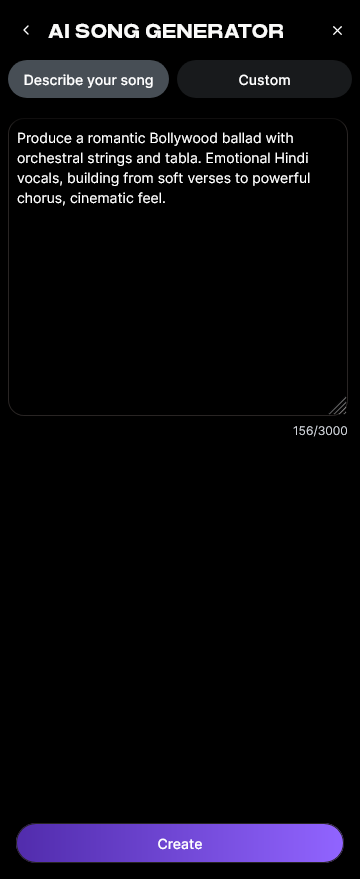
Paste your lyrics or write them directly into the text box. The system analyzes word structure, syllable count, and rhythm to shape melody contours. You can also include short descriptive lines ("sad piano ballad," "energetic pop anthem") to guide the composition.
Step 3: Style Selection

Choose your music style—Pop, EDM, Rock, Jazz, or any available genre mode. The Quick Style Selection setting instantly reconfigures tempo and instrument palette for your desired atmosphere.
Step 4: Configuration

Adjust generation parameters such as vocal tone (male, female, childlike, experimental), tempo, and intensity. If desired, upload Reference Audio—either a melody, vocal demo, or both—to align AI performance closely with your guides.
Step 5: Generation

Submit your configuration. The AI singing voice model builds a melody line that matches your lyrics, applies harmonization, and combines instruments. Processing is asynchronous: once submitted, the system renders audio before returning the downloadable result.
Step 6: Generation Complete

After processing, you’ll see the completed preview panel listing your new song versions. Here you can audition different stylistic outcomes or compare multilingual variants.
Step 7: Export Results

Finally, export your generated song in multiple formats—MP3, WAV, or separated stems for further mixing. These outputs can be imported into your DAW for mastering or shared directly on streaming platforms.
How to make AI sing a song with Soundverse AI Song Generator

Soundverse enables users to turn their lyrics or text descriptions into complete songs using the AI Song Generator. It runs through a multi‑stage process covering lyrics interpretation, melody generation, arrangement, and mixing. Users can operate in two modes:
- Describe Your Song: Provide prompt‑based descriptions such as "dreamy lo‑fi vibe with female vocals."
- Custom Mode: Enter lyrics and audio settings manually for precise control.
- Reference Audio Support: Upload sample music, vocals, or both to guide structure.
- Quick Style Selection: Instantly choose genres like Pop, EDM, Hip‑Hop, or Rock.
Its typical use cases include songwriting demos, YouTube and social‑media content creation, personalized gifts, and multilingual music production spanning more than ten languages. The AI Singing Generator and Melody to Song Generator act as complementary tools—ideal if you only need acapella vocals or want to transform a hummed tune into a full arrangement.
For example, creators seeking to make EDM tracks can pair the lyric‑to‑song workflow with tips from How to Create EDM with Soundverse AI or explore arrangement insights from What is Soundverse Arrangement Studio. These integrations make Soundverse a complete ecosystem for AI‑driven music creation.
What are the best practices for generating professional‑sounding AI songs?
- Provide emotional context. Algorithms create melody by reading tone; write expressive prompts ("inspirational," "romantic") to capture intent.
- Use genre‑specific vocabulary. Mention musical elements such as "synth lead" or "acoustic guitar" to shape arrangement.
- Iterate and compare. Generate several versions, choose the most natural performance, then fine‑tune through external mixing.
- Combine with vocal synthesis plugins. Tools like Synthesizer V can refine large‑scale collaborations.
- Stay creative with multilingual lyrics. Soundverse supports more than ten languages, helping global creators reach multicultural audiences.
How AI singing voice technology is shaping music trends in 2026
By 2026, the global music industry sees AI singing as a mainstream production technique. Many studios use it for prototypes before recording human performances. The flexibility of vocal synthesis software and music generation tools lets independent artists compete on equal footing with professional producers.
A broader impact is evident across diverse genres—from AI music in the USA to niche aesthetics like lo‑fi or meditation music. AI doesn’t replace creativity; it accelerates it, giving musicians new ways to test melodies, visualize arrangements, and communicate feelings across languages.
Start Creating Songs with AI Today
Turn your lyrics into a fully composed track using Soundverse’s powerful AI song generator. No musical training needed—just imagination and your words to create something truly original.
Related Articles
- Generate AI Music with Soundverse Text-to-Music: Discover how to turn simple text prompts into rich, dynamic music tracks using Soundverse’s text-to-music technology.
- AI Ranks Soundverse’s AI Singer #1: The Ultimate AI Singing Platform Dominating 2025: See why Soundverse’s AI Singer is revolutionizing vocal generation for creators worldwide.
- What AI Can Generate Songs: Explore the top AI tools capable of composing and performing songs based on your lyrics or ideas.
- How to Make AI-Generated Music: Learn the step-by-step process to create professional-quality tracks with the latest AI music generators.
Here's how to make AI Music with Soundverse
Video Guide

Here’s another long walkthrough of how to use Soundverse AI.
Text Guide
- To know more about AI Magic Tools, check here.
- To know more about Soundverse Assistant, check here.
- To know more about Arrangement Studio, check here.
Soundverse is an AI Assistant that allows content creators and music makers to create original content in a flash using Generative AI.
With the help of Soundverse Assistant and AI Magic Tools, our users get an unfair advantage over other creators to create audio and music content quickly, easily and cheaply.
Soundverse Assistant is your ultimate music companion. You simply speak to the assistant to get your stuff done. The more you speak to it, the more it starts understanding you and your goals.
AI Magic Tools help convert your creative dreams into tangible music and audio. Use AI Magic Tools such as text to music, stem separation, or lyrics generation to realise your content dreams faster.
Soundverse is here to take music production to the next level. We're not just a digital audio workstation (DAW) competing with Ableton or Logic, we're building a completely new paradigm of easy and conversational content creation.
TikTok: https://www.tiktok.com/@soundverse.ai
Twitter: https://twitter.com/soundverse_ai
Instagram: https://www.instagram.com/soundverse.ai
LinkedIn: https://www.linkedin.com/company/soundverseai
Youtube: https://www.youtube.com/@SoundverseAI
Facebook: https://www.facebook.com/profile.php?id=100095674445607
Join Soundverse for Free and make Viral AI Music

We are constantly building more product experiences. Keep checking our Blog to stay updated about them!